1. Úvod
This manual provides detailed instructions for the safe and effective operation of your COLBOR CL60 65W COB LED Video Light. Please read this manual thoroughly before using the product and retain it for future reference. The COLBOR CL60 is a compact, bi-color LED light designed for various photography and videography applications, featuring adjustable color temperature, brightness, and special effects.
2. Bezpečnostní informace
Abyste předešli poškození produktu nebo zranění sebe či jiných osob, dodržujte prosím následující bezpečnostní opatření:
- Do not disassemble or modify the product. Unauthorized modifications may cause malfunction or electric shock.
- Keep the device dry. Do not handle with wet hands or immerse in water.
- Ujistěte se, že zdroj napájení odpovídá specifikovanému objemutage požadavky.
- Vyhněte se přímému vystavení očí světelnému zdroji.
- Uchovávejte mimo dosah dětí.
- Operate in a well-ventilated area to prevent overheating.
- Remove the protective film from the COB light before initial use.
3. Obsah balení
Ověřte, zda jsou v balení obsaženy všechny níže uvedené položky:
- COLBOR CL60 Video Light (x1)
- Standard Adapter (Bowens Mount) (x1)
- Bowens Mount Reflector (x1)
- Light Base (x1)
- COB Protective Cover (x1)
- Carrying Bag (x1)
- Napájecí adaptér (x1)
- Uživatelská příručka (x1)
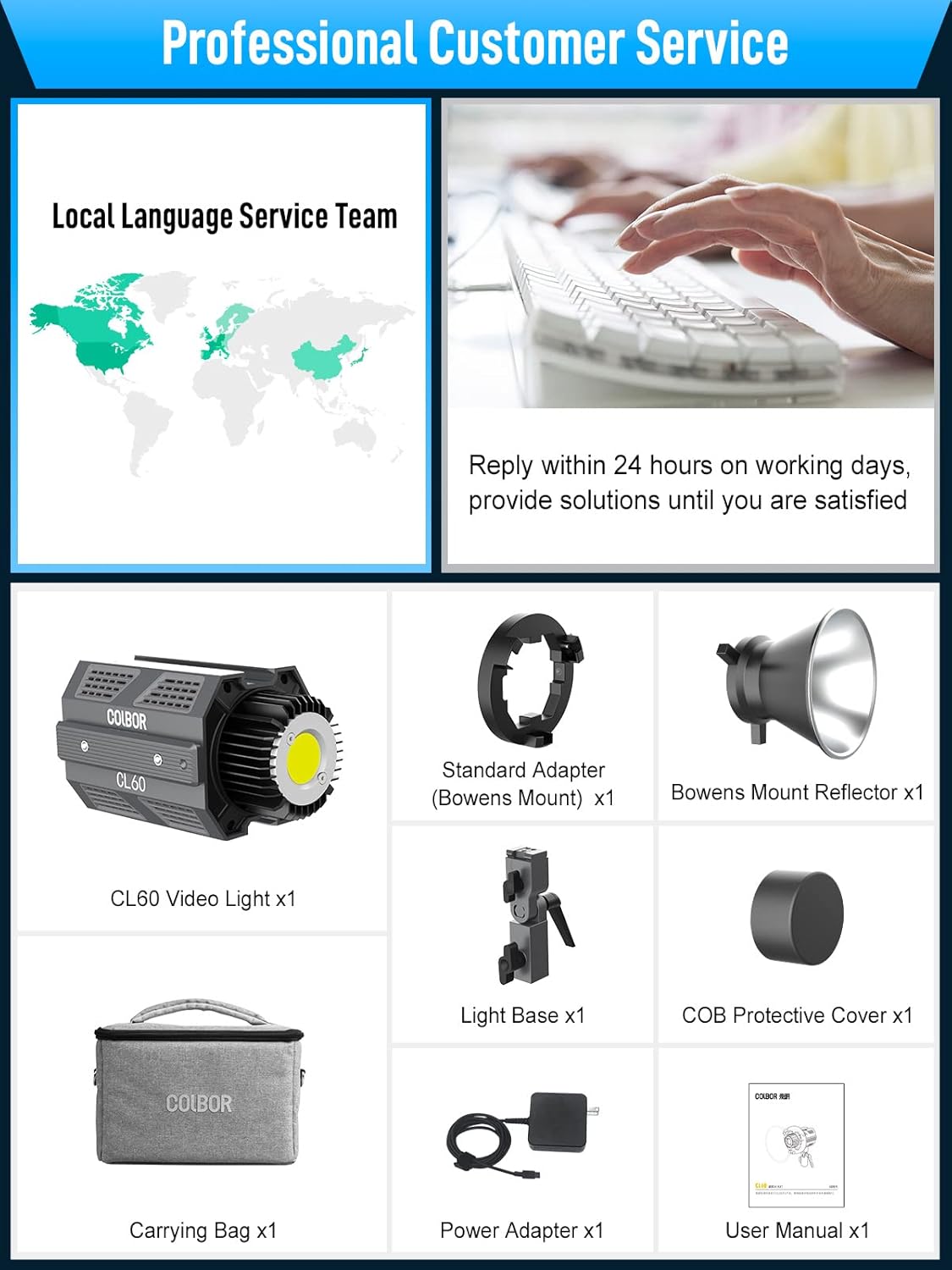
Image: Contents of the COLBOR CL60 package, including the light, various adapters, reflector, protective cover, carrying bag, power adapter, and user manual.
4. Konec produktuview
The COLBOR CL60 is a compact and robust video light constructed from aircraft-grade aluminum alloy. It features a COB LED for continuous output, a control panel with an LCD screen, and multiple mounting options.
Klíčové vlastnosti:
- Nastavitelná teplota barev: 2700K až 6500K.
- Ovládání jasu: 0% to 100% dimming.
- Vysoké podání barev: CRI 97+ for accurate color reproduction.
- Special Lighting Effects: 10 built-in effects with 46 modes.
- Kompaktní design: Weighs approximately 550 grams (1.2 lbs) and measures 14x8x9cm (5.5x3x3.5 inches).
- Kompatibilita s bajonetem Bowens: Allows attachment of various light modifiers.
- PowerCube Design: Multiple CL60 units can be interlocked via slide rails to create a larger light matrix.
- COLBOR Studio APP Control: Remote control for up to 10 lights.
- Všestranné možnosti napájení: Supports Type-C PD power banks, PD adapters, V-mount, and NP-F batteries.
- Quiet Cooling System: Aluminum alloy body with a built-in cooling system, operating below 20dB in Quiet Mode.

Image: Two COLBOR CL60 lights demonstrating light output and color rendering capabilities with a CRI of 97+.

Image: A person holding the COLBOR CL60 light, illustrating its ultra-compact size and portability.
5. Nastavení
Follow these steps to set up your COLBOR CL60 video light:
- Attach the Light Base: Secure the light base to the bottom slide rail of the CL60. This base typically includes a 1/4" screw thread for mounting onto a light stand or tripod.
- Mount to a Stand: Attach the CL60 (with the light base) to a compatible light stand or tripod. Tighten securely.
- Install Bowens Mount Adapter: If using Bowens mount accessories, attach the standard Bowens mount adapter to the front of the CL60. Align the adapter with the light's front and twist to lock.
- Attach Reflector or Modifier: Mount the Bowens mount reflector or any other compatible light modifier (e.g., softbox, lantern) onto the Bowens mount adapter.
- Připojte napájení: Connect the power adapter to the Type-C port on the CL60 and then to a power outlet. Alternatively, connect a compatible PD power bank or battery solution (see Section 7 for details).
- PowerCube Configuration (Optional): For increased light output, multiple CL60 units can be interlocked using their side slide rails to form a larger lighting matrix.

Obrázek: Detailní záběr view of the Bowens mount mechanism on the COLBOR CL60, illustrating how light modifiers are attached.

Image: Diagram showing how multiple COLBOR CL60 units can be connected via their slide rails to form a larger 'PowerCube' lighting array.
6. Návod k obsluze
The COLBOR CL60 can be operated using its onboard controls or via the COLBOR Studio App.
Ovládání na palubě:
- Zapnutí/vypnutí: Stisknutím tlačítka napájení zapnete nebo vypnete světlo.
- Adjust Brightness (DIM): Use the designated control wheel to adjust the light intensity from 0% to 100%.
- Adjust Color Temperature (CCT): Use the CCT control wheel to change the color temperature between 2700K (warm) and 6500K (cool).
- Access Special Effects (EFF): Press the 'EFF' button to cycle through the available lighting effects. Use the control wheel to select and adjust specific effect modes (e.g., Fire, Pulsing, TV, Lightning).
- Navigace v nabídce: Use the 'SET' button and control wheels to navigate through menu options displayed on the LCD screen.

Image: Visual representation of various lighting effects available on the COLBOR CL60, such as Fire, CCT Chase, Pulsing, TV, Explosion, Faulty Bulb, Welding, Strobe, Lightning, and SOS.
7. App Control (COLBOR Studio App)
The COLBOR Studio App allows for remote control of your CL60 light(s) via a smartphone or tablet.
- Stáhněte si aplikaci: Hledat "COLBOR Studio" in your device's app store and install it.
- Povolit Bluetooth: Ujistěte se, že je na vašem smartphonu/tabletu povoleno Bluetooth.
- Párování zařízení: Open the COLBOR Studio App. The app should automatically detect nearby CL60 lights. Follow the in-app instructions to pair your light(s).
- Ovládací funkce: Within the app, you can adjust brightness, color temperature, and activate special effects. The app also supports matrix control, allowing you to manage up to 10 lights simultaneously or individually.

Image: A smartphone screen displaying the COLBOR Studio App interface, showing controls for brightness, color temperature, and multiple light management.
8. Power Solutions
The COLBOR CL60 offers flexible power options for studio and on-location use:
- Napájecí adaptér: Use the included power adapter for continuous power from a wall outlet.
- Type-C PD Power Bank: The CL60 supports charging and operation via PD (Power Delivery) compatible power banks with an output greater than 65W.
- V-Mount / NP-F Batteries: With optional accessories (sold separately), the CL60 can be powered by V-mount or NP-F batteries for portable operation.

Image: Close-up of the COLBOR CL60's Type-C charging port and examples of power bank and V-mount battery setups.
9. Údržba
Proper maintenance ensures the longevity and performance of your COLBOR CL60:
- Čištění: K čištění vnějšího povrchu světla používejte měkký, suchý hadřík. Nepoužívejte agresivní chemikálie ani abrazivní materiály.
- Skladování: Store the light in its carrying bag in a cool, dry place away from direct sunlight and extreme temperatures.
- Chladicí systém: The built-in Hummingbird-Intelligence Cooling System manages heat. Ensure the vents are not obstructed during operation. The fan operates quietly, typically below 20dB in Quiet Mode.

Image: Diagram illustrating the internal cooling system of the COLBOR CL60, highlighting airflow and heat dissipation mechanisms.
10. Řešení problémů
If you encounter issues with your COLBOR CL60, refer to the following common problems and solutions:
| Problém | Možná příčina | Řešení |
|---|---|---|
| Světlo se nerozsvítí. | No power, faulty cable, or power adapter. | Check power connection. Ensure power adapter is functional. Try a different Type-C cable or power source. |
| Aplikace se nemůže připojit ke světlu. | Bluetooth off, app issue, or light not in pairing mode. | Ensure Bluetooth is enabled on your device. Restart the app and the light. Try re-pairing the device in the app. |
| Light output is inconsistent or flickers. | Nestabilní napájení nebo vnitřní problém. | Ensure a stable power source. If using a power bank, verify it meets the required output. Contact support if the issue persists. |
| Fan noise is louder than expected. | Operating in Smart Mode or obstructed vents. | Check if the light is in Quiet Mode. Ensure vents are clear of obstructions. |
11. Specifikace
| Funkce | Detail |
|---|---|
| Model | CL60 |
| Výkon | 65W |
| Teplota barev | 2700K-6500K |
| CRI | 97+ |
| Rozměry produktu | 5.5 x 3 x 3.5 palce (14 x 8 x 9 cm) |
| Hmotnost položky | 1.21 libry (550 gramů) |
| Montáž | Bowens Mount, 1/4" screw thread, Slide Rails |
| Kontrolní metoda | Onboard controls, COLBOR Studio App |
| Vstup napájení | Type-C (PD compatible), AC Adapter, V-mount/NP-F (with optional accessories) |
| Chladicí systém | Hummingbird-Intelligence Cooling System (<20dB in Quiet Mode) |
12. Záruka a podpora
COLBOR products are designed for reliability and performance. For warranty information and technical support, please refer to the warranty card included with your product or visit the official COLBOR website. Our customer service team is available to assist with any questions or issues you may encounter.
For direct support, please contact COLBOR customer service through the contact information provided on the official webweb nebo vaše nákupní platforma.


