1. Úvod
This manual provides essential information for setting up, operating, and maintaining your DELL Vostro 5620 Business Laptop. Please read this guide thoroughly to ensure optimal performance and longevity of your device.

Image: DELL Vostro 5620 Business Laptop with an expense analysis chart on its screen, highlighting its business application.
2. Co je v krabici
Ověřte, zda jsou v balení přítomny všechny položky:
- DELL Vostro 5620 Business Laptop
- AC adaptér
- Webvačka (integrovaná)
- Dokumentace (včetně této příručky)
3. Klíčové vlastnosti
The DELL Vostro 5620 is designed for business and productivity, offering a robust set of features:
- Zobrazit: 16-inch Full HD (1920x1080) Anti-Glare WVA Display with 250 nits brightness and ComfortView technologie.
- Procesor: 12th Generation Intel Core i7-1260P.
- Paměť: 32GB DDR4 SDRAM.
- Skladování: 1TB PCIe NVMe Solid State Drive (SSD).
- Webvačka: FHD 1080p Camera with Privacy Shutter.
- Zvuk: Dual Stereo Speakers by Waves MaxxAudio Pro.
- Klávesnice: Backlit Keyboard with Numeric Keypad.
- Zabezpečení: Integrated Fingerprint Reader.
- Konektivita: Intel Wi-Fi 6 AX 2x2 (Gig+) and Bluetooth 5.
- Operační systém: Windows 11 Pro.
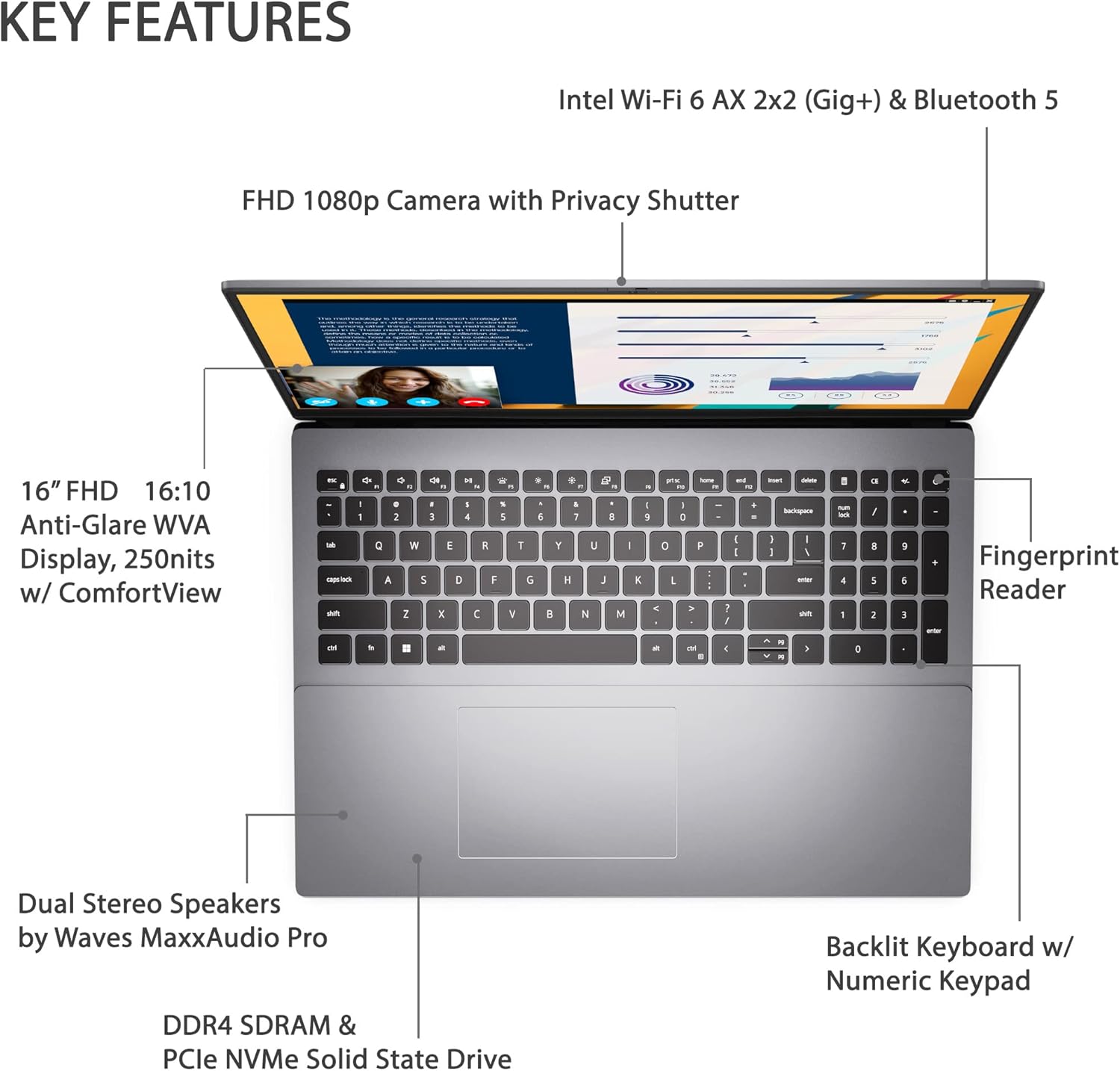
Image: Visual representation of the DELL Vostro 5620's key features, such as the 16-inch FHD display, FHD 1080p camera with privacy shutter, backlit keyboard, fingerprint reader, and dual stereo speakers.

Image: The laptop positioned on a desk, displaying a video call, demonstrating its utility for communication.
4. Počáteční nastavení
- Rozbalit: Opatrně vyjměte notebook a veškeré příslušenství z obalu.
- Připojte napájení: Plug the AC adapter into the laptop's power jack and then into a wall outlet.
- Zapnutí: Otevřete víko notebooku a stiskněte tlačítko napájení.
- Nastavení systému Windows: Postupujte podle pokynů na obrazovce a dokončete nastavení systému Windows 11 Pro, včetně jazyka, regionu, síťového připojení a vytvoření uživatelského účtu.
- Aktualizace: After initial setup, connect to the internet and check for system updates to ensure your laptop has the latest drivers and security patches.
5. Základní obsluha
Správa napájení
- Zapnutí: Stiskněte tlačítko napájení, které se nachází v pravém horním rohu klávesnice.
- Režim spánku: Zavřete víko nebo v nabídce Start vyberte možnost „Spánek“.
- Vypnout: V nabídce Start vyberte možnost „Vypnout“.
- Restartovat: V nabídce Start vyberte možnost „Restartovat“.
Klávesnice a touchpad
- The backlit keyboard provides comfortable typing in various lighting conditions.
- Integrovaný touchpad podporuje vícedotyková gesta pro navigaci.

Image: Close-up of hands using the backlit keyboard and touchpad of the laptop.
6. Porty a sloty
The DELL Vostro 5620 offers a variety of ports for connectivity:

Obrázek: Podrobný view of the laptop's left and right sides, illustrating the location and type of each port.
- Čtečka SD karet
- Port USB 3.2 Gen 1 typu A
- Port RJ-45 (Ethernet).
- Konektor pro sluchátka
- Klínová štěrbina zámku
- Napájecí konektor
- Port HDMI 1.4
- Port USB 3.2 Gen 1 typu A
- USB 3.2 Gen 2x2 Type-C™ port (supports DisplayPort and Power Delivery)
7. Technické specifikace
| Funkce | Specifikace |
|---|---|
| Model | DELL Vostro 5620 |
| Velikost displeje | 16 palce |
| Rozlišení obrazovky | 1920 x 1080 pixelů (FHD) |
| Procesor | Intel Core i12-7P 1260. generace |
| BERAN | 32 GB DDR4 |
| Skladování | 1 TB SSD |
| Grafika | Intel Integrated Graphics |
| Operační systém | Windows 11 Pro |
| Bezdrátové připojení | Wi-Fi 6, Bluetooth |
| Webvačka | FHD 1080p s clonou pro soukromí |
| Speciální funkce | Backlit Keyboard, Fingerprint Reader |
| Hmotnost položky | 4.21 libry |
| Rozměry produktu | 9.92 x 14.05 x 0.72 palce |
8. Údržba
- Čištění: K čištění obrazovky a vnějšího povrchu používejte měkký hadřík, který nepouští vlákna. Vyhněte se agresivním chemikáliím.
- Aktualizace softwaru: Regularly check for and install operating system and driver updates to maintain security and performance.
- Péče o baterie: Pro prodloužení životnosti baterie se vyhýbejte extrémním teplotám a častému úplnému vybíjení baterie.
- Správa úložiště: Pravidelně odstraňujte nepotřebné files and applications to optimize storage space and system speed.
9. Řešení problémů
Běžné problémy a řešení
- Notebook se nezapíná: Ensure the AC adapter is securely connected and the power outlet is functional. Try a different outlet if necessary.
- Problémy se zobrazením: If the screen is blank or flickering, try connecting an external monitor to check if the issue is with the laptop's display or graphics. Adjust display settings in Windows.
- Pomalý výkon: Zavřete nepotřebné aplikace, zkontrolujte, zda se neobjevuje malware, zajistěte dostatek volného místa v úložišti a aktualizujte ovladače.
- Problémy s připojením k Wi-Fi: Restartujte router a notebook. Zkontrolujte nastavení Wi-Fi a ujistěte se, že máte aktuální ovladače.
10. Záruka a podpora
Your DELL Vostro 5620 Business Laptop comes with a standard manufacturer's warranty. For detailed warranty terms and conditions, please refer to the documentation included with your product or visit the official Dell support webmísto.
For technical assistance, driver downloads, or service requests, please contact Dell Support:
- Podpora společnosti Dell Webmísto: www.dell.com/support
- Telefonická podpora: Refer to your region-specific Dell support contact information.
Please have your service tag nebo expresní servisní kód připravený při kontaktování podpory.


