1. Konec produktuview
The ErGear Height Adjustable Electric Standing Desk is designed to provide a versatile and ergonomic workspace, allowing users to seamlessly switch between sitting and standing positions. This desk features a robust construction, smooth height adjustment, and programmable memory settings to enhance comfort and productivity.

Figure 1: ErGear Height Adjustable Electric Standing Desk
2. Bezpečnostní informace
- Ensure the desk is securely anchored to the wall if children are present to prevent tipping.
- Nepřekračujte maximální nosnost stolu 80 kg (176 liber).
- Během nastavování výšky držte ruce a předměty v dostatečné vzdálenosti od pohyblivých částí.
- Neumisťujte tekutiny přímo na ovládací panel nebo do blízkosti elektrických součástí.
- Používejte pouze dodaný napájecí adaptér a kabely.
3. Vlastnosti produktu
- Vynikající stabilita: Constructed with a sturdy solid steel frame and aerospace-grade lifting column connectors, ensuring stability even at full height.
- Smooth Height Adjustment: Electric motor allows for quiet and smooth height transitions from 28.35 inches (72 cm) to 46.94 inches (119 cm).
- Předvolby paměti: Save up to three preferred height settings for quick and convenient adjustment.
- Uprated Motor: Powerful lifting performance and reliable long-term operation, tested for over 50,000 full-load lift cycles.
- Safe Low-VOC Materials: Desktop materials are designed with sharply reduced formaldehyde and other VOC emissions, meeting federal and state safe air standards.
- Integrovaná správa kabelů: Features cable routing options to keep your workspace tidy.
- Háčky na příslušenství: Includes hooks for headphones or bags, enhancing organization.

Figure 2: Ergonomics Tailored to You
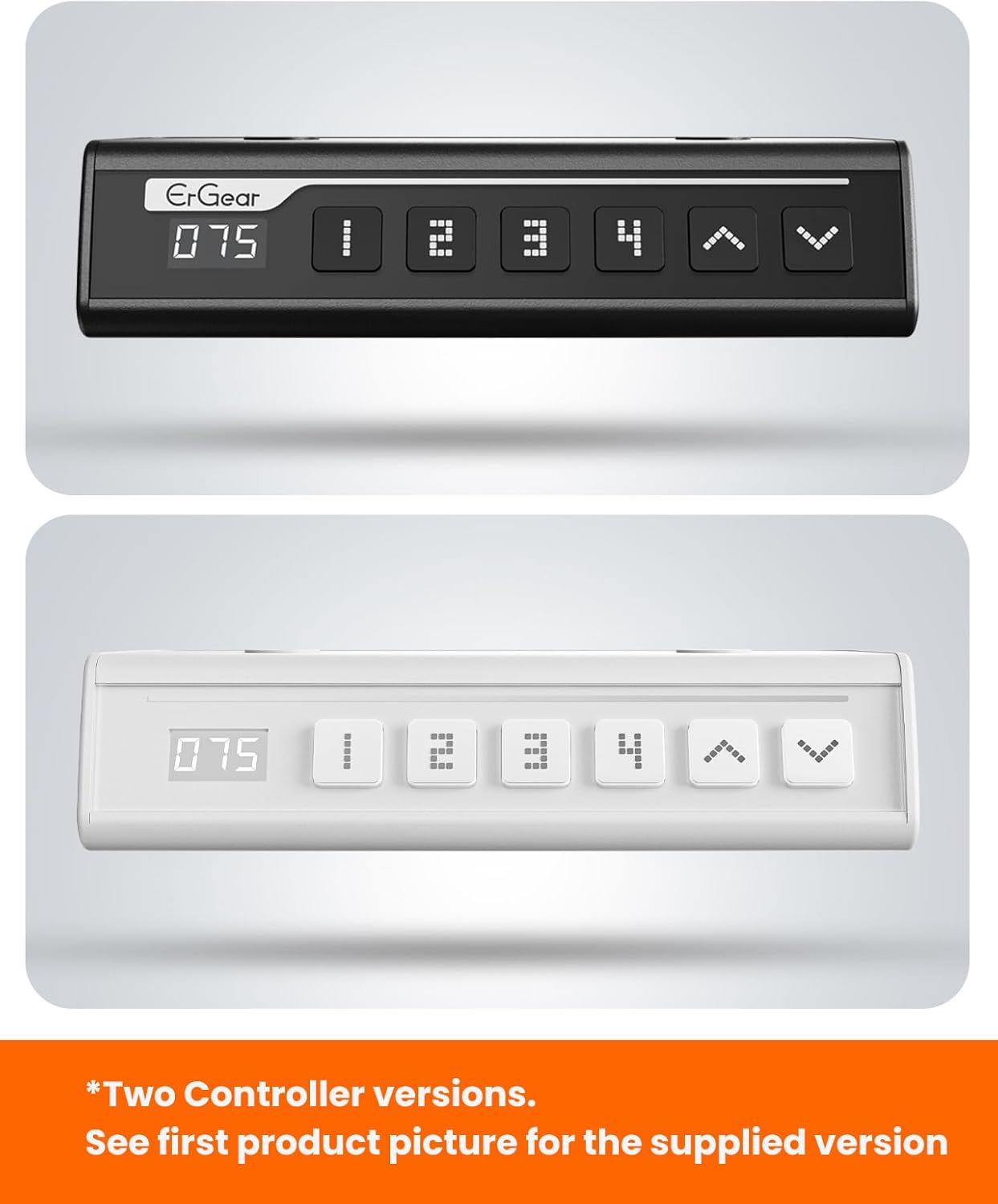
Figure 3: Built For Durability
4. Nastavení a montáž
Assembly of the ErGear Electric Standing Desk is designed to be straightforward. Please follow the steps below and refer to the official assembly video for visual guidance.
4.1 Vybalení a příprava
- Pečlivě vybalte všechny součásti a ověřte je podle seznamu dílů v přiloženém manuálu.
- Ensure you have all necessary tools, which are typically included.
- Uvolněte prostor pro montáž.
4.2 Montážní kroky
- Assemble the Desk Legs: Attach the crossbars to the lifting columns using the provided screws.
- Attach Side Plates and Transmission Rod: Secure the side plates to the leg assemblies. Insert the transmission rod fully into the left leg and connect it to the motor.
- Assemble and Attach the Desktop: Place the desktop panels together, ensuring proper alignment. Secure the desktop to the assembled frame using the designated screws.
- Připojit kabely: Connect the motor and control panel cables to the main control box. Secure cables using the provided cable management clips.
- Install Cable Hole Covers: Place the cable hole covers into the designated openings on the desktop.

Obrázek 4: Zjednodušená montážview
4.3 Videonávod k montáži
Video 1: Official ErGear Standing Desk Assembly Guide. This video provides a step-by-step visual walkthrough of the assembly process for the EGESD4/5/6/7 Series desks.
5. Návod k obsluze
The ErGear Electric Standing Desk features an intuitive control panel for easy height adjustment and memory preset management.
5.1 Základní nastavení výšky
- Použijte Šipka nahoru (^) tlačítko pro zvednutí stolu.
- Použijte Šipka dolů (v) tlačítko pro spuštění stolu.
- Release the button at your desired height. The digital display will show the current height in inches.
5.2 Nastavení předvoleb paměti
The desk allows you to save up to three custom height settings for quick recall.
- Nastavte stůl do požadované výšky pomocí tlačítek se šipkami nahoru/dolů.
- Stiskněte tlačítko 'S' (Set) tlačítko. Na displeji se zobrazí „S-“.
- Okamžitě stiskněte jedno z číselných tlačítek (1, 2 nebo 3) to save the current height to that preset. The display will show the number you selected, confirming the setting.
5.3 Using Memory Presets
- To move the desk to a saved height, simply press the corresponding number button (1, 2 nebo 3). The desk will automatically adjust to the programmed height.

Figure 5: Control Panel with Memory Presets

Figure 6: Intuitive Smart Controls
6. Údržba
- Čištění: Otřete pracovní plochu a rám měkkým hadříkemamp hadříkem. Nepoužívejte abrazivní čisticí prostředky ani agresivní chemikálie.
- Správa kabelů: Periodically check and organize cables to prevent tangling or damage, especially during height adjustments.
- Inspekce: Pravidelně kontrolujte všechny šrouby a spoje, abyste se ujistili, že jsou pevné a bezpečné.
7. Řešení problémů
If you encounter any issues with your ErGear Electric Standing Desk, please refer to the following common troubleshooting tips:
- Stůl se nehýbe: Check all cable connections to ensure they are securely plugged in. Verify the power outlet is functional.
- Nerovnoměrná výška: If the desk legs are not moving synchronously, ensure the transmission rod is fully inserted and secured. Refer to the assembly video for proper installation of the transmission rod.
- Kódy chyb: If the display shows an error code, consult the full user manual (if provided separately) or contact customer support for specific guidance.
- Resetovací funkce: Some models may have a reset procedure. Typically, this involves holding down specific buttons on the control panel for a few seconds. Refer to your specific model's instructions.
8. Specifikace
| Funkce | Specifikace |
|---|---|
| Značka | ErGear |
| Číslo modelu | EGESD 6W |
| Rozměry produktu (D x Š x V) | 28"D x 55"W x 28.35"H (Minimum) |
| Maximální výška | 46.46 palce |
| Minimální výška | 28.35 palce |
| Tloušťka desky stolu | 0.71 palce |
| Doporučená maximální hmotnost | 176 liber (80 kg) |
| Typ horního materiálu | Umělé dřevo |
| Základní materiál | Legovaná ocel |
| Počet výškových poloh | 3 (Programmable Memory Presets) |
| Požadovaná montáž | Ano |
| Obsahuje všechny montážní nástroje | Ano |

Obrázek 7: Rozměry stolu
9. Záruka a podpora
9.1 Záruka na produkt
- Desktop and Desk Frame: 5-year protection.
- Motors and Electrical Components: 2-year protection.

Obrázek 8: Informace o záruce
9.2 Zákaznická podpora
For any questions, assistance, or warranty claims, please contact our US-Based Customer Support team. Refer to your product packaging or the ErGear official webstránky pro kontaktní údaje.

Figure 9: US-Based Customer Support


