1. Úvod
Thank you for choosing the WALI GMF004 Freestanding Quad Monitor Mount. This manual provides essential instructions for safe installation, operation, and maintenance of your monitor mount. Please read this manual thoroughly before installation and retain it for future reference. This mount is designed to support four monitors, each between 17 and 27 inches, with a maximum weight capacity of 22 lbs per arm. It features a sturdy glass base and offers full adjustability for an ergonomic viewzkušenosti.

2. Bezpečnostní informace
VAROVÁNÍ: Nepřečtení a nedodržení všech pokynů, varování a upozornění v této příručce může vést k vážnému zranění osob, poškození produktu nebo poškození majetku.
- Nepřekračujte maximální nosnost 10 kg na rameno.
- Ensure the mounting surface can safely support the combined weight of the mount and all attached equipment.
- Používejte tento výrobek pouze k účelu, ke kterému je určen, jak je popsáno v tomto návodu.
- If you have any questions, contact WALI customer support.
- Udržujte malé části mimo dosah dětí.
3. Obsah balení
Verify that all components are present and undamaged. If any parts are missing or damaged, please contact WALI customer support for assistance.
- 1 x Main Pole
- 1 x Glass Base
- 2 x Horizontal Arms (with VESA plates and cable clips)
- 1 x Mounting Hardware Kit (screws, washers, Allen keys)
- 1 x Uživatelská příručka
4. Pokyny k nastavení
Follow these steps to assemble and set up your WALI GMF004 monitor mount.
4.1 Sestava základny
- Attach the rubber feet to the bottom of the glass base.
- Secure the main pole to the glass base using the provided screws and Allen key.
4.2 Arm Installation
- Slide the horizontal arms onto the main pole at your desired heights. Secure them with the locking mechanisms.
- Attach the VESA plates to the back of your monitors using the appropriate screws from the hardware kit.
- Carefully slide the monitors (with VESA plates attached) onto the horizontal arms. Ensure they are securely locked in place.
4.3 Správa kabelů
Utilize the integrated cable clips on the arms and main pole to route and organize your monitor cables for a clean and tidy workspace.

4.4 Instalační videoprůvodce
For a visual step-by-step installation guide, please watch the official WALI installation video below:
5. Návod k obsluze
The WALI GMF004 monitor mount offers various adjustments to optimize your viewzkušenosti.
5.1 Nastavení výšky
To adjust the height of the monitors, loosen the locking mechanism on the main pole, slide the horizontal arms to the desired position, and then re-tighten the mechanism securely.
5.2 Nastavení sklonu
Each monitor can be tilted +/- 90 degrees. Loosen the tilt knob behind the VESA plate, adjust the monitor to your preferred angle, and then tighten the knob.
5.3 Nastavení natočení
The monitors can swivel 360 degrees around the VESA plate connection point. Simply rotate the monitor to achieve the desired viewúhel.
5.4 Nastavení rotace
Monitors can be rotated 360 degrees from landscape to portrait orientation. Gently turn the monitor until it clicks into the desired orientation.

6. Údržba
Regular maintenance ensures the longevity and safe operation of your WALI GMF004 monitor mount.
- Čištění: Otřete držák měkkým hadříkemamp hadříkem. Nepoužívejte abrazivní čisticí prostředky ani rozpouštědla, která by mohla poškodit povrchovou úpravu.
- Kontrola těsnosti: Periodically check all screws and connections to ensure they are securely tightened. Re-tighten if necessary.
- Kontrola kabelů: Zkontrolujte kabely, zda nevykazují známky opotřebení nebo poškození. Poškozené kabely ihned vyměňte.
7. Řešení problémů
If you encounter issues with your WALI GMF004 monitor mount, refer to the following common problems and solutions:
- Monitors sagging or not holding position: Ensure all adjustment screws and locking mechanisms are fully tightened. The weight of your monitors might be close to the maximum capacity; ensure it does not exceed 22 lbs per arm.
- Držák se zdá být nestabilní: Verify that the main pole is securely attached to the glass base and that the base is on a flat, stable surface.
- Difficulty adjusting monitors: Loosen the relevant adjustment screws slightly before attempting to move the monitor, then re-tighten once in position.
If problems persist, contact WALI customer support for further assistance.
8. Specifikace
| Funkce | Detail |
|---|---|
| Číslo modelu | GMF004 |
| Značka | WALI |
| Kompatibilita velikosti monitoru | 17 - 27 palce |
| Nosnost na rameno | 22 lb (10 kg) |
| Kompatibilita VESA | 75x75mm, 100x100mm |
| Typ montáže | Volné stání |
| Typ pohybu | Articulating (Tilt, Swivel, Rotation) |
| Materiál | Metal, Glass (Base) |
| Barva | Černý |
| Hmotnost položky | 16.72 libry |
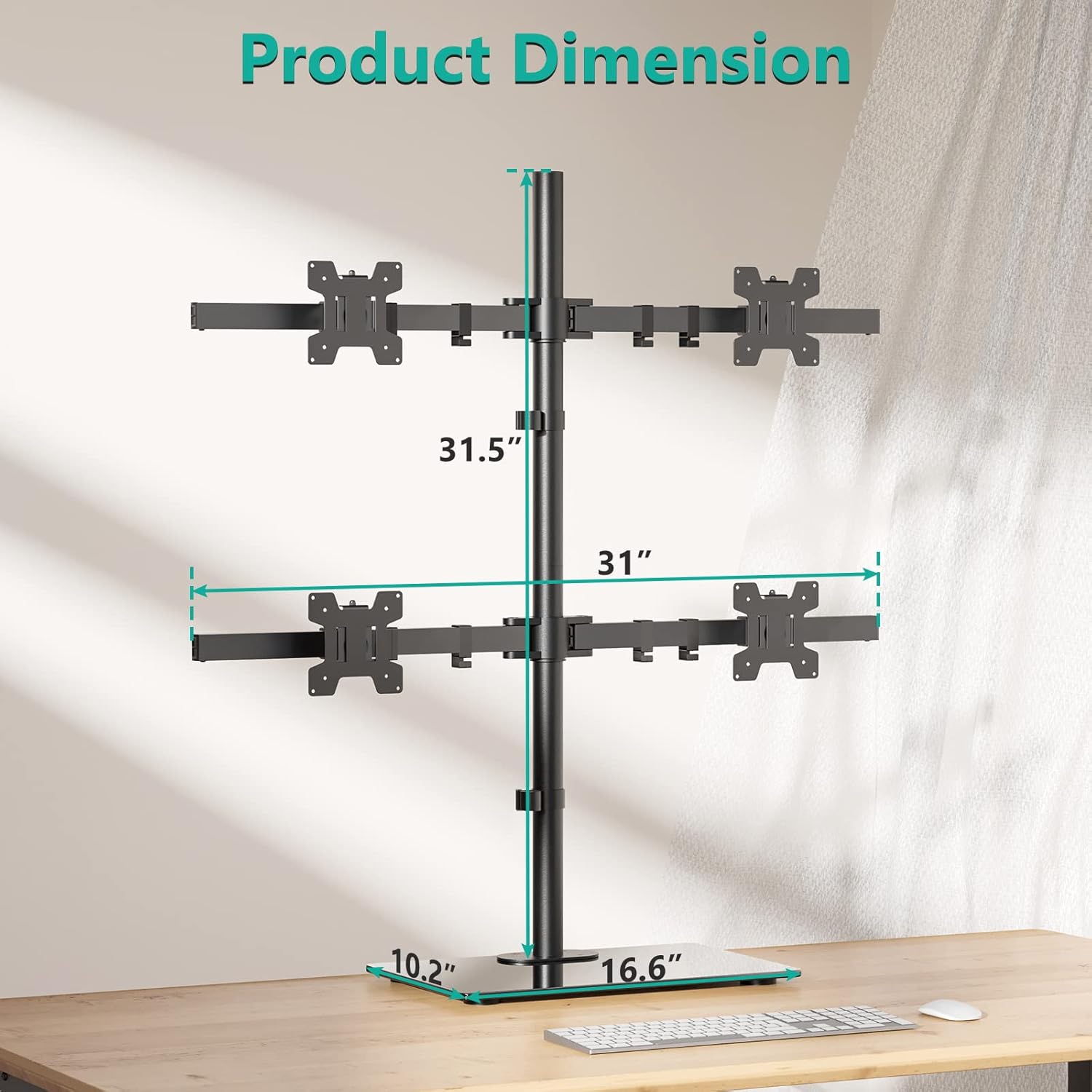
| Rozměry balení | 17.76 x 13.23 x 4.13 palce |

9. Záruka a podpora
WALI products are designed for durability and performance. For specific warranty information, please refer to the documentation included with your purchase or visit the official WALI website. WALI offers experienced and friendly US-based customer support available to assist 7 days a week. If you have any questions, require technical assistance, or need to report a missing/damaged part, please contact us:
- E-mail: [Insert WALI Support Email Here]
- Telefon: [Insert WALI Support Phone Number Here]
- Webmísto: WALI Official Store on Amazon


