1. Úvod
This manual provides essential information for the safe and efficient operation of your ONN 43-Inch Class 4K UHD (2160P) LED Smart TV. This television offers a 4K Ultra High Definition display, High Dynamic Range (HDR) compatibility, and integrated smart TV functionalities powered by Roku. It supports popular streaming services and voice assistants like Alexa and Google Assistant. Please read this manual thoroughly before using your television and retain it for future reference.

Image 1: ONN 43-Inch 4K UHD Smart TV in a typical living room environment.
2. Bezpečnostní informace
Always follow basic safety precautions when using this product to reduce the risk of fire, electric shock, and injury. Keep this manual handy for reference.
- Zdroj napájení: Připojujte televizor pouze k určenému zdroji napájení.
- Větrání: Zajistěte dostatečné větrání kolem televizoru. Neblokujte větrací otvory.
- Voda a vlhkost: Nevystavujte televizor dešti ani vlhkosti. Nepokládejte na televizor předměty naplněné tekutinami.
- Čištění: Před čištěním televizor odpojte ze zásuvky. Použijte měkký, suchý hadřík.
- Montáž na stěnu: If wall mounting, ensure the mount is compatible with VESA 400x400 standards and installed by qualified personnel.
- Děti: Dohlížejte na děti, aby na televizor nelezly nebo si s ním nehrály.
3. Obsah balení
Ověřte, zda jsou v balení přítomny všechny položky. Pokud některé položky chybí nebo jsou poškozené, obraťte se na prodejce.
- ONN 43-Inch Class 4K UHD LED Smart TV
- Dálkové ovládání
- Wall Mount (Note: For renewed products, TV stands may not be included as a wall mount is provided for installation.)
- Napájecí kabel
- Stručný průvodce (není součástí této příručky)

Image 2: The ONN 43-Inch 4K UHD Smart TV alongside its included wall mount.
4. Nastavení
4.1 Montáž na stěnu
Your ONN 43-Inch Smart TV is designed for wall mounting using a VESA 400x400 compatible bracket. Follow these general steps for installation:
- Připravte zeď: Locate wall studs and ensure the mounting area can support the TV's weight (approximately 16.9 pounds) plus the mount.
- Attach Mount Brackets to TV: Secure the wall mount brackets to the VESA holes on the back of the TV using appropriate screws.
- Instalace nástěnné desky: Mount the wall plate securely to the wall studs according to the wall mount manufacturer's instructions.
- Zavěste televizi: Carefully lift the TV and attach it to the wall plate. Ensure it is securely locked in place.
Note: Always refer to the specific instructions provided with your wall mount for detailed installation steps. Professional installation is recommended.
4.2 Připojení periferních zařízení
Televizor nabízí různé porty pro připojení externích zařízení:
- HDMI: 3 HDMI ports (including 1 eARC) for high-definition audio/video devices like Blu-ray players, gaming consoles, or cable boxes.
- USB: 1 USB port pro přehrávání médií z USB disků.
- LAN: 1 ethernetový port pro kabelové připojení k internetu.
- Optický: 1 Optical digital audio output for connecting to soundbars or home theater systems.
- Složený: 1 Composite video input for older devices.
- Koaxiální/kabel: 1 Coaxial input for antenna or cable TV connection.
- sluchátka: 1 Headphone jack for private listening.
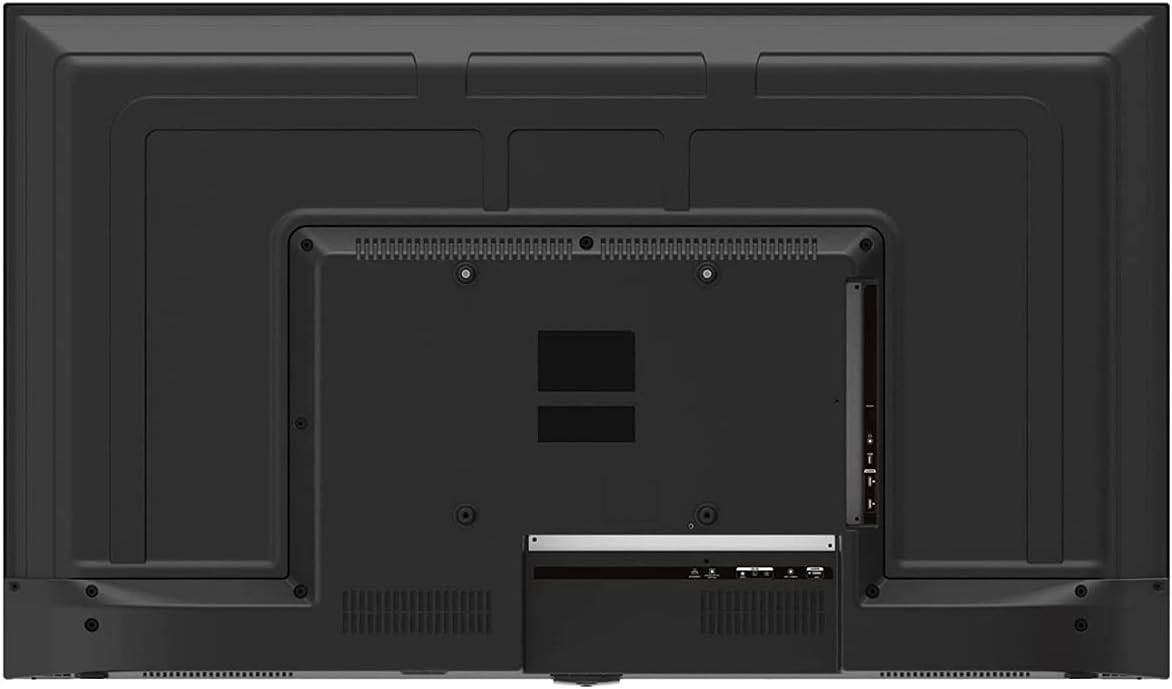
Image 3: Rear panel of the ONN 43-Inch Smart TV, highlighting the available connectivity ports.
4.3 Počáteční zapnutí a nastavení sítě
- Zapnutí: Connect the power cord to the TV and a power outlet. Press the power button on the remote control.
- Výběr jazyka: Postupujte podle pokynů na obrazovce a vyberte preferovaný jazyk.
- Internetové připojení: Select your Wi-Fi network from the list and enter the password. Alternatively, connect an Ethernet cable for a wired connection.
- Nastavení účtu Roku: Follow the instructions to create or sign in to your Roku account. This is necessary to access streaming channels and features.
5. Ovládání vašeho televizoru
5.1 Dálkové ovládání
The included remote control provides easy access to all TV functions and streaming services. It features dedicated buttons for popular streaming apps like Netflix, Apple TV+, Paramount+, and HBO Max.
5.2 Smart TV Interface (Roku TV)
The Roku TV home screen provides a centralized hub for all your entertainment. You can easily navigate through streaming channels, live TV inputs, and device connections.

Image 4: The Roku TV home screen on the ONN 43-Inch Smart TV, showing available streaming applications.

Obrázek 5: Úhlové view 43palcové chytré televize ONN, showcasing the user interface from a different perspective.
- Domov: Access the main Roku TV interface.
- Živé televizní vysílání: Browse available live television channels.
- Streamovací obchod: Discover and add new streaming channels.
- Aplikace a vstupy: Select connected devices (e.g., HDMI 1, HDMI 2) or launch installed applications.
5.3 Integrace hlasového asistenta
The TV is compatible with Alexa and Google Assistant. You can use a compatible voice assistant device (sold separately) or the Roku mobile app to control your TV with voice commands, such as turning it on/off, changing channels, or launching apps.
5.4 Nastavení obrazu
To adjust picture quality, navigate to Settings > Picture Settings on the Roku TV menu. Options typically include Brightness, Contrast, Color, Tint, Sharpness, and various picture modes (e.g., Movie, Sports, Vivid, Standard).
5.5 Nastavení zvuku
To adjust audio settings, navigate to Settings > Audio Settings. Options may include Volume Mode, Audio Delay, and various sound modes (e.g., Standard, Theater, Music).
6. Údržba
6.1 Čištění televizoru
- Před čištěním vždy odpojte televizor ze zásuvky.
- K jemnému otření obrazovky a skříně použijte měkký hadřík, který nepouští vlákna.
- Na odolné skvrny lehceampOtřete hadřík vodou nebo jemným, neabrazivním čističem obrazovek. Nikdy nestříkejte čistič přímo na obrazovku.
6.2 Aktualizace softwaru
Your ONN Roku TV automatically receives software updates to improve performance and add new features. Ensure your TV is connected to the internet for these updates. You can manually check for updates via Nastavení > Systém > Aktualizace systému.
7. Řešení problémů
Pokud narazíte na problémy s televizorem, podívejte se na následující běžná řešení:
| Problém | Řešení |
|---|---|
| Žádná síla | Ujistěte se, že je napájecí kabel bezpečně zapojený do televizoru i do funkční elektrické zásuvky. Zkuste jinou zásuvku. |
| Žádný obraz/zvuk | Check all cable connections (HDMI, coaxial). Ensure the correct input source is selected on the TV. |
| Dálkový nefunkční | Vyměňte baterie v dálkovém ovladači. Ujistěte se, že mezi dálkovým ovladačem a infračerveným senzorem televizoru nejsou žádné překážky. |
| Nelze se připojit k Wi-Fi | Verify your Wi-Fi password. Restart your router and modem. Move the TV closer to the router if possible. |
| Špatná kvalita obrazu | Check the resolution settings of your connected device. Adjust picture settings on the TV. Ensure you are viewpřehrávání obsahu v rozlišení 4K pro optimální rozlišení. |
8. Specifikace
| Funkce | Detail |
|---|---|
| Velikost obrazovky | 43 palce |
| Technologie displeje | LED |
| Rezoluce | 4K Ultra HD (2160p) |
| Kompatibilita HDR | Ano |
| Platforma Smart TV | Televize Roku |
| Podpora hlasového asistenta | Alexa, Google Assistant |
| Konektivita | 3 HDMI (1 eARC), 1 Composite, 1 USB, 1 LAN, 1 Optical, 1 Coaxial/Cable, 1 Headphone |
| Poměr stran | 16:9 |
| Rozměry produktu (D x Š x V) | 7 cm x 38 cm x 23 cm |
| Hmotnost položky | 16.9 libry |
| Barva | Černý |

Obrázek 6: Boční profesionálfile of the ONN 43-Inch Smart TV, illustrating its slim design.

Image 7: Energy Guide label providing estimated yearly energy cost and consumption for the television.
9. Záruka a podpora
For warranty information and technical support, please refer to the documentation included with your product or visit the official ONN support website. As this is a renewed product, specific warranty terms may vary. Please consult the seller or product listing for details regarding the renewed product warranty.


