Zavedení
This manual provides essential instructions for the safe installation, operation, and maintenance of your Jupiter Zphyr 5-Blade BLDC Ceiling Fan. Please read this manual thoroughly before installation and use, and retain it for future reference.
The Jupiter Zphyr fan features a Brushless Direct Current (BLDC) motor, designed for high energy efficiency and quiet operation. It includes a remote control for convenient operation and advanced features.
Bezpečnostní informace
- Doporučená profesionální instalace: Instalaci by měl provést kvalifikovaný elektrikář v souladu s místními elektrotechnickými předpisy.
- Odpojit napájení: Always ensure the main power supply is disconnected before attempting any installation, maintenance, or cleaning.
- Remove Regulator: It is crucial to remove or disconnect any existing fan regulator before installing this BLDC fan. Failure to do so may damage the fan's motor.
- Bezpečná montáž: Ensure the fan is securely mounted to a ceiling joist or a structure capable of supporting its weight.
- Světlá výška čepele: Maintain adequate clearance between the fan blades and any obstructions.
- Pouze pro vnitřní použití: Tento ventilátor je určen pouze pro vnitřní použití.
- svtage: Operate the fan only within the specified voltagrozsah e (230 voltů střídavého proudu).

Důležité: Disconnect the regulator before installation to prevent damage.
Obsah balení
Před zahájením instalace ověřte, zda jsou všechny komponenty přítomny:
- Sestava motoru
- 5 Čepele
- Down Rod
- Clamp Shromáždění
- Dálkové ovládání

Image: Jupiter Zphyr 5-Blade BLDC Ceiling Fan with its remote control.
Nastavení a instalace
For detailed installation steps, refer to the separate installation guide provided with your fan. The following is a general overview:
- Připravte se na instalaci: Turn off power at the circuit breaker. Ensure the existing fan regulator is removed or bypassed.
- Namontujte držák: Securely attach the mounting bracket to the ceiling junction box or a suitable support structure.
- Assemble Down Rod and Motor: Insert the down rod through the canopy and connect it to the motor assembly.
- Zapojte ventilátor: Connect the fan's electrical wires to the household wiring according to the wiring diagram in the detailed installation guide. Ensure all connections are secure.
- Připojit čepele: Securely attach the five blades to the motor housing.
- Závěrečná kontrola: Před obnovením napájení dvakrát zkontrolujte všechna připojení a ujistěte se, že je ventilátor bezpečně namontován.

Image: An illustration of the Jupiter BLDC Ceiling Fan components, highlighting its energy efficiency and inverter compatibility.
Návod k obsluze
Funkce dálkového ovládání
The Jupiter Zphyr fan is operated using the included smart remote control. Ensure the remote has working batteries.

Image: The smart remote control for the Jupiter Zphyr fan, detailing its various functions.
- Zapnuto/Vypnuto: Stisknutím tlačítka napájení zapnete nebo vypnete ventilátor.
- LED: Toggles the integrated LED light on or off.
- Ovládání rychlosti: Buttons labeled 1-5 (or similar) adjust the fan speed.
- Boost Speed: Activates maximum fan speed for rapid cooling.
- Režim spánku: Gradually reduces fan speed by 10 RPM every hour for comfortable sleep.
- Režim časovače: Set the fan to automatically switch off after 2, 4, 6, or 8 hours.
- Reverse Rotation (REV): Changes the direction of blade rotation. Useful for different seasons.
Obousměrná rotace
The fan offers bi-directional rotation for year-round comfort:
- Letní režim (proti směru hodinových ručiček): Pushes air downwards, creating a cooling breeze.
- Zimní režim (ve směru hodinových ručiček): Draws cool air up, circulating warm air near the ceiling downwards, helping to distribute heat more evenly.
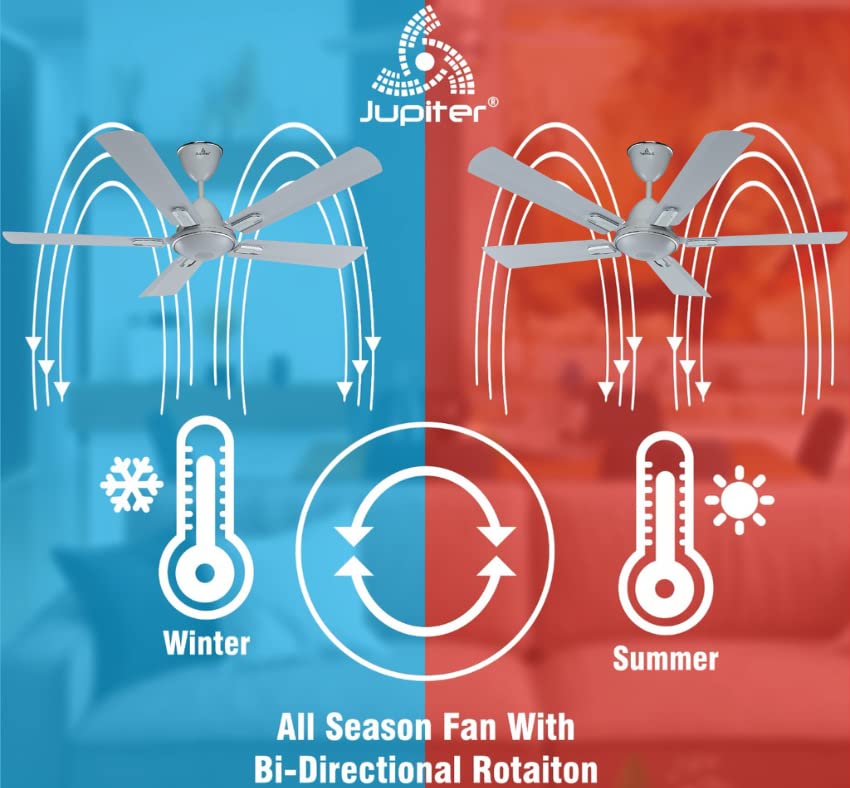
Image: Illustration demonstrating the fan's bi-directional rotation for effective air circulation in both winter and summer.
Jupiter Fan Controller App (for Android with IR Blaster)
For Android phones equipped with an IR Blaster, the Jupiter Fan Controller App can be used to manage the fan. The app functions identically to the physical remote control, allowing you to:
- Switch the fan ON/OFF.
- Upravte rychlost ventilátoru.
- Set a timer and switch ON Sleep mode.
- Switch the LED light ON/OFF.
- Activate Boost Mode.

Image: A smartphone displaying the Jupiter Fan Controller App interface, compatible with Android phones featuring an IR Blaster.
Energy Efficiency and Performance
The Jupiter Zphyr fan is designed with a Super Energy Efficient BLDC Motor, offering significant power savings and consistent performance.
- BLDC motor: Consumes significantly less power compared to traditional induction fans.
- Inverter Stabilization Technology: Maintains consistent speed even during low input voltage or power fluctuations, and runs longer on inverter batteries.
- Vysoký přívod vzduchu: Provides air delivery comparable to standard ceiling fans while consuming less energy.
- LED indikace: The fan's LED can also serve as a subtle night lamp.

Image: The BEE 5-star energy rating label for the Jupiter Zphyr fan, indicating high energy efficiency.
Power Savings Comparison
The image below illustrates the potential energy savings of the Jupiter 5 BLDC Fan compared to other fan types, based on specific usage and electricity cost assumptions:

Image: A comparative table showing wattage consumption, warranty, air delivery, units consumed, electricity cost, and savings for Jupiter 5 BLDC Fan, BEE 1 Star Rated Fan, and Regular Fan.
Note: Calculations are based on 15 hours usage per day, 365 days a year, and electricity charges of ₹7 per unit. Savings are calculated against a regular fan.
Údržba
- Čištění: Regularly clean the fan blades and motor housing with a soft, damp hadříkem. Nepoužívejte abrazivní čisticí prostředky ani rozpouštědla. Před čištěním se ujistěte, že je přístroj vypnutý.
- Vyvážení čepele: Pokud se ventilátor kymácí, zkontrolujte, zda jsou všechny lopatky bezpečně upevněny a vyváženy.
- Není nutné mazání: The BLDC motor is designed for maintenance-free operation and does not require lubrication.
Odstraňování problémů
| Problém | Možná příčina | Řešení |
|---|---|---|
| Ventilátor se nespustí | No power supply; Remote control batteries low/dead; Incorrect wiring; Existing regulator not removed. | Check power supply; Replace remote batteries; Verify wiring connections (consult electrician); Ensure regulator is removed. |
| Dálkové ovládání nefunguje | Batteries low/dead; Obstruction between remote and fan; Remote out of range. | Replace batteries; Ensure clear line of sight; Operate within 20ft distance. |
| Ventilátor se třese | Loose blades; Unbalanced blades; Loose mounting. | Tighten blade screws; Check blade balance; Ensure mounting bracket is secure. |
| Ventilátor vydává neobvyklý zvuk | Loose screws; Internal component issue. | Check and tighten all screws; If noise persists, contact customer service. |
Specifikace
| Funkce | Detail |
|---|---|
| Značka | Jupiter |
| Model | Zphyr |
| Design elektrického ventilátoru | Stropní ventilátor |
| Barva | Bílý |
| Zdroj napájení | Elektrický kabel |
| Rozměry produktu | 45H x 30Š x 20V centimetrů |
| Speciální funkce | Automatic Shut-Off, High Velocity, Remote Controlled, Reverse Rotation |
| Doporučená použití | Pouze pro vnitřní použití |
| Úroveň hluku | 60 decibelů |
| Wattage | 35 wattů |
| Počet čepelí | 5 |
| Délka čepele | 1200 milimetrů |
| svtage | 230 voltů (AC) |
| Hmotnost položky | 4.5 kg |
| Kontrolní metoda | Vzdálený |
| Specifikace splněna | CE |
| Země původu | Indie |
Záruka a podpora
The Jupiter Zphyr fan comes with a 3letá omezená záruka. For warranty claims, the product must be returned to the manufacturer's plant at Hyderabad, with all freight charges paid by the customer.
For queries, returns, or technical support, please contact:
- Číslo zákaznického servisu: +91-9440285167
- ID e-mailu: support@jupiterfans.com
- Webmísto: www.jupiterfans.com
Please register your warranty on the official webmísto: www.jupiterfans.com


