1. Úvod
Thank you for choosing the PRIXTON Cinema Mini Projector. This compact and versatile projector is designed to provide an immersive viewing experience for movies, games, and presentations. Its multiple connectivity options and portable design make it ideal for various environments. Please read this manual carefully before using the projector to ensure proper operation and to maximize its lifespan.
2. Bezpečnostní informace
- Napájení: Používejte pouze určený napájecí adaptér. Ujistěte se, že hlasitosttage je kompatibilní s vaším regionem.
- Větrání: Neblokujte větrací otvory. Zajistěte dostatečný prostor kolem projektoru pro správné proudění vzduchu, abyste zabránili přehřátí.
- Bezpečnost očí: Nedívejte se přímo do objektivu projektoru, když je zapnutýamp svítí. Jasné světlo může způsobit poškození očí.
- Voda a vlhkost: Chraňte projektor před vodou, deštěm a nadměrnou vlhkostí. Neobsluhujte jej mokrýma rukama.
- Čištění: Před čištěním odpojte napájení. Použijte měkký, suchý hadřík. Nepoužívejte tekuté čisticí prostředky.
- Umístění: Umístěte projektor na stabilní, rovný povrch. Neumísťujte jej na přímé sluneční světlo ani do blízkosti zdrojů tepla.
- Děti: Uchovávejte projektor a jeho příslušenství mimo dosah dětí.
3. Obsah balení
Zkontrolujte prosím, zda jsou v balení přítomny všechny položky:
- Mini projektor PRIXTON Cinema
- Dálkové ovládání
- Napájecí adaptér
- Uživatelská příručka
4. Konec produktuview
Familiarize yourself with the various parts of your PRIXTON Cinema Mini Projector.
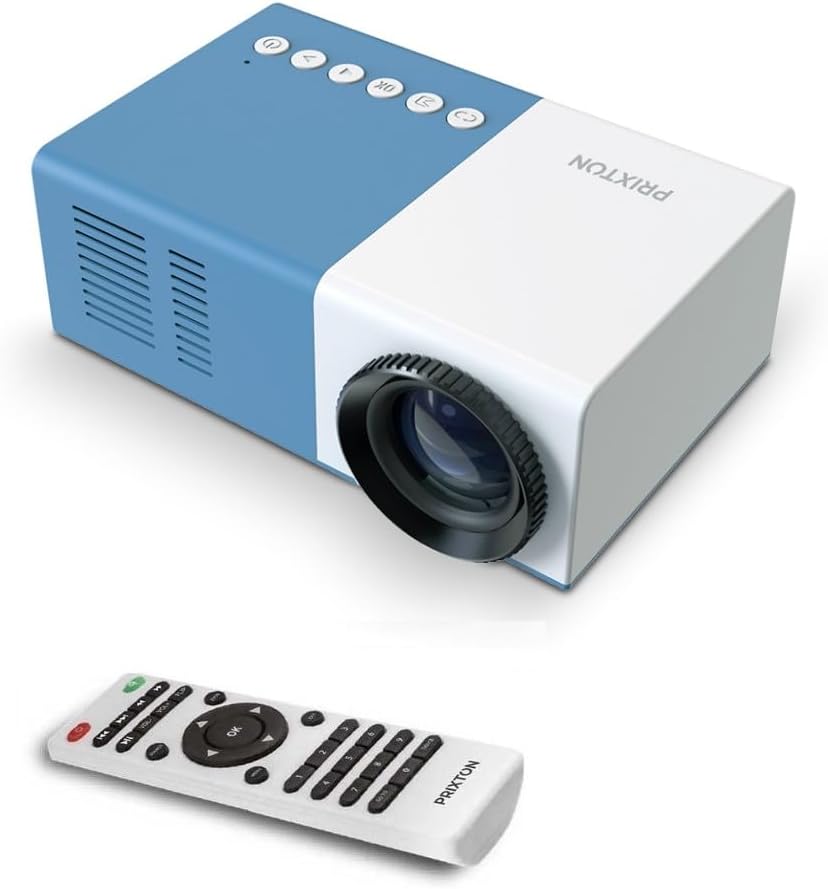
Obrázek 4.1: Přední a horní View of the PRIXTON Cinema Mini Projector with its remote control. The projector is blue and white, showing the lens, control buttons, and the included remote.
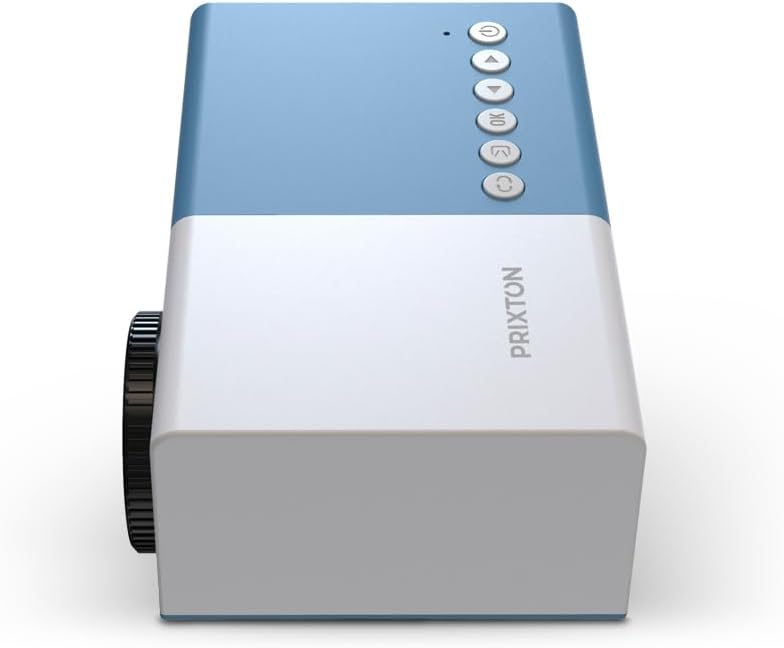
Obrázek 4.2: Nahoru view of the projector, highlighting the control buttons (Power, Menu, OK, Navigation) and the focus wheel on the side.
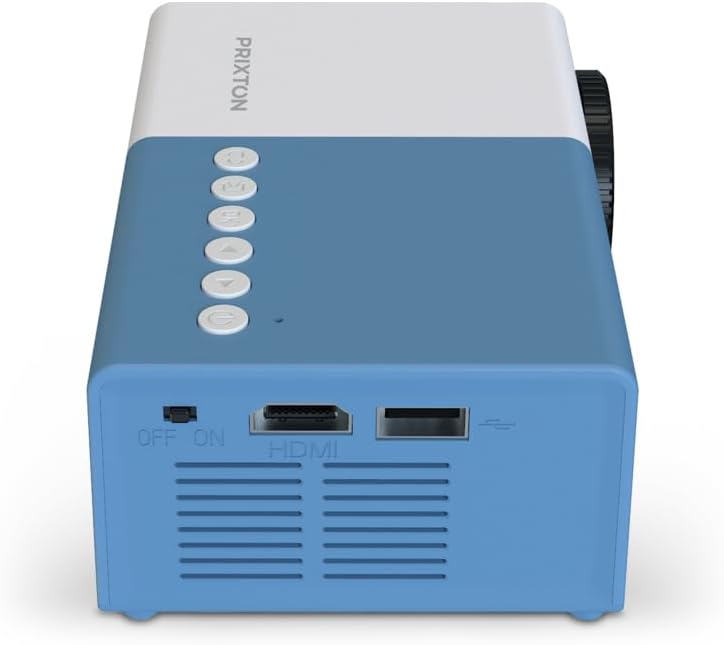
Obrázek 4.3: Zadní view of the projector, showing the power switch, HDMI port, USB port, and ventilation grilles.

Obrázek 4.4: Strana view of the projector, displaying the MicroSD card slot, AV In port, and additional ventilation.
Komponenty:
- Čočka: Promítá obraz na plátno.
- Focus Wheel: Upravuje jasnost obrazu.
- Ovládací tlačítka: Power, Menu, OK, and navigation buttons for on-device control.
- Vypínač: Slouží k zapnutí nebo vypnutí projektoru.
- Port HDMI: Connects to devices like laptops, streaming sticks, and game consoles.
- USB port: Pro přehrávání médií z USB disků.
- Slot microSD: Pro přehrávání médií z karet MicroSD.
- AV vstup: Připojuje se ke starším zařízením pomocí AV kabelu.
- Integrovaný reproduktor: Poskytuje zvukový výstup.
5. Nastavení
5.1 Připojení napájení
- Připojte napájecí adaptér ke vstupnímu portu projektoru.
- Zapojte napájecí adaptér do elektrické zásuvky.
- Flip the power switch on the projector to the 'ON' position. The power indicator light should illuminate.
5.2 Umístění a projekce
Place the projector on a stable surface, ensuring the lens is facing the projection surface (wall or screen).

Obrázek 5.1: Illustration of projection distance and screen size. The projector can project images between 24 and 60 inches, with a maximum distance of 2 meters from the surface.
- For optimal image quality, ensure the room is dark.
- The projector can display images from 24 inches to 60 inches.
- The optimal projection distance is up to 2 meters (approximately 6.5 feet). Adjust the distance to achieve your desired screen size.
6. Provoz
6.1 Zapnutí/vypnutí
- Zapnutí: After connecting power, press the Power button on the projector or the remote control.
- Vypnutí: Znovu stiskněte tlačítko napájení. V případě potřeby potvrďte vypnutí.
6.2 Nastavení zaostření
After powering on, the image may appear blurry. Use the focus wheel located on the side of the projector to sharpen the image until it is clear.
6.3 Výběr zdroje
To select an input source (HDMI, USB, MicroSD, AV):
- Press the 'Source' or 'Input' button on the remote control or the projector.
- Use the navigation buttons to highlight your desired input source.
- Stisknutím tlačítka „OK“ potvrďte svůj výběr.
7. Konektivita
The PRIXTON Cinema Mini Projector offers multiple ways to connect your devices.
7.1 Připojení HDMI
Connect devices such as laptops, streaming sticks (e.g., Chromecast, Fire TV Stick), game consoles, or Blu-ray players using an HDMI cable.
- Connect one end of the HDMI cable to your device and the other end to the HDMI port on the projector.
- Select 'HDMI' as the input source (refer to Section 6.3).
7.2 Přehrávání z USB a MicroSD
The projector supports direct media playback from USB drives and MicroSD cards.
- Insert your USB drive into the USB port or your MicroSD card into the MicroSD slot.
- Select 'USB' or 'MicroSD' as the input source.
- Procházejte files using the remote control and select the media you wish to play.
7.3 AV In Connection
For older devices that use composite video and stereo audio (RCA), connect them via the AV In port.
- Connect the AV cable from your device to the AV In port on the projector.
- Select 'AV' as the input source.
8. Zvukový výstup
The projector features an integrated stereo speaker, providing audio for your content. Volume can be adjusted using the remote control.

Obrázek 8.1: The PRIXTON Cinema Mini Projector in use, projecting content in a living room environment, demonstrating its portability and ease of setup for home entertainment.
9. Údržba
9.1 Čištění objektivu
Používejte měkký hadřík bez žmolků, speciálně určený pro optické čočky. Nepoužívejte abrazivní čisticí prostředky ani nadměrnou sílu, mohlo by dojít k poškrábání čočky.
9.2 Čištění těla projektoru
Wipe the exterior of the projector with a soft, dry cloth. Avoid using chemical cleaners that may damage the finish.
9.3 Větrání
Regularly check that the ventilation grilles are free from dust and debris to ensure proper heat dissipation and prevent overheating.
9.4 Skladování
When not in use, store the projector in a cool, dry place, away from direct sunlight and extreme temperatures. If possible, use the original packaging or a protective case.
10. Řešení problémů
Pokud se s projektorem setkáte s problémy, podívejte se na následující běžné problémy a jejich řešení.
| Problém | Možná příčina | Řešení |
|---|---|---|
| Na obrazovce není žádný obraz | No power; Incorrect input source; Cable not connected. | Check power connection and switch; Select correct input source; Ensure HDMI/AV/USB cable is securely connected. |
| Obraz je rozmazaný | Není nastavené zaostření; Projektor je příliš blízko/daleko. | Adjust the focus wheel; Adjust projection distance. |
| Žádný zvuk | Volume too low; Muted; Source device audio issue. | Increase volume; Unmute projector; Check audio settings on source device. |
| Dálkové ovládání nefunguje | Batteries low/dead; Obstruction; Remote not aimed at sensor. | Replace batteries; Remove obstructions; Aim remote directly at the projector's IR sensor. |
| Projektor se přehřívá a vypíná | Zablokované větrání; Dlouhodobé používání. | Ujistěte se, že jsou větrací otvory volné; Nechte projektor vychladnout; Používejte projektor v dobře větraném prostoru. |
11. Specifikace
Technical specifications for the PRIXTON Cinema Mini Projector.
| Funkce | Specifikace |
|---|---|
| Značka | Prixton |
| Číslo modelu | Cinema Mini |
| Barva | Modrý |
| Projekční technologie | LED |
| Nativní rozlišení | QVGA 320 x 240 |
| Podporované rozlišení | Up to Full HD (1920 x 1080) |
| Jas | 35 000 lumenů (1 600 ANSI lumenů) |
| Velikost projekce | 24" - 60" |
| Projekční vzdálenost | Až 2 metrů |
| Konektivita | HDMI, USB, MicroSD, AV In |
| Zvukový výstup | Integrovaný stereo reproduktor |
| Speciální funkce | Lehký, přenosný |
| Zahrnuté komponenty | Dálkové ovládání |
12. Záruka a podpora
For warranty information, please refer to the documentation provided at the time of purchase or contact your retailer. Information regarding spare parts availability and software updates is not available in this manual. For further assistance or technical support, please visit the official PRIXTON webnebo kontaktujte jejich zákaznický servis.


