1. Úvod
This manual provides essential information for the safe and efficient use of your ONN 32-Inch Class HD (720P) LED Smart TV, Model 100012589. Please read these instructions thoroughly before operating your television and retain them for future reference.

Image 1.1: The ONN 32-inch Smart TV displaying its Roku interface, alongside the included wall mount bracket. This image illustrates the product and its primary mounting accessory.
2. Důležité bezpečnostní informace
Dodržujte následující bezpečnostní opatření, abyste předešli požáru, úrazu elektrickým proudem nebo zranění:
- Nevystavujte televizor dešti ani vlhkosti.
- Neotevírejte dvířka televizoruasing; veškerý servis svěřte kvalifikovanému personálu.
- Zajistěte řádné větrání kolem televizoru.
- Chraňte napájecí kabel před pošlapáním nebo přiskřípnutím.
- Během bouřek nebo pokud televizor delší dobu nepoužíváte, odpojte jej ze zásuvky.
- Uchovávejte televizor mimo dosah zdrojů tepla a přímého slunečního záření.
3. Co je v krabici
Po vybalení zkontrolujte, zda jsou přítomny všechny položky:
- 32palcová chytrá LED televize ONN třídy HD (720P)
- Wall Mount Bracket (TV stands are not included with this model)
- Dálkové ovládání (není výslovně uvedeno, ale je standardní součástí televizorů)
- Power Cable (not explicitly listed but standard for TVs)
4. Nastavení
4.1 Montáž na stěnu
This television is designed for wall mounting and does not include traditional TV stands. The rear panel features VESA 400x400 compatible screw holes for easy installation of the included wall mount.
- Carefully unpack the TV and the wall mount bracket.
- Určete vhodné místo na zdi a ujistěte se, že unese hmotnost televizoru a držáku.
- Attach the wall mount bracket to the TV using the provided screws, aligning with the VESA mounting points on the TV's rear.
- Securely fasten the other part of the wall mount to the wall according to the wall mount's specific instructions.
- Carefully lift and attach the TV to the wall-mounted bracket.

Image 4.1: The rear panel of the ONN 32-inch Smart TV, highlighting the VESA mounting points for wall bracket attachment. This view is crucial for proper wall mount installation.
4.2 Připojení napájení
After mounting, connect the power cable to the TV's power input and then to a standard electrical outlet.
4.3 Průvodce počátečním zapnutím a nastavením
Press the power button on the remote control or TV. Follow the on-screen instructions to complete the initial setup, including network connection, channel scanning, and account setup for streaming services.
5. Ovládání vašeho televizoru
5.1 Funkce dálkového ovládání
Use the provided remote control to navigate the TV's interface. Common buttons include Power, Volume Up/Down, Channel Up/Down, Home, Back, and directional arrows for menu navigation.
5.2 Navigace v rozhraní Smart TV
The ONN Smart TV features an intuitive interface for accessing various functions and applications. Use the directional buttons on your remote to move between options and the OK/Select button to confirm.
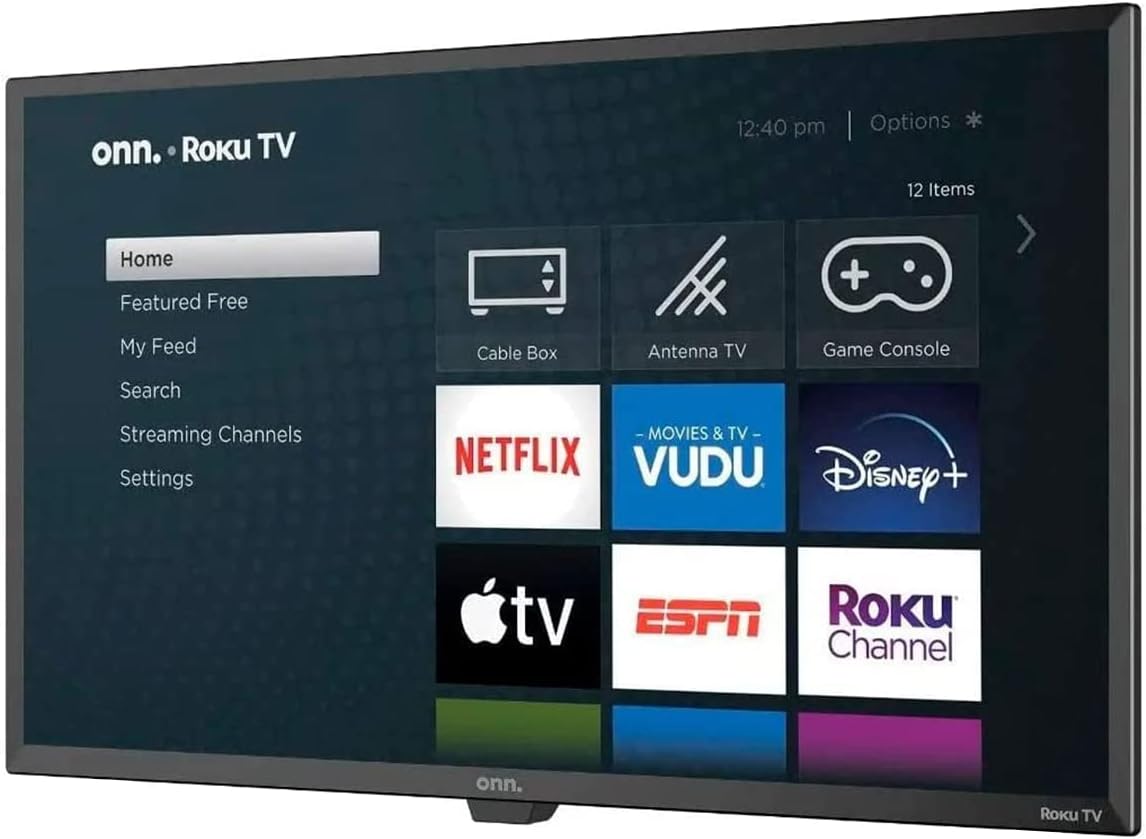
Image 5.1: The ONN Smart TV's home screen, showcasing the Roku operating system with various streaming application icons like Netflix, Disney+, and Apple TV. This illustrates the user interface for content selection.
5.3 Přístup ke streamovacím službám
Your ONN Smart TV provides instant access to popular streaming services such as Netflix, YouTube, Disney+, and Apple TV. Select the desired app icon from the home screen to launch it. An active internet connection is required.
6. Konektivita
Televizor nabízí různé porty pro připojení externích zařízení:
- HDMI porty: For connecting high-definition devices like Blu-ray players, game consoles, or cable/satellite boxes.
- USB port: Pro připojení paměťových zařízení USB pro přehrávání médií files.
- Wi-Fi: Vestavěné bezdrátové připojení pro přístup k internetu a streamování.
7. Smart Features and Voice Assistants
This Smart TV integrates with voice assistants for enhanced control:
- Kompatibilita Alexa: Control your TV using Amazon Alexa-enabled devices. You can issue commands to play movies, TV shows, adjust volume, and more.
- Google Assistant Compatibility: Use Google Assistant-enabled devices to control your TV, search for content, and manage playback.
Refer to the respective voice assistant's setup guide for pairing instructions with your ONN Smart TV.
8. Řešení problémů
Pokud narazíte na problémy s televizorem, prostudujte si následující běžné problémy a jejich řešení:
| Problém | Možné řešení |
|---|---|
| Žádná síla | Ujistěte se, že je napájecí kabel bezpečně připojen k televizoru i k funkční elektrické zásuvce. Zkuste jinou zásuvku. |
| Žádný obraz, ale zvuk je přítomen | Check the input source. Ensure external devices are powered on and connected correctly via HDMI. |
| Žádný zvuk, ale obraz je přítomen | Zkontrolujte úroveň hlasitosti a nastavení ztlumení. Ověřte audio kabely externích zařízení. |
| Nelze se připojit k Wi-Fi | Ujistěte se, že je váš Wi-Fi router zapnutý a v dosahu. Znovu zadejte heslo k Wi-Fi. Restartujte televizor a router. |
| Dálkové ovládání nefunguje | Vyměňte baterie. Ujistěte se, že mezi dálkovým ovladačem a infračerveným senzorem televizoru nejsou žádné překážky. |
9. Specifikace
| Funkce | Detail |
|---|---|
| Číslo modelu | 100012589 |
| Velikost obrazovky | 32 palce |
| Technologie displeje | LED |
| Rezoluce | 720p (HD) |
| Poměr stran | 16:9 |
| Konektivita | HDMI, USB, Wi-Fi |
| Typ reproduktoru | Vestavěný |
| Hmotnost položky | 16.32 libry |
| svtage | 2.4E+2 volty (AC) |
| Wattage | 100 wattů |
| Podporované internetové služby | Netflix, YouTube, Disney+, Apple TV |
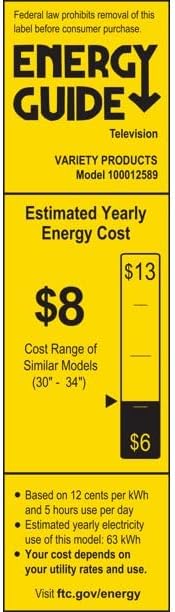
Image 9.1: The Energy Guide label for the ONN Model 100012589 television, indicating an estimated yearly energy cost of $8 based on 12 cents per kWh and 5 hours use per day.
10. Údržba
10.1 Čištění obrazovky
Jemně otřete obrazovku měkkým hadříkem, který nepouští vlákna. V případě odolných skvrn lehceampOtřete hadřík vodou nebo specializovaným čističem obrazovek. Vyhněte se agresivním chemikáliím nebo abrazivním materiálům.
10.2 Čištění Casing
Otřete televizor casing with a soft, dry cloth. Do not use liquid cleaners directly on the TV.
11. Záruka a podpora
Tento produkt je nabízen jako položka Amazon Renewed. Produkty Amazon Renewed jsou profesionálně kontrolovány a testovány, aby fungovaly a vypadaly jako nové. Pokud nejste s nákupem spokojeni, máte nárok na výměnu nebo vrácení peněz za obnovené produkty v souladu s podmínkami. Obnovená záruka Amazonu.
For further assistance or support, please refer to the Amazon Renewed customer service channels.


