1. Konec produktuview
The MINLOVE 108S is a high-definition projector designed for both home theater and business presentations. It features native 1080p resolution, 5G and 2.4G WiFi connectivity for seamless screen mirroring, and Bluetooth 5.0 for audio output. With a brightness of 9800 lumens and a 10000:1 contrast ratio, it delivers clear and vibrant images up to 450 inches. This package includes a 100-inch projector screen for immediate use.
Obsah balení:
- MINLOVE 108S Projector x1
- Kabel HDMI x1
- Remote Control x1 (Batteries not included)
- AV kabel 3 v 1 x1
- Uživatelská příručka x1
- Napájecí kabel 1x
- 100-inch Projector Screen x1
- Krytka objektivu x1

Image 1.1: The MINLOVE 108S Projector, showcasing its compact design and the included 100-inch screen, along with icons representing various streaming services and connectivity options.
2. Průvodce nastavením
2.1 Umístění
Position the projector on a stable, flat surface or mount it to the ceiling. Ensure there is adequate ventilation around the unit. The optimal projection distance will vary based on desired screen size, with a maximum display size of 450 inches.
2.2 Připojení napájení
- Připojte napájecí kabel k napájecímu vstupu projektoru.
- Plug the other end of the power cord into a standard electrical outlet (240 Volts).
2.3 Počáteční zapnutí
Stisknutím tlačítka napájení na projektoru nebo na dálkovém ovladači zapněte zařízení. Rozsvítí se kontrolka.
2.4 Zaostření a korekce lichoběžníkového zkreslení
- Soustředit: Otáčejte zaostřovacím kroužkem na objektivu projektoru, dokud se promítaný obraz nebude jevit ostrý a jasný.
- Korekce lichoběžníkového zkreslení: Use the manual keystone correction dial (typically ±15°) to adjust the image shape if it appears trapezoidal. This corrects for projection angles that are not perfectly perpendicular to the screen.
3. Návod k obsluze
3.1 Možnosti připojení
3.1.1 WiFi Connection (5G/2.4G) for Screen Mirroring
The projector supports dual-band 2.4G and 5G WiFi for wireless screen mirroring from iOS, Android, and Windows devices. Ensure both the projector and your device are connected to the same local WiFi network.
- Navigate to the 'Screen Mirroring' or 'WiFi Display' option in the projector's menu.
- Select your device's operating system (iOS/Android/Windows).
- Na mobilním zařízení nebo počítači povolte zrcadlení/casting obrazovky a vyberte projektor ze seznamu dostupných zařízení.
Poznámka: Wired screen mirroring is also supported for iOS devices using a USB cable or an HDMI conversion cable.

Image 3.1: Visual representation of 5G and 2.4G WiFi connectivity, demonstrating wireless screen mirroring from laptops, tablets, and smartphones to the projector.
3.1.2 Připojení Bluetooth 5.0
Connect the projector to external Bluetooth speakers, headphones, or other Bluetooth audio devices for an enhanced audio experience. Bluetooth connection is for audio output only.
- Go to the 'Bluetooth Settings' in the projector's menu.
- Povolte Bluetooth a vyhledejte dostupná zařízení.
- Vyberte ze seznamu audiozařízení Bluetooth, které chcete spárovat.

Image 3.2: The MINLOVE projector highlighting its built-in HiFi stereo speakers and its ability to connect to external Bluetooth devices like headphones and speakers.
3.1.3 Kabelová připojení
The projector offers multiple wired input ports for various devices:
- HDMI (x2): Connect TV boxes, gaming consoles (PS5, Xbox), laptops, PCs, Blu-ray players.
- USB (1x): Přehrávejte média přímo z USB disků.
- AV: Connect older devices using the included 3-in-1 AV cable.
- VGA: Connect to computers.
- Micro SD: Play media from Micro SD cards.

Image 3.3: An illustration of the MINLOVE projector's universal connectivity, showing its compatibility with a wide range of devices through HDMI, USB, and other ports.
3.2 Výběr vstupního zdroje
Use the 'Source' button on the remote control or the projector's control panel to cycle through available input sources (HDMI1, HDMI2, USB, AV, Screen Mirroring).
3.3 Navigace v nabídce
Use the arrow keys and 'OK' button on the remote control to navigate the projector's on-screen menu. Adjust settings such as picture mode, sound mode, aspect ratio, and network settings.

Image 3.4: The projector's home interface, showing various applications and examples of its use in different settings, such as watching movies, exercising, and outdoor entertainment.
4. Údržba
4.1 Čištění čoček
Gently clean the projector lens with a soft, lint-free cloth or a lens cleaning brush. Avoid using abrasive cleaners or excessive force, which can scratch the lens.
4.2 Čištění prachového filtru
Regularly check and clean the dust filter (if accessible) to ensure proper airflow and prevent overheating. Refer to the specific location of the filter in the product diagram if available.
4.3 lamp Život
The LED light source in the MINLOVE 108S projector has an estimated lifespan of up to 60,000 hours, providing long-term performance without frequent lamp nahrazení.
4.4 Skladování
When not in use, store the projector in a cool, dry place, away from direct sunlight and extreme temperatures. Use the lens cap to protect the lens from dust and scratches.
5. Řešení problémů
- Bez napájení: Ensure the power cord is securely connected to both the projector and the electrical outlet. Check if the outlet is functional.
- Bez obrázku:
- Ověřte, zda je vybrán správný vstupní zdroj.
- Check all connected cables (HDMI, AV, etc.) for secure connections.
- Upravte zaostřovací kroužek.
- Špatná kvalita obrazu:
- Adjust the focus and keystone correction.
- Ujistěte se, že projekční plocha je rovná a čistá.
- Check the resolution settings on your source device.
- If a browning or multicolored spot appears, this may indicate overheating. Turn off the unit to cool down or ensure adequate ventilation.
- Žádný zvuk:
- Zvyšte hlasitost na projektoru i zdrojovém zařízení.
- If using Bluetooth, ensure the device is properly paired and selected as the audio output. Note that Bluetooth audio may experience slight latency.
- Check audio cable connections for wired setups.
- Dálkové ovládání nefunguje: Replace the batteries in the remote control. Ensure there are no obstructions between the remote and the projector's IR receiver.
6. Specifikace
| Funkce | Specifikace |
|---|---|
| Číslo modelu | 108S |
| Standardní rozlišení | Nativní rozlišení 1920 x 1080 pixelů |
| Jas | 9800 XNUMX lumenů |
| Kontrastní poměr | 10000:1 |
| Funkce zvětšení | 100 % - 75 % |
| Korekce lichoběžníkového zkreslení | ±15° Manuální |
| Maximální velikost obrazovky | 450 palce |
| Životnost LED | 60,000 hodin |
| Bezdrátová funkce | 5G/2.4G WiFi & Bluetooth 5.0 |
| Poměr stran | 4:3 / 16:9 / Auto |
| Kompatibilita | iOS, Android, PC, Xbox, PS4/PS5, TV Stick, HDMI, USB |
| Typ připojení | Wi-Fi, HDMI (x2), USB (x1), AV, VGA, Micro SD |
| Rozměry produktu | 29.97 x 19.99 x 10.01 cm |
| Hmotnost položky | 3.68 kg |
| svtage | 240 voltů |
| Wattage | 50 wattů |

Image 6.1: Visual comparison illustrating the superior brightness, sharpness, and wider color gamut of the MINLOVE projector compared to traditional models.
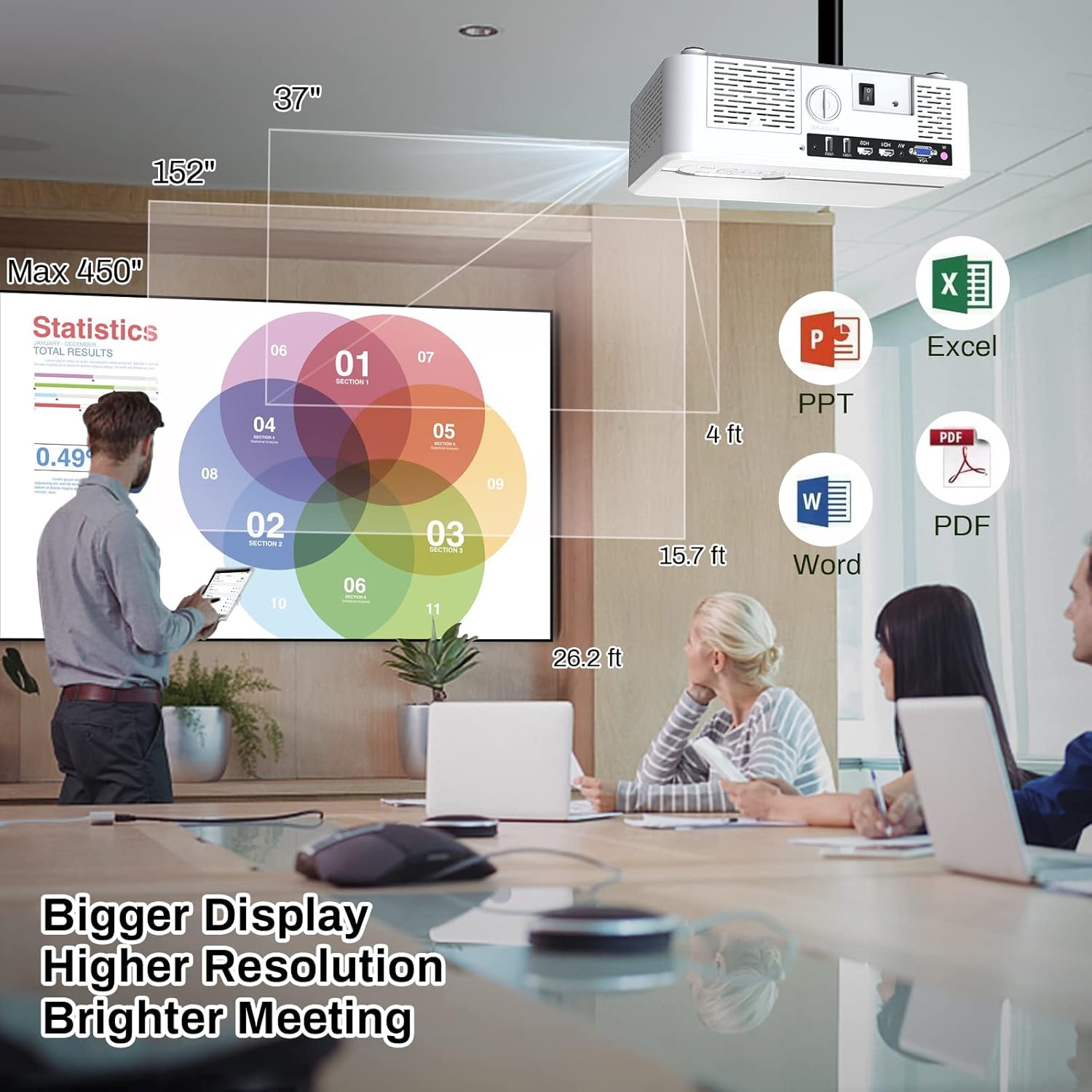
Image 6.2: The MINLOVE projector in a business environment, demonstrating its capability to project large, high-resolution displays for meetings and presentations.
7. Záruka a podpora
The MINLOVE 108S projector comes with a 1-year warranty. For any questions, technical assistance, or after-sales service, please contact MINLOVE customer support. Our customer service team is available 24/7 to provide satisfactory solutions.


