1. Úvod
This manual provides essential instructions for the safe and efficient operation, setup, and maintenance of your Fellowes LX25 Paper Shredder. Please read this manual thoroughly before using the shredder and retain it for future reference.
The Fellowes LX25 is designed for personal use, offering cross-cut shredding for enhanced security of your documents.
2. Důležité bezpečnostní informace
WARNING: Failure to follow these safety instructions may result in injury or damage to the shredder.
- Udržujte ruce, vlasy a volné oblečení v dostatečné vzdálenosti od vstupního otvoru pro papír.
- Udržujte děti a domácí zvířata vždy v dostatečné vzdálenosti od drtiče.
- Před přemisťováním, čištěním nebo vyprazdňováním odpadkového koše odpojte drtič ze zásuvky.
- Na drtiči ani v jeho blízkosti nepoužívejte aerosolové výrobky, maziva na bázi ropy ani jiné hořlavé látky.
- Do not shred metal objects, wet paper, or adhesive materials as this can damage the cutting mechanism.
- The shredder features a Patented Safety Lock. Always engage the safety lock when the shredder is not in use to prevent accidental operation.

Image: A hand is shown pushing a switch on the top of the shredder, labeled 'Safety Lock', indicating the activation of the safety feature.
3. Obsah balení
Ověřte, zda jsou v balení přítomny všechny položky:
- Fellowes LX25 Shredder Unit
- Odpadkový koš
- Návod k použití (tento dokument)
4. Nastavení
- Vybalte skartovačku: Carefully remove all packaging materials from the shredder and its components.
- Umístění skartovačky: Place the shredder on a flat, stable surface near a power outlet. Ensure there is adequate space around the unit for ventilation and operation.
- Insert Waste Bin: Ujistěte se, že je odpadkový koš správně vložen do drtiče. Drtič nebude fungovat, pokud koš není správně usazen.
- Připojte napájení: Zapojte napájecí kabel do standardní elektrické zásuvky.

Image: The Fellowes LX25 shredder is positioned on the floor next to an office desk, illustrating its compact size and typical placement. Dimensions are indicated as 14¼" H x 12⅜" W x 8⅛" D.
5. Návod k obsluze
- Zapnutí: Locate the power switch on the top of the shredder. Slide the switch to the 'ON' position.
- Disengage Safety Lock: If the safety lock is engaged, slide the safety lock switch to the 'UNLOCKED' position.
- Feed Documents: Insert up to 6 sheets of paper into the paper entry slot. The shredder will automatically start and stop.
- Drcení dalších materiálů: The LX25 can also shred staples, small paper clips, and plastic credit cards. Insert these items one at a time into the paper entry slot.
- Nepřetržitý provoz: The shredder is designed for intermittent use. It has a maximum continuous run time of approximately 3 minutes, followed by a cool-down period.
- Power Off and Engage Safety Lock: When finished shredding, slide the power switch to the 'OFF' position and engage the safety lock for security.

Image: A hand feeds multiple sheets of paper into the shredder's entry slot. Graphics indicate a sheet capacity of 6 sheets and illustrate the cross-cut shredding pattern (5/32" x 1¼"). Icons also show that staples, paper clips, and credit cards can be shredded.

Image: The shredder is displayed alongside icons indicating it is suitable for 1 user, has a run time of up to 3 minutes, and operates quietly.
6. Údržba
- Vyprázdnění odpadkového koše: Regularly check and empty the 3-gallon waste bin to prevent paper jams and ensure optimal performance. Always unplug the shredder before removing the bin.
- Cleaning the Shredder: Use a soft, dry cloth to clean the exterior of the shredder. Do not use abrasive cleaners or solvents.
- Mazání čepelí: For optimal performance and longevity, it is recommended to oil the shredder blades periodically (e.g., after every 30 minutes of accumulated shredding or when performance decreases). Use a shredder-specific oil and follow the oil manufacturer's instructions.
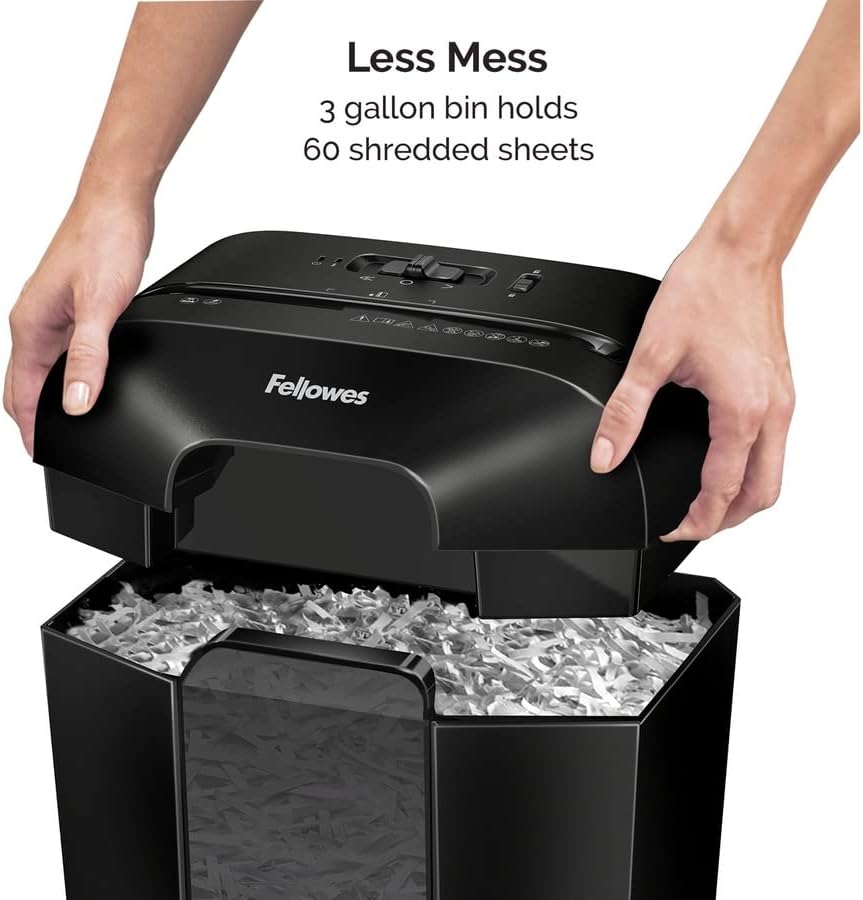
Image: A person's hands are shown lifting the top section of the shredder, exposing the waste bin below, which contains shredded paper. Text indicates 'Less Mess' and that the '3 gallon bin holds 60 shredded sheets'.
7. Řešení problémů
| Problém | Možná příčina | Řešení |
|---|---|---|
| Skartovačka se nezapne. | Not plugged in; Waste bin not properly seated; Safety lock engaged; Overheat protection activated. | Ensure power cord is securely plugged in. Re-seat the waste bin. Disengage the safety lock. Allow shredder to cool down for 20-30 minutes. |
| Zaseknutý papír. | Too many sheets inserted; Material not suitable for shredding. | Unplug the shredder. Carefully remove paper from the entry slot. If accessible, remove paper from the cutting mechanism. Plug in and try again with fewer sheets. |
| Drtič se během provozu zastaví. | Overheat protection activated; Waste bin full. | Allow shredder to cool down for 20-30 minutes. Empty the waste bin. |
8. Specifikace
- Model: LX25 (4300401)
- Typ skartace: Příčný řez
- Úroveň zabezpečení: P-4
- Kapacita archu: 6 listů na průchod
- Velikost částic: 5/32" x 1-1/4"
- Skartuje: Paper, staples, small paper clips, plastic credit cards
- Kapacita přihrádky: 3 XNUMX galonů
- Rozměry (V x Š x H): 14.2 x 8.7 x 12.2 palce
- Hmotnost: 9.28 libry
- Nepřetržitá doba chodu: Až 3 minut
- Období ochlazení: Approximately 20-30 minutes after continuous use
9. Záruka a podpora
For warranty information or technical support, please refer to the warranty card included with your product or visit the official Fellowes website. You may also contact Fellowes customer service directly for assistance with your LX25 Paper Shredder.


