1. Úvod
This manual provides detailed instructions for the operation and maintenance of your aiworth L15 Digital Voice Activated Recorder. Please read this manual thoroughly before using the device to ensure proper function and to maximize its capabilities.
2. Konec produktuview
The aiworth L15 is a compact and versatile digital voice recorder designed for high-quality audio capture in various environments, including meetings, lectures, and classes. It features a 16GB internal memory, voice activation, noise reduction, and password protection.

Obrázek 1: Přední view of the aiworth L15 Digital Voice Activated Recorder, showing the display, REC button, and PLAY/PAUSE and D/STOP controls.
2.1 Součásti a ovládací prvky zařízení

Obrázek 2: Detailed diagram illustrating the various buttons, ports, and features of the aiworth L15 recorder.
- MENU/DEL: Access menu options or delete files.
- NAHORU: Navigate up in menus or increase volume.
- DOLŮ: Navigate down in menus or decrease volume.
- Slot pro TF kartu: Insert a microSD (TF) card for expanded storage (up to 64GB).
- EXTERNÍ MIKROFON: Port pro připojení externího mikrofonu.
- SLUCHÁTKA: 3.5mm jack pro připojení sluchátek.
- REC: One-touch record button.
- PLAY/PAUSE: Play or pause recordings/music.
- RETURN/STOP: Stop playback/recording or return to the previous menu.
- VOL+: Zvyšte hlasitost.
- VOL-: Snížit hlasitost.
- NA: Power on switch.
- OFF: Power off switch.
- Port USB: Micro USB port pro nabíjení a přenos dat.
3. Nastavení
3.1 Počáteční nabíjení
Before first use, fully charge the device. Connect the recorder to a computer's USB port or a USB wall adapter using the provided USB cable. The battery icon on the screen will indicate charging status. A full charge typically takes approximately two hours and provides up to 20 hours of continuous recording.
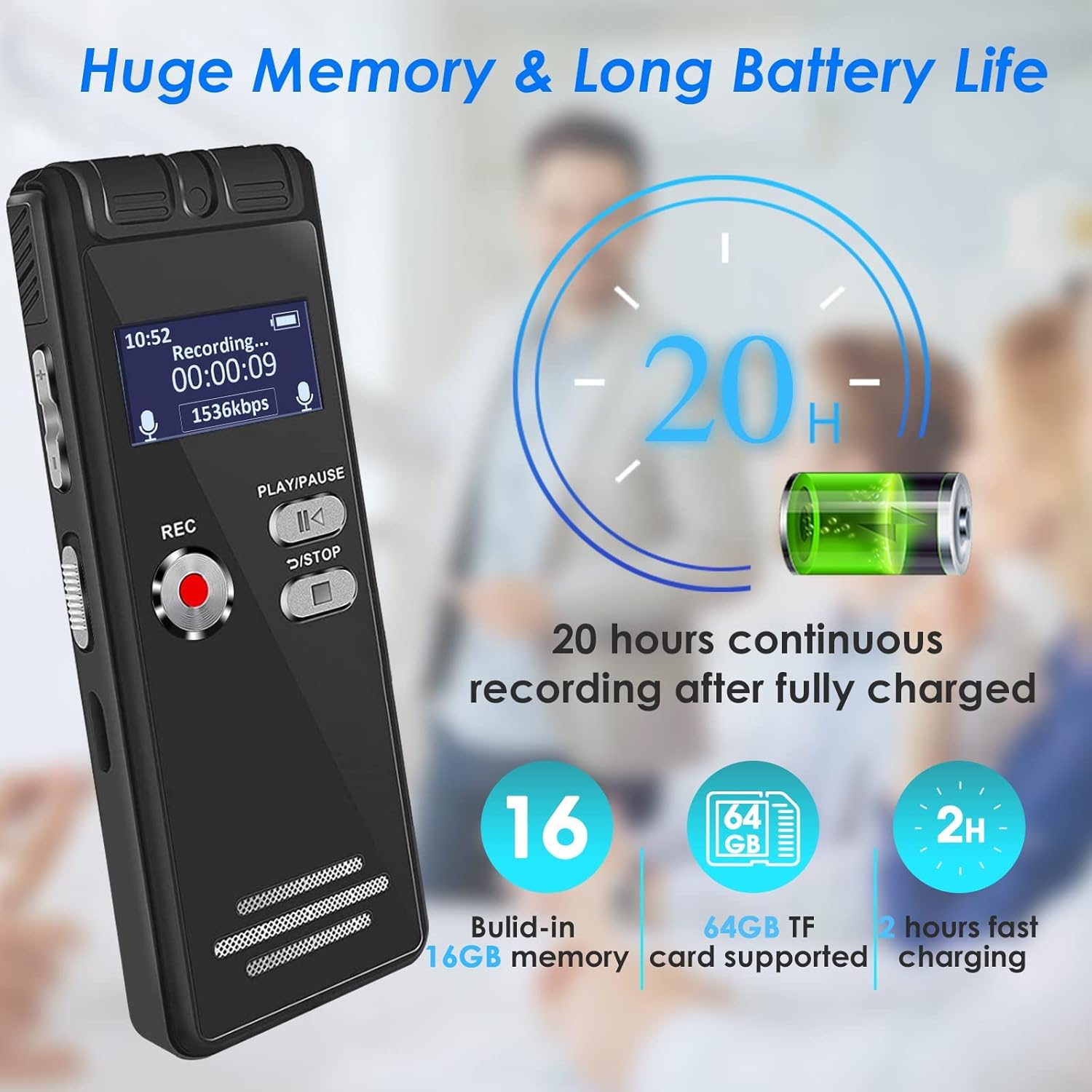
Obrázek 3: The aiworth L15 recorder highlighting its 20-hour battery life and 16GB built-in memory, expandable with a 64GB TF card.
3.2 Zapnutí/vypnutí
- Zapnutí: Posuňte vypínač do polohy „ON“.
- Vypnutí: Slide the power switch to the 'OFF' position.
3.3 Nastavení jazyka
Zařízení podporuje více jazyků. Chcete-li jazyk změnit:
- Stiskněte tlačítko MENU/DEL tlačítko pro vstup do hlavní nabídky.
- Použijte NAHORU/DOLŮ buttons to navigate to 'Language'.
- Stiskněte PLAY/PAUSE vybrat.
- Choose your desired language and confirm with PLAY/PAUSE.
3.4 Setting a Password
To protect your recordings and personal information, you can set a six-digit password.
- Z hlavní nabídky přejděte na „Nastavení“.
- Select 'Password Setting'.
- Follow the on-screen prompts to set your six-digit password.
- Remember your password, as it is crucial for accessing your device.
4. Návod k obsluze
4.1 Základní nahrávání
The L15 offers one-touch recording for convenience.
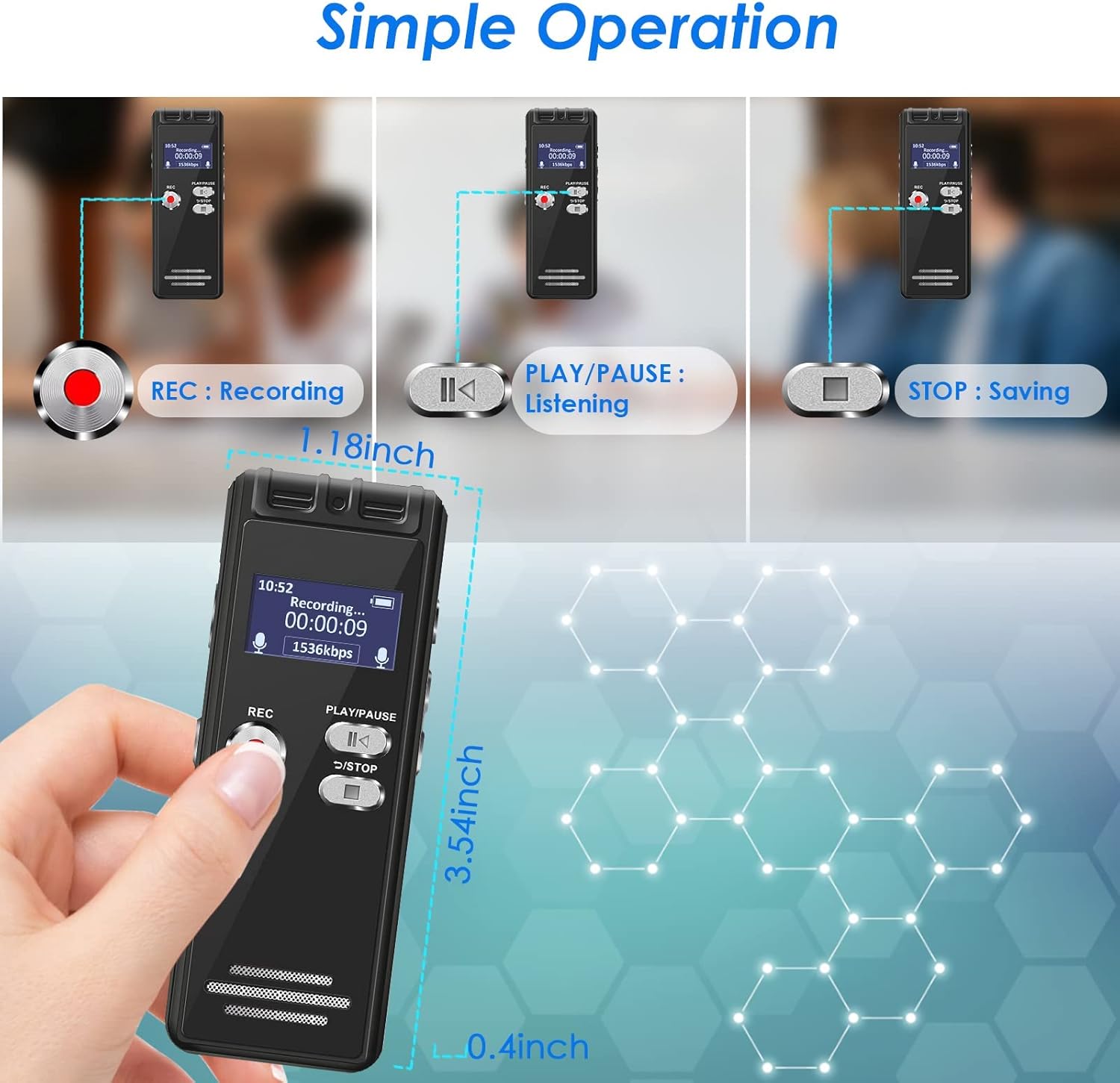
Obrázek 4: Visual guide for the simple operation of the aiworth L15, demonstrating the REC, PLAY/PAUSE, and STOP functions.
- Zahájení nahrávání: Stiskněte tlačítko REC button. The screen will display 'Recording...' and the recording time.
- To Stop and Save: Stiskněte tlačítko RETURN/STOP button. The recording will be saved automatically with a timestamped filejméno.
4.2 Voice Activated Recording (AVR)
In AVR mode, the recorder will only record when audio is detected, saving memory space and listening time. The device features 5 adjustable sensitivity levels.

Obrázek 5: The aiworth L15 demonstrating its Voice Activated Recording feature with 5 adjustable sensitivity levels to optimize recording efficiency.
- From the main menu, navigate to 'Recording Mode'.
- Select 'AVR Mode'.
- You can then adjust the sensitivity level (1-5) within the settings. Level 1 is least sensitive, Level 5 is most sensitive.
- Stiskněte REC to start voice-activated recording.
4.3 Advanced Recording Modes
- Segmentovaný záznam: Records in segments, useful for organizing longer sessions.
- Časované nahrávání: Set specific times for the recorder to start and stop recording automatically.
- Nahrávání přes linkový vstup: Connect external audio sources (CD, recorder, DVD, cell phone) via the LINE-IN port to record directly.
- Nahrávání během nabíjení: The device supports recording while connected to a power source.
4.4 Funkce přehrávání
- Normální přehrávání: Navigate to 'Recordings' or 'Music' from the main menu, select a filea stiskněte PLAY/PAUSE.
- Opakování AB: Během přehrávání stiskněte tlačítko MENU/DEL button to set point A, then press it again to set point B. The device will loop playback between A and B.
- Přehrávání s proměnnou rychlostí: Adjust playback speed in the settings menu during playback.
- Rychlé převíjení vpřed/vzad: Použijte NAHORU/DOLŮ buttons during playback to fast forward or rewind.
4.5 File Řízení
- File Pojmenování: Záznam files are automatically named according to the timestamp (e.g., YYYYMMDD_HHMMSS.WAV).
- Mazání Files: Přejděte na file you wish to delete, press the MENU/DEL button, and confirm deletion.
- Přenos Files: Connect the recorder to a computer (Windows XP/7/8/10 or Mac OS 10-10.14) using the USB cable. The device will appear as a removable disk, allowing you to drag and drop files.
4.6 Using as a U Disk / MP3 Player
- Disk U: When connected to a computer, the L15 functions as a 16GB USB flash drive.
- Mp3 přehrávač: Transfer MP3/WAV music files to the device. Navigate to 'Music' from the main menu to play your audio files.
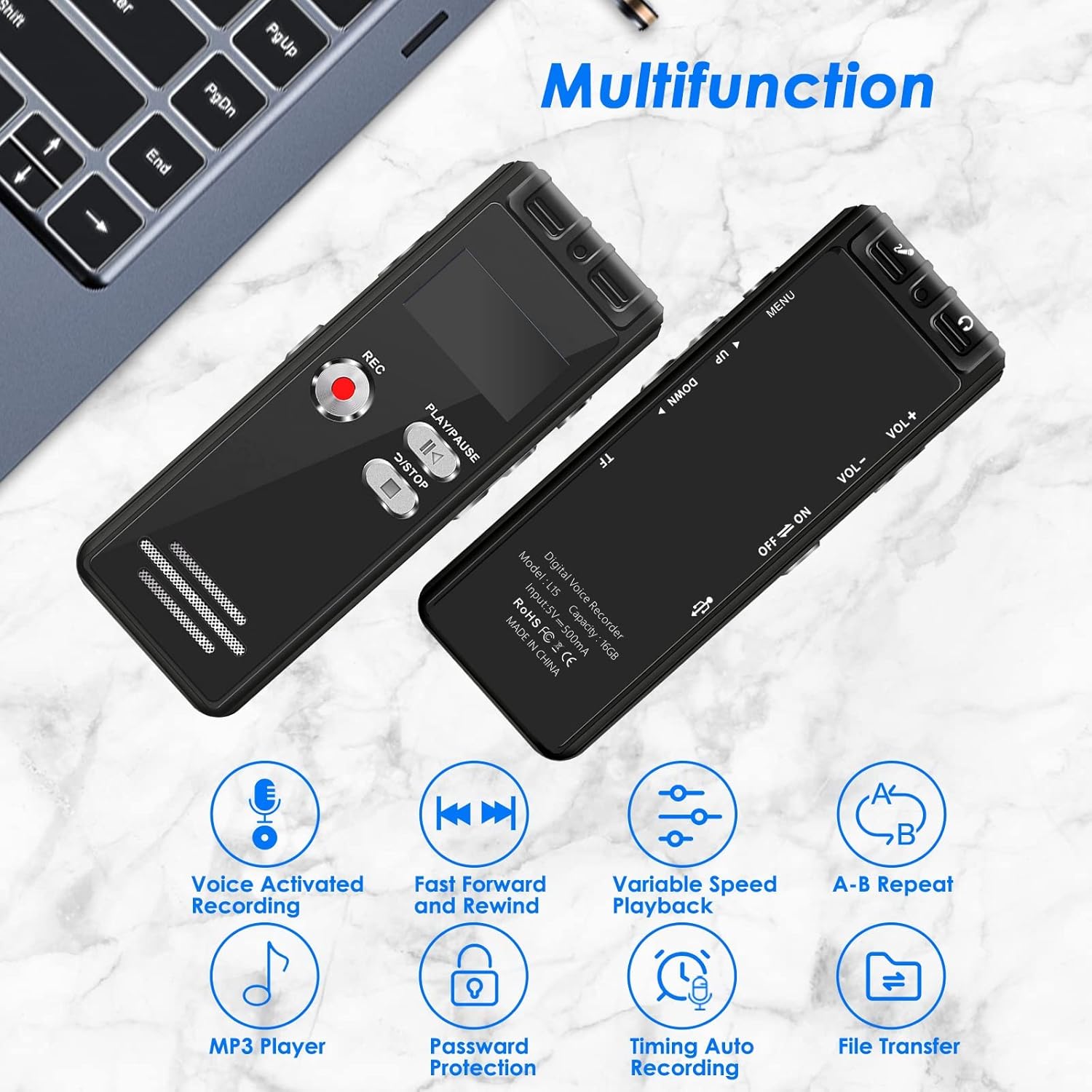
Obrázek 6: The aiworth L15 demonstrating its multifunctionality, including Voice Activated Recording, Fast Forward/Rewind, Variable Speed Playback, A-B Repeat, MP3 Player, Password Protection, Timing Auto Recording, and File Převod.
5. Údržba
- Čištění: K čištění zařízení používejte měkký, suchý hadřík. Nepoužívejte tekuté čisticí prostředky ani abrazivní materiály.
- Péče o baterie: Chcete-li prodloužit životnost baterie, vyvarujte se častého úplného vybíjení. Zařízení pravidelně nabíjejte, i když jej delší dobu nepoužíváte.
- Skladování: Přístroj skladujte na chladném a suchém místě mimo dosah přímého slunečního záření a extrémních teplot.
- Záloha dat: Pravidelně zálohujte důležité nahrávky do počítače, abyste předešli ztrátě dat.
6. Řešení problémů
- Zařízení se nezapíná: Ensure the battery is charged. Connect to a power source and try again. Check the power switch is in the 'ON' position.
- Nelze se připojit k počítači: Ensure you are using the original USB cable provided. Some third-party cables may not support data transfer. Try a different USB port on your computer. Ensure the device is powered on when connected.
- Poor recording quality/Excessive background noise: Ensure the microphone is not obstructed. Adjust the voice activation sensitivity levels (AVR mode) if applicable. Ensure the device is placed in an optimal position for recording.
- Zapomenuté heslo: If you forget your password, please contact customer support for assistance.
- Obrazovka je prázdná nebo nereaguje: Try resetting the device by holding the power button for an extended period (e.g., 10-15 seconds) or allowing the battery to fully discharge and then recharging.
7. Specifikace
| Funkce | Specifikace |
|---|---|
| Číslo modelu | L15 |
| Vnitřní paměť | 16 GB |
| Rozšiřitelná paměť | Až 64 GB (TF karta) |
| Kapacita záznamu | Approx. 1160 hours (16GB) |
| Typ baterie | 1 Lithium Ion (součástí balení) |
| Výdrž baterie (nahrávání) | Až 20 hodin |
| Doba nabíjení | Přibl. 2 hodin |
| Rozměry produktu | 4 x 9 x 1 cm |
| Hmotnost položky | 46 g |
| Hardwarové rozhraní | Micro USB 2.0 Type AB |
| Jack pro sluchátka | 3.5 mm |
| Kompatibilní OS | Windows XP/7/8/10, Mac OS 10-10.14 |
| Nahrávací formáty | WAV, MP3 |
| Formáty přehrávání | MP3, WAV |
8. Záruka a podpora
8.1 Záruka na produkt
The aiworth L15 Digital Voice Activated Recorder comes with a 12měsíční záruka na výrobek od data nákupu. Tato záruka se vztahuje na výrobní vady a poruchy při běžném používání. Nevztahuje se na škody způsobené nesprávným použitím, nehodami, neoprávněnými opravami nebo běžným opotřebením.
8.2 Zákaznická podpora
For any questions, technical assistance, or warranty claims, please contact our customer service. We offer 24-hour online customer service to assist you with any issues you may encounter while using your recorder.
Please refer to the contact information provided with your purchase or on the official aiworth webstránky pro podrobnosti o podpoře.


