1. Konec produktuview
The Kuephom Portable CD Player (Model PM11-Black) is a versatile audio device designed for personal and multi-user listening. It features a built-in speaker, rechargeable battery, and anti-skip protection, making it suitable for various environments including home, car, and travel. The player supports multiple audio formats and offers adjustable playback speed for learning purposes.

Image 1.1: Kuephom Portable CD Player and accessories.
Klíčové vlastnosti:
- Dobíjecí baterie: Integrated 1500mAh battery provides up to 8 hours of playback with earphones or 5 hours with the built-in speaker on a 4-hour charge.
- Vestavěný reproduktor: Allows direct listening without external headphones or speakers.
- Ochrana proti přeskakování: Ensures uninterrupted audio playback during movement or light shocks.
- Memory Playing: Resumes playback from the last played track when the device is turned on again.
- Široká kompatibilita: Supports CD, CD-R, CD-RW, MP3, and WMA formats.
- Více možností připojení: Includes 3.5mm AUX input/output, USB port, and headphone jack.
- Nastavitelná rychlost přehrávání: Useful for language learning or musical practice.
2. Průvodce nastavením
2.1 Nabíjení zařízení
Before initial use, fully charge the CD player. The device features a built-in rechargeable battery, eliminating the need for disposable AA batteries.
- Locate the charging port on the side of the CD player.
- Connect the provided USB charging cable to the player and a compatible USB power source (e.g., wall charger, power bank, car charger, computer USB port).
- Rozsvítí se kontrolka nabíjení. Úplné nabití obvykle trvá přibližně 4 hodiny.

Image 2.1: Charging options for the CD player.
2.2 Vkládání CD
The CD player supports standard CD, CD-R, CD-RW, MP3, and WMA disc formats.
- Locate the 'OPEN' switch on the side of the player.
- Slide the switch to the 'OPEN' position to release the lid.
- Gently place the CD onto the central spindle with the label side facing up. Ensure the CD is securely seated.
- Pevně zavřete víko, dokud nezacvakne na místo.
Video 2.2: Demonstrates the basic functions and usage scenarios of the Kuephom Portable CD Player, including loading a CD and identifying ports.
2.3 Připojení externích zařízení
- Sluchátka: Plug the included earbuds or your preferred 3.5mm headphones into the headphone jack (blue port).
- Připojení AUX: Use the provided 3.5mm audio cable to connect the player's AUX port (green port) to external speakers or a car's AUX input.
- USB přehrávání: Insert a USB flash drive into the USB port to play compatible audio files (MP3, WMA).

Image 2.3: Connecting the CD player to a car's audio system.
3. Návod k obsluze
3.1 Zapnutí/vypnutí
Locate the power switch on the side of the player. Slide it to the 'ON' position to power on the device. Slide it to 'OFF' to power off.
3.2 Základní ovládací prvky přehrávání
The control panel on the top of the player features intuitive buttons:
- Přehrát/Pozastavit (►▮): Stisknutím spustíte nebo pozastavíte přehrávání.
- Předchozí skladba (◀◀): Press once to go to the beginning of the current track. Press twice to go to the previous track.
- Další skladba (►►): Stisknutím přeskočíte na další skladbu.
- Zvýšení hlasitosti (+): Zvyšuje hlasitost.
- Snížit hlasitost (-): Snižuje hlasitost.
3.3 Pokročilé funkce přehrávání
- Opakování (OPAKOVÁNÍ): Cycles through repeat modes (e.g., repeat one, repeat all, random).
- Režim (MODE): Switches between different playback modes (e.g., CD, USB, AUX).
- A-B Repeat (A-B): Allows repeating a specific segment of audio.
- Program (PROG): Enables programming a custom playback order for tracks.
- Speed Adjustment (SPEED +/-): Adjusts the playback speed, useful for language learning or transcribing audio.

Image 3.1: The adjustable playback speed feature is beneficial for learning.
3.4 Anti-Skip and Memory Functions
- Ochrana proti přeskakování: This function is automatically activated when the player is turned on, providing a buffer against minor shocks and vibrations to ensure continuous playback.
- Memory Playing: The device remembers the last played track and position, resuming from that point when powered on again.
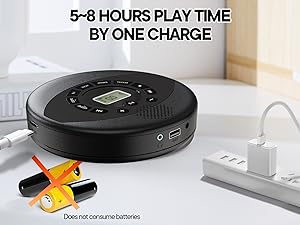
Image 3.2: Anti-shock protection for active use.
4. Údržba
4.1 Cleaning the CD Player
- K čištění vnějšího povrchu přehrávače použijte měkký, suchý hadřík.
- For the lens, use a specialized CD lens cleaning kit. Do not touch the lens directly.
- Vyhněte se použití abrazivních čisticích prostředků nebo rozpouštědel.
4.2 Péče o baterii
- Chcete-li prodloužit životnost baterie, vyvarujte se častého úplného vybíjení.
- Pokud zařízení delší dobu nepoužíváte, skladujte jej na chladném a suchém místě.
- Charge the device at least once every three months if unused to prevent deep discharge.
4.3 Péče o CD
- CD manipulujte za hrany, abyste zabránili otiskům prstů a poškrábání.
- CD čistěte měkkým hadříkem, který nepouští vlákna, a otírejte je od středu směrem ven.
- Store CDs in their cases to protect them from dust and damage.
5. Řešení problémů
| Problém | Možná příčina | Řešení |
|---|---|---|
| Přehrávač se nezapne. | Baterie je vybitá. Vypínač je vypnutý. | Charge the battery. Ensure the power switch is in the 'ON' position. |
| Žádný zvuk. | Volume is too low. Headphones/AUX cable not connected properly. CD/USB not playing. | Increase volume. Check connections. Ensure CD/USB is playing and not paused. |
| CD přeskakuje nebo se nepřehrává. | CD is dirty or scratched. CD is not properly seated. Incorrect CD format. | Clean the CD. Re-seat the CD. Ensure the CD format (CD, CD-R, CD-RW, MP3, WMA) is supported. |
| Přehrávání z USB nefunguje. | USB drive not properly inserted. Incompatible file formát. | Ujistěte se, že je USB disk zcela zasunut. Zkontrolujte, zda files are MP3 or WMA format. |
6. Specifikace produktu
| Funkce | Detail |
|---|---|
| Číslo modelu | PM11-Black |
| Rozměry produktu | 5.7 x 5.7 x 1.2 palce |
| Hmotnost položky | 1.01 libry |
| Typ baterie | 1 lithium-polymerová baterie (součástí balení) |
| Konektivita | Pomocný, USB |
| Speciální funkce | Anti-Skip Protection, Portable, Programmable Memory, Rechargeable |
| Zahrnuté komponenty | CD player X 1, Earbuds X 1, Audio cable X 1, Charging cable X 1, Pouch X 1 |
| Podporované formáty | CD, CD-R, CD-RW, MP3, WMA |
7. Záruka a podpora
For warranty information and customer support, please contact Kuephom directly. Details regarding product warranty periods and service procedures are typically provided with your purchase documentation or can be found on the official Kuephom webmísto.
If you encounter any issues not covered in this manual, please reach out to Kuephom customer service for assistance.


