Zavedení
This manual provides comprehensive instructions for the installation, operation, and maintenance of your MOZA R16 Direct Drive Wheelbase. The MOZA R16 is a high-performance direct drive system designed for realistic force feedback in sim racing applications. Please read this manual thoroughly before using the product to ensure proper setup and safe operation.
Bezpečnostní informace
Dodržujte následující bezpečnostní opatření, abyste předešli zranění nebo poškození zařízení:
- Před použitím se ujistěte, že je rozvor bezpečně upevněn ke stabilnímu povrchu.
- Během provozu držte ruce a volný oděv v dostatečné vzdálenosti od rotujícího hřídele.
- Use only the provided power adapter. Using an incorrect adapter may damage the device or pose a fire hazard.
- Nevystavujte zařízení vodě ani nadměrné vlhkosti.
- Vyhněte se provozu zařízení v extrémních teplotách.
- Před čištěním nebo prováděním jakékoli údržby odpojte napájení.
- Tento výrobek je určen pro dospělé. Uchovávejte mimo dosah dětí.
Obsah balení
Ověřte, zda jsou v balení přítomny všechny položky:
- MOZA R16 Direct Drive Wheelbase
- Napájecí adaptér a kabel
- USB kabel
- Mounting Screws and Tools (if included with specific kit)
- Uživatelská příručka (tento dokument)
Nastavení
1. Mounting the Wheelbase
The MOZA R16 wheelbase can be mounted to a sim racing rig or desk using compatible mounting solutions (sold separately). Ensure the mounting surface is robust enough to handle the 16 Nm of torque.
- Align the mounting holes on the wheelbase with your chosen mounting bracket.
- Secure the wheelbase using appropriate bolts and nuts. Do not overtighten.

Obrázek 1: Strana view of the MOZA R16 Direct Drive Wheelbase, showing its robust construction and mounting points. The wheelbase is black with yellow accents and features a gold-colored quick-release mechanism.
2. Propojovací kabely
Connect the necessary cables to the wheelbase and your computer.
- Napájecí kabel: Connect the power adapter to the wheelbase's power input port, then plug the adapter into a wall outlet.
- USB kabel: Connect one end of the USB cable to the wheelbase's USB port and the other end to an available USB port on your computer.
- Wheel Connection: Attach your MOZA steering wheel to the quick-release mechanism on the wheelbase. Ensure it clicks securely into place.
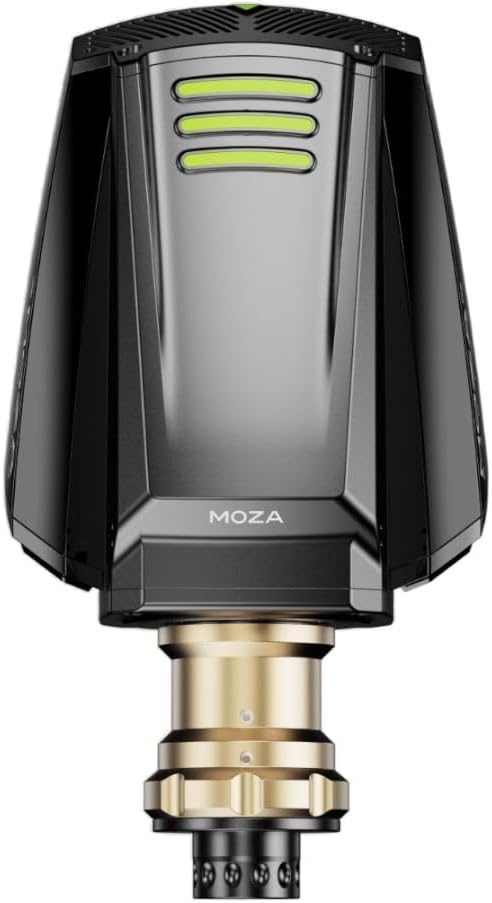
Obrázek 2: Přední view of the MOZA R16 Direct Drive Wheelbase, highlighting the quick-release mechanism where a steering wheel attaches. The gold-colored shaft is visible, ready for wheel installation.
3. Instalace softwaru
Download and install the MOZA Pit House software from the official MOZA Racing website. This software is essential for driver installation, firmware updates, and configuring wheelbase settings.
- Návštěva mozaracing.com/ke stažení.
- Download the latest version of MOZA Pit House.
- Dokončete instalaci podle pokynů na obrazovce.
- Launch MOZA Pit House and ensure your R16 wheelbase is detected.
Návod k obsluze
1. Zapnutí/vypnutí
Once all cables are connected, the wheelbase will power on automatically when the power adapter is plugged in. There is typically a power button on the unit for manual control, or it can be controlled via MOZA Pit House.
2. Using MOZA Pit House
MOZA Pit House is your central hub for managing the R16 wheelbase. Here you can:
- Adjust Force Feedback (FFB) strength and characteristics.
- Set steering angle and linearity.
- Update wheelbase firmware.
- Calibrate connected MOZA peripherals (pedals, shifters).
- Přístup k hernímu profesionálovifiles a nastavení.

Obrázek 3: Shora dolů view of the MOZA R16 Direct Drive Wheelbase, showing the overall form factor and the quick-release shaft. The MOZA logo is visible on the top surface.
3. Kompatibilita s hrami
The MOZA R16 is compatible with most major PC sim racing titles. Ensure your game settings are configured to recognize the MOZA wheelbase as a controller. Refer to your game's specific controller setup guide for detailed instructions.
Údržba
1. Čištění
To maintain the appearance and functionality of your wheelbase:
- Před čištěním odpojte napájení.
- Vnější povrch otřete měkkým suchým hadříkem.
- Vyhněte se použití abrazivních čisticích prostředků nebo rozpouštědel.
2. Aktualizace firmwaru
Regularly check for and install firmware updates via MOZA Pit House to ensure optimal performance and access to new features.
3. Skladování
When not in use for extended periods, store the wheelbase in a dry, dust-free environment. Consider covering it to prevent dust accumulation.
Odstraňování problémů
If you encounter issues with your MOZA R16 wheelbase, refer to the following common solutions:
| Problém | Možná příčina | Řešení |
|---|---|---|
| Žádná síla | Power cable loose, power adapter faulty, wall outlet issue. | Check all power connections. Try a different wall outlet. Ensure the power adapter is functioning. |
| No Force Feedback | USB connection issue, MOZA Pit House not running, game FFB settings incorrect, firmware outdated. | Verify USB connection. Ensure MOZA Pit House is open and detects the wheelbase. Check in-game FFB settings. Update firmware. |
| Wheel Not Detected | Loose quick-release, USB connection issue, driver problem. | Ensure the steering wheel is securely attached to the quick-release. Reconnect USB cable. Reinstall MOZA Pit House drivers. |
Specifikace
Key technical specifications for the MOZA R16 Direct Drive Wheelbase:
- Název modelu: R16
- Číslo modelu položky: RS031
- Značka: MOZA RACING
- Maximální točivý moment: 16 Nm
- Hmotnost položky: 13.1 kilogramů (28.8 liber)
- Výrobce: MOZA RACING
- Konektivita: USB
- Speciální funkce: Kompaktní
- První k dispozici: 19. října 2022
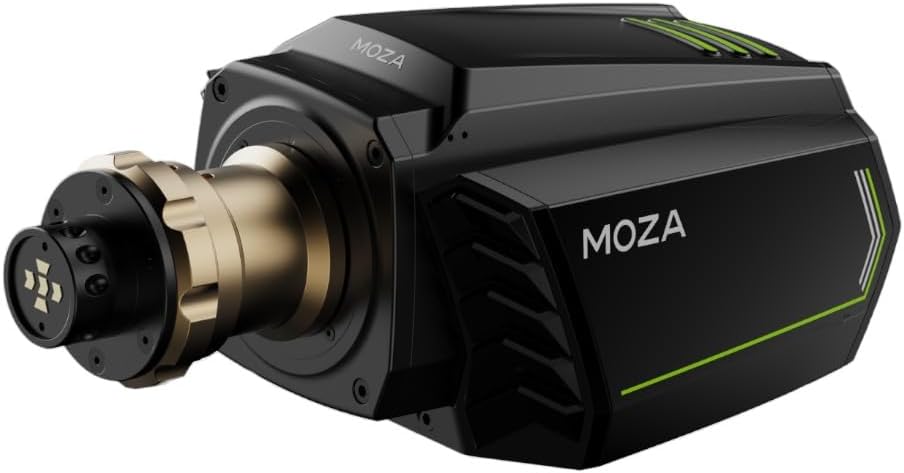
Obrázek 4: Strana view of the MOZA R16 Direct Drive Wheelbase, showcasing its design with green accent lines and the MOZA logo. This view emphasizes the robust casing.
Záruka a podpora
MOZA Racing products typically come with a limited manufacturer's warranty. For specific warranty terms and conditions, please refer to the official MOZA Racing webwebu nebo v záručním listu dodaném s vaším produktem.
For technical support, troubleshooting assistance, or warranty claims, please visit the official MOZA Racing support page or contact their customer service directly:
- Oficiální Webmísto: mozaracing.com
- Stránka podpory: Viz webweb, kde najdete nejaktuálnější kontaktní informace podpory.


