Zavedení
This manual provides comprehensive instructions for the installation, operation, and maintenance of your Kensington SD4839P USB-C Triple Video Dock. Please read this manual thoroughly before using the product to ensure proper functionality and to prevent damage.
Bezpečnostní informace
- Nevystavujte zařízení vodě ani nadměrné vlhkosti.
- Nepokoušejte se zařízení rozebírat ani upravovat. Zrušíte tím záruku a může dojít k poškození.
- Use only the power adapter supplied with the dock.
- Zajistěte dostatečné větrání kolem doku, abyste zabránili přehřátí.
- Uchovávejte mimo dosah dětí.
Obsah balení
Ověřte, zda jsou v balení přítomny všechny položky:
- Kensington SD4839P USB-C Triple Video Dock
- Kabel USB-C na USB-C
- Napájecí adaptér
- Stručný průvodce (není součástí této digitální příručky)
Konec produktuview
The Kensington SD4839P is a USB-C triple video docking station designed to expand the connectivity of your laptop. It provides multiple video outputs, USB ports, and power delivery through a single USB-C connection.
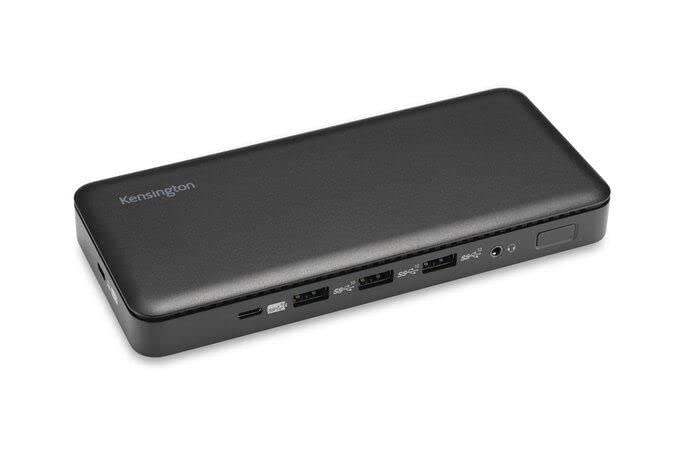
Obrázek 1: Přední view of the Kensington SD4839P USB-C Triple Video Dock. This image displays the compact design of the docking station, highlighting its various ports for connecting peripherals and displays.
Rozložení portu:
- Přední: USB-A ports, USB-C data port.
- Zadní: Power input, USB-C host port (with power delivery), DisplayPort outputs, HDMI output, USB-A ports, Ethernet port, Audio jack.
Nastavení
- Připojte napájení: Connect the included power adapter to the DC-in port on the back of the dock, then plug the adapter into a power outlet.
- Připojení k hostitelskému zařízení: Connect one end of the supplied USB-C to USB-C cable to the USB-C host port on the back of the dock and the other end to a compatible USB-C port on your laptop. Ensure your laptop's USB-C port supports DisplayPort Alternate Mode and Power Delivery for full functionality.
- Připojení displejů:
- Connect your monitors to the available DisplayPort and/or HDMI ports on the dock using appropriate cables.
- The dock supports up to three external displays, depending on your host device's capabilities and operating system.
- Připojení periferií: Connect your USB devices (keyboard, mouse, external drives, etc.) to the USB-A and USB-C data ports on the dock.
- Připojení k síti (volitelné): For a wired network connection, connect an Ethernet cable from your router or network switch to the Ethernet port on the dock.
Provozní
Počáteční připojení:
Upon initial connection, your operating system (Windows, macOS, Chrome OS) should automatically detect the dock and connected devices. The SD4839P is designed to be driverless for most basic functions.
Konfigurace displeje:
- Windows: Right-click on the desktop and select "Display settings" to arrange your monitors, change resolution, and set display modes (extend, duplicate, second screen only).
- MacOS: Přejít na Nastavení systému (nebo Předvolby systému) > Displeje to configure your external monitors.
Dodávka energie:
The dock provides power delivery to your connected laptop through the USB-C host cable, charging it while you work. The wattage provided is listed in the specifications section.
Údržba
- Čištění: Disconnect the dock from power and all devices before cleaning. Use a soft, dry, lint-free cloth to wipe the exterior. Do not use liquid cleaners or aerosols.
- Skladování: Store the dock in a cool, dry place away from direct sunlight and extreme temperatures when not in use for extended periods.
- Správa kabelů: Abyste předešli poškození, vyhněte se ostrým ohybům nebo zlomům kabelů.
Odstraňování problémů
| Problém | Možné řešení |
|---|---|
| No power to the dock or laptop. |
|
| Žádné zobrazení na externích monitorech. |
|
| Zařízení USB nebyla rozpoznána. |
|
| Problémy s připojením k síti. |
|
Specifikace
- Číslo modelu: K33480EU
- Rozměry produktu: 19.69 x 19.69 x 11.02 palce
- Hmotnost položky: 2.29 liber (1.04 kilogramů)
- Značka: Kensington
- Hardwarové rozhraní: USB typ C
- Celkový počet portů USB: 3 (plus 1 USB-C data port)
- Počet portů: 5 (referring to primary functional ports)
- Celkový počet portů HDMI: 1
- DisplayPort Outputs: 2 (for triple video output capability)
- Wattage (Power Delivery): 85 wattů
- Kompatibilní zařízení: Dell Precision 5510, Google Pixelbook, HP EliteBook Folio 9470m, MacBook Air, MacBook Pro, Microsoft Surface series, iPad, iPhone series, iPod series (See product page for full list)
Záruka a podpora
Kensington products are designed for reliability and performance. For warranty information, technical support, or to register your product, please visit the official Kensington webwebové stránky nebo se obraťte přímo na jejich zákaznickou podporu. Uschovejte si doklad o koupi pro případ reklamace.
Oficiální Kensington Webmísto: www.kensington.com


