1. Úvod
Thank you for choosing the OSAKI iPLAYr Side-Firing Sound Table Top Home Audio System. This device is designed to provide continuous background music for homes and offices, featuring Bluetooth connectivity, FM radio, and a unique side-firing sound experience. Please read this manual carefully before using the product to ensure proper operation and to maximize your listening enjoyment.
2. Bezpečnostní informace
- Zdroj napájení: Používejte pouze dodaný napájecí adaptér. Ujistěte se, že hlasitosttage odpovídá požadavkům uvedeným na adaptéru.
- Umístění: Place the unit on a stable, flat surface. Avoid placing it in direct sunlight, near heat sources, or in areas with high humidity or dust. Ensure adequate ventilation around the unit.
- Voda a vlhkost: Nevystavujte jednotku dešti, vlhkosti ani kapajícím/stříkajícím tekutinám. Na jednotku nestavte předměty naplněné tekutinami, například vázy.
- Čištění: Před čištěním odpojte napájení. Použijte měkký, suchý hadřík. Nepoužívejte tekuté čisticí prostředky ani aerosolové spreje.
- Servis: Nepokoušejte se o opravu jednotky sami. Veškerý servis svěřte kvalifikovanému servisnímu personálu.
- Děti: Keep the unit and its accessories out of reach of children.
3. Obsah balení
Zkontrolujte prosím, zda jsou ve vašem balení obsaženy všechny níže uvedené položky:
- OSAKI iPLAYr Main Unit
- Napájecí adaptér
- Dálkové ovládání
- Bluetooth Adaptor (if included as a separate accessory)
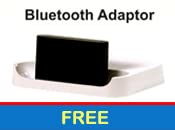
Obrázek 3.1: Included Bluetooth Adaptor, if provided as a separate component.
4. Vlastnosti produktu
The OSAKI iPLAYr is equipped with several features designed to enhance your audio experience:
- Side-Firing Sound Technology: This unique design projects sound sideways, allowing it to reflect off walls and surfaces, creating a natural, immersive sound field similar to how sound is perceived in a live environment.
- Bluetooth připojení: Wirelessly connect your smartphone or other Bluetooth-enabled devices for audio streaming.
- Integrované FM rádio: Enjoy your favorite radio stations directly from the unit.
- Pomocný vstup: Connect non-Bluetooth devices via a standard 3.5mm audio cable.
- Dálkové ovládání: Conveniently manage playback, volume, and modes from a distance.
- 10 Watts Audio Output: Delivers clear and consistent sound for continuous background music.

Obrázek 4.1: Diagram illustrating how side-firing sound reflects off surfaces to create a natural sound experience.
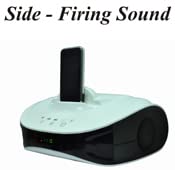
Obrázek 4.2: The OSAKI iPLAYr unit with a smartphone docked, highlighting its side-firing speaker design.

Obrázek 4.3: Horní přední část view of the OSAKI iPLAYr, displaying the integrated control buttons for power, playback, and volume.
5. Pokyny k nastavení
5.1 Vybalení a umístění
- Carefully remove the OSAKI iPLAYr unit and all accessories from the packaging.
- Place the unit on a stable, flat surface, such as a table or bedside cabinet. For optimal side-firing sound, ensure there are clear surfaces (like walls) nearby for sound reflection.
5.2 Připojení napájení
- Locate the DC 12V IN port on the back of the unit.
- Připojte dodaný napájecí adaptér k tomuto portu.
- Zapojte napájecí adaptér do standardní elektrické zásuvky.
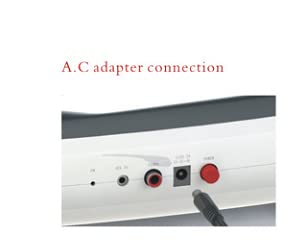
Obrázek 5.1: Detailní záběr view of the AC adapter connection port on the rear panel of the OSAKI iPLAYr.
5.3 Připojení zdrojů zvuku
The back panel of the OSAKI iPLAYr features various input ports:
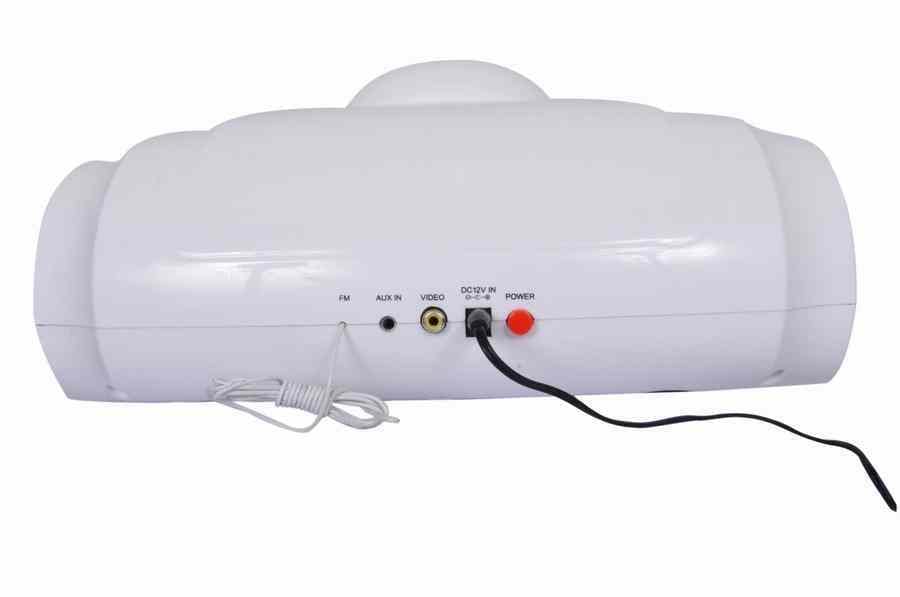
Obrázek 5.2: Rear panel connections including FM antenna, Aux In, Video Out, DC 12V In, and Power button.
- Pomocný vstup: Connect external audio devices (e.g., MP3 players, computers) using a 3.5mm audio cable to the 'AUX IN' port.
- Anténa FM: Connect the provided FM antenna (if applicable) to the 'FM' port for improved radio reception.
- Video výstup: The 'VIDEO' port allows connection to a display for video playback from a docked device (if supported by the docked device and cable).
6. Návod k obsluze
6.1 Zapnutí/vypnutí
Stiskněte tlačítko Moc button on the unit or the remote control to turn the device on or off.
6.2 Výběr režimu
Stiskněte tlačítko Režim button on the unit or remote to cycle through available input sources: Bluetooth, AUX, and FM Radio.
6.3 Párování Bluetooth
- Switch the unit to Bluetooth mode. The Bluetooth indicator light will flash, indicating it is ready for pairing.
- Na smartphonu nebo zařízení s podporou Bluetooth vyhledejte dostupná zařízení Bluetooth.
- Select "OSAKI iPLAYr" from the list. Once connected, the indicator light will become solid.
- Nyní můžete bezdrátově streamovat zvuk ze svého zařízení.
6.4 Provoz FM rádia
- Switch the unit to FM Radio mode.
- Použijte Předchozí/Další stopa buttons on the unit or remote to scan for radio stations.
- Pro lepší příjem upravte polohu FM antény.
6.5 Ovládání hlasitosti
Upravte hlasitost pomocí Zvýšení hlasitosti (+) a Snížit hlasitost (-) tlačítka na jednotce nebo na dálkovém ovladači.
6.6 Using as a Home Cinema System
The side-firing sound design of the OSAKI iPLAYr can enhance your home cinema experience. Place the unit in front of your television or display, ensuring its side speakers are not obstructed. Connect your TV's audio output to the iPLAYr's AUX IN port. The reflected sound will create a wider soundstage, making movies and shows more immersive.

Obrázek 6.1: The OSAKI iPLAYr positioned below a television, demonstrating its use as a compact home cinema audio solution.

Obrázek 6.2: A user enjoying music from the OSAKI iPLAYr, illustrating its suitability for continuous background music.
7. Údržba
7.1 Čištění
To clean the unit, first disconnect it from the power source. Use a soft, dry, lint-free cloth to wipe the exterior surfaces. Do not use abrasive cleaners, waxes, or solvents as they may damage the finish.
7.2 Skladování
Pokud budete přístroj skladovat delší dobu, odpojte jej od napájení a uložte jej na chladném a suchém místě, mimo dosah přímého slunečního záření a extrémních teplot.
8. Řešení problémů
| Problém | Možná příčina | Řešení |
|---|---|---|
| Žádná síla | Napájecí adaptér není připojen nebo je zásuvka vadná. | Ujistěte se, že je napájecí adaptér bezpečně zapojený do zařízení a do funkční elektrické zásuvky. |
| Žádný zvuk | Volume too low; incorrect input mode; audio cable not connected properly. | Increase volume. Select the correct input mode (Bluetooth, AUX, FM). Check audio cable connections. |
| Bluetooth není párování | Unit not in pairing mode; device too far; previously paired device connected. | Ensure unit is in Bluetooth pairing mode. Move device closer. Disconnect from other Bluetooth devices. |
| Špatný příjem FM | Anténa není připojena nebo je špatně umístěna. | Connect the FM antenna. Adjust its position for better signal. |
9. Specifikace
| Funkce | Specifikace |
|---|---|
| Číslo modelu | iPLAYR (BT) |
| Typ reproduktoru | Surround Sound (Side-Firing) |
| Maximální výstupní výkon reproduktoru | 10 wattů |
| Technologie připojení | Pomocný, Bluetooth |
| Speciální funkce | Rádio, dálkové ovládání |
| Kompatibilní zařízení | Smartphone |
| Kontrolní metoda | Vzdálený |
| Zdroj napájení | Elektrický s kabelem (DC 12V) |
| Materiál | Plast |
| Rozměry produktu (DxŠxV) | 22.7 x 30.6 x 12.5 cm |
| Hmotnost položky | 1 kg |
| Země původu | Čína |
10. Záruka a podpora
OSAKI mini Audio products are designed for reliability. In the event that your product requires service, please note the following:
- Customers should send the product to the centralized service center located in Mumbai or to the nearest available associate service center.
- After repair, the product will be sent back to the customer.
For further assistance or to locate a service center, please refer to the official OSAKI mini Audio webwebu nebo kontaktujte zákaznickou podporu.
Můžete také navštívit OSAKI Store on Amazon pro více informací.


