Zavedení
This manual provides detailed instructions for the BEITONG BAT 2 Wired USB Gaming Controller. It covers setup, operation, maintenance, and troubleshooting to ensure optimal performance and longevity of your device. The BEITONG BAT 2 is designed for a responsive and immersive gaming experience on compatible platforms.
Vlastnosti produktu
- 8th Generation Upgraded Chip: Features ultra-low latency (≤ 0.008 s) for smooth and responsive gameplay.
- Kabelové USB připojení: Ensures stable and reliable connectivity.
- Kompatibilita s více platformami: Supports PC (Windows 7/8/10/11), Laptops, Android TV, and Tesla Model 3/Y (before 11/2021). Note: Does not support Xbox, PS4/5, or Switch.
- High Precision Joysticks: Designed for 360° flexible positioning and fine-tuning, enhancing control in various game genres.
- Dual Vibrating Motors: Built-in asymmetrical motors provide varied vibration feedback based on in-game events, increasing immersion. (Vibration effect is active only when supported by the game.)
- Funkce Turbo: A dedicated turbo button simplifies complex combo inputs, offering an advantagv rychlých hrách.
Obsah balení
- BEITONG BAT 2 Wired USB Gaming Controller
- Uživatelská příručka (tento dokument)
Pokyny pro nastavení
- Připojte ovladač: Insert the USB connector of the BEITONG BAT 2 controller into an available USB port on your PC, Laptop, Android TV, or compatible Tesla vehicle.

Image: The BEITONG BAT 2 controller connected via USB to a laptop, desktop PC, Steam Deck (with OTG adapter), Android TV, and Tesla car screen. This illustrates the multi-platform compatibility.
- Instalace ovladače: For Windows operating systems (7/8/10/11), the necessary drivers should install automatically upon first connection. Allow a few moments for the system to recognize the device.
- Ověřit připojení: Once connected, the controller's indicator light should illuminate, signifying a successful connection. You can test the controller's functionality through your operating system's game controller settings.
- Tesla Compatibility Note: For Tesla Model 3 and Model Y, ensure your vehicle was manufactured before November 2021 for compatibility. An OTG adapter may be required for some devices, such as the Steam Deck.
Návod k obsluze
Rozložení a funkce ovladače
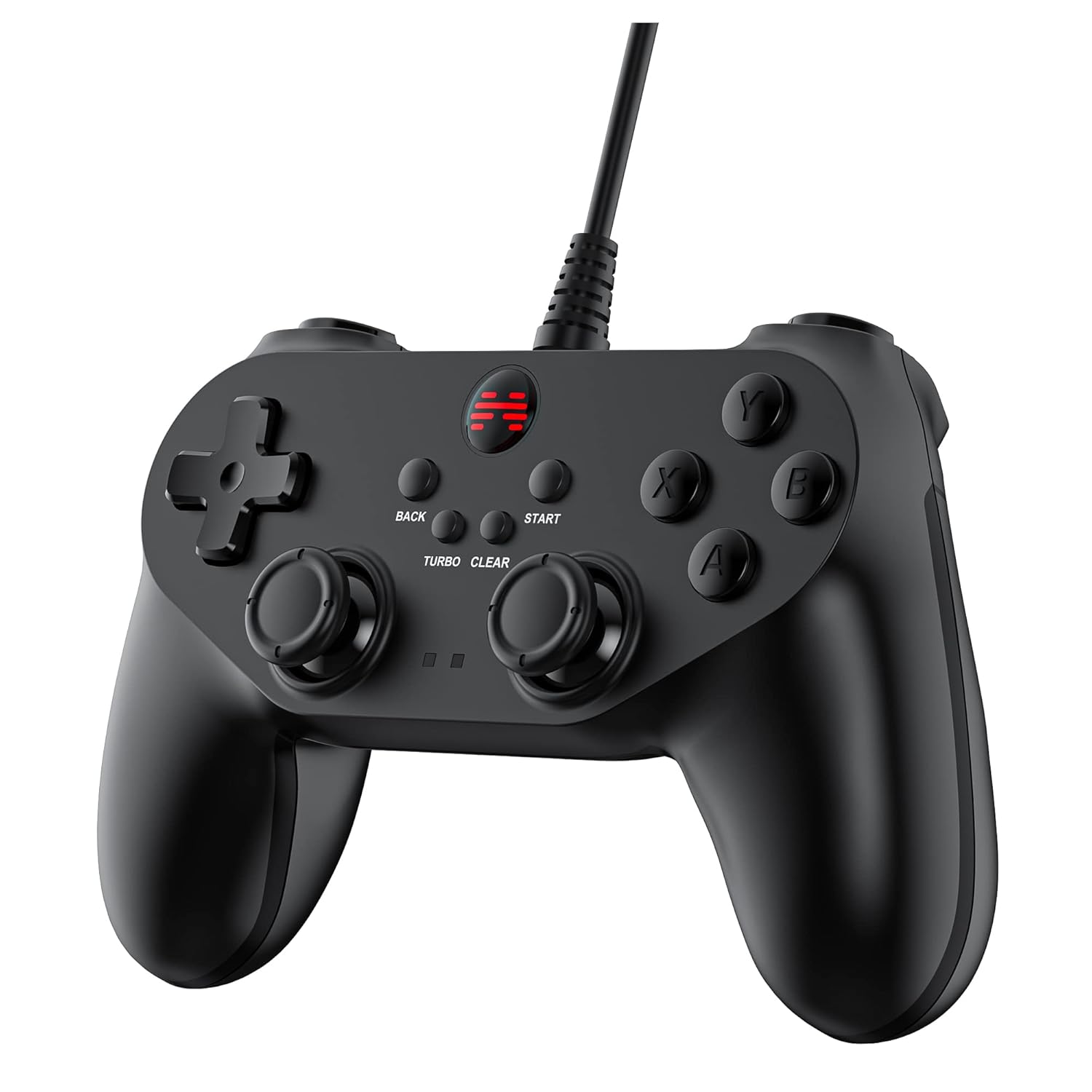
Obrázek: Detailní přední strana view of the BEITONG BAT 2 controller, highlighting the ergonomic design, dual analog sticks, D-pad, action buttons (A, B, X, Y), and central function buttons (Back, Start, Turbo, Clear).
- Analogové joysticky: Use for precise 360° movement and camera control in games. The joysticks are designed for high precision and flexible positioning.
- D-Pad: Používá se pro směrové zadávání, často pro navigaci v menu nebo pro konkrétní herní akce.
- Akční tlačítka (A, B, X, Y): Primary input buttons for in-game actions.
- Shoulder Buttons (L1, R1) and Triggers (L2, R2): Located on the top of the controller for additional actions. Note that L2 and R2 are digital buttons, not analog triggers.
- BACK and START Buttons: Standard function buttons for pausing games, accessing menus, or other in-game commands.
- Tlačítko TURBO: Activates the turbo function.
- Tlačítko CLEAR: Deactivates the turbo function.
Pomocí funkce Turbo
- Aktivace Turba: Stiskněte a podržte TURBO button, then press the action button (e.g., A, B, X, Y, L1, R1, L2, R2) you wish to apply turbo to. The selected button will now repeatedly register input as long as it is held down.
- Deaktivace Turba: Stiskněte a podržte JASNÝ button, then press the action button that has turbo enabled. The turbo function for that specific button will be deactivated.
- Global Turbo Clear: To clear all active turbo settings, press and hold the JASNÝ tlačítko po dobu přibližně 3 sekund.

Obrázek: Detailní záběr view of the central part of the controller, highlighting the "TURBO" and "CLEAR" buttons, indicating their function for rapid input.
Zpětná vazba od vibrací
The controller features dual asymmetrical vibrating motors that provide haptic feedback during gameplay. The intensity and pattern of vibration vary based on in-game events, such as impacts, explosions, or specific actions. This feature is active only when supported by the game being played.
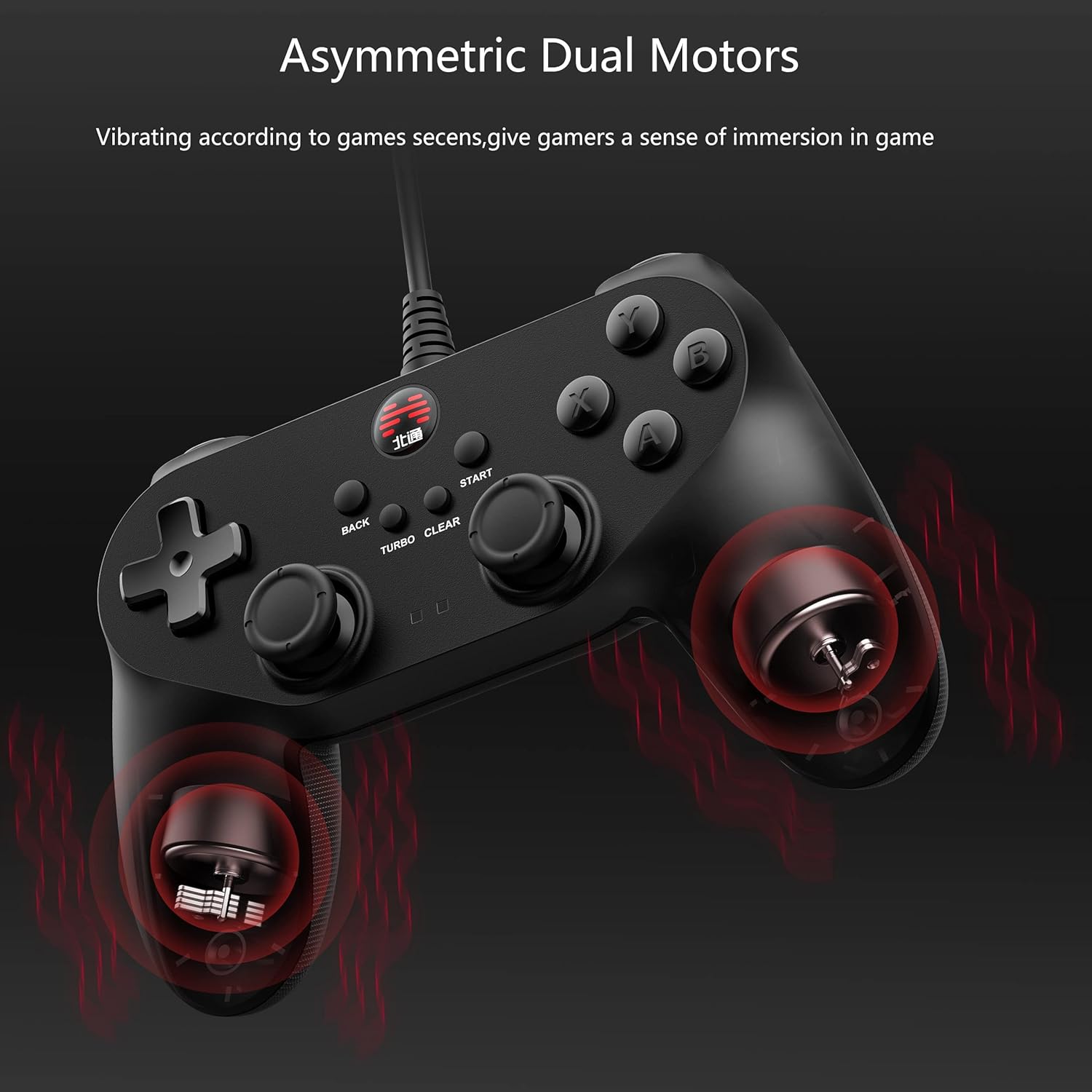
Image: An X-ray style diagram of the BEITONG BAT 2 controller, illustrating the placement of the two asymmetrical vibrating motors within the grips, with red waves indicating vibration.
Údržba a péče
- Čištění: K čištění ovladače použijte měkký, suchý hadřík. V případě odolných nečistot použijte lehceamp Lze použít hadřík, ale dbejte na to, aby se do zařízení nedostala vlhkost. Nepoužívejte agresivní chemikálie ani abrazivní čisticí prostředky.
- Skladování: Řídicí jednotku skladujte na chladném a suchém místě mimo dosah přímého slunečního záření a extrémních teplot. Nepokládejte na ni těžké předměty.
- Péče o kabely: Do not sharply bend or pull the USB cable. Always grasp the plug when disconnecting, not the cable itself, to prevent damage.
- Vyhněte se kapkám: Protect the controller from drops and impacts, as these can damage internal components.
Odstraňování problémů
- Controller not recognized by PC/device:
- Ujistěte se, že je kabel USB bezpečně zapojený do ovladače i zařízení.
- Try a different USB port on your computer or device.
- Restartujte počítač nebo zařízení.
- Check your operating system's device manager or game controller settings to see if the controller is listed. If there's an error, try updating or reinstalling drivers.
- Verify compatibility: The controller does not support Xbox, PS4/5, or Switch consoles.
- Vibrace nefungují:
- Ověřte si, zda hra, kterou hrajete, podporuje vibrační zpětnou vazbu.
- Zkontrolujte nastavení ve hře, zda jsou vibrace zapnuté.
- Some games may require specific drivers or software updates for full functionality.
- Buttons or joysticks unresponsive/inaccurate:
- Ujistěte se, že je ovladač správně připojen a rozpoznán.
- Calibrate the controller through your operating system's game controller settings.
- Clean around the buttons and joysticks to remove any debris that might be causing sticking.
- If the issue persists, contact BEITONG customer support.
- Turbo function not working:
- Follow the operating instructions carefully to activate and deactivate turbo for specific buttons.
- Ensure you are pressing the correct combination of TURBO/CLEAR and action buttons.
Specifikace
| Funkce | Detail |
|---|---|
| Číslo modelu | BTP-BD2E |
| Konektivita | Kabelové USB |
| Kompatibilita | PC (Windows 7/8/10/11), Laptop, Android TV, Tesla Model 3/Y (before 11/2021) |
| Latence | ≤ 0.008 sekund |
| Vibrace | Dual Asymmetrical Motors |
| Rozměry | 5.91 x 4.33 x 1.97 palce |
| Hmotnost | 9.6 unce |
| Výrobce | BEITONG |
Záruka a podpora
BEITONG is committed to providing quality products and customer satisfaction. While specific warranty details are not provided in this manual, the BEITONG technology team is available to provide support for any issues encountered with your controller.
For technical assistance, troubleshooting, or inquiries regarding your BEITONG BAT 2 controller, please refer to the official BEITONG website or contact their customer service channels. Contact information can typically be found on the product packaging or the manufacturer's official webmísto.


