Keychron Q10 drátová uživatelská příručka mechanické klávesnice
Model: Q10 | Brand: Keychron
1. Úvod
The Keychron Q10 is a premium 75% Alice layout mechanical keyboard designed for ergonomic comfort and extensive customization. Featuring a split, curved frame, it aims to reduce wrist strain during prolonged use. This manual provides detailed instructions for setting up, operating, customizing, and maintaining your Keychron Q10 keyboard.

Image 1.1: Keychron Q10 Alice Layout Mechanical Keyboard with an example Gateron G Pro Blue Switch.
2. Obsah balení
Please verify that all items listed below are included in your Keychron Q10 package:
- 1x Fully Assembled Keyboard (including Aluminum case, PCB, Steel Plate, Sound Absorbing Foam, 14x Gaskets, 5 sets Stabilizers, 1 set Keycaps (Double-Shot PBT), 1 set Switches (Gateron G Pro), 1x Acoustic Tape)
- 1x kabel Type-C to Type-C
- 1x adaptér typu A na typ C
- 1x stahovák spínačů
- 1x stahovák klíčenky
- 1x Šroubovák
- 1x hexadecimální klíč

Image 2.1: Visual representation of the Keychron Q10 keyboard and its included accessories.
3. Nastavení
- Rozbalte klávesnici: Carefully remove the Keychron Q10 keyboard and all accessories from its packaging.
- Připojte kabel: Use the provided Type-C to Type-C cable to connect the keyboard to your computer. If your computer only has Type-A ports, use the included Type-A to Type-C adapter.
- Kompatibilita operačního systému: The Keychron Q10 is compatible with Mac, Windows, and Linux operating systems. No additional drivers are typically required for basic functionality.
- Počáteční test: Open a text editor or word processor and test typing on the keyboard to ensure all keys are functioning correctly.
4. Ovládání klávesnice
4.1 Základy psaní
The Keychron Q10 functions as a standard mechanical keyboard. Its 75% Alice layout provides an ergonomic split design for comfortable typing. Familiarize yourself with the key placement, especially the split spacebar and modified bottom row.
4.2 Programovatelný knoflík
The integrated programmable knob offers quick access to various functions. By default, it often controls volume (rotate) and mute (press). Its functions can be customized extensively using the QMK/VIA software.

Image 4.1: The programmable knob, typically used for volume control and muting audio.
4.3 RGB podsvícení
The keyboard features 22+ RGB backlight effects. These can be cycled through using specific key combinations (refer to the keyboard's default keymap or QMK/VIA software for details). The south-facing RGB lighting ensures compatibility with various keycap profiles.
5. Přizpůsobení
The Keychron Q10 is designed for deep customization, allowing users to tailor the keyboard to their specific needs.
5.1 Programovatelnost QMK/VIA
The keyboard fully supports QMK (Quantum Mechanical Keyboard) firmware and VIA software. This allows you to remap any key, create custom macros, and adjust lighting effects across multiple layers without needing to flash new firmware. The VIA configurator is a web-based tool for easy customization.

Image 5.1: The VIA web-based configurator for customizing keymaps and macros.
5.2 Přepínače vyměnitelné za provozu
The Q10 features a hot-swappable PCB, allowing you to change mechanical switches without soldering. It is compatible with most MX-style 3-pin and 5-pin switches. This enables users to experiment with different switch types to find their preferred typing feel.
- Odstranění spínačů: Pomocí dodaného stahováku spínačů opatrně uchopte horní a spodní klipsny spínače a vytáhněte jej přímo nahoru.
- Instalace přepínačů: Zarovnejte piny nového spínače s otvory na desce plošných spojů. Jemně zatlačte spínač dolů, dokud nezacvakne. Ujistěte se, že piny nejsou ohnuté.

Image 5.2: A keycap removed, revealing the hot-swappable switch socket.
5.3 Klávesy
The keyboard comes with OSA Profile Double-Shot PBT Keycaps, known for their durability and comfortable feel. These can also be replaced with other MX-compatible keycap sets.
- Odstranění krytek kláves: Pomocí dodaného stahováku kláves jemně vytáhněte klávesy přímo nahoru.
- Instalace kláves: Align the keycap stem with the switch stem and press down firmly until it is seated.
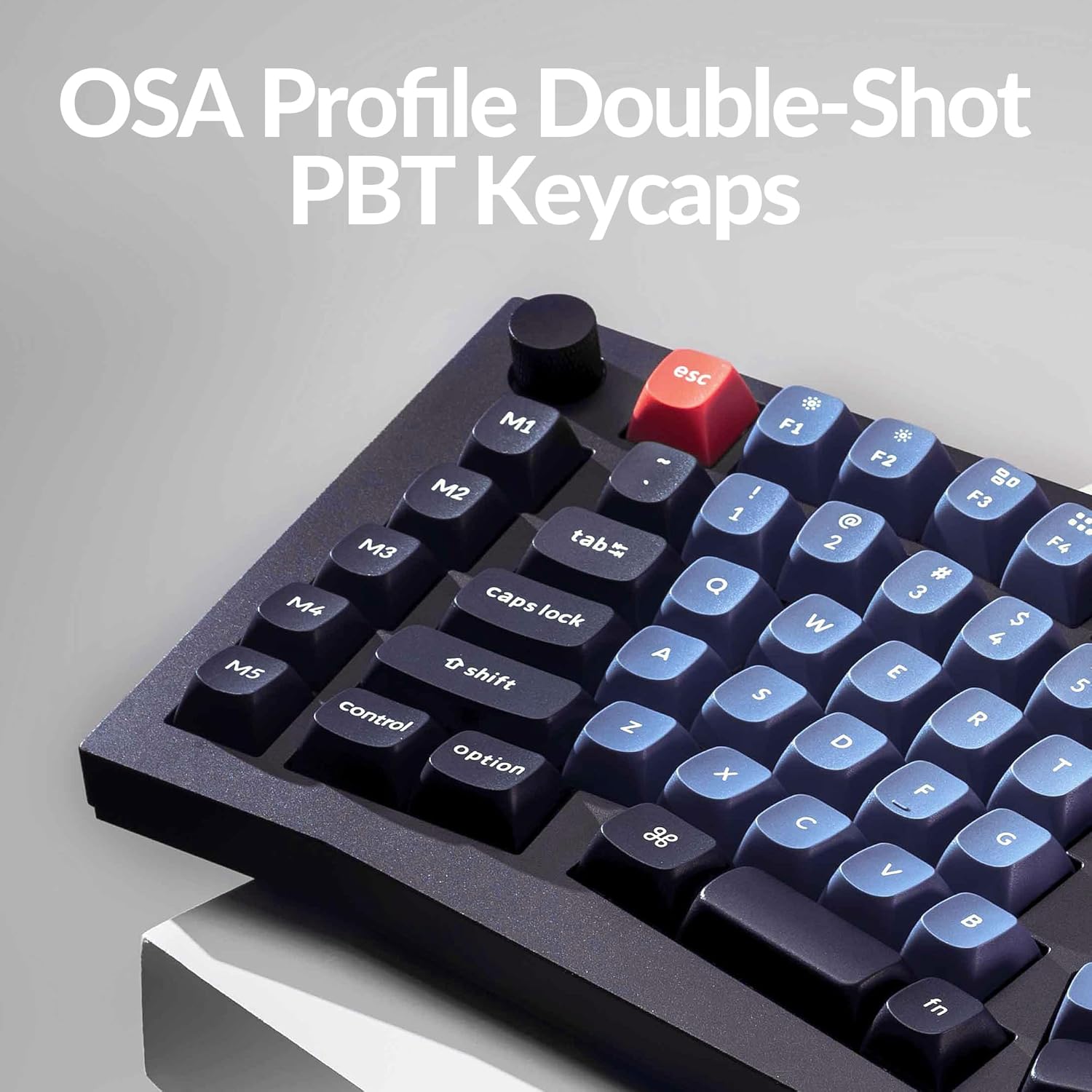
Image 5.3: The OSA Profile Double-Shot PBT Keycaps on the Keychron Q10.
6. Údržba
6.1 Čištění klávesnice
Pravidelné čištění pomáhá udržovat funkčnost a vzhled klávesnice.
- Před čištěním odpojte klávesnici od počítače.
- K odstranění prachu a nečistot z prostoru mezi klávesami použijte nádobku se stlačeným vzduchem.
- For stubborn dirt, remove keycaps using the keycap puller and clean the exposed switches and plate with a soft brush or a damp cloth (ensure it's not dripping wet).
- Wipe keycaps with a mild cleaning solution on a cloth, then dry thoroughly.
6.2 Konstrukce s dvojitým těsněním
The keyboard features an innovative double-gasket design with silicone pads to minimize sound resonance and improve typing acoustics. This design requires no special maintenance from the user.

Image 6.1: Cross-section diagram showing the double-gasket structure for enhanced typing sound.
7. Řešení problémů
Pokud se s klávesnicí Keychron Q10 setkáte s problémy, vyzkoušejte následující kroky pro řešení problémů:
- Klávesnice nereaguje: Ujistěte se, že je kabel USB-C bezpečně připojen ke klávesnici i k počítači. Zkuste jiný port USB nebo kabel.
- Nefunkční konkrétní klávesy: If a single key is not functioning, it might be a faulty switch. Since the keyboard is hot-swappable, try replacing the switch with a known working one. Ensure the switch pins are straight before insertion.
- RGB Backlight Issues: Check if the backlight is enabled. If using VIA, ensure the lighting settings are correctly configured.
- Přizpůsobení se nepoužívá: Ensure you have saved and applied changes within the VIA software. Sometimes, restarting the VIA application or reconnecting the keyboard can resolve this.
- Firmware Reset: If issues persist, a firmware reset might be necessary. Refer to the official Keychron website for specific instructions on how to reset or reflash the Q10 firmware.
For further assistance, please visit the official Keychron support page or contact their customer service.
8. Specifikace
| Funkce | Detail |
|---|---|
| Značka | Keychron |
| Model | Q10 |
| Rozložení | 75% Alice Layout |
| Konektivita | Kabelové (USB-C) |
| Typ přepínače | Gateron G Pro Blue (Hot-swappable) |
| Klíčenky | Double-Shot PBT (OSA Profile) |
| Materiál těla | Full CNC Aluminum |
| Podsvícení | 22+ RGB Effects (South-facing) |
| Programovatelnost | QMK/VIA Support |
| Speciální funkce | Programmable Knob, Double Gasket Design |
| Kompatibilní zařízení | PC (Mac, Windows, Linux) |
| Hmotnost položky | 7.1 libry |
| Rozměry balení | 16.26 x 8.27 x 2.87 palce |

Image 8.1: The Keychron Q10 keyboard, highlighting its robust full CNC aluminum body.
9. Záruka a podpora
Keychron products typically come with a limited warranty. For detailed warranty information, terms, and conditions, please refer to the official Keychron webwebu nebo v záručním listu dodaném s vaším produktem.
For technical support, troubleshooting assistance, or any product-related inquiries, please visit the Keychron support page or contact their customer service team directly. You can usually find contact information on the official Keychron webmísto: www.keychron.com


