1. Úvod
The HyperX DuoCast is a versatile USB condenser microphone designed for clear audio capture across various applications, including gaming, streaming, podcasting, and voiceovers. It features customizable RGB lighting, multiple polar patterns, and convenient controls for an optimized user experience.

Obrázek 1.1: Přední strana view of the HyperX DuoCast microphone with its integrated stand and RGB light ring.
2. Obsah balení
Ověřte, zda jsou v balení přítomny všechny položky:
- HyperX DuoCast USB Condenser Microphone
- Kabel USB typu C na typ A.
- Rychlý průvodce

Image 2.1: Contents of the HyperX DuoCast retail package, including the microphone, USB cable, and documentation.
3. Pokyny k nastavení
3.1 Připojení mikrofonu
- Connect the USB Type-C end of the provided cable to the USB-C port on the back of the HyperX DuoCast microphone.
- Connect the USB Type-A end of the cable to an available USB port on your PC, PS5, PS4, or Mac.
- The microphone will automatically be detected by your operating system.
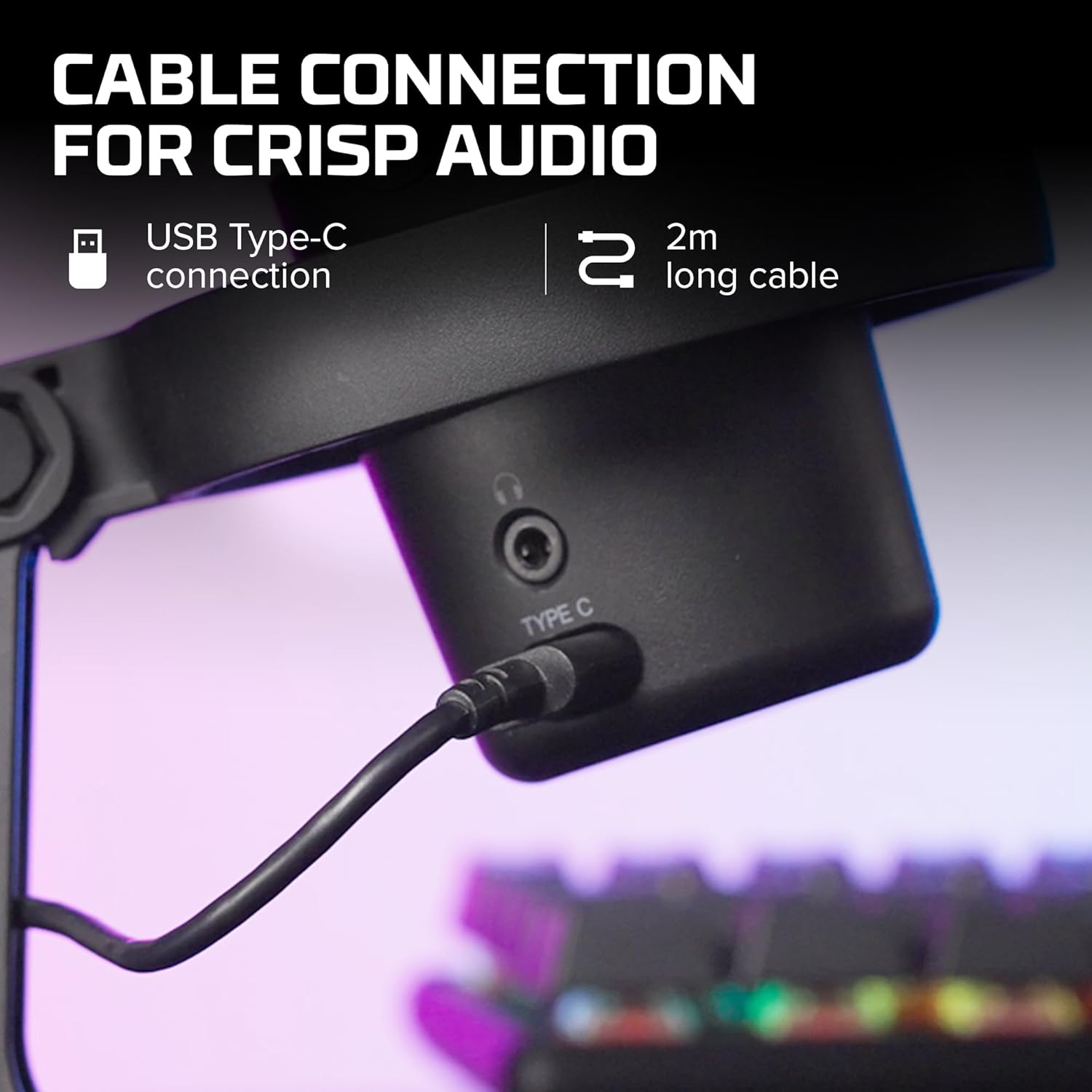
Obrázek 3.1: Detail view of the USB Type-C connection port on the HyperX DuoCast microphone.
3.2 Positioning the Microphone
The DuoCast features a low-profile shock mount to reduce unwanted vibrations. For optimal audio quality, position the microphone directly in front of you, approximately 6-12 inches (15-30 cm) from your mouth.

Image 3.2: HyperX DuoCast microphone positioned on a boom arm for optimal recording, with a user wearing headphones.
3.3 Instalace softwaru (volitelné)
For advanced customization of RGB lighting and other settings, download and install the HyperX NGENUITY Software from the official HyperX webTento software je kompatibilní s operačními systémy Windows.

Image 3.3: User customizing the RGB lighting of the HyperX DuoCast microphone using the HyperX NGENUITY software interface on a computer screen.
4. Ovládání mikrofonu
4.1 Polar Patterns
The DuoCast offers two selectable polar patterns: Cardioid and Omnidirectional. Switch between these patterns using the button located on the microphone.
- Kardioidní: Ideal for single-person recording, such as streaming, podcasts, and voiceovers. It captures sound primarily from the front, reducing background noise.
- Všesměrový: Suitable for multi-person recordings, conference calls, or capturing ambient sounds, as it picks up sound equally from all directions.

Image 4.1: Diagram illustrating the Cardioid and Omnidirectional polar patterns and their recommended use cases.
4.2 Tap-to-Mute Sensor
The microphone features a convenient tap-to-mute sensor on the top. Tapping the top of the microphone will instantly mute or unmute your audio. The RGB light ring will change color to indicate the mute status.

Image 4.2: Close-up of the microphone's top showing the tap-to-mute sensor and the gain control knob.
4.3 Nastavení regulace zesílení
Adjust the microphone's input sensitivity (gain) using the control knob located on the microphone. Rotate the knob to increase or decrease the gain to achieve optimal audio levels and prevent distortion.
4.4 RGB osvětlení
The DuoCast features a customizable RGB light ring with two zones. The lighting can be personalized using the HyperX NGENUITY Software (Windows only) to match your setup or preference.
4.5 Sluchátkový výstup
A 3.5mm headphone jack is integrated into the microphone for direct monitoring of your audio output. Connect your headphones to this port to hear your voice in real-time.
5. Údržba
To ensure the longevity and optimal performance of your HyperX DuoCast microphone, follow these maintenance guidelines:
- Čištění: Use a soft, dry cloth to clean the microphone's exterior. Avoid using harsh chemicals, solvents, or abrasive materials.
- Skladování: Pokud mikrofon nepoužíváte, skladujte jej v čistém a suchém prostředí mimo dosah extrémních teplot a vlhkosti.
- Zacházení: S mikrofonem zacházejte opatrně. Nevystavujte jej pádu ani silným nárazům, které by mohly poškodit vnitřní součásti.
6. Řešení problémů
If you encounter issues with your HyperX DuoCast microphone, refer to the following common solutions:
| Problém | Možná příčina | Řešení |
|---|---|---|
| Žádný audio vstup | Mikrofon není správně připojen Incorrect input device selected Mikrofon ztlumen | Ujistěte se, že je kabel USB bezpečně připojen. Verify the DuoCast is selected as the default input device in your system settings. Tap the top of the microphone to unmute. |
| Nízká hlasitost zvuku | Gain setting too low System input volume too low | Adjust the gain control knob on the microphone. Increase the microphone input volume in your system's sound settings. |
| Zkreslený zvuk | Gain setting too high Mikrofon je příliš blízko zdroje zvuku | Decrease the gain control knob on the microphone. Přesuňte mikrofon dále od zdroje zvuku. |
| Nadměrný hluk na pozadí | Incorrect polar pattern selected High gain setting | Switch to Cardioid polar pattern for single-person use. Reduce the gain setting. Ujistěte se, že jste v klidném prostředí. |
| RGB podsvícení nefunguje | Problém se softwarem USB connection problem | Ensure HyperX NGENUITY Software is installed and updated (Windows only). Znovu připojte kabel USB. |
7. Specifikace
| Funkce | Detail |
|---|---|
| Typ mikrofonu | USB kondenzátor |
| Polární vzory | Kardioidní, všesměrové |
| Audio Citlivost | 6 decibelů |
| Odstup signálu od šumu | 70 dB |
| Frekvenční odezva | 20 Hz - 20 kHz |
| Rozlišení nahrávání | 24 bitů / 96 kHz |
| Konektivita | USB (Type-C to Type-A) |
| Kompatibilní zařízení | PC, PS5, PS4, Mac |
| Speciální funkce | Customizable RGB Light Ring, Tap-to-Mute Sensor, Gain Control, Low-profile Shock Mount, Internal Pop Filter, 3.5mm Headphone Output |
| Rozměry (D x Š x V) | 5.5 x 9.3 x 5 palce (140 x 236 x 127 mm) |
| Hmotnost položky | 8.6 unce (243.2 gramů) |
| Číslo modelu | 4P5E2AA |

Image 7.1: Diagram showing the physical dimensions (width, height, depth) and weight of the HyperX DuoCast microphone.
8. Záruka a podpora
For warranty information and technical support, please visit the official HyperX website or contact HyperX customer service. Keep your proof of purchase for warranty claims.
Online podpora: www.hyperx.com/support


