Zavedení
This manual provides essential information for the safe and efficient operation of your Crosley Montero Portable Rechargeable Bluetooth Speaker. Please read this manual thoroughly before using the device and retain it for future reference.
Bezpečnostní informace
- Nevystavujte reproduktor vodě ani nadměrné vlhkosti. Tento produkt není vodotěsný.
- Neumísťujte reproduktor do blízkosti zdrojů tepla, jako jsou radiátory, topná tělesa, kamna nebo jiná zařízení (včetně amplifikátory), které produkují teplo.
- Používejte pouze nástavce/příslušenství specifikované výrobcem.
- Odpojte toto zařízení během bouřky s blesky nebo když se delší dobu nepoužívá.
- Veškerý servis svěřte kvalifikovanému servisnímu personálu. Je -li zařízení jakýmkoli způsobem poškozeno, je nutná údržba.
Co je v krabici
- Crosley Montero Portable Rechargeable Bluetooth Speaker
- Kabel micro-USB
- 3.5mm Aux In kabel
Konec produktuview
The Crosley Montero speaker features a classic design with modern connectivity options. It includes controls for mode selection, track navigation, and volume adjustment on the top panel. The rear panel houses the input/output ports.
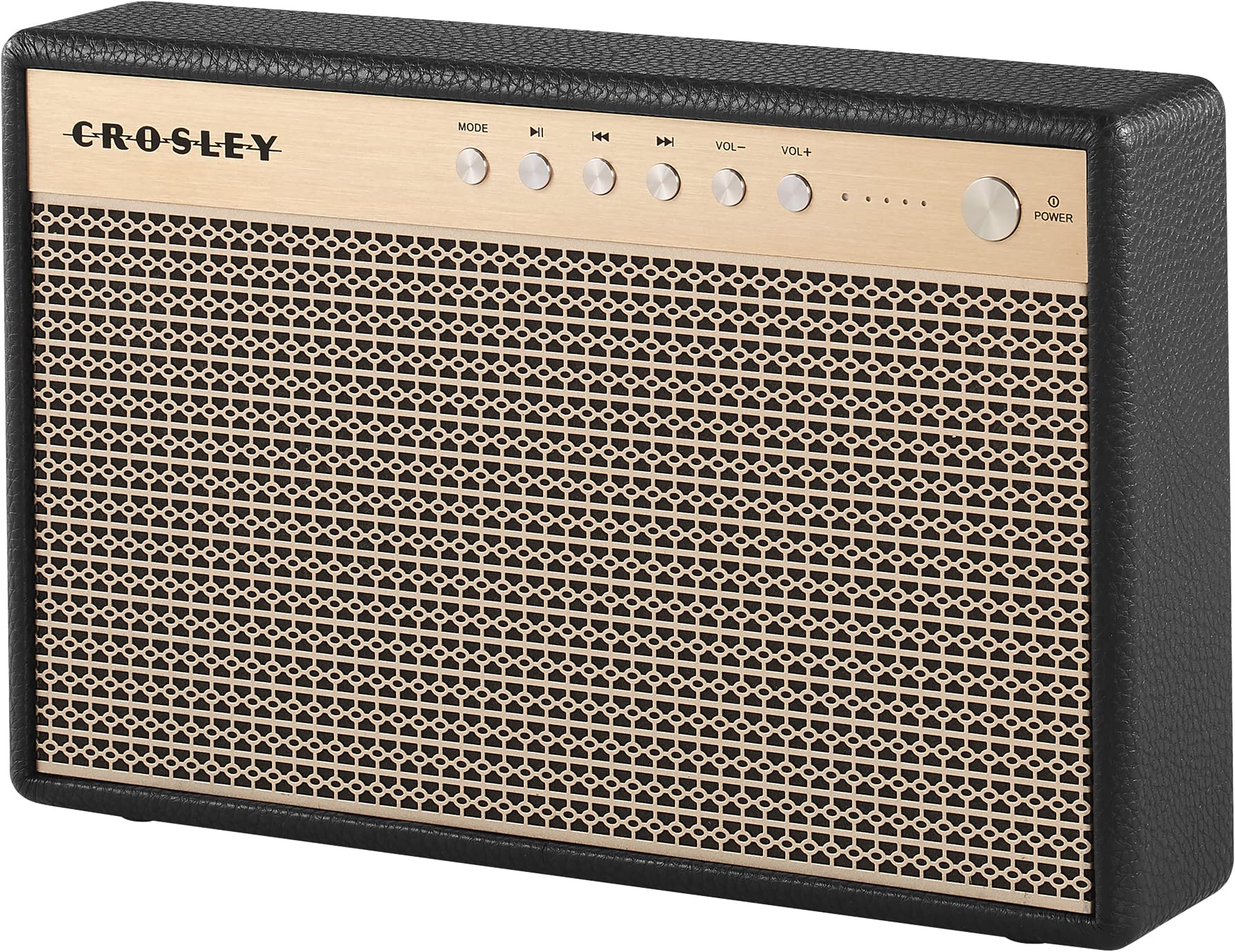
Obrázek 1: Přední view of the Crosley Montero speaker, showing the speaker grille and control panel.

Obrázek 2: Zadní view of the Crosley Montero speaker, highlighting the AUX input, USB OTG (input port), Phone Charging (output: 5V 1A), and DC 5V power input ports.
Nastavení
Nabíjení reproduktoru
Before initial use, fully charge the speaker using the provided Micro-USB cable. Connect the Micro-USB cable to the DC 5V port on the rear of the speaker and the other end to a compatible USB power adapter (not included). The charging indicator lights will illuminate during charging and turn off when fully charged.
Zapnutí/vypnutí
- To power on: Press and hold the Power button on the control panel.
- To power off: Press and hold the Power button. The speaker must be disconnected from external power before shutting off.
Návod k obsluze
Párování pomocí Bluetooth
- Power on the speaker. The Bluetooth indicator light will flash, indicating it is in pairing mode.
- Na zařízení s podporou Bluetooth (chytrý telefon, tablet atd.) povolte Bluetooth a vyhledejte dostupná zařízení.
- Select "Crosley Montero" from the list of devices.
- Once paired, the Bluetooth indicator light on the speaker will remain solid. You can now stream audio from your device.
Pomocný vstup
To connect a device via the auxiliary input:
- Connect one end of the 3.5mm Aux In cable to the AUX port on the rear of the speaker.
- Druhý konec kabelu připojte ke konektoru pro sluchátka nebo audio výstupu vašeho externího zařízení.
- Press the "MODE" button on the speaker's control panel until the AUX mode is selected.
- Adjust the volume on both the speaker and your external device.
Nabíjení telefonu přes USB
The speaker features a USB port for charging external devices. Connect your phone's USB charging cable to the "Phone Charging (Output: 5V 1A)" port on the rear of the speaker. This feature allows you to charge your phone while the speaker is in use or on standby.
Základní ovládací prvky
- REŽIM: Stisknutím přepínáte mezi režimy vstupu Bluetooth a AUX.
- Přehrát/pozastavit: Press to play or pause audio during Bluetooth playback.
- Předchozí skladba: Press to go to the beginning of the current track or the previous track during Bluetooth playback.
- Další skladba: Press to skip to the next track during Bluetooth playback.
- VOL-: Stisknutím snížíte hlasitost.
- VOL+: Stisknutím zvýšíte hlasitost.
1 video: An official video demonstrating the features and operation of the Crosley Montero Portable Rechargeable Bluetooth Speaker.
2 video: A concise official video showcasing the Crosley Montero Portable Rechargeable Bluetooth Speaker.
Údržba
- Clean the speaker with a soft, dry cloth. Do not use liquid cleaners or aerosol sprays.
- Keep the speaker away from dust and direct sunlight.
- Pokud reproduktor delší dobu nepoužíváte, skladujte jej na chladném a suchém místě.
Odstraňování problémů
| Problém | Řešení |
|---|---|
| Reproduktor se nezapne. | Ensure the speaker is charged. Connect it to a power source using the Micro-USB cable. |
| Z reproduktoru nevychází žádný zvuk. | Check volume levels on both the speaker and the connected device. Ensure the correct mode (Bluetooth/AUX) is selected. |
| Zařízení Bluetooth se nemůže spárovat. | Ensure the speaker is in pairing mode (flashing Bluetooth indicator). Turn off and on Bluetooth on your device. Move the device closer to the speaker. |
| Telefon se nenabíjí přes USB. | Verify the USB cable is securely connected to the "Phone Charging" port and your phone. Ensure the speaker has sufficient battery charge. |
Specifikace

Obrázek 3: Overall dimensions of the Crosley Montero speaker: 10.25" W x 6.5" H x 2.25" D.
- Název modelu: Montero
- Typ reproduktoru: přenosný reproduktor
- Technologie připojení: Bluetooth, USB
- Technologie bezdrátové komunikace: Bluetooth
- Maximální výstupní výkon reproduktoru: 30 wattů
- Frekvenční odezva: 18 kHz
- Zdroj napájení: Napájení baterií (1 lithium-iontová baterie je součástí balení)
- Rozměry produktu: 10.25"H x 6.5"Š x 2.25"V
- Hmotnost položky: 2.8 Pounds (approximately 2.76 pounds)
- Materiál: Plast
- Zahrnuté komponenty: Speaker, Micro-USB Cable, 3.5mm Aux In Cable
Záruka a podpora
This Crosley product comes with a limited warranty. For specific warranty details, please refer to the warranty card included with your purchase or visit the official Crosley website. For technical support or customer service, please contact Crosley's USA-based customer support.


