Zavedení
This manual provides essential information for the proper setup, operation, and maintenance of your Sony PXW-Z190V 4K XDCAM Camcorder. Please read this manual thoroughly before using the product to ensure optimal performance and longevity.

Image: The Sony PXW-Z190V 4K XDCAM Camcorder displayed with its comprehensive professional bundle, including various lenses, a monitor, microphones, batteries, and a carrying case.
Co je v krabici
Ověřte, zda jsou v balení obsaženy všechny níže uvedené položky:
- 1 x Sony PXW-Z190 4K 3-CMOS 1/3" Sensor XDCAM Camcorder
- 1 x Sony ECM-VG1 Electret Condenser Shotgun Microphone
- 2 x BP-U30 Lithium-Ion Battery
- 1 x 7" Full HD Monitor with 4K Support
- 1 x Wireless Lapel & Handheld Microphone System
- 1 x Professional 160 LED Video Light Studio Series
- 1 x Sony 64GB UHS-I SDXC Memory Card (Class 10)
- 1 x Professional Full Size Tripod
- 1 x 82mm 4-Piece +1 +2 +4 +10 Close-Up Macro Filter Set with Case
- 1 x 82mm 3 Piece Filter Kit (UV, Fluorescent, Polarizer)
- 1 x Soft Padded Carrying Case
- 1 x 6 x 6 inch Straps (Assorted Colors)
- 1 x Lens Cleaning Solution
- 1 x Blower Brush
- 1 x utěrka z mikrovlákna
- 1 x Lens Tissue Paper
- 1 x 5pc Cotton Swabs
- 1 x Lens Pen Cleaner
- 1 x Memory Card Wallet
- 1 x SD Card USB Reader
Nastavení
1. Instalace baterie
- Ujistěte se, že je videokamera vypnutá.
- Vyhledejte přihrádku na baterii na zadní straně videokamery.
- Insert a charged BP-U30 Lithium-Ion Battery into the compartment, ensuring it clicks securely into place.
2. Vložení paměťové karty
- Otevřete kryt slotu paměťové karty.
- Insert the 64GB SDXC Memory Card with the label facing the correct direction until it locks.
- Zavřete kryt slotu paměťové karty.
3. Připojení mikrofonu
- Attach the Sony ECM-VG1 Electret Condenser Shotgun Microphone to the camcorder's microphone holder.
- Connect the microphone cable to the appropriate audio input jack on the camcorder.
4. Připojení monitoru
- Mount the 7" Full HD Monitor to a suitable accessory shoe or mounting point on the camcorder or tripod.
- Connect the monitor to the camcorder using an HDMI cable for video output.
5. Nastavení stativu
- Extend the legs of the Professional Full Size Tripod to the desired height.
- Securely attach the camcorder to the tripod head using the mounting plate.
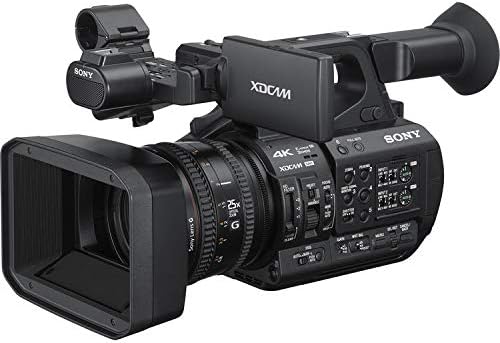
Image: A front-right view of the Sony PXW-Z190V camcorder, highlighting its lens, body, and control layout.
Návod k obsluze
1. Zapnutí/vypnutí
Locate the power switch, typically near the battery compartment or on the side panel. Slide it to the 'ON' position to power on the camcorder. To power off, slide it to the 'OFF' position.
2. Základní nahrávání
- Ensure a formatted SDXC card is inserted.
- Press the 'RECORD' button to start recording. The recording indicator will illuminate.
- Stiskněte tlačítko „RECORD“ znovu pro zastavení nahrávání.
- The camcorder supports 4K 60p recording for high-resolution video.
3. Zoom Lens Operation
Use the zoom rocker on the camcorder's handle or the zoom ring on the lens to adjust the 25x optical zoom. The camcorder features an integrated Sony G Optical Zoom Lens.
4. Electronic Variable ND Filter
The Electronic Variable ND Filter allows for precise control over exposure, even in bright conditions, without changing the aperture. Adjust the ND filter using the dedicated controls on the camcorder body.
5. Ovládání zaostření
The camcorder supports Auto Focus (AF) for convenient operation. Manual focus is also available for precise control. Switch between AF and MF using the focus mode switch on the lens barrel.
6. Wi-Fi připojení
The built-in 2.4/5 GHz Wi-Fi allows for remote control and file transfer. Refer to the camcorder's on-screen menu for Wi-Fi setup and connection instructions.
7. Stabilizace obrazu
The camcorder features both electronic and optical image stabilization to reduce blur caused by camera shake during handheld shooting.
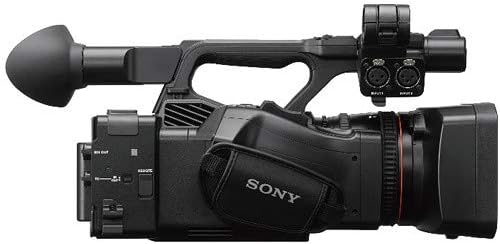
Image: A top-left view of the Sony PXW-Z190V camcorder, showing the handle, microphone input, and various control buttons.
Údržba
1. Čištění videokamery
- Čočka: Use the provided Lens Pen Cleaner or a Blower Brush to remove dust. For smudges, apply a small amount of Lens Cleaning Solution to a Microfiber Cloth or Lens Tissue Paper and gently wipe in a circular motion.
- Tělo: Otřete tělo videokamery měkkým, suchým hadříkem. V případě odolných nečistot lehceampOpláchněte hadřík vodou. Nepoužívejte agresivní chemikálie.
- Senzory: Sensor cleaning should only be performed by authorized service personnel.
2. Péče o baterie
- Charge batteries fully before use.
- Pokud baterie nepoužíváte, skladujte je na chladném a suchém místě.
- Nevystavujte baterie extrémním teplotám.
3. Skladování
When not in use, store the camcorder in the Soft Padded Carrying Case in a dry, dust-free environment. Remove batteries if storing for extended periods.
Odstraňování problémů
If you encounter issues with your camcorder, consider the following general troubleshooting steps:
- Bez napájení: Ensure batteries are charged and correctly inserted. Check power connections if using an AC adapter.
- Problémy s nahráváním: Verify that a memory card is inserted and has sufficient free space. Check card compatibility and format if necessary.
- Kvalita obrazu: Ensure the lens is clean and free from smudges. Check focus settings (Auto/Manual).
- Problémy s připojením: For Wi-Fi or USB issues, ensure cables are properly connected and device settings are correct.
For persistent problems, consult the full user manual available on the Sony support website or contact Sony customer support.
Specifikace
| Funkce | Detail |
|---|---|
| Značka | Sony |
| Číslo modelu | ESONPXWZ190VUP5 |
| Typ videokamery | Videokamera |
| Technologie fotosenzoru | CMOS (Three 1/3" Exmor R CMOS Sensors) |
| Rozlišení záznamu videa | 4K (4K 60p Recording) |
| Typ paměti Flash | SD, SDXC |
| Formát záznamu videa | MP4 |
| Podporovaný formát zvuku | AAC, MP3, PCM |
| Velikost obrazovky | 7 Inches (External Monitor) |
| Technologie připojení | USB, Wi-Fi (Built-In 2.4/5 GHz) |
| Optický zoom | 25 x (Integrated Sony G Optical Zoom Lens) |
| Stabilizace obrazu | Yes (Electronic, Optical) |
| Typ zaměření | Automatické ostření |
| Režimy fotografování | Zpomalený pohyb |
| Hmotnost položky | 27.9 Pounds (Bundle Weight) |
| Počet baterií | 2 Lithium Ion batteries required (BP-U30) |
| Úroveň odolnosti proti vodě | Není odolný vůči vodě |
Záruka a podpora
Informace o záruce
Tento produkt je dodáván s a 90denní omezená zárukaPro případné reklamace si prosím uschovejte doklad o koupi. Záruka se vztahuje na výrobní vady za běžných podmínek používání.
Zákaznická podpora
For technical assistance, service, or further information, please contact Sony customer support. You can find contact details and additional resources on the official Sony webmísto.


