1. Úvod
Thank you for choosing the GRIFEMA GD1003-2 Smart WiFi-Bluetooth E27 RGB LED Bulbs. These smart bulbs offer versatile lighting options, including 16 million colors, adjustable white light (2700K-6500K), and smart control via Wi-Fi and Bluetooth. This manual provides essential information for safe installation, setup, operation, and maintenance of your smart bulbs.

Obrázek 1.1: Konecview of GRIFEMA Smart LED Bulb features.
2. Konec produktuview
The GRIFEMA GD1003-2 is a smart LED bulb designed for modern lighting needs. It features an E27 base, 10W power consumption, and an 80W incandescent equivalent brightness. Key functionalities include:
- Duální konektivita: Supports both Wi-Fi (2.4GHz) and Bluetooth for flexible control.
- Plné barevné spektrum: 16 million RGB colors and adjustable white light from 2700K (warm white) to 6500K (cool white).
- Stmívatelné: Jas lze nastavit od 1 % do 100 %.
- Inteligentní ovládání: Compatible with Amazon Alexa and Google Home for voice control, and controllable via a mobile application.
- Pokročilé funkce: Includes group control, scene modes, timer settings, and music synchronization.

Image 2.1: GRIFEMA Smart LED Bulb with key specifications and dimensions.
3. Bezpečnostní informace
Please read and follow these safety instructions carefully before installing and using the bulbs:
- Ensure the power is turned off before installation or removal to prevent electric shock.
- Do not use in fully enclosed fixtures as this may shorten the bulb's lifespan.
- Not suitable for dimmers other than those controlled by the smart application.
- Avoid exposing the bulb to direct water or extreme humidity.
- Žárovku nerozebírejte ani neupravujte.
- Uchovávejte mimo dosah dětí.
4. Nastavení
4.1 Fyzická instalace
- Turn off the power to the light fixture at the main switch.
- Carefully screw the GRIFEMA GD1003-2 smart bulb into a standard E27 socket.
- Turn the power back on. The bulb should flash, indicating it is in pairing mode. If not, turn it off and on three times to reset.
4.2 Stažení aplikace a vytvoření účtu
- Scan the QR code on the product packaging or search for the recommended smart home app (e.g., 'SurpLife' or 'Smart Life') in your mobile app store (iOS or Android).
- Stáhněte a nainstalujte aplikaci.
- Otevřete aplikaci a zaregistrujte si nový účet, nebo se přihlaste, pokud již nějaký máte.
4.3 Pairing the Bulb (Wi-Fi & Bluetooth)
The bulbs support dual Wi-Fi and Bluetooth connectivity for easy pairing.
- Ujistěte se, že máte na svém mobilním zařízení povolené Bluetooth a Wi-Fi.
- Open the smart home app. The app should automatically detect the new device in pairing mode.
- Follow the on-screen instructions to add the device. You will need to select your 2.4GHz Wi-Fi network and enter its password.
- Once connected, the bulb will stop flashing and appear in your device list within the app.

Image 4.1: Smart bulb compatibility and app interface for color selection.
5. Návod k obsluze
5.1 Basic On/Off and Brightness Adjustment
From the app, select the bulb you wish to control. You can toggle it on/off and adjust its brightness using the slider.

Image 5.1: Adjusting color temperature for different ambiances.
5.2 Color Selection (RGB & CCT)
- Barva RGB: Pomocí barevného kolečka v aplikaci si můžete vybrat ze 16 milionů barev.
- White Light (CCT): Adjust the white light temperature from warm (2700K) to cool (6500K) to suit your preference.
- Camera Color Selection: Some apps allow you to use your phone's camera to pick a color from your surroundings and apply it to the bulb.
5.3 scénické režimy
The app provides various pre-set scene modes (e.g., Reading, Party, Relax) that combine specific colors and brightness levels. You can also create and customize your own scenes.

Obrázek 5.2: Příkladamples of different lighting ambiances in various rooms.
5.4 Skupinová kontrola
You can group multiple GRIFEMA smart bulbs together in the app to control them simultaneously. This allows you to change the color, brightness, or scene for an entire room or area with a single command.

Image 5.3: App interface demonstrating group control of multiple bulbs.
5.5 Funkce časovače
Set schedules for your bulbs to turn on or off at specific times. This is useful for daily routines, security, or to help you fall asleep and wake up naturally.
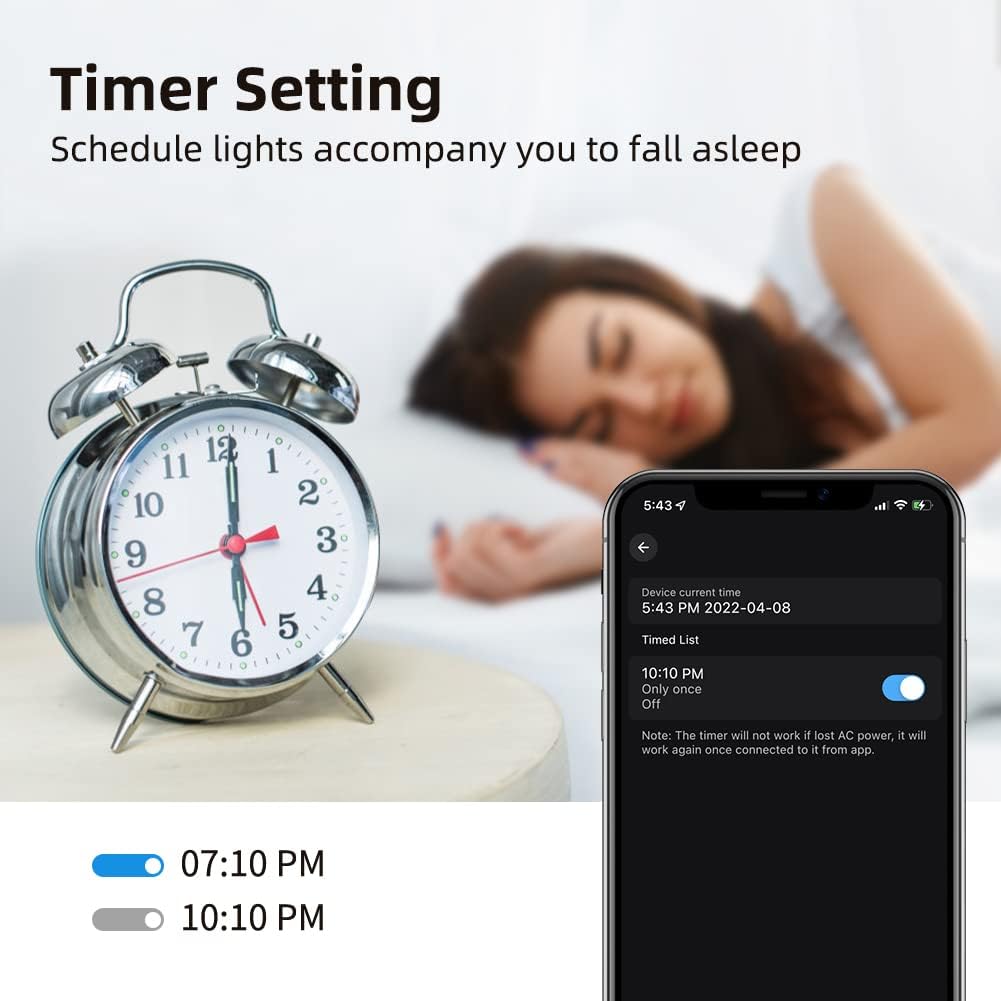
Image 5.4: Setting a timer for the smart bulb via the mobile app.
5.6 Music Sync / Microphone Mode
Activate the music sync feature in the app to make your lights change color and intensity in rhythm with music playing from your phone's microphone. This creates a dynamic atmosphere for parties or entertainment.
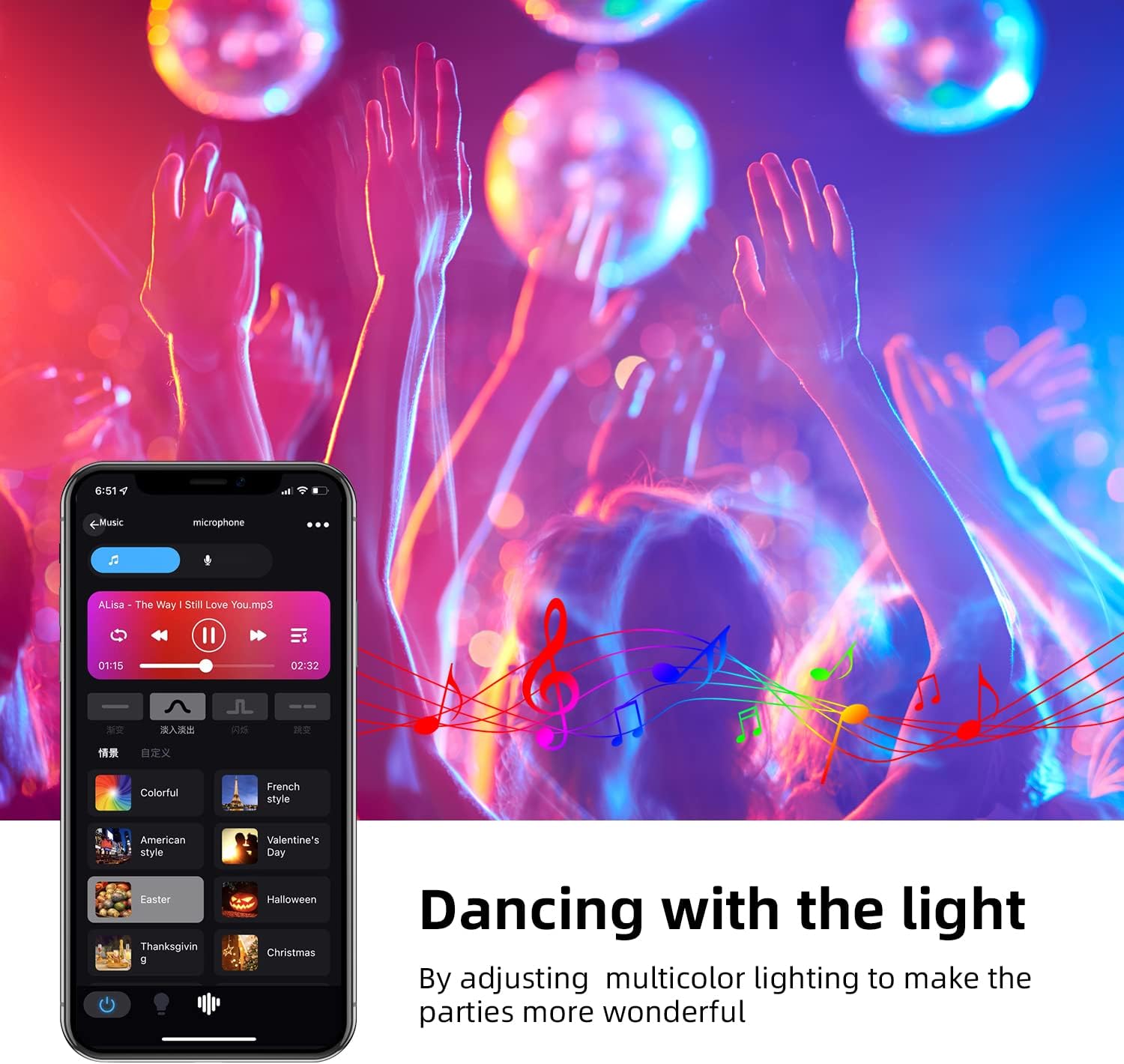
Image 5.5: Lights synchronizing with music in a party setting.

Image 5.6: Microphone mode interface for music synchronization.
5.7 Hlasové ovládání (Amazon Alexa / Google Home)
To enable voice control, link your smart home app account with Amazon Alexa or Google Home:
- Otevřete aplikaci Alexa nebo Google Home.
- Přejděte na „Dovednosti a hry“ (Alexa) nebo „Funguje s Googlem“ (Google Home).
- Hledat the smart home app you are using (e.g., 'SurpLife' or 'Smart Life').
- Enable the skill/service and link your account using your app credentials.
- Discover devices. Once discovered, you can use voice commands like:
- „Alexo, rozsviť světlo v obýváku.“
- "Hey Google, set the bedroom light to blue."
- "Alexa, dim the kitchen light to 50%."

Image 5.7: Controlling smart bulbs via app and voice commands with Alexa and Google Home.
6. Řešení problémů
- Bulb not connecting to Wi-Fi:
- Ujistěte se, že vaše Wi-Fi síť používá frekvenci 2.4 GHz. Sítě 5 GHz nejsou podporovány.
- Check if the bulb is flashing rapidly (pairing mode). If not, power cycle it three times (on-off-on-off-on) to reset.
- Ověřte, zda je vaše heslo k Wi-Fi správné.
- Move the bulb closer to your Wi-Fi router during setup.
- Ensure your phone's Bluetooth is on during initial setup. - Hlasové ovládání nefunguje:
- Confirm the smart home app is linked correctly to Alexa/Google Home.
- Ensure the bulb is named clearly in the app (e.g., "Living Room Light").
- Zkontrolujte si připojení k internetu. - Bulb unresponsive:
- Check the power supply to the light fixture.
- Try turning the bulb off and on from the wall switch.
- If issues persist, try re-pairing the bulb. - Color is not accurate:
- Ujistěte se, že je aplikace aktualizována na nejnovější verzi.
- Some colors may appear differently depending on the surrounding environment and wall color.
7. Údržba
To ensure optimal performance and longevity of your GRIFEMA smart bulbs:
- Clean the bulb with a soft, dry cloth. Do not use liquid cleaners or aerosols.
- Avoid operating the bulb in environments with extreme temperatures or high humidity.
- Do not expose the bulb to direct sunlight for extended periods.
8. Specifikace
| Specifikace | Hodnota |
|---|---|
| Značka | GRIFEMA |
| Číslo modelu | GD1003-2 |
| Výrobce | Ibergrif Griferias,S.L |
| Rozměry produktu (D x Š x V) | 6 x 6 x 11.8 cm |
| Hmotnost položky | 130 g |
| Počet položek | 2 |
| Barva | RGB + 2700K-6500K |
| Tvar | Pear (A19) |
| Typ žárovky | LED |
| Cap Type / Bulb Base | E27 |
| Světelný tok | 800 lm |
| Wattage | 10 W |
| Žárovkový ekvivalent | 80 wattů |
| Teplota barev | 2700K-6500K |
| Index podání barev (CRI) | 80 |
| Průměrná životnost | 20000 hodiny |
| svtage | 240 voltů |
| Speciální funkce | Color Changing, Dimmable, Wi-Fi, Bluetooth, Voice Control |
| Bezdrátové připojení | 2.4 GHz Wi-Fi |

Image 8.1: EU Energy Label for the GRIFEMA Smart LED Bulb. For more details, refer to the Databáze EPREL.

Image 8.2: Indication of the bulb's average lifespan.
9. Záruka a podpora
GRIFEMA products come with a standard manufacturer's warranty. Please refer to the warranty information provided at the time of purchase or contact GRIFEMA customer support for details.
For technical assistance, troubleshooting, or any questions regarding your GRIFEMA GD1003-2 smart bulbs, please visit the official GRIFEMA webwebové stránky nebo kontaktujte jejich oddělení zákaznických služeb. Kontaktní informace obvykle naleznete na obalu produktu nebo na oficiálních stránkách značky webmísto.
Online podpora: GRIFEMA Store on Amazon


