Zavedení
Thank you for choosing the iJoy Ultra Wireless Over-Ear Bluetooth Headphones. These headphones are designed to provide a versatile audio experience with multiple connectivity options and comfortable wear. This manual will guide you through the features, setup, and operation of your new headphones.

Image: iJoy Ultra Wireless Over-Ear Bluetooth Headphones, showcasing the sleek design and over-ear cushions.
Co je v krabici
Ujistěte se prosím, že máte v balení všechny položky:
- iJoy Ultra Wireless Over-Ear Bluetooth Headphones
- Nabíjecí kabel USB typu C.
- AUX kabel (3.5 mm)
Konec produktuview
Seznamte se s ovládacími prvky a porty sluchátek:

Obrázek: Boční view of the headphone ear cup, highlighting the control buttons for volume, track skipping, and power/play/pause/call management.
- Volume + / Skip Song: Hold for Volume Up, Press for Next Song.
- Power / Play / Pause / Answer/Reject Calls: Press to Play/Pause or Answer/Reject Calls. Hold to Power On/Off.
- Hlasitost - / Předchozí skladba: Hold for Volume Down, Press for Previous Song.
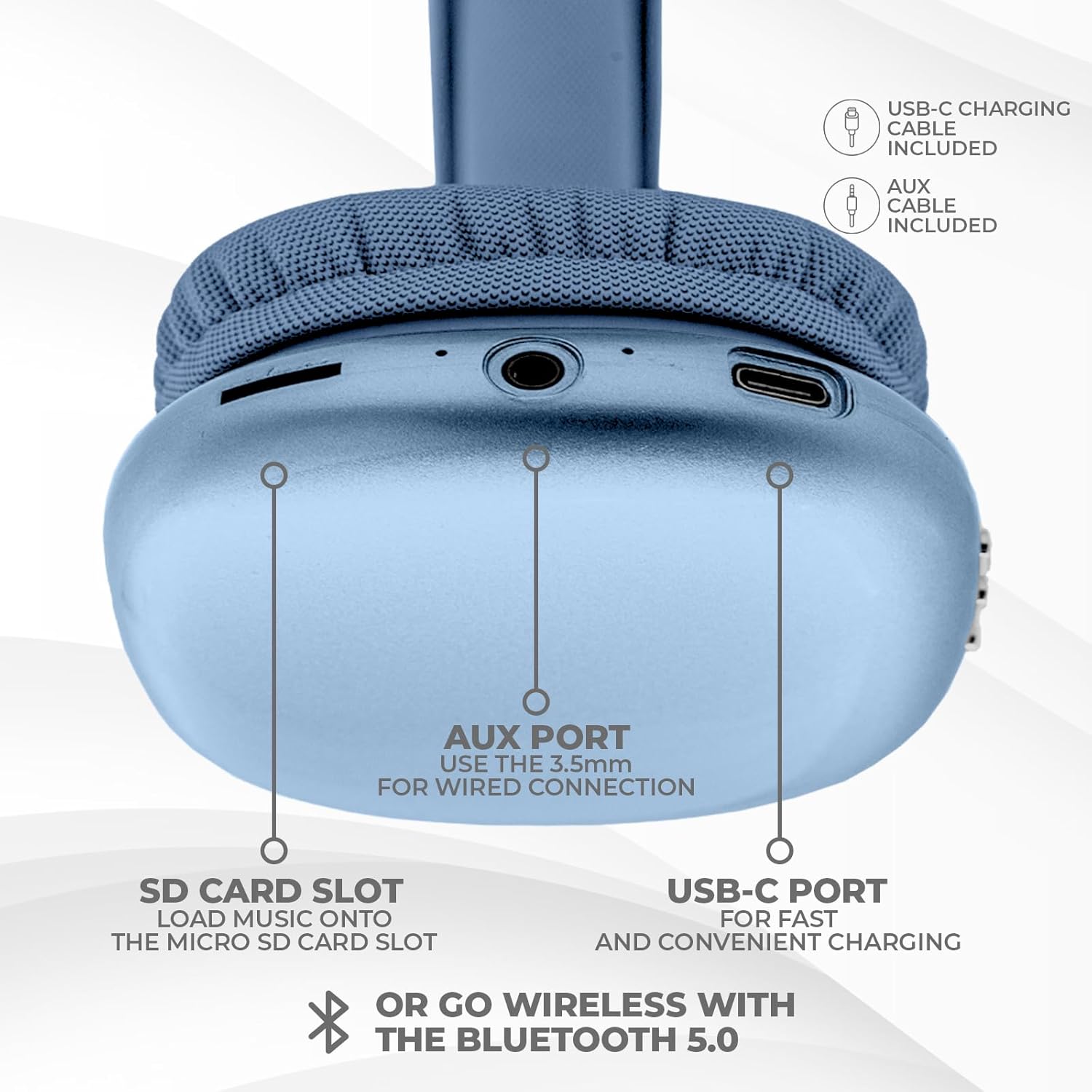
Obrázek: Spodní část view of the headphone ear cup, showing the USB-C charging port, AUX port, and SD card slot.
- Port USB-C: Pro nabíjení sluchátek.
- AUX Port (3.5mm): Pro kabelové audio připojení.
- Slot pro SD kartu: For direct audio playback from a Micro SD card.
Nastavení
1. Nabíjení sluchátek
Před prvním použitím sluchátka plně nabijte. Úplné nabití trvá přibližně 2 hodiny.
- Connect the provided USB Type C charging cable to the USB-C port on the headphone.
- Druhý konec kabelu USB připojte ke kompatibilnímu zdroji napájení USB (např. síťový adaptér, USB port počítače).
- LED indikátor bude zobrazovat stav nabíjení a po plném nabití zhasne nebo změní barvu.
2. Párování Bluetooth
Bezdrátové připojení sluchátek:
- Ujistěte se, že jsou sluchátka nabitá a vypnutá.
- Stiskněte a podržte tlačítko napájení, dokud LED indikátor nezačne blikat, což signalizuje režim párování.
- Na svém zařízení (chytrý telefon, tablet, notebook) povolte Bluetooth a vyhledejte dostupná zařízení.
- Select "iJoy Ultra" from the list of devices.
- Once connected, the LED indicator will typically show a solid light or slow flash.
Note: The Bluetooth range is approximately 10 meters (33 feet).
3. Drátové připojení (AUX)
For a non-wireless connection or when the battery is low:
- Connect one end of the provided 3.5mm AUX cable to the AUX port on the headphone.
- Připojte druhý konec AUX kabelu k 3.5mm audio konektoru na vašem zařízení.
- Sluchátka se automaticky přepnou do kabelového režimu.
4. Přehrávání z SD karty
Pro přehrávání hudby přímo z karty Micro SD:
- Insert a Micro SD card (with music files) into the SD card slot on the headphone.
- Sluchátka automaticky detekují kartu a začnou přehrávat hudbu.
- Use the track control buttons to navigate your music.
Návod k obsluze
Zapnutí/vypnutí
- Zapnutí: Stiskněte a podržte tlačítko napájení přibližně 3 sekundy.
- Vypnout: Stiskněte a podržte tlačítko napájení přibližně 3 sekundy.
Přehrávání hudby
- Přehrát/pozastavit: Stiskněte jednou tlačítko Napájení.
- Další skladba: Press the Volume + button once.
- Předchozí skladba: Press the Volume - button once.
- Zvýšit hlasitost: Hold the Volume + button.
- Snížit hlasitost: Hold the Volume - button.
Správa hovorů
Při připojení přes Bluetooth:
- Přijmout hovor: Stiskněte jednou tlačítko Napájení.
- Ukončit hovor: Během hovoru stiskněte jednou tlačítko napájení.
- Odmítnout hovor: Stiskněte a podržte tlačítko napájení přibližně 2 sekundy.
Životnost baterie
The headphones offer up to 10 hours of wireless playtime on a single charge.

Image: Visual representation of the headphones' battery life, indicating up to 10 hours of wireless playtime.
Údržba
To ensure the longevity and optimal performance of your iJoy Ultra headphones:
- Sluchátka pravidelně čistěte měkkým, suchým hadříkem.
- Nevystavujte sluchátka extrémním teplotám, vlhkosti nebo přímému slunečnímu záření.
- Nepoužívejte abrazivní čisticí prostředky nebo rozpouštědla.
- Když sluchátka nepoužíváte, uchovávejte je na chladném a suchém místě.
- Zabraňte pádu sluchátek na zem nebo jejich vystavení silným nárazům.
Odstraňování problémů
Pokud se se sluchátky setkáte s problémy, podívejte se na následující běžná řešení:
| Problém | Řešení |
|---|---|
| Sluchátka se nezapínají. | Ujistěte se, že jsou sluchátka plně nabitá. Připojte je ke zdroji napájení pomocí kabelu USB-C. |
| Nelze spárovat přes Bluetooth. | Make sure the headphones are in pairing mode (flashing LED). Turn off and on Bluetooth on your device. Ensure no other devices are currently connected to the headphones. Try 'forgetting' the device on your phone and re-pairing. |
| No sound or choppy audio. | Check volume levels on both headphones and your device. Ensure Bluetooth connection is stable or try a wired AUX connection. If using an SD card, ensure it is properly inserted and the files jsou kompatibilní. |
| Headphones are uncomfortable or too tight. | Adjust the headband for a better fit. The over-ear cushions are designed for comfort, but individual fit may vary. |
| Cannot connect to multiple devices simultaneously. | These headphones typically support connection to one device at a time. Disconnect from the current device before attempting to connect to another. |
Specifikace
| Funkce | Detail |
|---|---|
| Název modelu | Ultra |
| Číslo modelu položky | IJHP21 |
| Technologie připojení | Bezdrátové (Bluetooth), Kabelové (3.5mm AUX) |
| Technologie bezdrátové komunikace | Bluetooth |
| Dosah Bluetooth | 10 metrů (33 stop) |
| Jack pro sluchátka | Zásuvka 3.5 mm |
| Speciální funkce | SD Card Slot, Soft Cushion Padding, USB Type C |
| Životnost baterie | Až 10 hodin |
| Doba nabíjení | 2 hodiny |
| Typ ovládání | Volume Control, Track Management, Call Management |
| Umístění uší | Přes ucho |
| Materiál | Plast |
| Hmotnost položky | 8 uncí |
| Rozměry produktu | 7 x 3 x 8 palce |
| UPC | 842700193053 |
Oficiální video produktu
Video: An official product video from iJoy Electronics showcasing the features and design of the iJoy Ultra Bluetooth Over-Ear Headphones.
Záruka a podpora
For warranty information or technical support, please refer to the documentation included with your product or contact iJoy customer service directly. Keep your proof of purchase for any warranty claims.