1. Úvod
This manual provides detailed instructions for the installation, operation, and maintenance of your ANNKE 4K PoE Security Camera System. This system is designed for comprehensive surveillance, offering high-resolution video recording and smart detection features for both home and business environments. Please read this manual thoroughly before using the product to ensure proper setup and functionality.

Image 1.1: ANNKE 4K PoE Security Camera System components including NVR and 12 dome cameras.
2. Obsah balení
Ověřte, zda jsou všechny níže uvedené položky součástí balení. Pokud některé položky chybí nebo jsou poškozené, kontaktujte prosím zákaznickou podporu ANNKE.
- 1x 16-Channel 8MP PoE NVR (with 4TB HDD pre-installed)
- 12x 8MP IP PoE Dome Cameras
- 6x 30m/100ft síťové kabely
- 6x 18m/60ft síťové kabely
- 1x Napájecí adaptér pro NVR (DC48V)
- 1x HDMI kabel 5.9 stop/1.8 m
- 1x ethernetový kabel 3.2 stopy/1 m
- 1x USB myš
- 1x Stručný návod k obsluze
- 1x Samolepka na zeď
- 12x Screws for camera mounting

Image 2.1: Visual representation of all items included in the ANNKE 4K PoE Security Camera System package.
3. Klíčové vlastnosti
- Rozlišení Ultra HD 4K: Equipped with 8MP image sensors, delivering video footage with four times the pixels of 1080p, allowing for enhanced detail upon digital zoom.
- PoE (Power over Ethernet) Connectivity: Simplifies installation by transmitting both data and power through a single network cable, eliminating the need for separate power adapters for cameras.
- Person and Vehicle Detection: Advanced algorithms differentiate between human and vehicle movement, reducing false alarms.
- Komprese videa H.265+: Efficiently saves up to 75% of storage space compared to H.264, optimizing HDD usage for longer recording times.
- Nepřetržité nahrávání 24/7: The included 4TB surveillance-grade HDD is engineered for constant operation, supporting simultaneous recording from all 16 channels.
- Vzdálený přístup přes aplikaci ANNKE Vision: Free mobile application for Android and iOS devices enables live viewing, snapshots, video recording, and push notifications with event images.
- Customizable Motion Detection Areas: Define specific zones for motion detection to focus on critical areas and minimize irrelevant alerts.
- Kamery odolné proti povětrnostním vlivům s krytím IP67: Cameras feature a robust metal and ABS housing, providing protection against extreme weather conditions with an operating temperature range of -22°F to 140°F.

Image 3.1: Day and night vision clarity with 4K resolution.

Image 3.2: Simplified installation with PoE technology.
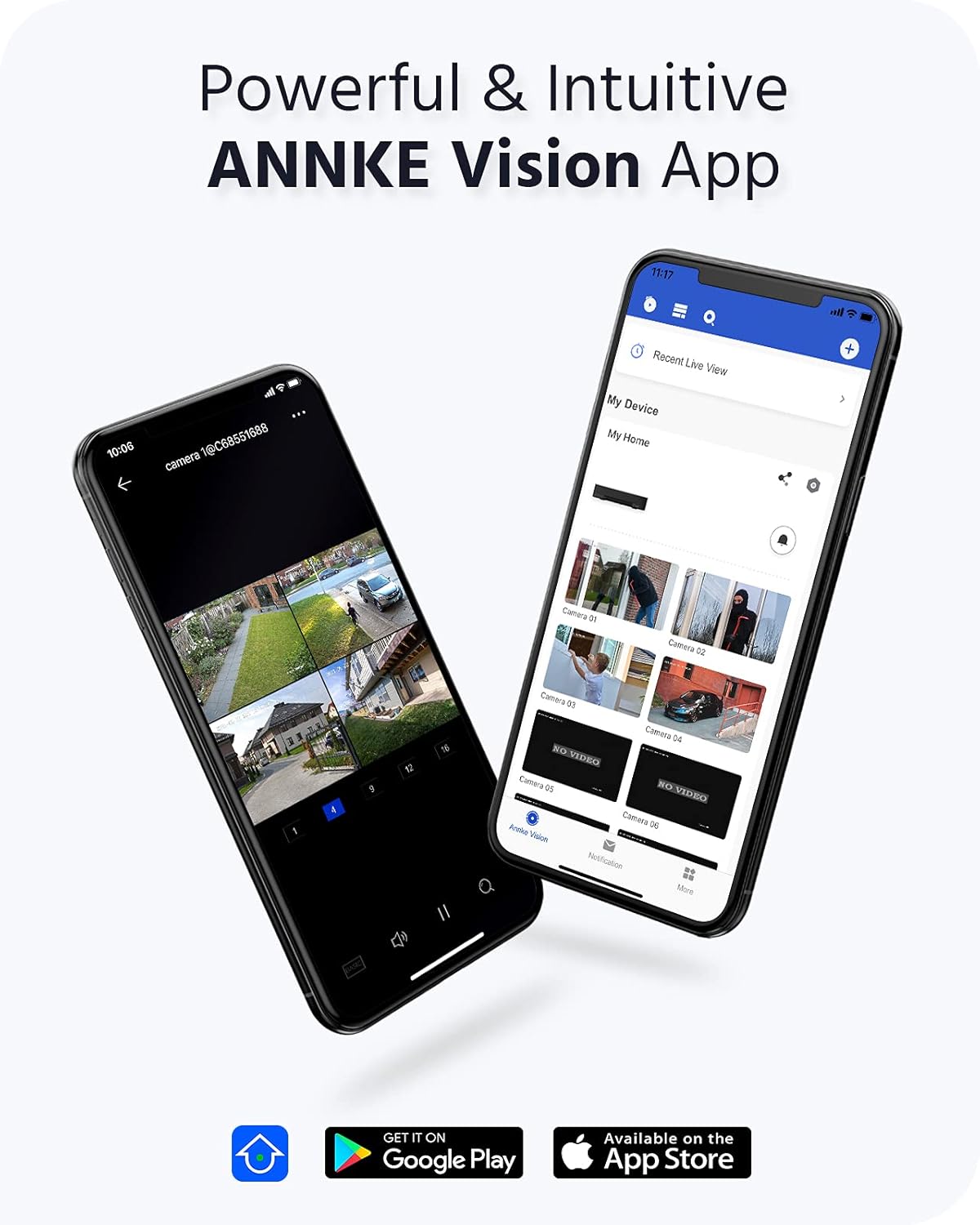
Image 3.3: ANNKE Vision App for remote monitoring.

Image 3.4: Various 24/7 monitoring and recording options.

Obrázek 3.5: Účinnost komprese videa H.265+.

Image 3.6: Customizing motion detection areas.

Image 3.7: IP67 weatherproof and wide operating temperature range.
4. Průvodce nastavením
Follow these steps to set up your ANNKE 4K PoE Security Camera System.
4.1 Počáteční nastavení NVR
- Připojení monitoru: Connect the NVR to a monitor using the provided HDMI cable or a VGA cable (not included).
- Připojení myši: Zapojte USB myš do jednoho z USB portů NVR.
- Připojit síť: Connect the NVR to your router using the Ethernet cable for internet access and remote viewschopnosti.
- Zapnutí: Connect the NVR power adapter to the NVR and then to a power outlet. The NVR will power on automatically.
- Počáteční konfigurace: Follow the on-screen wizard to set up basic settings such as language, date/time, and create a strong password for the NVR.
4.2 Camera Installation and Connection
The ANNKE PoE system utilizes Power over Ethernet, simplifying camera installation.
- Montáž kamer: Vyberte vhodná místa pro kamery a zajistěte tak optimální viewing angles and coverage. Use the provided screws to securely mount the cameras.
- Připojení PoE kabelů: Connect one end of the network cable to the camera's PoE port and the other end to an available PoE port on the NVR. The cameras will receive both power and data through this single cable.
- Ověřit připojení: Once connected, the cameras should automatically be detected and display video on the connected monitor.
4.3 ANNKE Vision App Setup
For remote access and mobile monitoring, download and configure the ANNKE Vision App.
- Stáhnout aplikaci: Hledat 'ANNKE Vision' in the Apple App Store (iOS) or Google Play Store (Android) and install it.
- Vytvořit účet: Otevřete aplikaci a zaregistrujte si nový účet, nebo se přihlaste, pokud již nějaký máte.
- Přidat zařízení: Tap the '+' icon to add your NVR. You can typically scan the QR code displayed on your NVR's monitor (under Network settings) or manually enter the NVR's serial number.
- Žít View: Once added, you can access live video feeds from your cameras, view recordings, and receive notifications directly on your smartphone.
5. Návod k obsluze
This section covers the basic operation of your ANNKE Security Camera System.
5.1 Živě View
After successful setup, you can view živé footagz vašich fotoaparátů:
- Na monitoru: The NVR will display a multi-channel live view on the connected monitor. Use the USB mouse to navigate the interface.
- Via ANNKE Vision App: Open the app on your smartphone or tablet, select your NVR, and tap on the desired camera feed for live viewIng.
- Přes Web prohlížeč: Přístup k NVR web rozhraní zadáním jeho IP adresy do a web prohlížeč na počítači připojeném ke stejné síti.
5.2 Režimy nahrávání
NVR podporuje různé režimy nahrávání:
- Nepřetržité nahrávání: Records 24/7 without interruption. Configurable via NVR settings.
- Záznam detekce pohybu: Records only when motion is detected in the configured areas.
- Plánované nahrávání: Záznamy pořizují během konkrétních časových období nastavených uživatelem.
- Záznam události: Records triggered by specific events like person/vehicle detection.
These modes can be configured through the NVR's menu system (right-click with the mouse on the monitor) or via the ANNKE Vision App/web rozhraní.
5.3 Přehrávání
Na review zaznamenané footage:
- On NVR: From the NVR's main menu, select 'Playback'. Choose the camera(s), date, and time range to review.
- Via ANNKE Vision App: In the app, select your NVR, then navigate to the playback section. Select the desired camera and timeline to view nahrávek.
5.4 Smart Detection (Person/Vehicle)
Configure smart detection features to receive more accurate alerts:
- Nastavení přístupu: Navigate to the 'Event' or 'Smart Analysis' section in the NVR menu or app settings.
- Povolit detekci: Activate 'Person Detection' and/or 'Vehicle Detection' for specific cameras.
- Configure Areas: Draw specific detection zones on the camera's view to define where the system should look for persons or vehicles.
- Nastavit akce: Choose actions to be taken upon detection, such as recording, sending push notifications, or triggering an audible alarm.
6. Údržba
Pravidelná údržba zajistí optimální výkon a dlouhou životnost vašeho bezpečnostního systému.
6.1 Cleaning Cameras
- Jemně otřete objektiv a kryt fotoaparátu měkkým hadříkemamp hadříkem. Nepoužívejte abrazivní čisticí prostředky ani rozpouštědla.
- Ensure the lens is free from dust, dirt, or spiderwebs for clear image quality.
6.2 aktualizací firmwaru
- Periodically check the ANNKE website or the NVR's system settings for available firmware updates.
- Firmware updates can improve system stability, add new features, and enhance security. Follow the provided instructions carefully when performing updates.
6.3 Správa pevných disků
- The 4TB HDD is configured for continuous recording with overwrite functionality, meaning older footage is automatically deleted to make space for new recordings.
- You can check the HDD status and remaining capacity in the NVR's storage settings.
7. Řešení problémů
This section addresses common issues you might encounter with your ANNKE Security Camera System.
7.1 Žádné zobrazení videa
- Zkontrolujte napájení: Ujistěte se, že je NVR zapnutý a napájecí adaptér je bezpečně připojen.
- Připojení monitoru: Verify the HDMI/VGA cable connection between the NVR and the monitor. Try a different cable or monitor if possible.
- Připojení fotoaparátu: Ensure all PoE cables are securely connected to both the cameras and the NVR's PoE ports. Check for any damaged cables.
- NVR Output Resolution: If the monitor shows 'Out of Range', the NVR's output resolution might be too high for the monitor. Connect the NVR to a different monitor or try resetting the NVR's display settings (refer to the quick guide for specific steps).
7.2 Žádný vzdálený přístup
- Internetové připojení: Ensure the NVR is connected to your router via an Ethernet cable and has internet access. Check the network status in the NVR settings.
- Přihlášení do aplikace: Verify you are logged into the ANNKE Vision App with the correct account.
- Stav zařízení: In the app, check if the NVR device is online. If offline, troubleshoot the NVR's network connection.
- Nastavení firewallu/routeru: Ensure your router's firewall is not blocking the NVR's connection. Port forwarding might be required in some complex network setups (consult your router's manual or ISP).
7.3 Problémy se záznamem
- HDD Status: Check the HDD status in the NVR's storage settings. Ensure it is detected and healthy.
- Plán nahrávání: Ověřte, zda je plán nahrávání správně nakonfigurován pro požadované kamery a časy.
- Nastavení detekce pohybu: If using motion detection, ensure it is enabled and the sensitivity and detection areas are properly set.
Pro další pomoc se prosím obraťte na podporu ANNKE. webnebo kontaktujte zákaznický servis.
8. Specifikace
| Funkce | Specifikace |
|---|---|
| Značka | ANNKE |
| Číslo modelu | AU-N46PCK4-V2-9CBN-V3#USH1 (H800 Series) |
| Technologie připojení | Kabelové (PoE) |
| Speciální funkce | Image Sensor, Person Detection, Vehicle Detection, Night Vision |
| Kanály NVR | 16-kanál |
| Rozlišení fotoaparátu | 8MP (4K Ultra HD) |
| Komprese videa | H.265 + |
| Kapacita úložiště | 4TB HDD (Surveillance-grade) |
| Zdroj napájení | Corded Electric (NVR), Power over Ethernet (Cameras) |
| Hodnocení odolnosti kamery proti povětrnostním vlivům | IP67 |
| Provozní teplota | -22 °F až 140 °F (-30 °C až 60 °C) |
| Video výstup NVR | HDMI (up to 4K), VGA (up to 1080p) |
| Product Dimensions (NVR) | 20.87 x 19.29 x 11.81 palce (přibližně) |
| Datum první dostupnosti | 24. dubna 2022 |
9. Záruka a podpora
ANNKE products are designed for reliability and performance. For warranty information, technical support, or service inquiries, please visit the official ANNKE website or contact their customer support team directly. Ensure you have your product model number (H800) and purchase details available when seeking support.
Oficiální web ANNKE Webmísto: www.annke.com


