Zavedení
The NUX NGS-6 Amp Academy is a versatile stomp-box amp modeler designed to deliver the authentic sound and feel of tube amplifiers in a compact pedal format. Utilizing NUX's advanced TSAC-2K (White-box Amp Modeling) algorithm, it offers exceptional headroom and dynamic range, making it highly pedal-friendly. This manual provides detailed instructions for setting up, operating, and maintaining your Amp Academy pedal to achieve optimal performance in various scenarios, from live stages to studio recording and silent practice.
Klíčové vlastnosti
- Advanced TSAC-2K Amp Modeling for realistic tube amp cítit.
- 6 Legendary Amp Models: Vintage, Classic, Modern, Brown, Red, and Iridium.
- 1024 Samples IR Resolution with 3rd-party IR loader capacity.
- Includes 12 Choptones custom IRs and 16 user slots.
- 32-bit/48kHz WAV format conversion for IRs via editor software.
- Versatile Connectivity: 1/4" Input/Output, XLR DI Out, 1/8" Phone Out, USB-C.
- Integrated Send/Return Effect Loop for external pedals.
- A/B Amp Footswitch and Scene Footswitch for flexible control.
- Intuitive Editor Software for detailed tweaking of IRs (Level, Low Cut, High Cut).
Ovládací prvky a připojení

Obrázek 1: Nahoře view z Amp Academy pedal.

Obrázek 2: Zadní view z Amp Academy pedal's connections.
Ovládací prvky na horním panelu
- ZÍSKAT: Adjusts the input gain of the selected ampmodel lifikátoru.
- MISTR: Ovládá celkovou výstupní hlasitost ampmodel lifikátoru.
- BASY, STŘEDY, VÝŠKY: Three-band equalizer controls for tone shaping.
- PŘÍTOMNOST: Adjusts the high-frequency response, adding clarity or bite.
- BOOST: Controls the level of the built-in boost effect.
- SCÉNA: Selects between different scene presets (S1, S2, S3).
- DECAY / RVB / LEVEL (Alt): These knobs control reverb parameters when the Alt function is active.
- N.R. (Noise Reduction): Adjusts the threshold for the noise reduction feature.
Nožní spínače
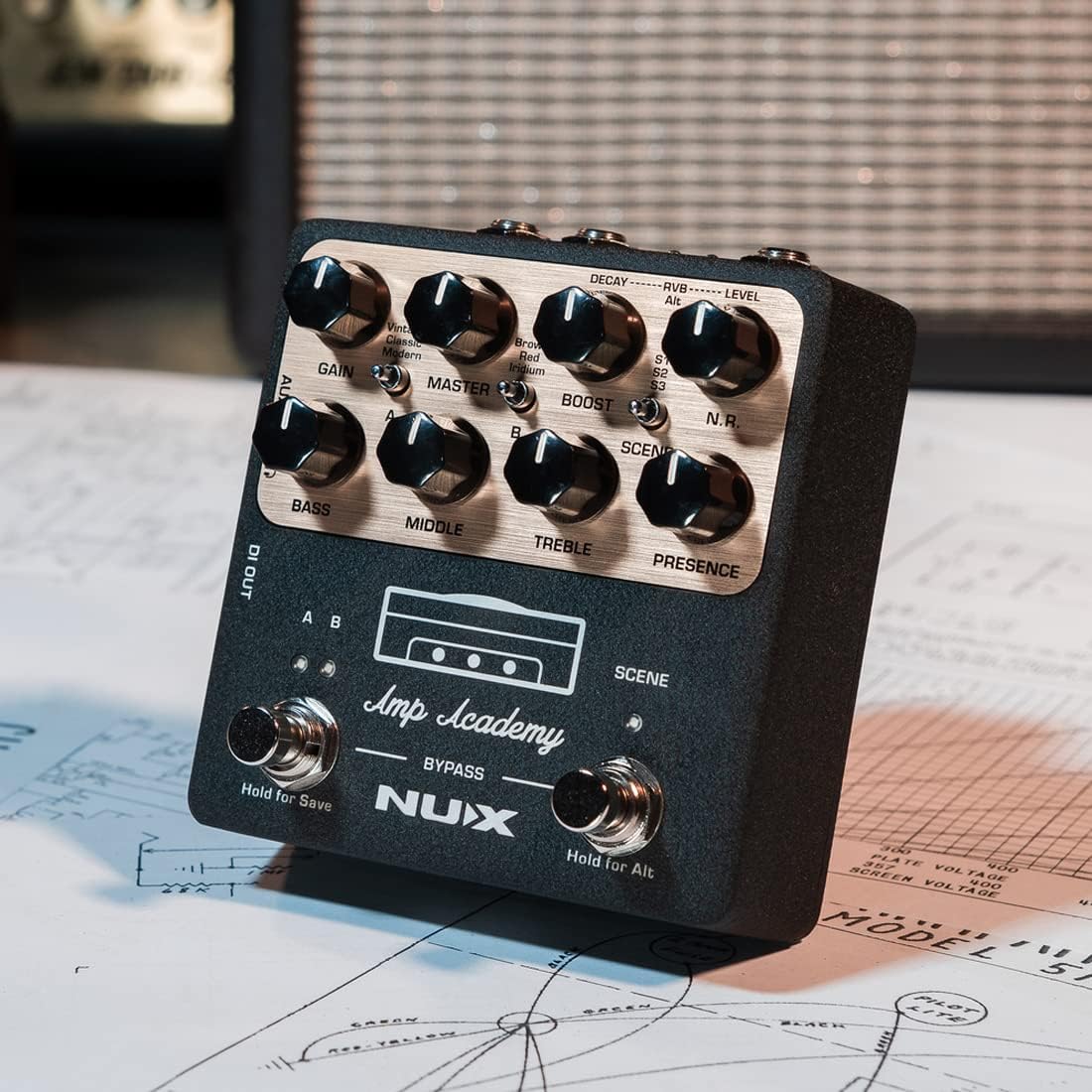
Figure 3: Close-up of footswitches.
- A/B Footswitch: Toggles between two different amp channels (A and B). Hold to save settings.
- SCENE Footswitch: Cycles through scene presets (S1, S2, S3). Hold for Alt function.
- BYPASS: Engages or disengages the pedal's effects.
Vstupní/výstupní konektory

Obrázek 4: Strana view spojení.

Figure 5: Close-up of side jacks.
- VSTUP (1/4" TS): Sem připojte kytaru nebo jiný nástroj.
- DI VÝSTUP (XLR): Balanced output for connecting directly to a mixer or PA system.
- OUT (1/4" TS): Main unbalanced output.
- INSERT (1/4" TRS): Send/Return loop for integrating external effects pedals. Use the included Y-cable.
- USB-C: For connecting to a computer for editor software, firmware updates, and USB audio streaming.
- DC 9V: Power input for the pedal (9V DC, center negative).
- AUX IN (1/8" TRS): Connect external audio sources for practice.
- PHONE OUT (1/8" TRS): Výstup pro sluchátka pro tiché cvičení.
Nastavení
Live Performance Setup
For live performance, connect the Amp Academy to a mixer or PA system using the XLR DI OUT for a balanced signal. You can also use the 1/4" OUT to connect to a powered FRFR (Full Range, Flat Response) speaker for a personal on-stage monitor. Integrate time-based effects (like modulation or delay) into the INSERT loop using the provided Y-cable.

Figure 6: Live Performance Setup Diagram.
Nastavení nahrávání
Připojte Amp Academy directly to a recording interface via USB-C or XLR DI OUT for instant, high-quality guitar tone without needing an amplifier or microphones. The USB-C connection allows for direct audio streaming to your computer. Ensure IR OUT switches are in the UP position if you wish to use the IR signal for 1/4" out. For DI OUT, hold A/B footswitch and power the pedal to toggle IR signal (A/B indicators flash 3 times for IR ON, no flash for IR OFF).

Figure 7: Recording Setup Diagram.
Silent Practice Setup
For immersive silent practice, connect headphones or monitors directly to the 1/8" PHONE OUT. You can also connect an external audio source to the AUX IN for backing tracks.

Figure 8: Silent Practice Setup Diagram.
Nastavení efektové smyčky
The Amp Academy features a send/return effects loop for integrating external time-based effects. Use the included TRS Y-cable to connect your external pedal(s) to the INSERT jack. The tip of the TRS connector is typically Send, and the ring is Return.
Video 1: NUX NGS-6 Amp Akademie Amp Modeler Overview. This video provides a comprehensive look at the pedal's features, sound, and connectivity options, including the effects loop.
Návod k obsluze
Základní operace
- Zapnutí/vypnutí: Connect the 9V DC power supply to power on. Disconnect to power off.
- Výběr Amp Modely: Use the rotary switch to select between the 6 legendary amp modely.
- Úprava tónu: Use the GAIN, MASTER, BASS, MIDDLE, TREBLE, and PRESENCE knobs to dial in your desired tone.
- Using Boost: Adjust the BOOST knob to add a clean boost to your signal.
- Výběr scény: Press the SCENE footswitch to cycle through S1, S2, and S3 presets.
- Ukládání předvoleb: Hold the A/B footswitch to save your current settings to the selected channel.
Using the Editor Software
The NUX Amp Academy editor software (available for PC/Mac/iOS/Android) provides in-depth control over all pedal parameters, including IR loading, EQ settings, and effect chain customization. Connect your pedal to your computer via the USB-C port to access the editor.

Obrázek 9: Amp Academy Editor Software - Signal Chain.
- IR zatížení: Load your favorite 3rd-party IRs into the pedal's user slots. The editor automatically converts WAV format files.
- Ovládání EQ: Fine-tune the EQ settings with visual feedback.
- Bias Tweaking: Upravit amplifier bias for nuanced tone shaping.
- Routing Modes: Configure various USB audio routing modes (Normal, Loopback, Reamp, Dry Out).

Obrázek 10: Amp Academy Editor Software - Routing Modes.
Údržba
- Keep the pedal clean and free from dust. Use a soft, dry cloth.
- Nevystavujte pedál extrémním teplotám, vlhkosti nebo přímému slunečnímu záření.
- Nepokoušejte se jednotku rozebírat ani opravovat sami. Obraťte se na kvalifikovaný servisní personál.
- Always use the specified 9V DC, center-negative power supply.
Odstraňování problémů
| Problém | Možná příčina | Řešení |
|---|---|---|
| Žádný zvukový výstup. | Incorrect connections, no power, pedal in bypass mode. | Check all cable connections. Ensure power supply is connected. Press BYPASS footswitch to engage effects. |
| Distorted or noisy sound. | GAIN too high, faulty cable, power supply issues. | Reduce GAIN. Try different cables. Ensure stable 9V DC power supply. Adjust N.R. knob. |
| Editor software not connecting. | USB cable issue, driver not installed, software version. | Try a different USB-C cable. Ensure correct drivers are installed (check NUX website). Update editor software and pedal firmware. |
| IRs not loading/sounding correctly. | Nesprávný file format, IR settings. | Ensure IRs are 32-bit/48kHz WAV format (editor can convert). Check Level, Low Cut, High Cut settings in editor. |
Specifikace
| Funkce | Specifikace |
|---|---|
| Model | NGS-6 |
| Rozměry (D x Š x V) | 3.8 x 3.3 x 5.2 palce |
| Hmotnost | 1.65 libry (748 gramů) |
| Požadavky na napájení | 9V DC, Center Negative |
| Rozlišení IR | 1024 Samples |
| IR sloty | 6 (s Amp slots), 12 Choptones custom IRs, 16 user slots |
| Sampsazba ling | 48 kHz |
| Bitová hloubka | 32bitový |
| Hardwarové rozhraní | USB-C |
Záruka a podpora
NUX products are designed for reliability and performance. For warranty information, please refer to the warranty card included with your product or visit the official NUX website. For technical support, firmware updates, and editor software downloads, please visit the NUX support page or contact their customer service directly. Keep your purchase receipt for warranty claims.


