1. Úvod
This manual provides detailed instructions for the setup, operation, and maintenance of your KECAG 10.1 Inch Digital Picture Frame. Please read this manual thoroughly before using the device to ensure proper functionality and to maximize your user experience. Keep this manual for future reference.
2. Konec produktuview
2.1 Klíčové vlastnosti
- 10.1 Inch 1080P HD IPS Screen: Features a 1920x1080 resolution with a 180° wide-angle IPS display for clear viewz různých úhlů.
- Přehrávání multimédií: Supports photo slideshows, video playback, and music playback.
- Pohybový senzor: Automatically turns the frame on/off based on detected movement to conserve energy.
- Timing On/Off Function: Allows scheduled power on and off times.
- Versatile Media Support: Compatible with SD cards and USB flash drives.
- Uživatelsky přívětivé rozhraní: Simple main menu for easy navigation.
- Dálkové ovládání: Umožňuje pohodlné ovládání na dálku.
- Další funkce: Includes calendar and alarm features.
2.2 Obsah balení
- KECAG 10.1 Inch Digital Picture Frame
- 32 GB USB Flash Drive
- Dálkové ovládání
- Napájecí adaptér
- Uživatelská příručka

Obrázek 2.2.1: The KECAG 10.1 Inch Digital Picture Frame displaying a family photo, accompanied by its remote control.
3. Nastavení
3.1 Připojení napájení
- Locate the power adapter included in the package.
- Connect the small end of the power adapter cable to the DC IN port on the back of the digital picture frame.
- Zapojte druhý konec napájecího adaptéru do standardní elektrické zásuvky.
- The frame will automatically power on or enter standby mode.
3.2 Inserting Media (USB Drive or SD Card)
The digital picture frame supports both USB flash drives and SD cards for media playback.
- Identify the USB port and SD card slot on the side or back of the frame.
- For a USB drive: Carefully insert the USB flash drive into the USB port.
- For an SD card: Insert the SD card into the SD card slot with the metal contacts facing down, until it clicks into place.
- Ensure the media is inserted correctly to avoid damage.

Obrázek 3.2.1: Illustrated steps for connecting media (USB/SD card) and power to the digital picture frame.
3.3 Initial Power On and Language Settings
- Once powered on, the frame may display a language selection screen.
- Use the remote control's navigation buttons (Up/Down/Left/Right) to select your preferred language.
- Stiskněte tlačítko ENTER potvrďte svůj výběr.
4. Návod k obsluze
4.1 Funkce dálkového ovládání
The remote control allows for convenient navigation and setting adjustments. Ensure the remote is aligned with the infrared sensor on the frame during use.
- JÍDELNÍ LÍSTEK: Access the main menu or return to the previous menu.
- FOTOGRAFIE: Directly enter photo playback mode.
- HUDBA: Directly enter music playback mode.
- FILM: Directly enter video playback mode.
- VÝSTUP: Exit current function or menu.
- ZADEJTE: Confirm selection or play/pause media.
- ZALOŽIT: Přístup k nastavení systému.
- Navigační tlačítka (nahoru/dolů/vlevo/vpravo): Procházejte nabídky a možnosti.
- VOL + / VOL-: Adjust volume during video or music playback.
4.2 Navigace v hlavní nabídce
From the main menu, you can select different functions:
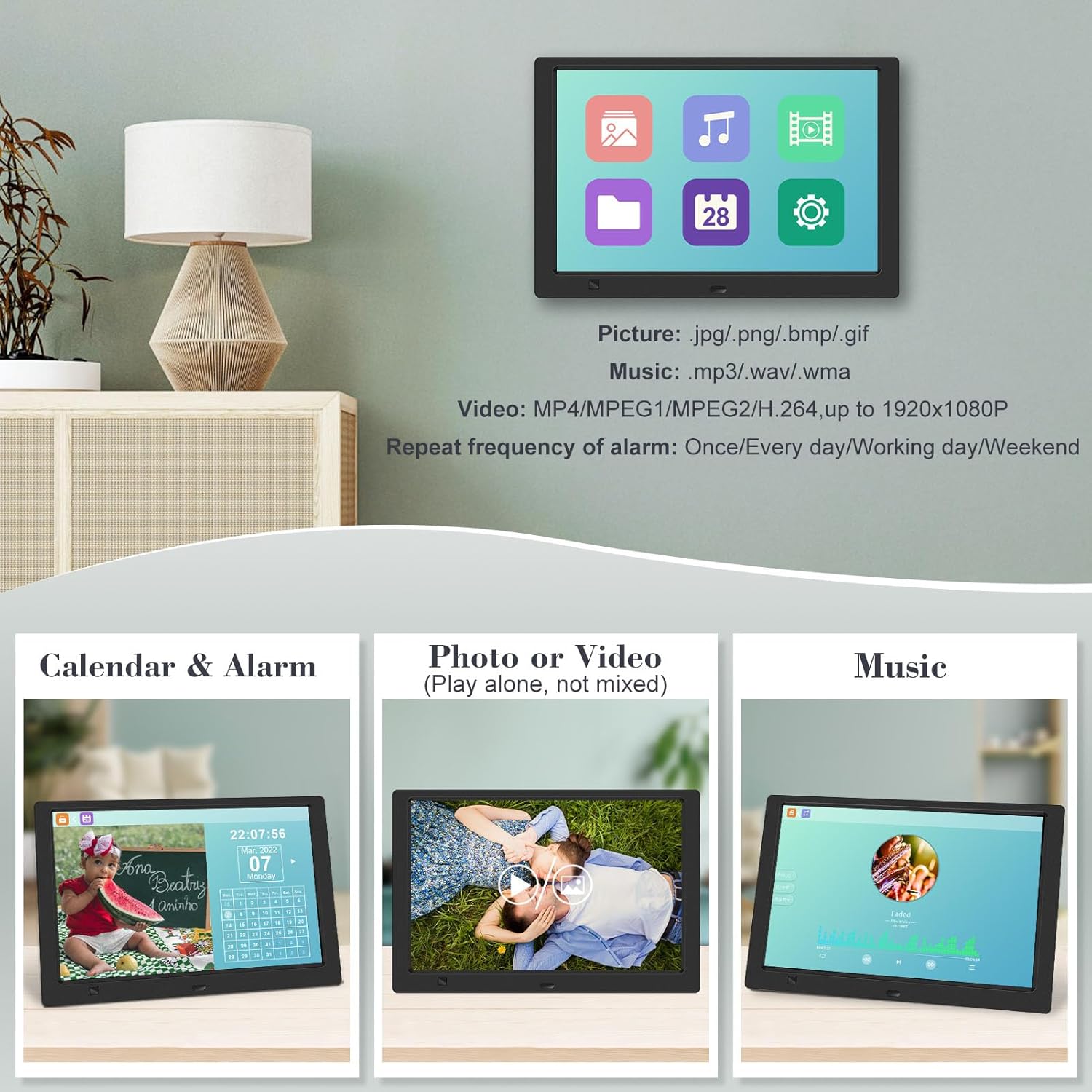
- Obrázek: View photos in a slideshow.
- Hudba: Přehrát zvuk files.
- Kalendář: Display calendar and set alarms.
- Nastavení: Configure device preferences.

Obrázek 4.2.1: The digital picture frame's interface showing options for Calendar, Photo/Video, and Music playback.
4.3 Photo Playback
- Z hlavní nabídky vyberte Obrázek nebo stiskněte FOTOGRAFIE tlačítko na dálkovém ovladači.
- The frame will automatically start a slideshow of photos found on the inserted media.
- Pořadí přehrávání: In settings, you can choose between Shuffle, Sequential, or Repeat All.
- Přechodové efekty: Select from various effects like Up/Down, Mosaic, Left/Right, or Random.
- Obrázek Preview: Access a thumbnail view of your photos.
- Otočení obrázku: Adjust the orientation of images (vertical/horizontal).
- Jas obrazovky: Adjust the display brightness in the settings menu.
Obrázek 4.3.1: The digital picture frame displaying a photo slideshow with background music and various image transition options.

Obrázek 4.3.2: Visual representation of slideshow and image preview options, including settings for playback order, display scale, picture rotation, time window, and screen brightness adjustment.
4.4 Video and Music Playback
- Z hlavní nabídky vyberte Film or Hudba, or use the corresponding buttons on the remote.
- Přejděte na požadované file using the remote control and press ENTER hrát.
- Supported video formats: MP4/MPEG1/MPEG2/H.264 up to 1920x1080.
- Supported music formats: MP3/WAV/WMA.
4.5 Motion Sensor Function
The motion sensor helps save energy by automatically turning the frame on or off.
- To enable/disable the motion sensor, go to the Nastavení menu.
- Select the motion sensor option and toggle it On or Off.
- When enabled, the frame will power on when movement is detected and turn off after a period of inactivity.
4.6 Timing On/Off Function
Set specific times for the frame to automatically power on and off.
- Přístup k Nastavení menu.
- Locate the Timing On/Off function.
- Set your desired power-on time and power-off time. You can also configure this for specific days (e.g., weekdays, weekends, every day).

Obrázek 4.6.1: Demonstrates the smart motion sensor turning on the frame when movement is detected and the timing on/off function for scheduled operation.
5. Údržba
5.1 Čištění obrazovky
Obrazovku jemně otřete měkkým, suchým hadříkem, který nepouští vlákna. V případě odolných skvrn ji lehce otřete.ampOtřete hadřík vodou nebo čisticím roztokem vhodným pro obrazovky. Nepoužívejte agresivní chemikálie ani abrazivní materiály.
5.2 Obecná péče
- Keep the frame away from direct sunlight, heat sources, and excessive moisture.
- Zabraňte pádu zařízení nebo jeho vystavení silným nárazům.
- Nepokoušejte se rám rozebírat, ztratíte tím záruku.
- Zajistěte řádné větrání kolem zařízení.
6. Řešení problémů
If you encounter issues with your digital picture frame, please refer to the following common problems and solutions:
| Problém | Možná příčina | Řešení |
|---|---|---|
| Rám se nezapne. | Napájecí adaptér není připojen nebo je zásuvka vadná. | Ujistěte se, že je napájecí adaptér bezpečně připojen k rámu a k funkční elektrické zásuvce. Zkuste jinou zásuvku. |
| No photos/videos/music displayed. | No media inserted, media not recognized, or unsupported file formát. | Ensure a USB drive or SD card is properly inserted. Check if files are in supported formats (JPG/PNG/BMP/GIF for photos; MP4/MPEG1/MPEG2/H.264 for video; MP3/WAV/WMA for music). Try reformatting the media (backup data first). |
| Dálkové ovládání nefunguje. | Battery depleted, remote not aimed correctly, or sensor obstructed. | Replace the remote control battery. Ensure the remote is pointed directly at the frame's infrared sensor. Remove any obstructions between the remote and the frame. |
| Obrazovka je prázdná nebo zamrzlá. | Dočasná softwarová závada. | Odpojte napájecí adaptér, počkejte 10 sekund a poté jej znovu zapojte, abyste restartovali rámeček. |
7. Specifikace
| Funkce | Specifikace |
|---|---|
| Velikost obrazovky | 10.1 palce |
| Rezoluce | 1920 x 1080 (1080p HD IPS) |
| Poměr stran | 16:9 |
| Viewúhel | 180° |
| Kompatibilní zařízení | SD Card, USB Drive |
| Podporované formáty fotografií | JPG, PNG, BMP, GIF |
| Podporované video formáty | MP4, MPEG1, MPEG2, H.264 (up to 1920x1080) |
| Podporované hudební formáty | MP3, WAV, WMA |
| Pohybový senzor | Ano |
| Číslo modelu položky | KECAG-CA-001 |
| Rozměry produktu | 6.4 x 9.7 x 0.99 palce |
| Hmotnost položky | 1.59 libry |
| Baterie (dálkový ovladač) | 1 lithiová kovová baterie (součástí balení) |
| Výrobce | KECAG |
8. Záruka a podpora
For warranty information, please refer to the documentation included with your product packaging. KECAG provides 24-hour customer service to assist with any issues or questions you may have regarding your digital picture frame. Please contact customer support for assistance.


