
wogree S66
Uživatelská příručka k 2.1kanálovému soundbaru Wogree
Model: S66
Zavedení
Děkuji za nákupasing the Wogree 2.1ch Soundbar with Built-in Subwoofer. This manual provides essential information for setting up, operating, and maintaining your new soundbar. Please read it thoroughly before use to ensure optimal performance and safety.
Důležité bezpečnostní informace
Abyste snížili riziko úrazu elektrickým proudem, požáru nebo poškození jednotky, dodržujte prosím následující bezpečnostní opatření:
- Nevystavujte tento spotřebič kapající nebo stříkající vodě.
- Na přístroj nepokládejte předměty naplněné tekutinami, jako jsou vázy.
- Zajistěte dostatečné větrání. Neblokujte žádné větrací otvory.
- Neinstalujte v blízkosti zdrojů tepla, jako jsou radiátory, tepelné regulátory, kamna nebo jiná zařízení (včetně amplifikátory), které produkují teplo.
- Chraňte napájecí kabel před šlapáním nebo přiskřípnutím, zejména u zástrček, zásuvek a v místě, kde vychází z přístroje.
- Používejte pouze nástavce/příslušenství určené výrobcem.
- Odpojte toto zařízení během bouřky s blesky nebo když se delší dobu nepoužívá.
- Veškeré opravy svěřte kvalifikovanému servisnímu personálu. Servis je nutný, pokud bylo zařízení jakýmkoli způsobem poškozeno, například je poškozen napájecí kabel nebo zástrčka, pokud do zařízení vnikla tekutina nebo do něj spadly předměty, zařízení bylo vystaveno dešti nebo vlhkosti, nefunguje normálně. , nebo byla vypuštěna.
Obsah balení
Zkontrolujte prosím, zda jsou ve vašem balení obsaženy všechny níže uvedené položky:
- Wogree 2.1ch Soundbar (Model S66)
- Dálkové ovládání
- Optický kabel
- Stereo audio kabel RCA na 3.5 mm
- Napájecí adaptér
- Mount Screws (for wall mounting)
- Uživatelská příručka (tento dokument)

Image: All items included in the Wogree Soundbar package.
Konec produktuview
The Wogree 2.1ch Soundbar is designed to enhance your home audio experience with clear sound and deep bass. It features a compact design suitable for various TV sizes and multiple connectivity options.
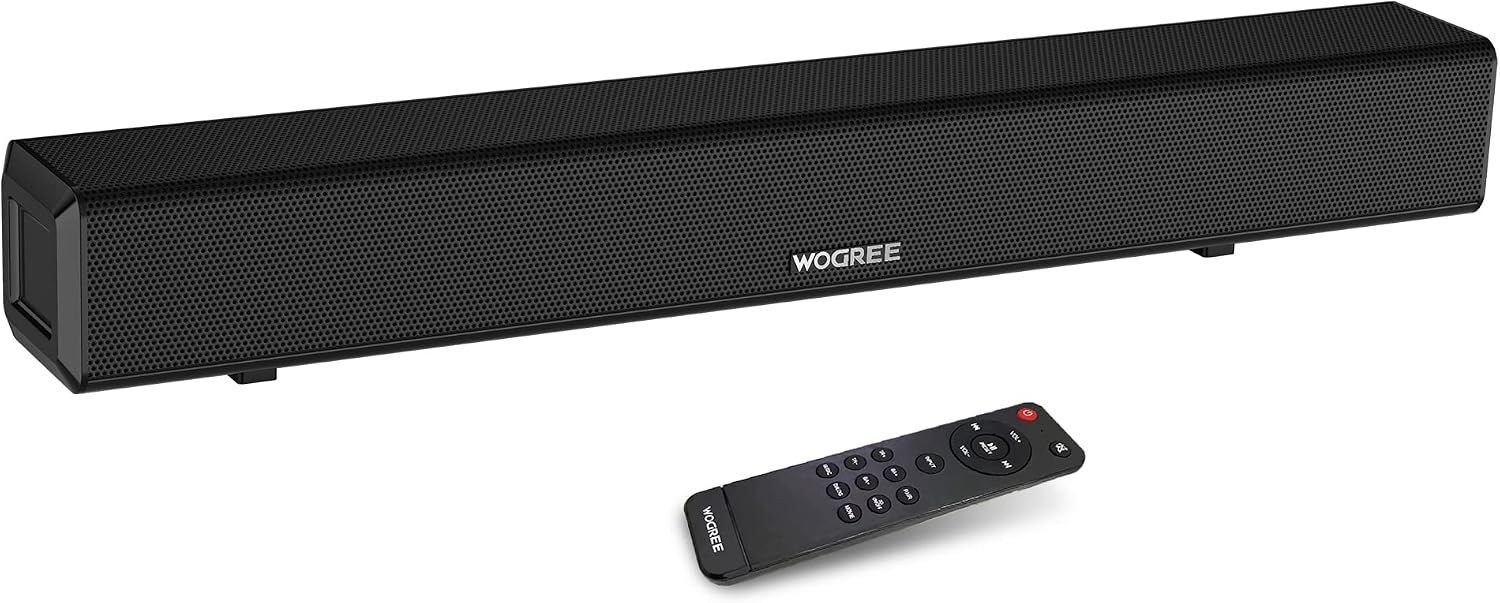
Obrázek: Přední strana view of the Wogree Soundbar with its remote control.
Klíčové vlastnosti:
- 2.1kanálový zvuk: Delivers clear sound with integrated bass.
- Vestavěný subwoofer: Provides enhanced bass performance without a separate unit.
- Výkon 80 W: Powerful audio for an immersive experience.
- Compact 24-inch Design: Fits easily in front of most TVs.
- Více vstupů: Supports Bluetooth, TV-ARC (HDMI), Optical, AUX, Line-in, and USB.
- Více režimů ekvalizéru: Optimalizovaný zvuk profiles for Music, Movie, Dialogue, and 3D audio.


Image: Left: Internal speaker configuration. Right: Visual representation of sound modes.
Nastavení
Follow these steps to set up your Wogree Soundbar:
1. Umístění
Place the soundbar on a stable, flat surface directly in front of your TV, or mount it on the wall below your TV using the provided screws. Ensure there are no obstructions in front of the soundbar to allow for optimal sound projection.

Image: Soundbar positioned below a television.
2. Připojování k napájení
- Connect the power adapter to the DC 18V input port on the back of the soundbar.
- Zapojte druhý konec napájecího adaptéru do elektrické zásuvky.
3. Audio připojení
Choose one of the following connection methods based on your TV's available ports:

Image: Available input ports on the back of the soundbar.
- HDMI (TV ARC):
- Connect an HDMI cable (not included) from the TV ARC port on the soundbar to the HDMI ARC port on your TV.
- Ensure your TV's audio output is set to HDMI ARC or external speakers. This connection allows your TV remote to control the soundbar volume and power.
- Optický:
- Connect the provided Optical cable from the OPTICAL port on the soundbar to the Optical Out port on your TV.
- Set your TV's audio output to "Optical" and ensure the digital audio format is set to "PCM" (Pulse Code Modulation).
- AUX / Line-in:
- Connect the provided Stereo RCA to 3.5mm Audio Cable from the LINE IN (AUX L/R) ports on the soundbar to the corresponding audio output ports on your TV or other audio device.
- Alternatively, use a 3.5mm to 3.5mm audio cable (not included) to connect to the AUX port.
- Bluetooth:
- Power on the soundbar. Press the "Input" button on the remote or the soundbar to select Bluetooth mode (indicated by a blue LED).
- Enable Bluetooth on your device (smartphone, tablet, etc.) and search for "Wogree S66". Select it to pair.
- Once paired, the blue LED will stop flashing and remain solid.

Image: Bluetooth connection setup.
- USB:
- Insert a USB flash drive (FAT32 format, max 32GB) into the USB port on the soundbar.
- The soundbar will automatically switch to USB mode and begin playing compatible audio files.
Návod k obsluze
Your Wogree Soundbar can be controlled using the included remote control or the physical buttons on the unit.
Funkce dálkového ovládání:

Image: Remote control and physical buttons.
- Vypínač: Zapíná/vypíná soundbar.
- Vstupní tlačítko: Cycles through input modes (Bluetooth, TV-ARC, Optical, AUX, USB).
- VOL +/-: Adjusts the main volume.
- TR+/-: Upravuje úrovně výšek.
- BA+/-: Nastavuje úrovně basů.
- Tlačítko ztlumení: Vypne nebo vypne zvuk.
- Přehrát/pozastavit: Plays or pauses audio (Bluetooth/USB mode).
- Předchozí další: Skips to the previous or next track (Bluetooth/USB mode).
- EQ Modes (Music, Movie, Dialog, 3D): Selects preset equalizer modes for optimized sound.
Fyzická tlačítka:
On the side of the soundbar, you will find basic controls:
- Vypínač: Short press to change input, long press to power On/Off.
- Hlasitost +/-: Upravuje hlasitost.
Údržba
Správná péče zajistí dlouhou životnost vašeho soundbaru:
- Čištění: K čištění povrchu soundbaru používejte měkký, suchý hadřík. Nepoužívejte tekuté čisticí prostředky ani aerosolové spreje.
- Větrání: Udržujte větrací otvory čisté od prachu a nečistot.
- Skladování: Pokud budete soundbar skladovat delší dobu, odpojte jej ze zásuvky a uložte jej na chladném a suchém místě.
- Vyhněte se vlhkosti: Do not expose the soundbar to water or excessive humidity.
Odstraňování problémů
Pokud se se soundbarem setkáte s problémy, podívejte se na následující běžné problémy a jejich řešení:
| Problém | Možná příčina | Řešení |
|---|---|---|
| Žádný zvuk ze soundbaru. |
|
|
| Problémy s párováním Bluetooth. |
|
|
| Dálkové ovládání nefunguje. |
|
|
Specifikace
| Funkce | Detail |
|---|---|
| Číslo modelu | S66 |
| Typ reproduktoru | Surround Sound (2.1 Channel) |
| Maximální výstupní výkon reproduktoru | 80 wattů |
| Rozměry produktu | 3"H x 24"Š x 3"V |
| Hmotnost položky | 5.3 libry |
| Technologie připojení | Wired (TV-ARC, Optical, AUX, USB), Wireless (Bluetooth) |
| Verze Bluetooth | 5.0 (implied from A+ content image) |
| Kontrolní metoda | Remote Control, Physical Buttons |
| Speciální funkce | Bass Boost, Hi Res Audio, LED Light, USB Port, Built-in DSP, 4 EQ Modes |
Záruka a podpora
The Wogree 2.1ch Soundbar comes with a Full Warranty. For detailed warranty information, please refer to the warranty card included in your package or contact Wogree customer support.
If you require technical assistance or have questions about your product, please visit the official Wogree store or contact their customer service department. Contact information can typically be found on the product packaging or the brand's official webmísto.
Wogree Brand Store: Visit Wogree Store on Amazon
Ask a question about this manual
Ask about setup, troubleshooting, compatibility, parts, safety, or missing instructions. Manuals+ will review the question and use this page’s manual context to help answer it.