1. Úvod
This manual provides essential information for the proper use and maintenance of your Headwolf FPad 1 Android Tablet. Please read this guide thoroughly before operating the device to ensure optimal performance and longevity. The Headwolf FPad 1 is an 8-inch tablet designed for everyday use, featuring a responsive display and the Android 12 operating system.
2. Obsah balení
Upon unboxing your Headwolf FPad 1 tablet, please verify that all the following items are included:
- Headwolf FPad 1 Tablet
- Uživatelská příručka (tento dokument)
- Power Adapter (USB-A wall charger)
- Nabíjecí kabel USB-A na USB-C
Note: The tablet may come with a pre-applied screen protector for immediate use.
3. Device Layout and Overview
Familiarize yourself with the physical components and ports of your Headwolf FPad 1 tablet.

Obrázek 3.1: Přední a zadní strana view of the Headwolf FPad 1 Tablet.
3.1. Zadní panel
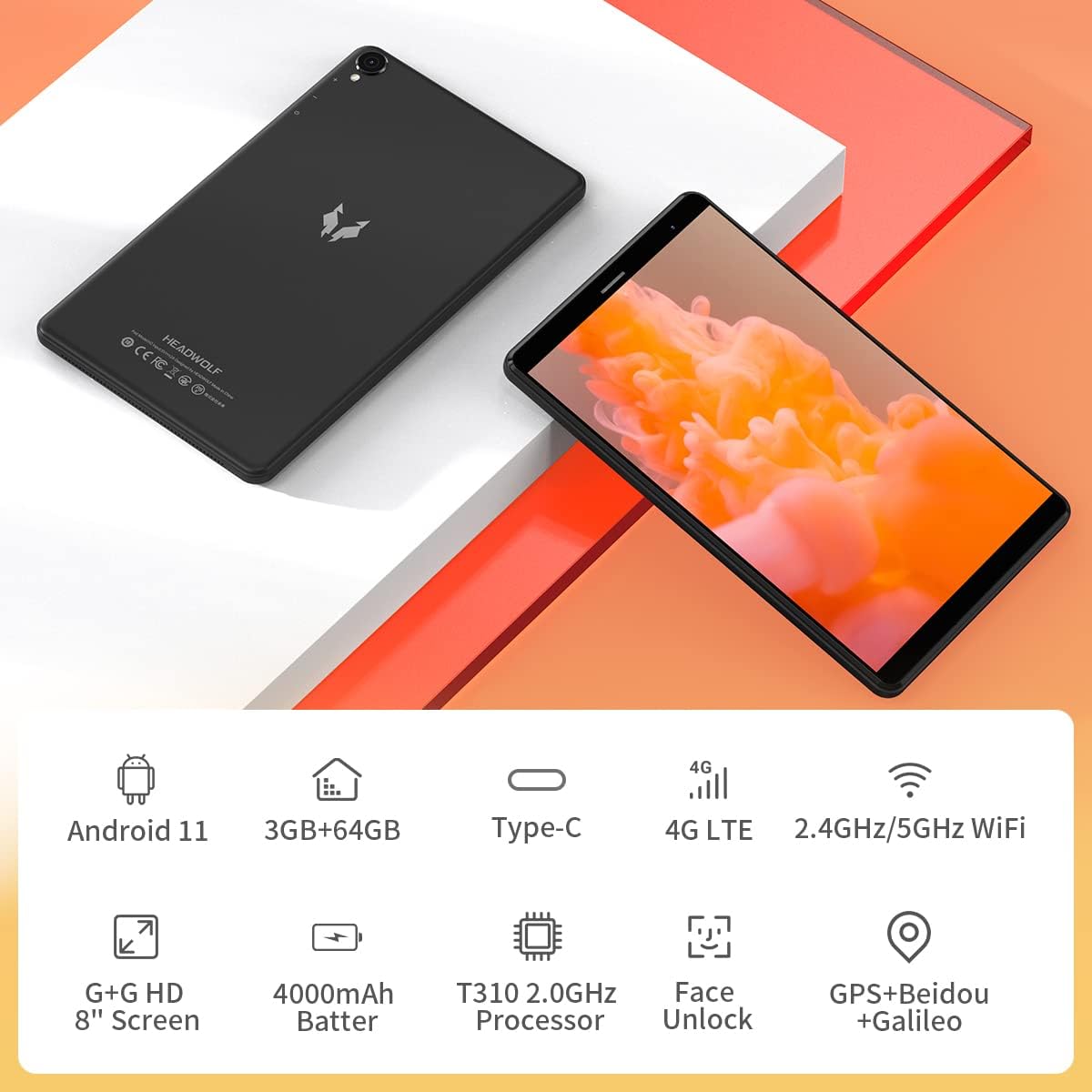
Figure 3.2: The back panel features the Headwolf logo, regulatory markings, and the rear camera module.
3.2. Přední panel

Figure 3.3: The front of the tablet displays the 8-inch screen, the front-facing camera, and an earpiece for calls.
3.3. Boční Views a porty

Figure 3.4: The side of the tablet includes the power button, volume rocker, 3.5mm headphone jack, SIM card slot, MicroSD card slot, and USB-C charging port.
- Vypínač: Located on the right side, used to power on/off or wake/sleep the device.
- Kolébkový ovladač hlasitosti: Adjacent to the power button, controls audio volume.
- Zadní kamera: 5MP camera with LED flash, located on the back panel.
- Přední kamera: 5MP camera, located on the front bezel above the screen.
- Port USB-C: For charging and data transfer, located on the top edge.
- 3.5mm konektor pro sluchátka: For connecting wired headphones, located on the top edge.
- Slot pro SIM kartu: Supports 4G LTE connectivity (check regional compatibility), located on the top edge.
- Slot pro microSD kartu: For expandable storage, located on the top edge.
- Řečníci: Nachází se na spodním okraji.
4. Nastavení
4.1. Počáteční zapnutí
- Press and hold the Power Button on the right side of the tablet until the Headwolf logo appears on the screen.
- The tablet will boot up, displaying the Android welcome screen.
4.2. Výběr jazyka a regionu
Follow the on-screen prompts to select your preferred language and region. This will configure the tablet's default settings.
4.3. Síťové připojení
Connect your tablet to a Wi-Fi network to access the internet and complete the setup process. You may also insert a 4G LTE SIM card for mobile data connectivity (if supported in your region).
4.4. Nastavení účtu Google
Přihlaste se pomocí svého účtu Google nebo si vytvořte nový. To je nutné pro stahování aplikací z Obchodu Google Play a přístup ke službám Google.
5. Návod k obsluze
5.1. Základní navigace
- Gesta na dotykové obrazovce: Klepnutím vyberete, přejetím prstem posouváte, přiblížením rozevřením prstů.
- Domovská obrazovka: Access your apps and widgets. Swipe left or right to navigate between screens.
- Panel oznámení: Přejetím prstem dolů od horního okraje obrazovky získáte přístup k oznámením a rychlému nastavení.
5.2. Konektivita
- Wi-Fi: Go to Settings > Network & Internet > Wi-Fi to connect to available networks. The tablet supports 2.4GHz and 5GHz Wi-Fi.
- Bluetooth: Go to Settings > Connected devices > Bluetooth to pair with Bluetooth accessories (e.g., headphones, speakers). The tablet supports Bluetooth 5.0.
- 4G LTE: If a compatible SIM card is inserted, mobile data can be enabled via Settings > Network & Internet > Mobile network.
- GPS: The tablet has built-in GPS for navigation and location services.
5.3. Fotoaparáty
The Headwolf FPad 1 features 5MP front and rear cameras.

Figure 5.1: The tablet is equipped with dual 5MP cameras and supports face unlock.
- Fotit: Open the Camera app, select photo mode, and tap the shutter button.
- Záznam videa: In the Camera app, switch to video mode and tap the record button. Video recording is supported up to 1080p.
- Nastavení fotoaparátu: Adjust settings like filters, white balance, and composition lines within the Camera app.
5.4. Konzumace médií
Enjoy videos, music, and e-books on your tablet's HD display.

Figure 5.2: The 8-inch HD IPS display provides a clear viewzkušenosti pro různá média.
- Přehrávání videa: Use pre-installed apps like YouTube or download others from the Play Store.
- Zvuk: The tablet features stereo speakers. For a more immersive experience, connect headphones via the 3.5mm jack or Bluetooth.
5.5. Hraní
The UNISOC T310 Quad-Core processor allows for smooth performance in most casual games. For graphically intensive games, performance may vary, and lower settings might be required for optimal gameplay.

Figure 5.3: The tablet's processor is capable of handling various gaming applications.
6. Údržba
- Čištění: K čištění obrazovky a těla přístroje používejte měkký hadřík, který nepouští vlákna. Vyhněte se agresivním chemikáliím.
- Péče o baterie: Pro prodloužení životnosti baterie se vyhýbejte extrémním teplotám a častému úplnému vybíjení baterie.
- Aktualizace softwaru: Pravidelně kontrolujte a instalujte aktualizace systému, abyste zajistili optimální výkon a zabezpečení.
- Správa úložiště: Pravidelně odstraňujte nepotřebné files and apps to free up internal storage. Consider using a MicroSD card for additional storage.
7. Řešení problémů
This section addresses common issues you might encounter with your Headwolf FPad 1 tablet.
7.1. Zařízení se nezapíná
- Ensure the battery is charged. Connect the tablet to the power adapter and wait a few minutes before attempting to power it on again.
- Press and hold the Power Button for at least 10-15 seconds to perform a forced restart.
7.2. Slow Performance/Freezing
- Zavřete nepoužívané aplikace běžící na pozadí.
- Vymažte data mezipaměti z aplikací a systému.
- Restartujte tablet.
- Zajistěte dostatek volného úložného prostoru.
7.3. Problémy s připojením k Wi-Fi
- Toggle Wi-Fi off and on in Quick Settings or Settings.
- Restartujte Wi-Fi router.
- Zapomeňte na síť a znovu se připojte.
7.4. Camera Quality
The 5MP cameras are designed for basic photography and video calls. For optimal results, ensure good lighting conditions. Camera performance may not be comparable to high-end smartphone cameras.
8. Specifikace
| Funkce | Specifikace |
|---|---|
| Značka | Headwolf |
| Název modelu / řada | FPad 1 / F1 |
| Číslo modelu položky | F2 |
| Operační systém | Android 12 (some marketing may refer to Android 11) |
| Velikost obrazovky | 8 palce |
| Rozlišení displeje | 1280x800 HD IPS |
| Procesor | UNISOC T310 Quad-Core A75 (2 GHz) |
| BERAN | 3 GB |
| Interní úložiště | 64 GB |
| Rozšiřitelné úložiště | MicroSD up to 512GB (some sources indicate up to 2TB) |
| Zadní kamera | 5 MP |
| Přední kamera | 5 MP |
| Kapacita baterie | 4000mAh (up to 7-8 hours usage) |
| Nabíjecí port | USB Type-C |
| Bezdrátové připojení | 5G WiFi, Bluetooth 5.0, 4G LTE |
| Navigace | GPS, Beidou, Galileo |
| Rozměry (DxŠxV) | 8.31 x 0.38 x 4.97 palce |
| Hmotnost položky | 11.4 unce (přibližně 320 g) |
| Barva | Purple (as listed in specifications, though product images show black/grey) |
9. Záruka a podpora
For warranty information and technical support, please refer to the documentation included with your purchase or visit the official Headwolf webUschovejte si doklad o koupi pro případné reklamace.


