Zavedení
The Browning Spec Ops Elite HP5 is a high-performance trail camera designed for capturing wildlife images and videos, as well as for security surveillance. It features advanced imaging capabilities, robust construction, and user-friendly controls to ensure reliable operation in various outdoor conditions. This manual provides detailed instructions for setting up, operating, maintaining, and troubleshooting your camera.

Obrázek: Přední strana view of the Browning Spec Ops Elite HP5 Trail Camera, showcasing its camouflage design and lens.
Klíčové vlastnosti
- Zobrazení ve vysokém rozlišení: Captures 24MP still images for exceptional detail.
- Full HD video: Records 1920 x 1080p HD+ videos with sound.
- Rychlá rychlost spouště: Adjustable 0.1-0.7 second trigger speed to capture fast-moving subjects.
- Extended Night Vision: Invisible infrared (IR) illumination reaches up to 100 feet, ideal for discreet night surveillance.
- Illuma-Smart Technology: Automatically adjusts IR flash for optimal night photos.
- Long Detection Range: Features an 80ft detection range.
- Programmable Delay: Customizable picture delay from 1 second to 60 minutes.
- Multi-Shot & Rapid-Fire: Options for capturing multiple images per trigger or rapid-fire sequences.
- Barva ViewObrazovka: Built-in 2-inch color screen for easy setup and playback.
- SDXC Card Support: Podporuje paměťové karty až do 512 GB.
- Odolný design: Rugged and water-resistant construction (IP54 rated) for outdoor use.
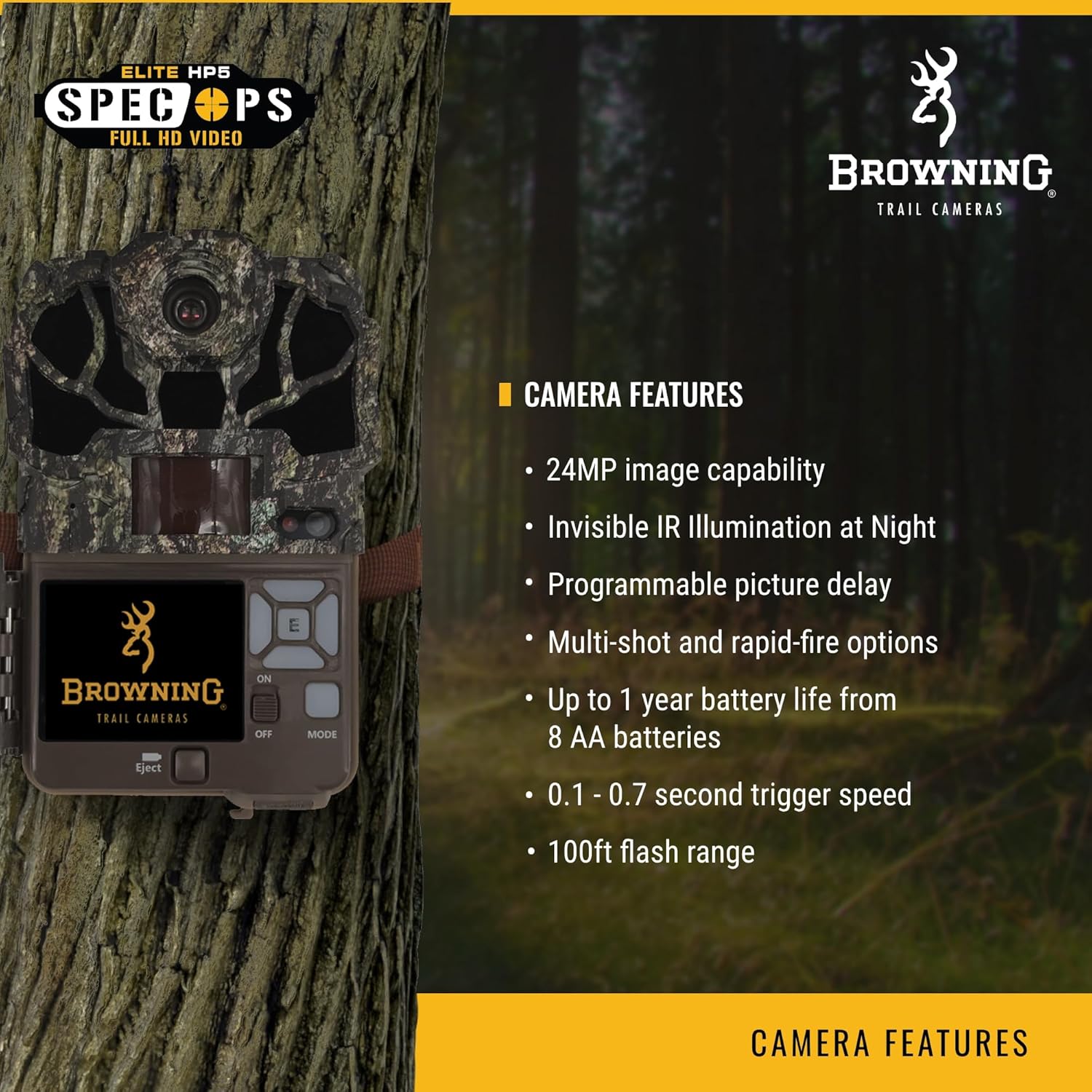
Image: A visual representation of the camera highlighting its key features like 24MP capability and invisible IR illumination.

Obrázek: Další view emphasizing advanced features such as 1080p Full HD videos and the 2-inch color view obrazovka.
Nastavení
1. Instalace baterie
- Otevřete kryt kamery pomocí uvolňovačeasing the latches on the side.
- Locate the battery compartment. The Spec Ops Elite HP5 requires 8 AA batteries.
- Vložte baterie a dbejte na správnou polaritu (+/-) vyznačenou uvnitř přihrádky.
- Bezpečně uzavřete přihrádku na baterie.
2. Vložení SD karty
- S otevřeným krytem kamery vyhledejte slot pro SD kartu.
- Insert a compatible SDXC memory card (up to 512GB) into the slot until it clicks into place. Ensure the card is inserted with the label facing the correct direction.
- Chcete-li SD kartu vyjmout, jemně ji zatlačte, dokud nezaklapne, poté ji uvolněte a karta se vysune.

Image: The camera with its side compartment open, showing the battery and SD card slots, and the internal display screen.
3. Montáž kamery
The camera can be mounted using the rear housing bracket or the bottom standard 1/4"-20 thread. Use the included strap or a compatible mounting accessory to secure the camera to a tree or post. Ensure the camera is stable and pointed towards the desired area of surveillance.

Image: Two individuals setting up the Browning Spec Ops Elite HP5 trail camera in an outdoor environment, demonstrating typical mounting.
Obsluha fotoaparátu
1. Zapnutí a počáteční nastavení
- After installing batteries and SD card, slide the power switch to the 'ON' position.
- The 2-inch color viewing screen will activate.
- Navigate the menu using the directional buttons and 'OK' button to set the date, time, and other initial preferences.
2. Výběr provozního režimu
The camera offers various operation modes:
- Trail Cam (Photo Mode): Zachycuje statické snímky při detekci pohybu.
- Režim videa: Nahrává videoklipy při detekci pohybu.
- Time Lapse Plus: Captures images at set intervals over a period, in addition to motion-triggered images.
Access the 'Operation Mode' setting in the menu to select your desired mode. For optimal wildlife monitoring, 'Video Mode' is often preferred for capturing animal behavior with sound.
3. Úprava nastavení
Within the menu, you can customize various settings:
- Kvalita fotografie: Select image resolution (e.g., 24MP).
- Rozlišení videa: Choose video quality (e.g., 1080p).
- Rychlost spouštění: Adjust the speed at which the camera reacts to motion.
- Zpoždění detekce: Set the time interval between consecutive captures.
- Režim blesku: Configure night vision settings.
- ID fotoaparátu: Assign a unique ID for easier organization if using multiple cameras.
4. ViewZachycení médií
Use the 'Playback' option in the menu to review photos and videos directly on the camera's screen. You can also remove the SD card and view media on a computer or compatible device.

Image: A high-quality image of a deer captured by the Browning Spec Ops Elite HP5, demonstrating the camera's performance in the field.
Údržba
- Čištění: Regularly wipe the camera lens and IR sensors with a soft, lint-free cloth to ensure clear images. Avoid abrasive materials or harsh chemicals.
- Výměna baterie: Replace all 8 AA batteries when the low battery indicator appears or when performance degrades. Use high-quality alkaline or lithium batteries for best results.
- Správa SD karet: Periodically format your SD card using the camera's menu option to maintain optimal performance and prevent data corruption. Back up important media before formatting.
- Skladování: When not in use, store the camera in a cool, dry place away from direct sunlight and extreme temperatures. Remove batteries if storing for extended periods.
- Ochrana proti počasí: Although water-resistant, avoid submerging the camera in water. Ensure all latches are securely closed during outdoor deployment to protect internal components from moisture.
Odstraňování problémů
| Problém | Možná příčina / řešení |
|---|---|
| Kamera se nezapíná | Check battery polarity. Replace batteries with fresh ones. Ensure power switch is in 'ON' position. |
| Nebyly pořízeny žádné snímky/videa | Ensure SD card is inserted correctly and not full. Check 'Operation Mode' settings. Verify motion sensor is clear and active. Format SD card. |
| Špatná kvalita obrazu/videa v noci | Clean lens and IR sensors. Ensure flash range is adequate for subject distance. Check battery level. |
| Krátká výdrž baterie | Use high-quality alkaline or lithium batteries. Reduce frequency of captures or video length settings. Extreme cold weather can reduce battery performance. |
| Kamera nedetekuje pohyb | Ensure camera is positioned correctly (not facing direct sunlight or heat sources). Clear any obstructions from the sensor. Adjust sensitivity settings. |
Specifikace
| Funkce | Detail |
|---|---|
| Model | BTC-8E-HP5 |
| Rozlišení statických snímků | 24 MP |
| Rozlišení videa | 1920 x 1080p HD+ with Sound |
| Rychlost spouštění | Nastavitelné 0.1 - 0.7 sekund |
| Doba zotavení | 0.5 sekund |
| Rozsah nočního vidění | 100 feet (Invisible IR) |
| Rozsah detekce | 80 stop |
| Zdroj napájení | 8 AA baterie |
| Podpora paměťových karet | Až 512 GB SDXC |
| Zobrazit | 2-inch Color Viewna obrazovce |
| Rozměry (D x Š x V) | 3.5 x 10.5 x 5.25 palce |
| Hmotnost | 0.005 unce (cca) |
| Materiál | Plast |
| Odolnost vůči povětrnostním vlivům | IP54 |

Image: A detailed specification chart for the Spec Ops Elite HP5, outlining technical data.
Záruka a podpora
The Browning Spec Ops Elite HP5 Trail Camera comes with a 1letá omezená záruka. This warranty covers defects in workmanship and materials under normal conditions of use. Browning will repair or replace the unit with a new or refurbished unit as needed.
For technical support, warranty claims, or additional product information, please visit the official Browning webnebo kontaktujte jejich oddělení zákaznických služeb. Můžete také navštívit Browning Store on Amazon pro více produktů a zdrojů.


