Zavedení
Děkuji za nákupasing the Naxa NT-1400 Portable 14.1-inch TV and Digital Multimedia Player. This device is designed to provide portable entertainment, featuring a built-in ATSC tuner for over-the-air HD TV reception and multimedia playback capabilities via USB. This manual provides essential information for the proper setup, operation, and maintenance of your device. Please read it thoroughly before use and retain it for future reference.
Bezpečnostní informace
- Zdroj napájení: Use only the provided AC adapter or DC car cord. Ensure the voltage odpovídá požadavkům na zařízení.
- Bezpečnost baterie: The device contains a rechargeable lithium battery. Do not expose to extreme temperatures, puncture, or disassemble. Dispose of batteries according to local regulations.
- Voda a vlhkost: Nevystavujte jednotku dešti, vlhkosti ani ji neponořujte do vody.
- Větrání: Zajistěte dostatečné větrání kolem jednotky. Neblokujte větrací otvory.
- Čištění: Před čištěním odpojte napájení. Použijte měkký, suchý hadřík. Nepoužívejte tekuté čisticí prostředky.
- Servis: Nepokoušejte se o opravu jednotky sami. Veškerý servis svěřte kvalifikovanému personálu.
Obsah balení
Ověřte, zda jsou v balení obsaženy všechny níže uvedené položky:
- Naxa NT-1400 Portable TV Unit
- Dálkové ovládání
- ETL AC Adapter
- DC Car Cord
- Externí anténa
- A/V kabel
- Stolní stojan
- Uživatelská příručka (tento dokument)

Image: Included accessories for the Naxa NT-1400.
Konec produktuview
The Naxa NT-1400 features a 14.1-inch LCD screen with 1280 x 800 resolution, a built-in ATSC tuner for digital TV, and various input options for multimedia playback.

Obrázek: Přední strana view of the Naxa NT-1400 Portable TV.

Image: Naxa NT-1400 in a portable setting, such as an RV.
Porty a ovládací prvky
Familiarize yourself with the various ports and controls located on the unit:
- MRAVENEC: Connect the external antenna for TV reception.
- HD-IN: HDMI input for connecting external high-definition devices.
- VGA: VGA input for connecting to computers or other compatible devices.
- AV-IN/AV-OUT: Audio/Video input and output for connecting to older devices or external displays.
- Jack pro sluchátka (3.5 mm): Pro soukromý poslech.
- USB port: Pro přehrávání multimédií filez USB disku.
- DC 12V ON/OFF: Power input for the AC adapter or DC car cord, with a power switch.
- Ovládací prvky na předním panelu: Volume, Channel, Menu, Input Source, Power.

Obrázek: Boční view of the Naxa NT-1400 showing input/output ports.
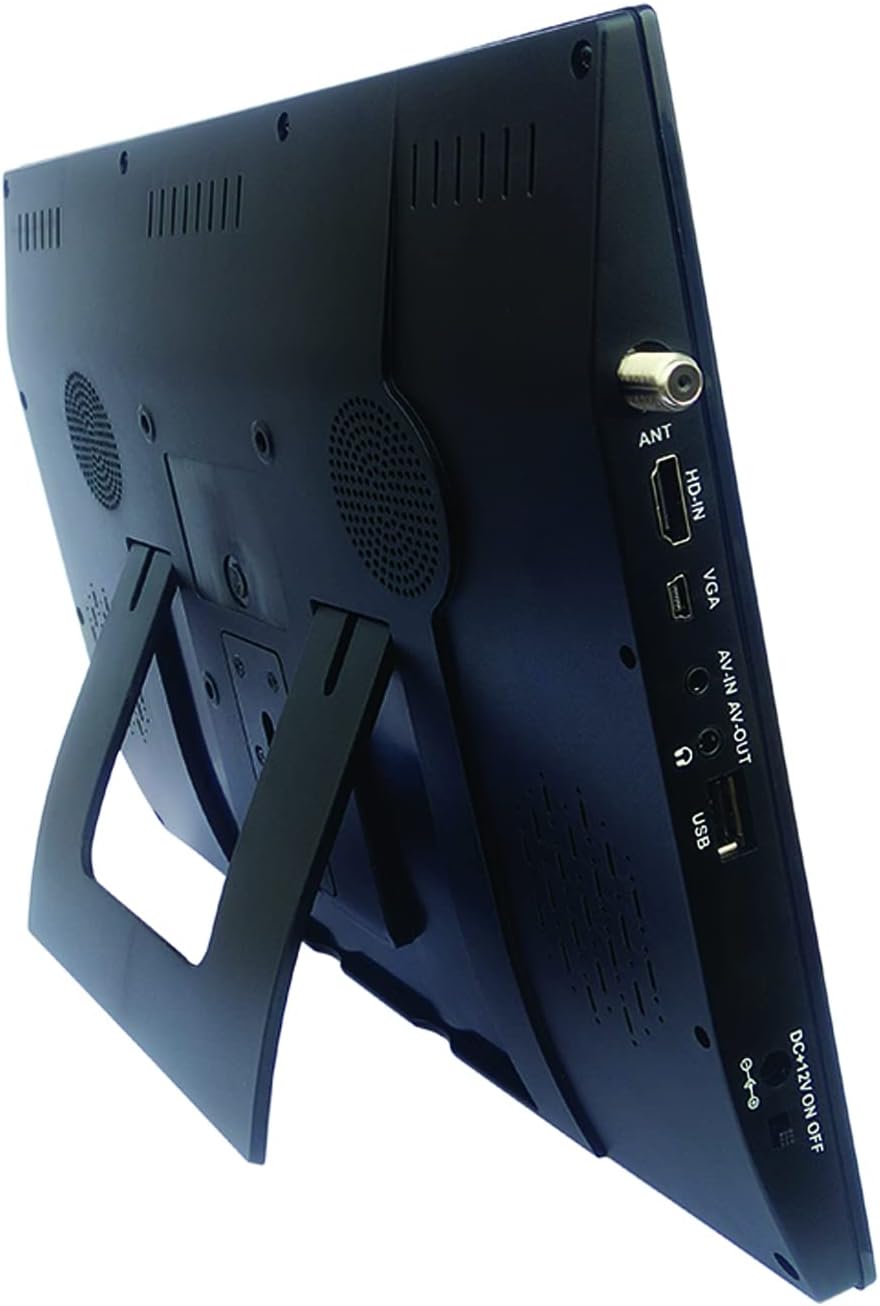
Image: Naxa NT-1400 with the integrated kickstand.
Nastavení
1. Napájení zařízení
- Napájení střídavým proudem: Connect the ETL AC adapter to the DC 12V input on the unit and plug it into a standard wall outlet.
- Napájení z auta stejnosměrným proudem: Connect the DC car cord to the DC 12V input on the unit and plug it into your vehicle's 12V accessory socket.
- Interní baterie: The unit has a built-in rechargeable lithium battery. Ensure it is charged before portable use. The battery charges automatically when connected to AC or DC power.
2. Připevnění stojanu
- The unit includes an integrated flip-out kickstand for quick setup.
- For more stable placement, attach the provided tabletop stand to the back of the unit using the designated mounting points.
3. Připojení antény
For optimal over-the-air TV reception, connect the external antenna to the ANT port on the side of the unit. Position the antenna in an area with good signal strength.
4. Počáteční skenování kanálů
After powering on the device for the first time, navigate to the 'Channel Setup' or 'Auto Scan' option in the main menu to scan for available digital TV channels. This process may take several minutes.
Návod k obsluze
1. Zapnutí/vypnutí
Press the 'POWER' button on the unit or the remote control to turn the device on or off.
2. Výběr vstupního zdroje
Press the 'MODE' or 'INPUT' button on the unit or remote control to cycle through available input sources: TV, USB, HDMI, VGA, AV.
3. Provoz TV
- Výběr kanálu: Use the 'CH+' / 'CH-' buttons on the unit or the remote control to change channels. You can also enter channel numbers directly using the remote's numeric keypad.
- Ovládání hlasitosti: Use the 'VOL+' / 'VOL-' buttons on the unit or the remote control to adjust the volume.
- Navigace v nabídce: Press the 'MENU' button to access settings. Use arrow keys and 'OK' on the remote to navigate and confirm selections.
4. Použití sluchátek
Plug standard 3.5mm headphones into the headphone jack for private audio listening. The internal speakers will automatically mute.
Přehrávání multimédií
The Naxa NT-1400 supports playback of various multimedia filez USB disku.
1. Připojení USB disku
Insert your USB flash drive into the USB port on the side of the unit.
2. Accessing USB Media
Switch the input source to 'USB'. The device will display a file browser. Navigate through your folders and select the desired media file.
3. Podporováno File Formáty
- Video: MPEG, XVID, AVC, MP4, H.264, HEVC (H.265), FLV, MKV
- Zvuk: MP3
- Obraz: JPEG
- Text: TXT
Údržba
Čištění
Ensure the unit is powered off and unplugged before cleaning. Use a soft, dry, lint-free cloth to wipe the screen and exterior surfaces. Do not use liquid cleaners, aerosols, or abrasive materials.
Péče o baterie
To prolong battery life, avoid fully discharging the battery frequently. If storing the unit for an extended period, charge the battery to approximately 50% and store in a cool, dry place.
Skladování
When not in use, store the unit in a clean, dry environment away from direct sunlight and extreme temperatures.
Odstraňování problémů
- Bez napájení: Ensure the AC adapter or DC car cord is securely connected and the power switch is in the 'ON' position. Check if the internal battery is charged.
- Žádný televizní signál: Verify the external antenna is properly connected and positioned. Perform an 'Auto Scan' for channels. Signal strength can vary by location.
- Žádný zvuk: Check the volume level. Ensure headphones are not plugged in unless intended. Verify the audio settings in the menu.
- Problémy s přehráváním z USB: Ensure the USB drive is formatted correctly (FAT32 is generally recommended). Verify that the media files jsou v podporovaných formátech.
- Dálkové ovládání nefunguje: Check the battery in the remote control. Ensure there are no obstructions between the remote and the unit's IR sensor.
Specifikace
| Funkce | Specifikace |
|---|---|
| Značka | Naxa |
| Číslo modelu | NT-1400 |
| Velikost obrazovky | 14.1 palce |
| Technologie displeje | LCD |
| Rezoluce | 1280 x 800 |
| Poměr stran | 16:9 |
| Obnovovací frekvence | 50/60 Hz |
| Typ tuneru | Built-in Digital ATSC TV Tuner |
| Konektivita | HDMI, USB, VGA, AV-IN/AV-OUT |
| Typ reproduktoru | Vestavěný |
| Baterie | 1 Lithium Ion (součástí balení) |
| Zdroj napájení | AC Adapter, DC Car Cord, Internal Battery |
| Rozměry produktu | 1.5"H x 13.45"Š x 9.2"V |
| Hmotnost položky | 2.2 libry |
Záruka a podpora
For warranty information, technical support, or service inquiries, please visit the official Naxa Electronics webnebo se obraťte na jejich zákaznický servis. Uschovejte si účtenku jako doklad o koupi pro případ reklamace.
Naxa Electronics: Visit the Naxa Store on Amazon