1. Úvod
Welcome to the Hover-1 Turbo Hoverboard Combo. This manual provides essential information for the safe and efficient operation, maintenance, and troubleshooting of your new Hover-1 Turbo Hoverboard and Go-Kart attachment. Please read this manual thoroughly before use and retain it for future reference.
The Hover-1 Turbo Hoverboard Combo transforms your Hover-1 hoverboard into a versatile and enjoyable Go-Kart. It features hand-operated rear wheel control, an adjustable frame, and a quick-attach connection for a new riding experience.
2. Bezpečnostní informace
VAROVÁNÍ: Nedodržení těchto bezpečnostních pokynů může vést k vážnému zranění nebo smrti.
- Always wear a helmet and appropriate safety gear (knee pads, elbow pads) when operating the Hover-1 Turbo Hoverboard Combo. Safety gear is sold separately.
- This product is designed for youth and should be operated under adult supervision.
- Nepřekračujte maximální hmotnostní limit 220 lb (100 kg).
- Operate on smooth, dry surfaces away from traffic, pedestrians, and obstacles.
- Avoid inclines greater than 8 stupňů.
- Nepracujte pod vlivem drog nebo alkoholu.
- Ensure all connections, especially the Go-Kart attachment, are securely fastened before each use.
- The Hover-1 Turbo Hoverboard is Certifikace UL 2272, indicating compliance with electrical safety standards.
3. Obsah balení
Ověřte, zda jsou všechny položky přítomny a v dobrém stavu:
- Hover-1 Turbo Hoverboard
- Go-Kart Seat Attachment
- Nabíječka
- Uživatelská příručka (tento dokument)

Image: The Hover-1 Turbo Hoverboard Combo, showcasing both the hoverboard and the attached Go-Kart seat.
4. Nastavení a montáž
The Go-Kart attachment requires assembly. Follow these steps to prepare your Hover-1 Turbo Hoverboard Combo for use:
- Rozbalení: Opatrně vyjměte všechny součásti z obalu. Zkontrolujte, zda nejsou poškozené.
- Hoverboard Preparation: Ensure your Hover-1 Turbo Hoverboard is fully charged before attaching the Go-Kart. Refer to the charging instructions in Section 5.1.
- Attaching the Go-Kart:
- Place the Go-Kart attachment over the Hoverboard. The footpads of the hoverboard should align with the attachment's securing points.
- Secure the Go-Kart to the hoverboard using the adjustable straps provided. Ensure the straps are tight and the attachment is stable.
- Adjust the frame length of the Go-Kart to comfortably fit the rider. Loosen the adjustment knobs, slide the frame to the desired length, and tighten the knobs securely.
- Adjust the backrest angle for rider comfort by loosening the adjustment knob behind the seat, setting the angle, and re-tightening.
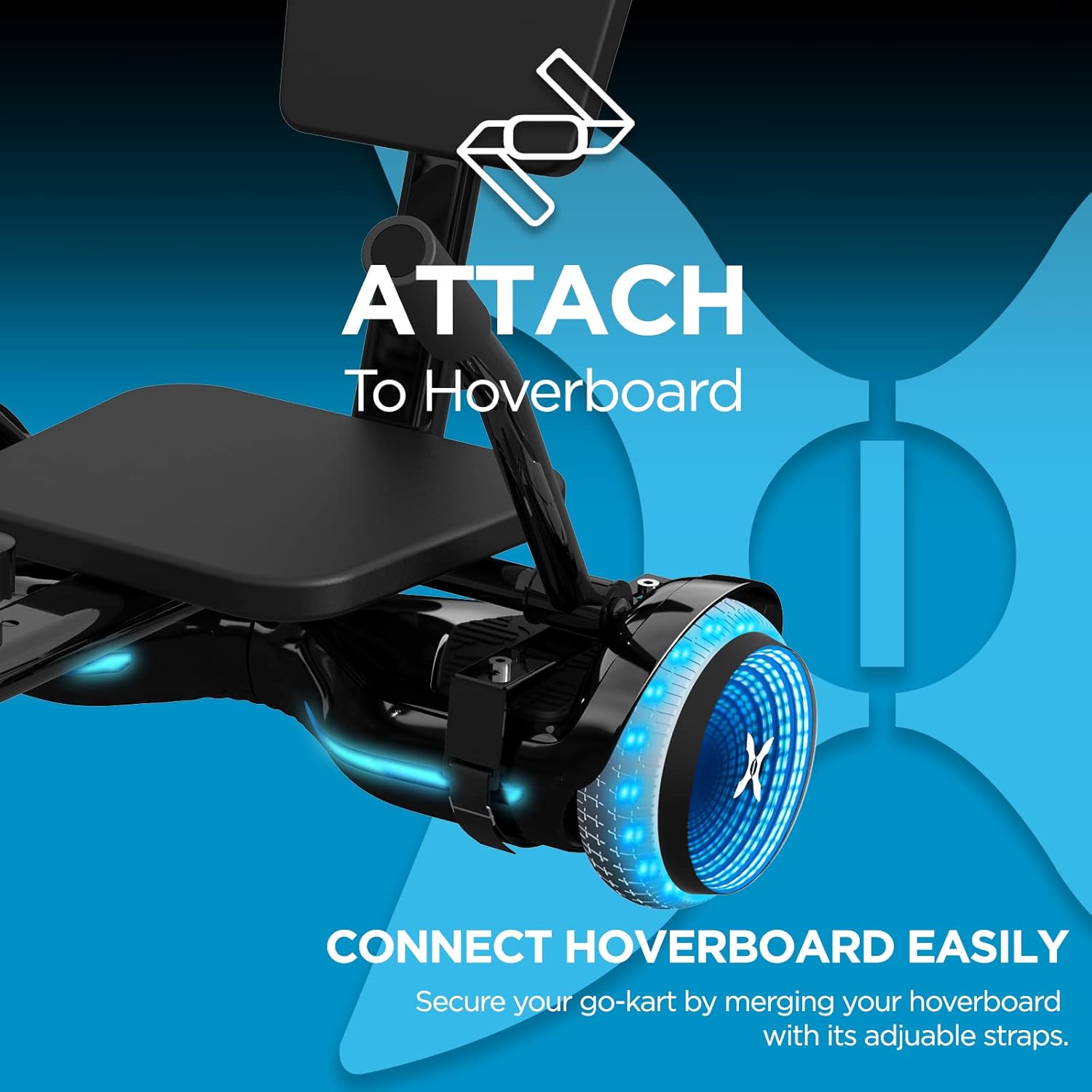
Image: Close-up of the Go-Kart attachment connecting to the Hover-1 Turbo Hoverboard.

Image: Detail of the adjustable frame mechanism on the Go-Kart attachment.
5. Návod k obsluze
5.1. Nabíjení hoverboardu
Before first use, fully charge the Hover-1 Turbo Hoverboard. The 25.2V/4.0 Ah Lithium-ion battery takes approximately 4.5 hodin to fully charge. Use only the provided charger.
- Připojte nabíječku k nabíjecímu portu na hoverboardu.
- Zapojte nabíječku do standardní zásuvky.
- Po dokončení nabíjení se kontrolka na nabíječce změní (např. z červené na zelenou).
- Disconnect the charger once fully charged to prevent overcharging.
5.2. Hoverboard Mode (Standing)
To operate the Hover-1 Turbo Hoverboard in standing mode:
- Zapněte hoverboard.
- Step onto one side of the hoverboard first. The self-balancing system will stabilize the board.
- Place your other foot onto the board.
- Lean slightly forward to move forward, and lean back to slow down or reverse. Turn by applying pressure to one footpad.

Image: A person demonstrating riding the Hover-1 Turbo Hoverboard in its traditional standing mode.
5.3. Go-Kart Mode (Seated)
With the Go-Kart attachment, control is intuitive and hand-operated:
- Ensure the Go-Kart attachment is securely fastened to the hoverboard.
- Sit comfortably in the seat with your feet on the footrests.
- Use the hand levers to control movement. Push both levers forward to accelerate, pull both back to brake or reverse.
- To turn, push one lever forward while keeping the other neutral or pulling it back slightly. For example, push the right lever forward to turn left.

Image: Close-up of the hand-operated controls on the Go-Kart attachment.
6. Údržba
Regular maintenance ensures the longevity and safe operation of your Hover-1 Turbo Hoverboard Combo.
- Čištění: Wipe down the hoverboard and Go-Kart attachment with a damp cloth. Do not use harsh chemicals or abrasive cleaners. Avoid getting water into electronic components.
- Péče o baterie:
- Po každém použití baterii plně nabijte.
- If storing for an extended period, charge the battery every 30 days to maintain its health.
- Nevystavujte baterii extrémním teplotám.
- Kontrola pneumatik: The hoverboard features 6.5" solid tires. Regularly inspect them for wear and tear.
- Kontrola upevňovacích prvků: Periodically check all screws, bolts, and straps on both the hoverboard and Go-Kart attachment to ensure they are tight and secure.
7. Řešení problémů
Pokud narazíte na problémy, podívejte se na následující běžné problémy a jejich řešení:
| Problém | Možná příčina | Řešení |
|---|---|---|
| Hoverboard se nezapíná. | Slabá baterie nebo tlačítko napájení nebylo správně stisknuto. | Plně nabijte hoverboard. Stiskněte a pevně podržte tlačítko napájení. |
| Go-Kart feels unstable or loose. | Attachment straps are not tight enough or frame adjustment knobs are loose. | Re-tighten all attachment straps and frame adjustment knobs. Ensure the hoverboard is properly seated in the attachment. |
| Hoverboard not responding to controls. | Calibration issue or sensor malfunction. | Turn off the hoverboard, place it on a flat surface, and re-calibrate according to the hoverboard's specific instructions (usually involves holding the power button). If issues persist, contact customer support. |
| Snížená rychlost nebo dojezd. | Slabá baterie, jízda ve svahu nebo těžký náklad. | Ensure battery is fully charged. Avoid steep inclines. Check rider weight against maximum limit. |
Pro další pomoc se prosím obraťte na zákaznickou podporu Hover-1.
8. Specifikace
| Funkce | Detail |
|---|---|
| Název modelu | Hover-1 Turbo Hoverboard |
| Číslo modelu | DSA-TRB-CMB-BLK |
| Značka | Vznášet-1 |
| Výkon motoru | 400W (2x 200W) |
| Nejvyšší rychlost | Až 7 mph (11 km/h) |
| Max Range | Up to 6 Miles (9.6 km) per charge |
| Typ baterie | 25.2V/4.0 Ah lithium-iontová (certifikovaná) |
| Doba nabíjení | Přibližně 4.5 hodiny |
| Maximální nosnost | 220 lb (100 kg) |
| Velikost kola | 6.5 inches (Solid Tires) |
| Maximální sklon | 8 stupňů |
| Speciální funkce | LED Wheel Lights, Self-Balancing System, Adjustable Go-Kart Frame |
| Certifikace | Certifikace UL 2272 |
| Hmotnost položky | 12.3 kg |
| Rozměry (balení) | 27.25 x 26.5 x 8.5 palce |
9. Záruka a podpora
The Hover-1 Turbo Hoverboard Combo comes with a Záruka 90-Day. For warranty claims, technical support, or replacement parts, please contact DGL Group, the manufacturer.
For the most up-to-date support information, please visit the official Hover-1 webwebu nebo se podívejte na kontaktní údaje uvedené na obalu produktu.


