1. Úvod
Děkuji za nákupasing the Muse MT-106 BT Stereo Turntable. This manual provides essential information for the safe and efficient operation of your new device. Please read it thoroughly before use and retain it for future reference.
The Muse MT-106 BT is a versatile 3-speed (33/45/78 RPM) stereo turntable featuring a Bluetooth receiver, a USB port for playback and encoding, and two integrated speakers. It is designed to play vinyl records and can also stream music from any Bluetooth-compatible device such as a tablet, smartphone, or laptop.
2. Bezpečnostní pokyny
- Zdroj napájení: Zajistěte napájení objtage odpovídá jmenovité hodnotě uvedené na jednotce.
- Voda a vlhkost: Do not expose the unit to rain, moisture, or dripping water. Do not place objects filled with liquids, such as vases, on the unit.
- Větrání: Zajistěte dostatečné větrání. Neblokujte větrací otvory.
- Teplo: Udržujte jednotku mimo dosah zdrojů tepla, jako jsou radiátory, topná tělesa, kamna nebo jiná zařízení produkující teplo.
- Čištění: Před čištěním odpojte přístroj ze zásuvky. Použijte měkký, suchý hadřík. Nepoužívejte tekuté ani aerosolové čisticí prostředky.
- Servis: Nepokoušejte se tento výrobek opravit sami. Veškerý servis svěřte kvalifikovanému servisnímu personálu.
- Umístění: Umístěte jednotku na stabilní, rovný povrch, abyste zabránili jejímu poškození v důsledku pádu.
3. Obsah balení
Zkontrolujte prosím, zda jsou v balení obsaženy následující položky:
- Muse MT-106 BT Stereo Turntable
- Uživatelská příručka
- Napájecí adaptér
- Adaptér 45 RPM
4. Konec produktuview
Familiarize yourself with the components and controls of your Muse MT-106 BT Turntable.

Obrázek 4.1: Celkově view of the Muse MT-106 BT Stereo Turntable. This image displays the turntable from an angled perspective, with its transparent dust cover lifted. The wooden base and integrated speakers are visible, along with the black platter, tonearm, and control knobs on the right side.
4.1 Front and Top Components
- Protiprachový kryt: Chrání talíř a raménko před prachem.
- Talíř: Otočná plošina, na které se umisťují záznamy.
- Vřeteno: Holds the record in place on the platter.
- Adaptér 45 ot./min: Používá se pro přehrávání 7palcových desek s velkými středovými otvory.
- Rameno: Drží stylus a sleduje drážky desky.
- Stylus (jehla): The part that reads the record grooves.
- Páčka tága: Lifts and lowers the tonearm.
- Volič rychlosti: Přepněte pro výběr 33, 45 nebo 78 otáček za minutu.
- Integrované reproduktory: Vestavěné reproduktory pro výstup zvuku.

Obrázek 4.2: Ovládací panel. Tento obrázek poskytuje podrobný view of the control panel located on the right side of the turntable. It shows three rotary knobs for volume and function selection, along with several buttons for playback control and mode switching.
4.2 Ovládací panel
- Ovladač napájení/hlasitosti: Turns the unit on/off and adjusts the volume.
- Knoflík pro výběr funkcí: Switches between Phono, Bluetooth, USB, and Aux-in modes.
- Ovládací tlačítka přehrávání: Play/Pause, Skip Forward, Skip Backward (for USB mode).
- Automatický vypínač: Enables or disables the automatic stop function for vinyl playback.
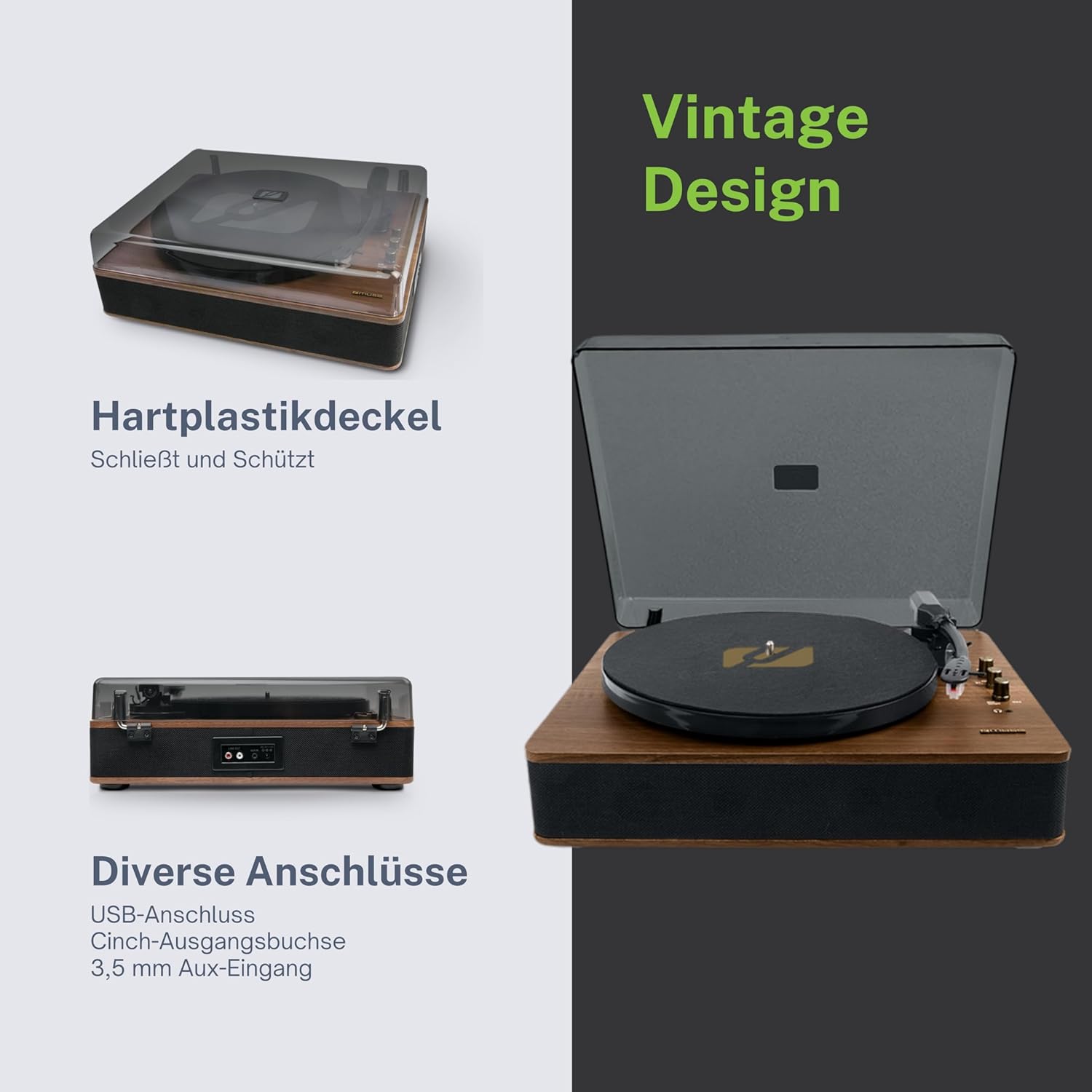
Figure 4.3: Rear Connections. The rear panel of the turntable is shown, featuring various connection ports including RCA audio outputs, a USB port, and an auxiliary input jack, allowing connection to external audio systems or devices.
4.3 Zadní a boční připojení
- RCA Output Jacks (L/R): Připojte se k externímu ampzesilovač nebo aktivní reproduktory.
- USB port: Pro přehrávání MP3 files from a USB drive or encoding vinyl to USB.
- Vstupní konektor AUX (3.5 mm): Připojte externí audio zařízení.
- DC IN Jack: Připojte napájecí adaptér.
- Jack pro sluchátka (3.5 mm): Pro soukromý poslech.

Figure 4.4: Key Functions Overview. An illustrative graphic highlighting the key functions and connectivity options of the turntable. Icons represent features such as USB encoding, MP3 playback via USB, RCA output, auto-stop, integrated speakers, headphone jack, auxiliary input, and AC power input.
5. Nastavení
5.1 Vybalení
- Opatrně vyjměte jednotku z obalu.
- Odstraňte veškerý balicí materiál a ochranné fólie.
- Keep the packaging for future transport or storage.
5.2 Umístění
- Umístěte otočný talíř na rovný, stabilní a vodorovný povrch.
- Avoid placing it near strong magnetic fields, direct sunlight, or heat sources.
- Ujistěte se, že je kolem jednotky dostatek prostoru pro správné větrání.
5.3 Připojení napájení
- Connect the supplied power adapter to the DC IN jack on the rear of the turntable.
- Zapojte napájecí adaptér do vhodné zásuvky.
5.4 Instalace protiprachového krytu
- Carefully attach the dust cover to the hinges on the back of the turntable.
- The dust cover protects the unit when not in use. Remove it or lift it fully when playing records.
6. Návod k obsluze
6.1 Přehrávání vinylových desek
- Zvedněte protiprachový kryt.
- Rotate the Power/Volume knob clockwise to turn on the unit.
- Set the Function Selector knob to 'Phono'.
- Place a record on the platter. If playing a 45 RPM single, place the 45 RPM adapter on the spindle first.
- Select the correct speed (33, 45, or 78 RPM) using the Speed Selector switch.
- Odstraňte z dotykového pera chránič.
- Zvedněte raménko přenosky pomocí páčky pro ovládání tága.
- Pohybujte raménkem přenosky nad požadovaný počáteční bod desky.
- Gently lower the tonearm onto the record using the cue lever. The music will begin to play.
- Upravte hlasitost pomocí knoflíku Napájení/Hlasitost.
- At the end of the record, if the Auto Stop switch is ON, the platter will stop rotating. If OFF, the platter will continue to rotate. Manually lift the tonearm and return it to its rest.
6.2 Režim Bluetooth
- Rotate the Power/Volume knob clockwise to turn on the unit.
- Set the Function Selector knob to 'BT' (Bluetooth). The Bluetooth indicator will flash, indicating pairing mode.
- Enable Bluetooth on your external device (smartphone, tablet, etc.) and search for available devices.
- Select 'MUSE MT-106 BT' from the list of devices. Once connected, the Bluetooth indicator will stop flashing and remain solid.
- You can now play music from your external device through the turntable's speakers. Adjust volume using both the turntable's knob and your external device.
6.3 USB Playback and Encoding
6.3.1 Přehrávání z USB
- Rotate the Power/Volume knob clockwise to turn on the unit.
- Set the Function Selector knob to 'USB'.
- Insert a USB flash drive into the USB port. The unit will automatically detect and begin playing MP3 files.
- Use the Playback Control Buttons (Play/Pause, Skip Forward, Skip Backward) to navigate tracks.
6.3.2 USB Encoding (Recording Vinyl to USB)
The MT-106 BT allows you to convert your vinyl records into digital MP3 filena USB disku.
- Ensure a USB flash drive is inserted into the USB port.
- Set the Function Selector knob to 'Phono'.
- Start playing your vinyl record as described in section 6.1.
- Press the 'Record' button (refer to Figure 4.2 for button location, typically indicated by a circle or 'REC' label). The recording indicator will illuminate.
- To stop recording, press the 'Record' button again. The recording indicator will turn off.
- The recorded audio will be saved as an MP3 file na vašem USB disku.
6.4 Pomocný vstup (AUX IN)
- Rotate the Power/Volume knob clockwise to turn on the unit.
- Set the Function Selector knob to 'AUX'.
- Connect an external audio device (e.g., MP3 player, CD player) to the AUX IN jack (3.5mm) on the rear of the turntable using an audio cable (not supplied).
- Play audio from your external device. The sound will be output through the turntable's speakers.
6.5 RCA výstup
Připojení gramofonu k externímu zařízení ampreproduktory nebo aktivní reproduktory:
- Ensure the turntable and the external audio system are turned off.
- Connect an RCA audio cable (not supplied) from the RCA Output Jacks (L/R) on the rear of the turntable to the corresponding audio input jacks on your ampzesilovač nebo aktivní reproduktory.
- Turn on both the turntable and your external audio system.
- Vyberte příslušný vstup na externím audiosystému.
7. Údržba
7.1 Čištění stylusu
- Použijte měkký kartáč, speciálně určený pro čištění stylusu, a jemně jej kartáčujte zezadu dopředu.
- Nepoužívejte nadměrnou sílu ani nehýbejte kartáčem ze strany na stranu, mohlo by dojít k poškození stylusu.
- Vyměňujte stylus přibližně každých 300–500 hodin přehrávání nebo pokud si všimnete zhoršení kvality zvuku.
7.2 Čištění jednotky
- Wipe the exterior of the turntable with a soft, dry, lint-free cloth.
- Nepoužívejte abrazivní čisticí prostředky, vosky ani rozpouštědla, protože by mohly poškodit povrchovou úpravu.
- Protiprachový kryt použijte v případě potřeby měkký hadřík a jemný, neabrazivní čisticí prostředek.
8. Řešení problémů
If you experience issues with your turntable, please consult the following table before contacting support.
| Problém | Možná příčina | Řešení |
|---|---|---|
| Žádná síla | Napájecí adaptér není připojen nebo je zásuvka vadná. | Ujistěte se, že je napájecí adaptér bezpečně připojen a zásuvka je funkční. |
| Žádný zvuk | Volume too low; incorrect function mode; external speakers not connected/powered. | Increase volume; select correct function (Phono, BT, USB, AUX); check external speaker connections and power. |
| Poor sound quality (vinyl) | Dirty or worn stylus; dirty record; incorrect speed selected. | Clean or replace stylus; clean record; select correct RPM. |
| Bluetooth se nepřipojuje | Turntable not in pairing mode; device too far; already connected to another device. | Ensure turntable is in BT mode and flashing; move device closer; disconnect from other devices. |
| Přehrávání z USB nefunguje | USB disk nebyl správně vložen; není podporován file formát; vadný USB disk. | Reinsert USB drive; ensure files are MP3 format; try a different USB drive. |
9. Specifikace
| Značka | MÚZA |
| Název modelu | MT-106 BT |
| Barva | Dřevo |
| Materiál | Dřevo |
| Hmotnost položky | 4.3 kg |
| Rychlosti rotace | 33, 45, 78 ot./min |
| Konektivita | Bluetooth, USB, RCA Output, 3.5mm AUX Input, 3.5mm Headphone Jack |
| Speciální funkce | Integrated Speaker, Dust Protection, Adjustable Speed, USB Encoding |
| Kompatibilní zařízení | Smartphone, tablet |
| Zdroj napájení | AC Adapter (1 AAAA battery required for unspecified function, likely remote or internal clock) |
| Země původu | Čína |
10. Záruka a podpora
This product is covered by a manufacturer's warranty. Please refer to the warranty card included with your purchase or visit the official MUSE webpodrobné záruční podmínky naleznete na webu.
For technical support, troubleshooting assistance, or inquiries regarding spare parts, please contact MUSE customer service through their official channels. Information regarding spare parts availability is currently not available.


