Zavedení
This manual provides detailed instructions for setting up, operating, maintaining, and troubleshooting your ASUS ROG Strix XG27AQ-W 27-inch 1440P HDR Gaming Monitor. Please read this manual thoroughly before using the product to ensure proper and safe operation.
Obsah balení
Ověřte, zda jsou v balení produktu přítomny všechny níže uvedené položky:
- XG27AQ-W Monitor
- DisplayPort kabel
- HDMI kabel
- USB kabel
- Napájecí kabel a adaptér
- Rychlý průvodce
- Záruční list
- Zpráva o kalibraci barev
- Nálepka ROG

Pokyny pro nastavení
1. Sestavení stojanu
Carefully place the monitor face down on a soft, clean surface to prevent scratches. Attach the stand base to the stand arm, securing it with the provided screw. Then, align the stand assembly with the mounting slot on the back of the monitor and push until it clicks into place. No screws are necessary for attaching the stand to the monitor panel.

2. Propojovací kabely
Connect the DisplayPort or HDMI cable from your computer's graphics card to the corresponding input port on the monitor. For USB functionality, connect the upstream USB cable from your computer to the monitor's USB upstream port. Finally, connect the power adapter to the monitor and then to a power outlet.

Klíčové vlastnosti
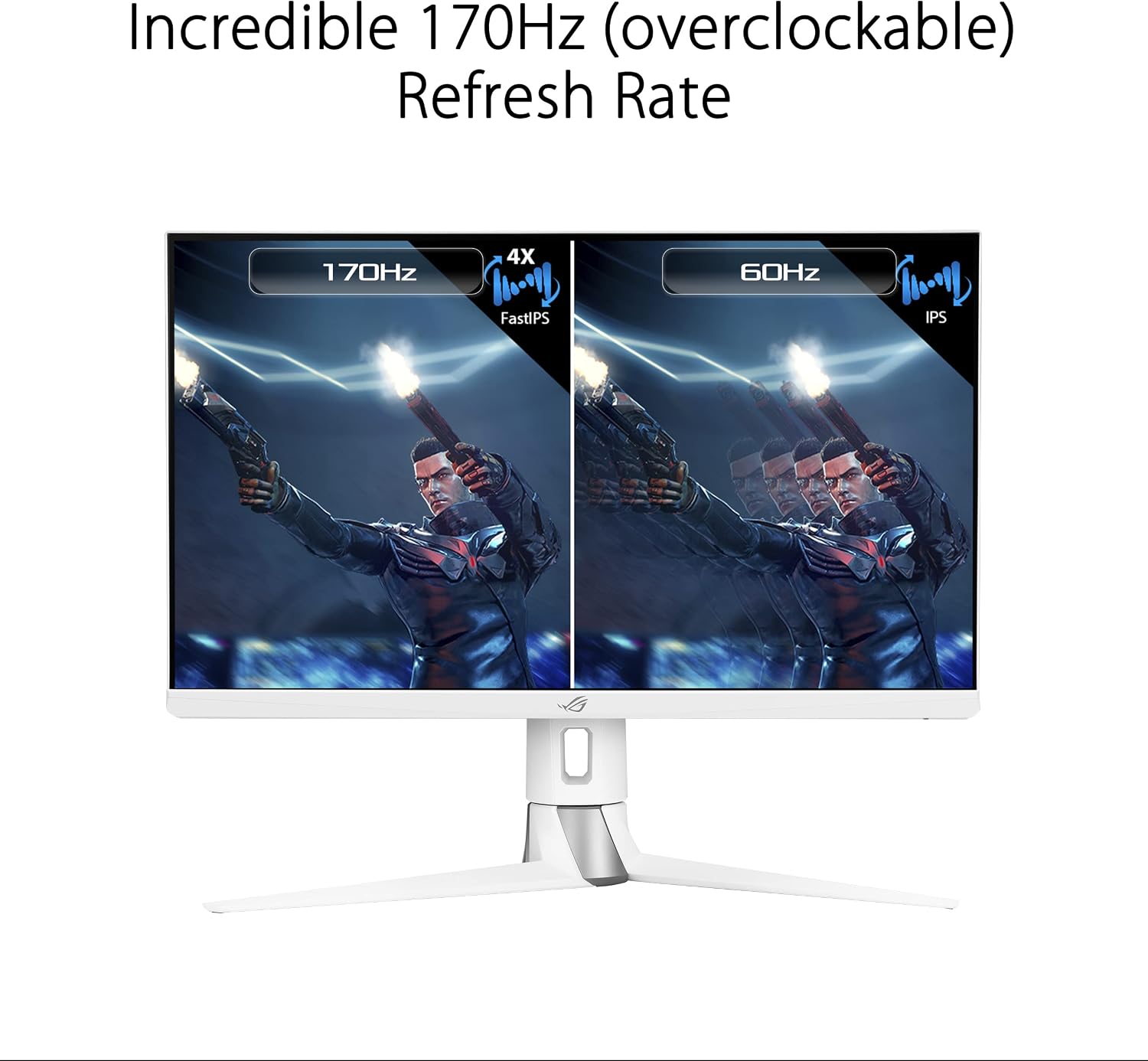
- 27-inch QHD (2560 x 1440) FastIPS Display: Offers an ultrafast 170Hz (overclocked) refresh rate, ideal for professional gamers and immersive gameplay.
- Doba odezvy 1 ms (GTG): ASUS FastIPS technology ensures sharp gaming visuals with high frame rates and minimal motion blur.
- Kompatibilní s G-SYNC: Poskytuje plynulý herní zážitek bez trhání díky výchozímu povolení variabilní obnovovací frekvence (VRR).
- Synchronizace s extrémně nízkým rozmazáním pohybu (ELMB SYNC): This technology works with G-SYNC Compatible to eliminate ghosting and tearing, providing sharp visuals at high frame rates.
- Technologie s vysokým dynamickým rozsahem (HDR): Features a professional color gamut that meets DCI-P3 95% and DisplayHDR 400 certification for superior contrast and color performance.
- Ergonomický design: The monitor stand offers extensive adjustments including height (0-100mm), swivel (+25°~-25°), pivot (0°~90°), and tilt (+20°~-5°).



Návod k obsluze
Nabídka na obrazovce (OSD).
The monitor features a 5-way OSD navigation joystick located on the rear right side for easy menu control. Press the joystick to access the main OSD menu. Use the joystick to navigate through options and adjust settings such as display modes, color settings, and gaming features.

Technologie péče o oči
The monitor incorporates ASUS Eye Care technology, including Blue Light Filter and Flicker-Free technology, to reduce eye strain during prolonged use. These features can be adjusted or enabled through the OSD menu.
Video: An official ASUS video demonstrating the benefits of ASUS EyeCare technology, including anti-glare screen, blue light filter, flicker-free technology, and ergonomic design for improved user comfort and eye health.
Specifikace
| Funkce | Specifikace |
|---|---|
| Velikost obrazovky | 27 palce |
| Rozlišení obrazovky | 2560 x 1440 (QHD) |
| Maximální rozlišení obrazovky | 2560 x 1440 pixelů |
| Typ panelu | Téměř IPS |
| Obnovovací frekvence | 170 Hz (přetaktováno) |
| Doba odezvy | 1 ms (GTG) |
| Technologie adaptivní synchronizace | Kompatibilní s G-SYNC |
| Podpora HDR | Displej HDR 400 |
| Barevný gamut | DCI-P3 95% |
| Konektivita | 2x HDMI (v2.0), 1x DisplayPort (v1.2), 1x USB 2.0 (upstream), 2x USB 3.0 (downstream), Earphone Jack |
| Ergonomie | Height, Swivel, Pivot, Tilt adjustable |
| Rozměry (DxŠxV) | 24 x 16 x 10 palce |
| Hmotnost položky | 19 libry |
| Barva | BÍLÝ |
Údržba
- Čištění obrazovky: Lehce používejte měkký hadřík, který nepouští vlákna dampened with water or a non-ammonia, non-alcohol based screen cleaner. Do not spray cleaner directly onto the screen.
- Čištění Casing: K otření monitoru použijte měkký, suchý hadřík casing. Vyhněte se abrazivním čisticím prostředkům.
- Větrání: Abyste zabránili přehřátí, ujistěte se, že ventilační otvory monitoru nejsou zablokované.
- Vypnout: Před čištěním nebo pokud nebudete monitor delší dobu používat, jej vždy vypněte a odpojte ze zásuvky.
Odstraňování problémů
| Problém | Řešení |
|---|---|
| Žádná síla | Ensure the power cord is securely connected to the monitor and a working power outlet. Check the power adapter. |
| Na obrazovce není žádný obraz | Verify the video cable (DisplayPort/HDMI) is correctly connected to both the monitor and your computer. Ensure the correct input source is selected via the OSD menu. |
| Obraz je rozmazaný nebo zkreslený | Check the display resolution settings on your computer and ensure they match the monitor's native resolution (2560x1440). Adjust OSD settings like sharpness or aspect ratio. |
| Blikající obrazovka | Ensure the video cable is properly connected. Try a different video cable. Enable or disable Flicker-Free technology in the OSD menu if available. |
| Z konektoru pro sluchátka nejde žádný zvuk | Check the audio output settings on your computer. Ensure the volume on the monitor (via OSD) and your connected device is not muted or too low. |
Záruka a podpora
Your ASUS ROG Strix XG27AQ-W monitor comes with a manufacturer's warranty. Please refer to the included Warranty Card for specific terms, conditions, and duration of coverage. For technical support, driver downloads, or further assistance, please visit the official ASUS support webnebo kontaktujte jejich zákaznický servis.
Online podpora: www.asus.com/support/