1. Úvod
This manual provides detailed instructions for the LFF DAB Plus Digital FM Radio. It covers setup, operation, maintenance, and troubleshooting to ensure optimal performance and user experience. Please read this manual thoroughly before using the device.

Přední view of the LFF DAB Plus Digital FM Radio, showing the speaker grille, color display, and extended antenna.
2. Obsah balení
Zkontrolujte prosím balení, zda neobsahuje následující položky:
- 1 x LFF DAB Plus Digital FM Radio
- 1 x AC napájecí adaptér
- 1 x Průvodce rychlým startem
3. Konec produktuview
Seznamte se s komponenty a ovládacími prvky rádia.
3.1 Klíčové vlastnosti

This diagram illustrates the radio's key functions: DAB+ radio, 60 station presets, FM radio, sleep timer, headphone jack, Bluetooth connectivity, full-color screen, and dual alarm capability.
3.2 Ovládací prvky a porty

Horní a boční view of the radio, showing control buttons and knobs on the top panel, and the 3.5mm headphone jack located on the side.
Refer to the diagram above for the location of the following:
- Vypínač: Zapíná/vypíná rádio.
- Tlačítko režimu: Switches between DAB+, FM, and Bluetooth modes.
- Knoflík ladění/výběru: Rotates to tune stations or navigate menus, press to select.
- Knoflík hlasitosti: Nastavuje hlasitost zvuku.
- Přednastavená tlačítka: For saving and recalling favorite stations.
- Alarm/Sleep Timer Button: Accesses alarm and sleep timer settings.
- Barevný displej: Zobrazuje informace o stanici, čas a možnosti nabídky.
- Jack pro sluchátka (3.5 mm): Pro soukromý poslech.
- Port DC IN: Pro připojení síťového adaptéru.
- Teleskopická anténa: Pro lepší příjem rádia.
4. Nastavení
4.1 Zapnutí
The radio can be powered by the included AC adapter or by batteries.
- Napájení střídavým proudem: Connect the AC power adapter to the DC IN port on the back of the radio and plug it into a wall outlet.
- Napájení baterie: Open the battery compartment on the back of the radio and insert 4 x 1.5V AA (LR6) batteries, ensuring correct polarity.
Zadní view of the radio, detailing the battery compartment for 4x AA batteries, the AC adapter input (5V/1000mA), and the 360° rotatable antenna. Product dimensions are also indicated.
4.2 Nastavení antény
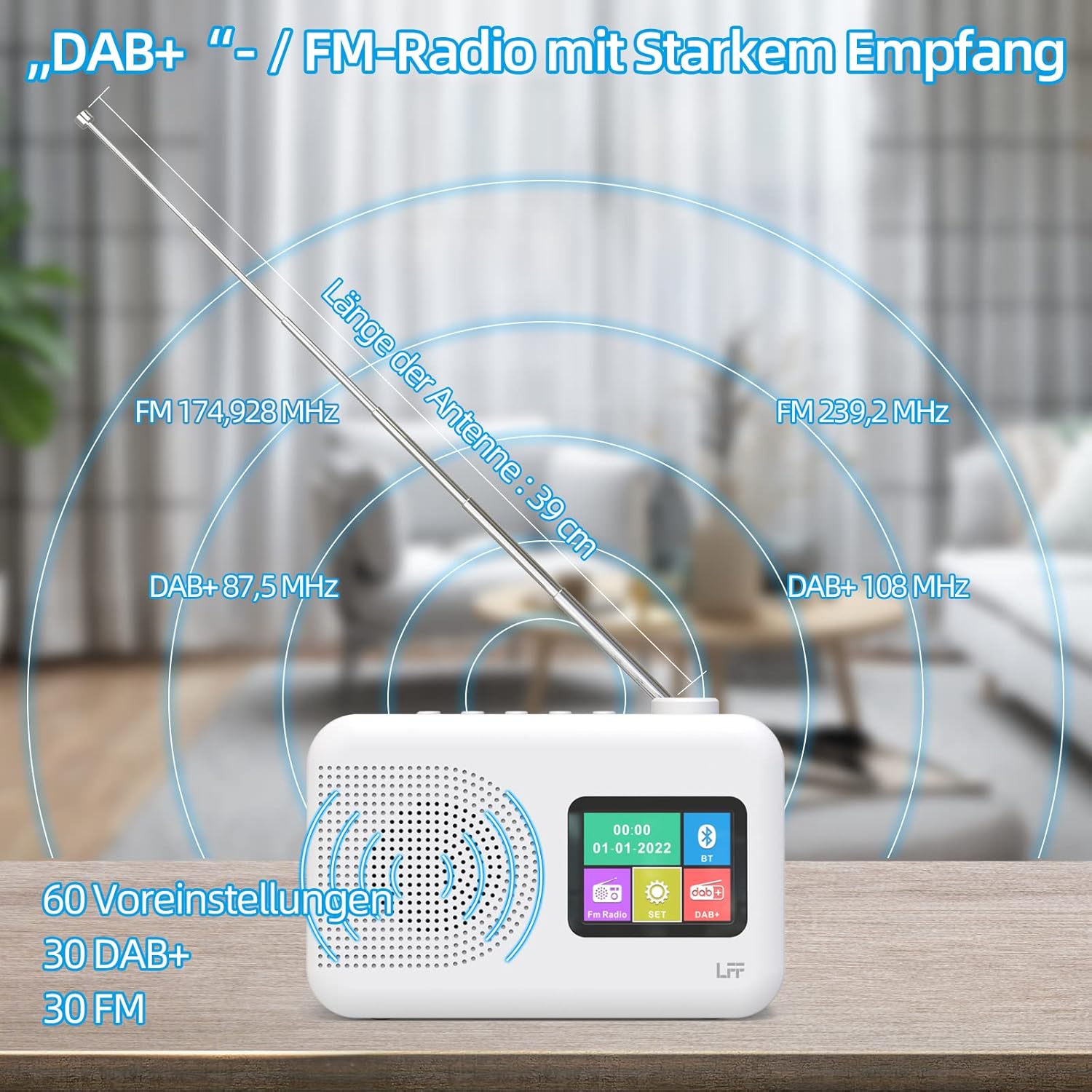
Extend the telescopic antenna fully (approximately 39 cm) and adjust its angle for optimal reception, especially for DAB+ and FM stations.

This diagram illustrates the radio's strong DAB+ and FM reception capabilities with the fully extended 39cm antenna, showing frequency ranges and the capacity for 60 total presets (30 DAB+, 30 FM).
4.3 Initial Scan (DAB+)
- Zapněte rádio.
- Ensure the mode is set to DAB+. If not, press the Režim tlačítko pro přepnutí.
- The radio will automatically perform a full scan for available DAB+ stations. This may take a few minutes.
- Once the scan is complete, the radio will display a list of found stations.
5. Návod k obsluze
5.1 Režim rádia DAB+
- Stiskněte tlačítko Režim pro výběr režimu DAB+.
- Otočte Naladit/Vybrat knob to browse through the available stations.
- Stiskněte tlačítko Naladit/Vybrat knoflík pro výběr stanice.
- Ukládání předvoleb: Chcete-li uložit stanici, stiskněte a podržte Přednastaveno button until the display confirms. To recall, briefly press the corresponding Přednastaveno button. Up to 30 DAB+ stations can be saved.
5.2 Režim rádia FM
- Stiskněte tlačítko Režim tlačítko pro výběr režimu FM.
- Otočte Naladit/Vybrat knoflík pro ruční naladění frekvence.
- Stiskněte a podržte Naladit/Vybrat knob for a few seconds to auto-scan for the next available station.
- Ukládání předvoleb: Similar to DAB+ mode, press and hold a Přednastaveno button to save, and briefly press to recall. Up to 30 FM stations can be saved.
5.3 Režim Bluetooth

This diagram illustrates the three primary playback options for the radio: through its internal speaker, via Bluetooth connection to an external device, or using headphones connected to the headphone jack.
- Stiskněte tlačítko Režim button to select Bluetooth mode. The display will show "Bluetooth Pairing" or similar.
- Na externím zařízení (např. smartphonu) povolte Bluetooth a vyhledejte dostupná zařízení.
- Select "LFF Radio" (or similar name) from the list to pair.
- Po spárování můžete přehrávat zvuk ze zařízení přes reproduktor rádia.
- Poznámka: This radio acts as a Bluetooth receiver. It does not support connecting to Bluetooth headphones or other Bluetooth speakers.
5.4 Časovač vypnutí
Časovač vypnutí umožňuje automatické vypnutí rádia po uplynutí nastavené doby.

This image depicts the sleep timer function, offering selectable durations of 15, 30, 45, 60, 90, and 120 minutes before the radio automatically powers off.
- Stiskněte tlačítko Alarm/Sleep Timer button repeatedly to cycle through sleep timer options (15 min, 30 min, 45 min, 60 min, 90 min, 120 min, OFF).
- Select your desired duration. The radio will turn off automatically after this time.
5.5 Budík
The radio features a dual alarm function.
- Stiskněte a podržte Alarm/Sleep Timer tlačítko pro vstup do nastavení budíku.
- Použijte Naladit/Vybrat knob to set the alarm time, alarm source (DAB+, FM, or buzzer), and volume.
- Stiskněte tlačítko Naladit/Vybrat knoflík pro potvrzení každého nastavení.
- Repeat the process for the second alarm if needed.
5.6 Použití sluchátek
Plug 3.5mm headphones into the headphone jack on the side of the radio for private listening. The internal speaker will automatically mute.
6. Údržba
6.1 Čištění
- Wipe the radio's surface with a soft, dry cloth.
- Nepoužívejte abrazivní čisticí prostředky, vosky ani rozpouštědla, protože by mohly poškodit povrchovou úpravu.
6.2 Výměna baterie
When using battery power, replace all four AA batteries when the low battery indicator appears on the display or when performance degrades.
- Ensure the radio is turned off and disconnected from AC power.
- Otevřete kryt bateriového prostoru na zadní straně.
- Vyjměte staré baterie a řádně je zlikvidujte.
- Insert new 4 x 1.5V AA (LR6) batteries, observing correct polarity (+/-).
- Bezpečně zavřete kryt bateriového prostoru.
6.3 Ochranná fólie na displej
The radio's display comes with a transparent protective film. For optimal clarity, gently peel off this film before first use.
7. Řešení problémů
Pokud narazíte na problémy, podívejte se na následující běžné problémy a jejich řešení:
| Problém | Možná příčina | Řešení |
|---|---|---|
| Žádná síla | Napájecí adaptér není připojen, baterie jsou vybité nebo nesprávně vložené. | Zkontrolujte připojení síťového adaptéru. Vyměňte baterie nebo zajistěte správnou polaritu. |
| Špatný příjem rádia | Anténa není vysunutá, oblast se slabým signálem, rušení. | Fully extend and adjust the telescopic antenna. Move the radio to a different location. Avoid sources of interference. |
| Bluetooth se nepřipojuje | Radio not in Bluetooth mode, device too far, already paired with another device. | Ensure radio is in Bluetooth mode. Keep devices within range. Disconnect from other devices. |
| Žádný zvuk | Volume too low, headphones connected, mute activated. | Zvyšte hlasitost. Odpojte sluchátka. Zkontrolujte, zda je aktivní ztlumení. |
8. Specifikace
- Značka: rozšíření LFF
- Model: DAB Plus Digital FM Radio
- Barva: Bílý
- Technologie připojení: Bluetooth
- Rozměry (D x Š x V): 16.1 cm x 5.9 cm x 10.9 cm
- Technologie ladění: DAB
- Zdroj napájení: AC Adapter (5V/1000mA) or 4 x 1.5V AA (LR6) Batteries
- Podporovaná rádiová pásma: DAB+, FM
- Frekvenční rozsah DAB+: 174.928 - 239.2 MHz
- Rozsah kmitočtu FM: 87.5 - 108 MHz
- Předvolby: 30 DAB+, 30 FM
- Délka antény: 39 cm (extendable)
- Speciální vlastnosti: DAB Plus Radio, Sleep Timer, Dual Alarm, Headphone Jack, Color Display
- Zahrnuté komponenty: DAB Digital Radio, AC Power Adapter, Quick Start Guide
9. Záruka a podpora
For any quality-related issues or technical support, please contact the seller directly. We are committed to resolving any problems you may encounter with your LFF DAB Plus Digital FM Radio.


