Zavedení
The Sony WF-C500 Truly Wireless in-Ear Bluetooth Earbud Headphones offer wireless connectivity with a compact design. These earbuds combine sound quality with extended battery life, personalization options, and IPX4 water resistance, making them suitable for various activities.
This manual provides essential information for setting up, operating, maintaining, and troubleshooting your WF-C500 earbuds.

Image: Sony WF-C500 Truly Wireless Earbuds (Black)
Nastavení
1. Počáteční nabíjení
Before first use, fully charge the earbuds and the charging case. Place the earbuds into the charging case. Connect the charging case to a USB power source using the provided USB-C cable. The indicator light on the case will show charging status.
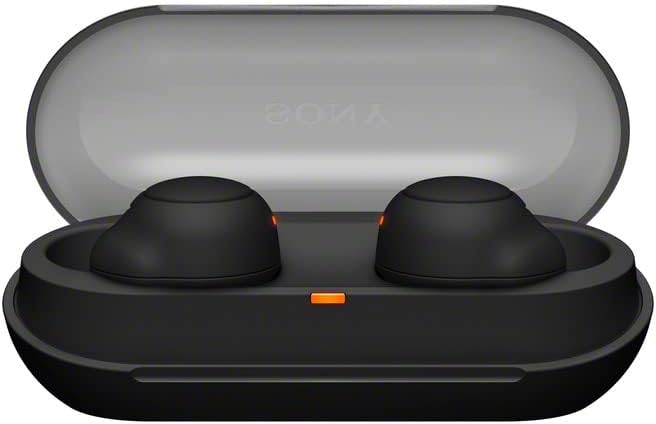
Image: Sony WF-C500 Earbuds in Charging Case
2. Párování Bluetooth
- Ujistěte se, že obě sluchátka jsou v nabíjecím pouzdře a víko je otevřené.
- Na svém zařízení (chytrém telefonu, tabletu atd.) povolte Bluetooth.
- V seznamu dostupných zařízení Bluetooth vyberte „WF-C500“.
- Po připojení hlasový pokyn potvrdí úspěšné spárování.
Návod k obsluze
Nošení sluchátek
Insert the earbuds firmly into your ears. The ergonomic design ensures a snug fit for comfort and optimal sound performance. The earbuds are marked 'L' for left and 'R' for right.
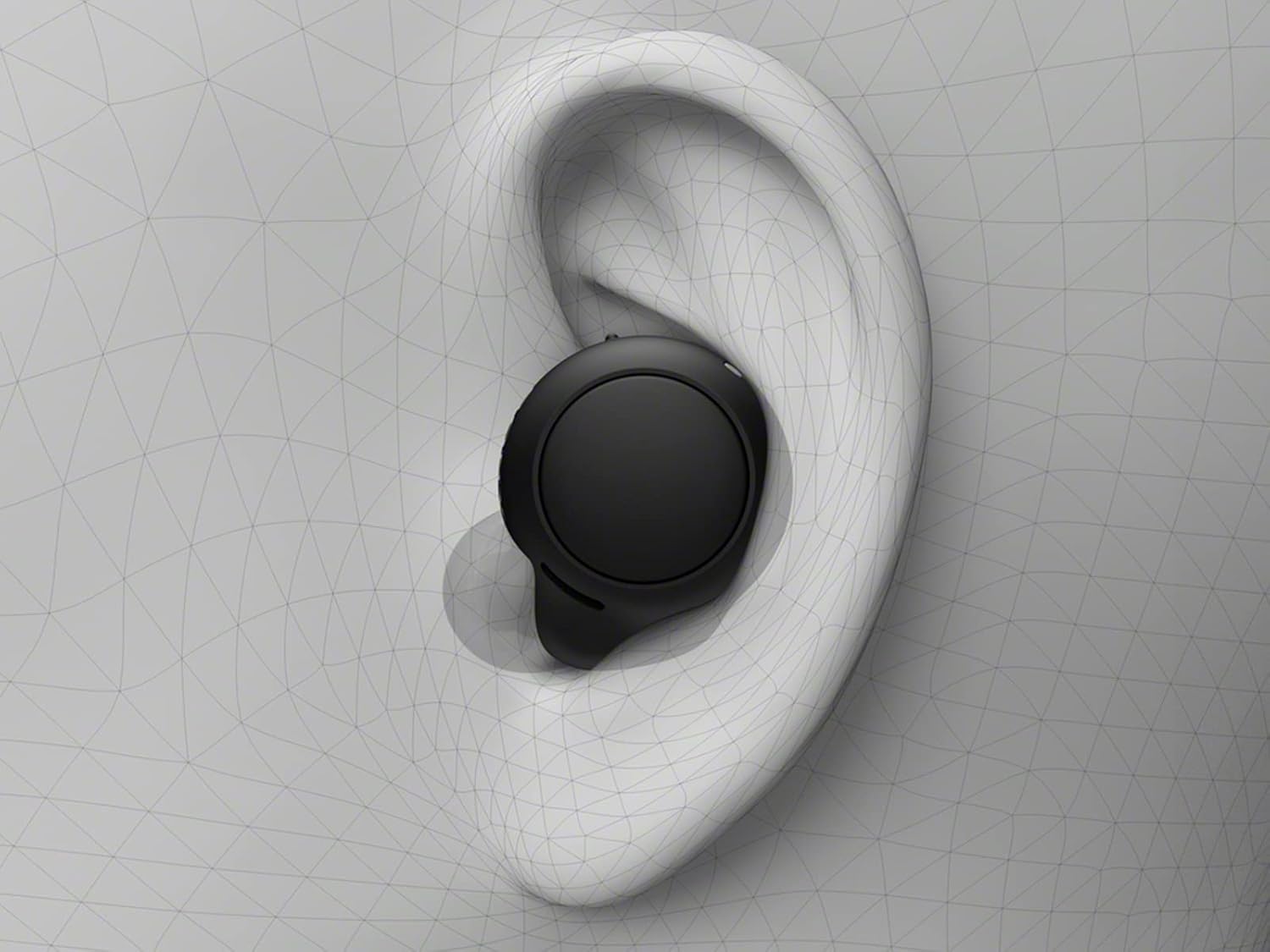
Image: Proper Earbud Placement
Základní ovládání (dotykové)
- Přehrát/pozastavit: Jediným klepnutím na jedno sluchátko.
- Další skladba: Dvakrát klepněte na pravé sluchátko.
- Předchozí skladba: Dvakrát klepněte na levé sluchátko.
- Přijmout/ukončit hovor: Během příchozího hovoru klepněte jedním klepnutím na kterékoli sluchátko.
- Odmítnout hovor: Během příchozího hovoru stiskněte a podržte kterékoli ze sluchátek po dobu 2 sekund.
- Aktivovat Voice Assistant: Trojitě klepněte na kterékoli sluchátko.
Hands-free volání
The built-in microphone allows for clear hands-free calling. You can answer or end calls directly from the earbuds without needing to access your phone.
Jedno použití sluchátek
The WF-C500 earbuds support optional use of a single earbud. Simply remove one earbud from the case and leave the other in, or put one away during use. The active earbud will automatically connect.
Životnost baterie a nabíjení
The earbuds provide up to 10 hours of listening time on a single charge. The compact charging case extends the total listening time to up to 20 hours.

Image: Battery Life and Quick Charging Information
Funkce rychlého nabíjení
A 10-minute quick charge provides up to an hour of additional playback time, ideal for when you're in a hurry.
Indikátory nabíjení
The charging case features an LED indicator that shows the battery status. A red light typically indicates low battery or charging in progress, while a green light indicates a full charge.
Design & Trvanlivost
The WF-C500 earbuds are designed to be small, lightweight, and comfortable for all-day wear. Their ergonomic surface design is crafted to fit most ear shapes securely.

Image: Single Sony WF-C500 Earbud
Voděodolnost
With an IPX4 water resistance rating, these earbuds are protected against splashes and sweat. This makes them suitable for workouts and outdoor activities, but they are not designed for submersion in water.
Kvalita zvuku a funkce
The WF-C500 earbuds deliver high-quality audio with features designed to enhance your listening experience.
DSEE (Digitální vylepšení zvuku)
DSEE technology restores high-frequency sounds lost in compression, providing a richer and more natural sound experience.

Image: DSEE Technology Logo
Zvuk 360 Reality
Immerse yourself in sound all around you with 360 Reality Audio. This feature creates an immersive audio experience, making music feel as real as if you were at a live concert or in a recording studio.
Přizpůsobitelný zvuk
Fine-tune your sound preferences using the Sony Headphones Connect app, which allows for sound customization and equalizer adjustments.
Video: Konecview of Sony WF-C500 Truly Wireless Earbuds features, including sound customization and design. (Source: Amazon Videos)
Specifikace
| Funkce | Detail |
|---|---|
| Název modelu | WFC500/B |
| Technologie připojení | Bluetooth 5.0 |
| Technologie bezdrátové komunikace | Bluetooth |
| Výdrž baterie (sluchátka) | Až 10 hodin |
| Celková výdrž baterie (s pouzdrem) | Až 20 hodin |
| Rychlé nabíjení | 10 minut nabíjení pro 1 hodinu přehrávání |
| Úroveň odolnosti proti vodě | IPX4 (Splash-proof and sweat-resistant) |
| Kontrolní metoda | Dotek |
| Mikrofon | Included for hands-free calling |
| Umístění uší | V uchu |
| Form Factor | V uchu |
| Rozměry | 3.9 x 2.2 x 2.9 palce |
| Hmotnost položky | 1 libry |
| Zahrnuté komponenty | Headphones, Charging Case |
Odstraňování problémů
Žádný zvuk nebo přerušované připojení
- Ujistěte se, že jsou obě sluchátka nabitá.
- Zkontrolujte, zda je na vašem zařízení povoleno Bluetooth a zda jsou vybrána sluchátka.
- Move your device closer to the earbuds to avoid interference.
- Zkuste zrušit párování a znovu spárovat sluchátka se zařízením.
- Restartujte zařízení a sluchátka.
Problémy s nabíjením
- Ověřte, zda je kabel USB-C bezpečně připojen k nabíjecímu pouzdru i ke zdroji napájení.
- Ujistěte se, že je zdroj napájení aktivní.
- Clean the charging contacts on both the earbuds and inside the case with a dry, soft cloth.
- If the charging indicator light is not behaving as expected, refer to the full product manual for specific light patterns.
Záruka a podpora
This product is a Certified Refurbished item. It is manufacturer refurbished, shows limited or no wear, and includes all original accessories. It comes with a 90-day limited hardware warranty.
For further support, please refer to the official Sony support webnebo kontaktujte svého prodejce.


