1. Úvod
This manual provides essential information for the safe and efficient use of your new Hyundai 43-inch 4K Ultra HD Smart LED TV, model UHDHY43WSR4BYI5. Please read these instructions thoroughly before operating the television and retain them for future reference. This guide covers setup, operation, maintenance, and troubleshooting to ensure you get the best experience from your device.

Image: Hyundai 43-inch 4K Smart LED TV front view s Webrozhraní OS.
2. Bezpečnostní informace
Abyste snížili riziko úrazu elektrickým proudem, požáru nebo poškození televizoru, vždy dodržujte tato základní bezpečnostní opatření:
- Zdroj napájení: Televizor připojujte pouze do zásuvky střídavého proudu se správným napětím.tage, jak je uvedeno na štítku produktu.
- Větrání: Ensure adequate ventilation around the TV. Do not block ventilation openings or place the TV on soft surfaces that may block airflow.
- Voda a vlhkost: Nevystavujte televizor dešti ani vlhkosti. Nepokládejte na televizor předměty naplněné tekutinami, například vázy.
- Čištění: Před čištěním televizor odpojte ze zásuvky. Použijte měkký, suchý hadřík. Nepoužívejte tekuté ani aerosolové čisticí prostředky.
- Umístění: Umístěte televizor na stabilní a rovný povrch. Neumísťujte jej na přímé sluneční světlo ani do blízkosti zdrojů tepla.
- Děti: Dohlížejte na děti, aby nelezly na televizor ani na nábytek, na kterém je umístěn.
3. Obsah balení
Ověřte, zda jsou v balení přítomny všechny položky:
- 1 x Hyundai 43-inch LED TV
- 1 x Remote Control (Magic Remote)
- 1 x Uživatelská příručka
- 1 x Záruční list
- 1 x Pair of Table Stand
- 1 x sada pro montáž na stěnu
4. Fyzické nastavení
4.1. Montáž televizoru
Your TV supports both table-top placement and wall mounting. Choose the method that best suits your environment.
Instalace stolního stojanu:
- Televizor opatrně položte obrazovkou dolů na měkký, čistý povrch, abyste zabránili poškození obrazovky.
- Attach the provided table stands to the designated slots on the bottom of the TV using the screws included in the kit. Ensure they are securely fastened.
- Umístěte televizor na stabilní a rovný povrch.
Montáž na stěnu:
Use the included wall mount kit. Follow the instructions provided with the wall mount kit for safe and secure installation. It is recommended to have professional assistance for wall mounting.

Image: Diagram illustrating the dimensions of the Hyundai 43-inch Smart LED TV, showing width, height, and depth with stand. Also indicates screen size and weights.
4.2. Propojovací kabely
Connect the power cord to the TV and then to a wall outlet. Connect your external devices (e.g., set-top box, gaming console, Blu-ray player) to the appropriate ports.
- HDMI: For high-definition audio and video. Your TV has multiple HDMI ports.
- USB: For connecting USB storage devices for media playback. Your TV has 2 USB ports.
- RF IN: Pro připojení antény nebo kabelové televize.
- Ethernet (RJ45): Pro kabelové připojení k internetu.
- AV IN: Pro připojení starších zařízení pomocí kompozitních video a stereo audio kabelů.
- Optický: Pro digitální audio výstup do soundbaru nebo systému domácího kina.

Obrázek: Zadní view of the Hyundai 43-inch Smart LED TV, showing the mounting points and general layout of the back panel.
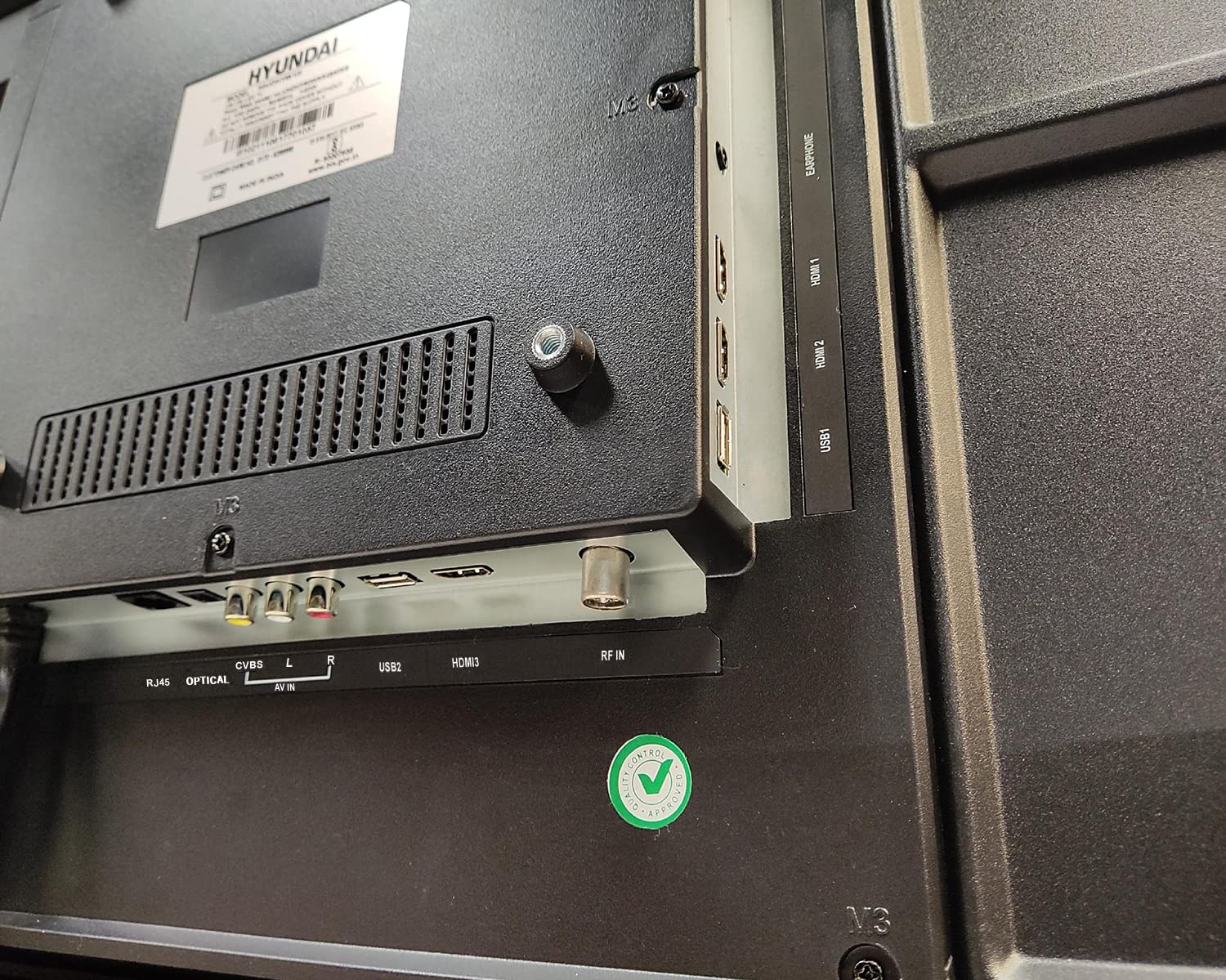
Obrázek: Detail view of the connectivity ports on the rear of the Hyundai 43-inch Smart LED TV, including HDMI, USB, RF IN, AV IN, Optical, and RJ45 Ethernet.
5. Initial Power On & Basic Operation
5.1. První nastavení
After connecting the power, press the power button on the remote control or the TV. The TV will guide you through the initial setup process, which includes:
- Výběr jazyka
- Výběr země/regionu
- Síťové připojení (Wi-Fi nebo Ethernet)
- Skenování kanálů (pro anténu/kabelovou televizi)
- Přijetí obchodních podmínek
5.2. Používání dálkového ovladače Magic Remote
Your Hyundai TV comes with a Magic Remote, offering intuitive control through pointing, clicking, scrolling, and voice commands.

Image: Diagram detailing the features of the Hyundai Magic Remote, including Air Mouse, Single Click Access, Scroll wheel, Voice Control, Universal Control, and Hot Keys for Netflix and Prime Video.
- Air Mouse: Namiřte dálkový ovladač na obrazovku pro pohyb kurzoru.
- Rolovací kolečko: Use the wheel to scroll through menus and web pages, or zoom in/out.
- Hlasové ovládání: Press the microphone button and speak your commands to search for content or control the TV.
- Horké klávesy: Dedicated buttons for popular streaming services like Netflix and Prime Video for quick access.
- Univerzální ovládání: The Magic Remote can control compatible external devices such as set-top boxes and sound systems.

Image: Front and angled side view of the Hyundai Magic Remote, showcasinjeho ergonomický design a rozložení tlačítek.
6. Funkce chytré televize (WebOS)
Your Hyundai TV is powered by WebOS, offering a user-friendly interface and access to a wide range of smart features.
6.1. Připojení k internetu
For smart features, connect your TV to the internet:
- Wi-Fi: Go to Settings > Network > Wi-Fi Connection, select your network, and enter the password. The TV supports 5 GHz / 2.4 GHz Dual Band Wi-Fi.
- Ethernet: Connect an Ethernet cable from your router to the RJ45 port on the TV.
6.2. Navigace WebOS and Apps
The WebOS launcher bar provides quick access to installed applications, inputs, and settings. Use the Magic Remote to navigate.
- Předinstalované aplikace: Enjoy popular streaming services like Netflix, Prime Video, Disney+ Hotstar, YouTube, ZEE5, SonyLIV, Voot, ALT Balaji, and Hungama.
- Úložiště obsahu: Download additional applications from the WebOS Content Store.
- ThinQ AI: Utilize AI features for personalized recommendations and smart home integration.
- Magic Mobile Connection: Easily connect your smartphone to the TV for content sharing.
- Ovládání sdílení: Share content from your mobile device to the TV.
- Miracast: Wirelessly mirror your compatible device's screen to the TV.

Image: Hyundai 43-inch Smart TV displaying WebOS home screen with various smart features like ThinQ AI, 4K Upscaling, HDR10, Magic Remote, MEMC, Miracast, Bezel-less design, Dual Band Wi-Fi, Dolby Audio, Bluetooth 5.0, Real Cinema Experience, and Alexa.

Obrázek: Shora dolů view of the Hyundai 43-inch Smart TV screen showing popular streaming app logos including Netflix, Disney+ Hotstar, Prime Video, ZEE5, SonyLIV, Voot, YouTube, ALT Balaji, and Hungama.
7. Údržba
7.1. Čištění televizoru
Před čištěním vždy odpojte televizor ze zásuvky.
- Obrazovka: Jemně otřete obrazovku měkkým hadříkem, který nepouští vlákna. V případě odolných skvrn lehceampOpláchněte hadřík vodou nebo specializovaným čističem obrazovek (ujistěte se, že je bezpečný pro LED obrazovky) a opatrně otřete. Nestříkejte tekutinu přímo na obrazovku.
- Tělo: Rám televizoru a zadní panel otřete měkkým, suchým hadříkem. Nepoužívejte abrazivní čisticí prostředky ani rozpouštědla.
7.2. Aktualizace softwaru
Your TV may receive software updates to improve performance and add new features. It is recommended to keep your TV connected to the internet to receive these updates automatically or check for them manually in the settings menu.
8. Řešení problémů
Pokud se s televizorem setkáte s problémy, podívejte se na následující běžné problémy a jejich řešení:
| Problém | Možné řešení |
|---|---|
| Žádná síla | Check if the power cord is securely plugged into both the TV and the wall outlet. Ensure the outlet is working. Try a different power outlet. |
| Žádný obraz ani zvuk | Verify that the correct input source is selected. Check all cable connections (HDMI, AV, etc.). Ensure external devices are powered on. |
| Dálkové ovládání nefunguje | Check the batteries and replace them if necessary. Ensure there are no obstructions between the remote and the TV. Re-pair the Magic Remote if it has become disconnected. |
| Problémy s připojením Wi-Fi | Restart your router and modem. Check the Wi-Fi password. Ensure the TV is within range of your Wi-Fi router. Try a wired Ethernet connection. |
| Chytré funkce nereagují | Check your internet connection. Restart the TV by unplugging it for a few minutes and plugging it back in. Ensure the TV's software is up to date. |
Pokud problém přetrvává i po vyzkoušení těchto řešení, kontaktujte zákaznickou podporu.
9. Specifikace
Key technical specifications for the Hyundai UHDHY43WSR4BYI5 TV:
- Model: UHDHY43WSR4BYI5
- Velikost obrazovky: 109 cm (43 palců)
- Rezoluce: 4K Ultra HD (3840 x 2160 pixelů)
- Technologie displeje: Typ displeje LED, A+
- Operační systém: WebOS
- Procesor: ARM CA55 1.1 GHz Quad Core Processor
- BERAN: 1.5 GB
- ROM: 8 GB
- Obnovovací frekvence: 60 Hz
- Zvukový výstup: 20 Watts Box Speakers, Dolby Ultra Surround
- Konektivita: Wi-Fi (Dual Band 5 GHz / 2.4 GHz), Bluetooth 5.0, HDMI (multiple), USB (2 ports), Ethernet (RJ45), Headphone, AV In, Optical
- Speciální vlastnosti: Simplink (HDMI CEC), Magic Mobile Connection, Share Control, ThinQ AI, Magic Remote with Voice Control and Air Mouse, HDR10, 4K Upscaling, MEMC, Miracast, Bezel-less design, Alexa built-in.
- Rozměry produktu (DxŠxV): 96.2 x 56.7 x 9 cm (bez podstavce)
- Hmotnost položky: 6.7 kg (without stand), 6.8 kg (with table stand)
- Zdroj napájení: AC 130 V, 108 W
- Viewúhel: 178 stupňů
10. Záruka a podpora
Your Hyundai 43-inch 4K Ultra HD Smart LED TV comes with a 1-letá záruka from the date of purchase. Please retain your purchase receipt and warranty card for any warranty claims.
For technical support, service requests, or further assistance, please contact Goldenarch Consumer Electronics Pvt. Ltd., the manufacturer, at smiles@Hyundaice.in or call 0172 52-99-999.


