Zavedení
Thank you for choosing the La Crosse Technology LW3101 Wi-Fi Weather Station. This manual provides detailed instructions to help you set up, operate, and maintain your device, ensuring you get the most accurate weather information and forecasts.
Vlastnosti produktu
- Čas a datum: Displays current time and date with language selection and 12/24 hour format options.
- Internet Weather Forecasts: Provides 3-day forecasts at a glance, including 12-hour and 6-day outlooks, predicted weather conditions, and precipitation percentages.
- Vnitřní/venkovní teplota a vlhkost: Displays readings in Celsius or Fahrenheit.
- Alerts & Data Logging: Features alerts and recording for indoor and outdoor data.
- Tepelný index a rosný bod: Calculates and displays heat index and dew point values.
- Atmosférický tlak: Shows atmospheric pressure with 5 trend arrows.
- Wi-Fi připojení: Connects to the La Crosse View application for additional forecast icons, daily min/max values, and rain probabilities on the screen.
- Rozšiřitelné senzory: Allows for the addition of supplementary sensors.
- Nastavitelné podsvícení: Features adjustable or automatic backlight with an auto-dim function.
- Indikátor slabé baterie: Provides indicators for low battery levels for both the station and its sensor.
Obsah balení
The La Crosse Technology LW3101 Wi-Fi Weather Station package includes:
- 1 x LW3101 Weather Station
- 1 x Návod k použití
- Note: Batteries are not included and are required for operation.
Nastavení
1. Počáteční nastavení
- Zapnutí: Insert the required batteries (not included) into the weather station and the outdoor sensor. Ensure correct polarity.
- Umístění senzoru: Place the outdoor sensor in a shaded area, protected from direct sunlight and rain, to ensure accurate temperature and humidity readings.
- Umístění stanice: Position the main weather station indoors, away from direct heat sources or vents, for accurate indoor readings.
2. Připojení Wi-Fi
To access internet-based forecasts and advanced features, connect your LW3101 to your home Wi-Fi network using the La Crosse View aplikace.
- Stáhnout aplikaci: Download the "La Crosse View" app from your smartphone's app store.
- Vytvořit účet: Otevřete aplikaci a postupujte podle pokynů na obrazovce k vytvoření nového účtu nebo k přihlášení.
- Přidat zařízení: In the app, select "Add Device" and choose your LW3101 model.
- Postupujte podle pokynů: The app will guide you through connecting your weather station to your Wi-Fi network. Ensure your phone is connected to the 2.4GHz band of your Wi-Fi router during setup.
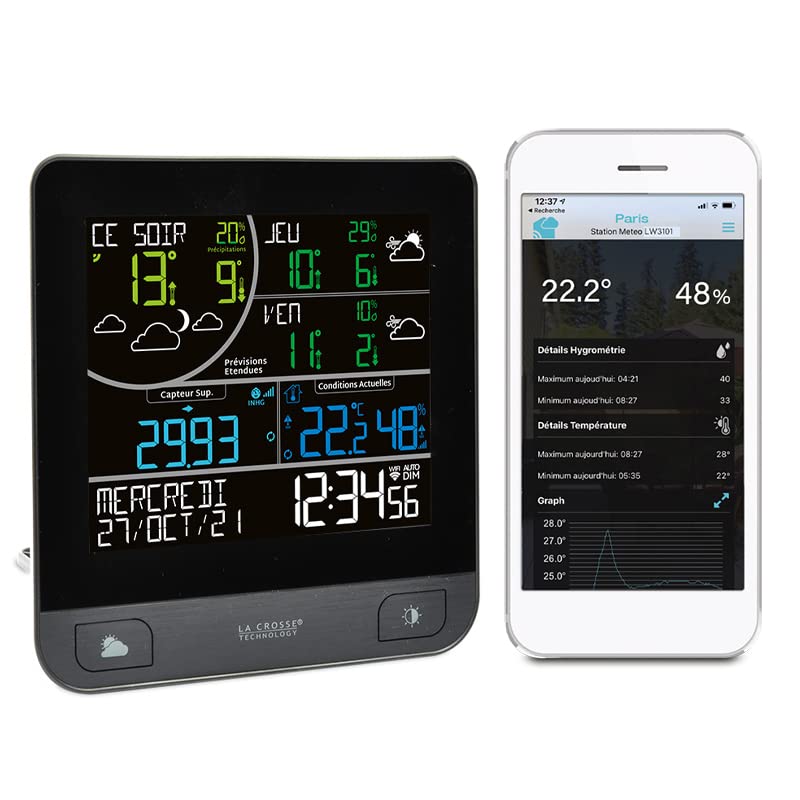
Image: The La Crosse Technology LW3101 weather station display showing current weather data and forecasts, alongside a smartphone screen displaying the La Crosse View application with detailed weather information.
Návod k obsluze
1. Zobrazit přesview
Hlavní displej zobrazuje různé informace:
- Horní sekce: Internet weather forecasts (3-day, 12-hour, 6-day outlooks).
- Střední část: Indoor and outdoor temperature/humidity, heat index, dew point.
- Spodní část: Atmospheric pressure, time, and date.
2. Nastavení času a data
Once connected to Wi-Fi, the time and date will automatically synchronize. You can adjust the language and 12/24 hour format through the device settings or the La Crosse View aplikace
3. Zobrazení předpovědi počasí
The station receives weather forecasts via the internet. The display will show icons representing predicted conditions, along with temperature ranges and precipitation probabilities for the coming days.
4. Temperature and Humidity Readings
The station displays both indoor and outdoor temperature and humidity. Ensure the outdoor sensor is properly placed for accurate external readings.

Image: A smartphone screen displaying the La Crosse View application, showing a detailed graph of temperature fluctuations over several hours, along with current temperature and humidity readings.
5. Upozornění
You can set customizable alerts for temperature and humidity thresholds through the La Crosse View app. The station will notify you when these thresholds are met.
6. Nastavení podsvícení
The display backlight can be adjusted manually or set to an automatic dimming function for comfortable viewza různých světelných podmínek.
Údržba
1. Výměna baterie
When the low battery indicator appears on the display for either the main station or the outdoor sensor, replace the batteries promptly with new ones of the specified type. Ensure correct polarity during replacement.
2. Čištění
Očistěte meteorologickou stanici a senzor měkkým hadříkemamp hadříkem. Nepoužívejte abrazivní čisticí prostředky ani rozpouštědla, protože by mohly poškodit displej neboasing. Keep the devices dry.
Odstraňování problémů
- Bez displeje/napájení: Check battery installation and ensure they are fresh. If using an AC adapter (if applicable, not specified here), ensure it is properly connected.
- Žádná data z venkovního senzoru: Ensure the outdoor sensor is within range of the main station and has fresh batteries. Try re-pairing the sensor according to the app instructions.
- Inaccurate Forecasts: Verify your Wi-Fi connection is stable. Internet-based forecasts rely on external data sources; minor discrepancies may occur.
- Odpojení Wi-Fi: Check your home Wi-Fi network. Restart your router and the weather station. Reconnect through the La Crosse View app if necessary.
- Display Segments Missing: This could indicate a hardware issue. Contact customer support if troubleshooting steps do not resolve the problem.
Specifikace
| Výrobce | Technologie La Crosse |
| Číslo modelu | LW3101-MEG |
| Rozměry balení | 20.9 x 17.1 x 7.9 cm; 600 gramů |
| Barva | Šedá |
| Styl | Moderní |
| Materiál | Kov nebo plast |
| Zdroj napájení | Napájení z baterie |
| Počet položek v balení | 1 |
| Přesnost měření | +/- 1 ° C |
| Typ zobrazení | LED |
| Speciální funkce | Wireless, Wi-Fi Connectivity |
| Komponenty v ceně | Návod k použití |
| Baterie jsou součástí dodávky | Žádný |
| Jsou vyžadovány baterie | Ano |
Informace o záruce
Specific warranty details for the La Crosse Technology LW3101 are not provided in this manual. Please refer to the warranty card included with your product or visit the official La Crosse Technology webstránky, kde najdete nejaktuálnější informace o záruce.
Podpora
For technical assistance, troubleshooting, or further inquiries regarding your La Crosse Technology LW3101 Wi-Fi Weather Station, please visit the official La Crosse Technology support webnebo kontaktujte jejich oddělení zákaznických služeb. Kontaktní informace obvykle naleznete na webových stránkách výrobce webmístě nebo na obalu produktu.


