Zavedení
This manual provides comprehensive instructions for the Angrox XRT140 Universal Remote Control, designed as a replacement for various VIZIO Smart TV models. It covers setup, operation, and troubleshooting to ensure optimal performance and ease of use.
Konec produktuview

Obrázek: Přední a zadní strana view of the Angrox XRT140 Universal Remote Control.
Klíčové vlastnosti
- Přístup jedním dotykem: Dedicated buttons for popular streaming services including Vudu, Netflix, Prime Video, Xumo, Hulu, and Redbox, plus a WatchFree button.
- Responzivní tlačítka: Engineered for quick response times (less than 0.5 seconds) and durability (over 11,000 clicks).
- Rozšířený rozsah: Offers a transmitting distance of over 42 feet for flexible use.
- Odolná konstrukce: Made from high-quality ABS material with a glossy finish for enhanced durability and soft, tactile buttons.
- Není vyžadováno žádné programování: Ready to use immediately after battery installation.
Kompatibilita
The Angrox XRT140 remote control is designed for broad compatibility with VIZIO Smart TV models and can replace several VIZIO remote models.
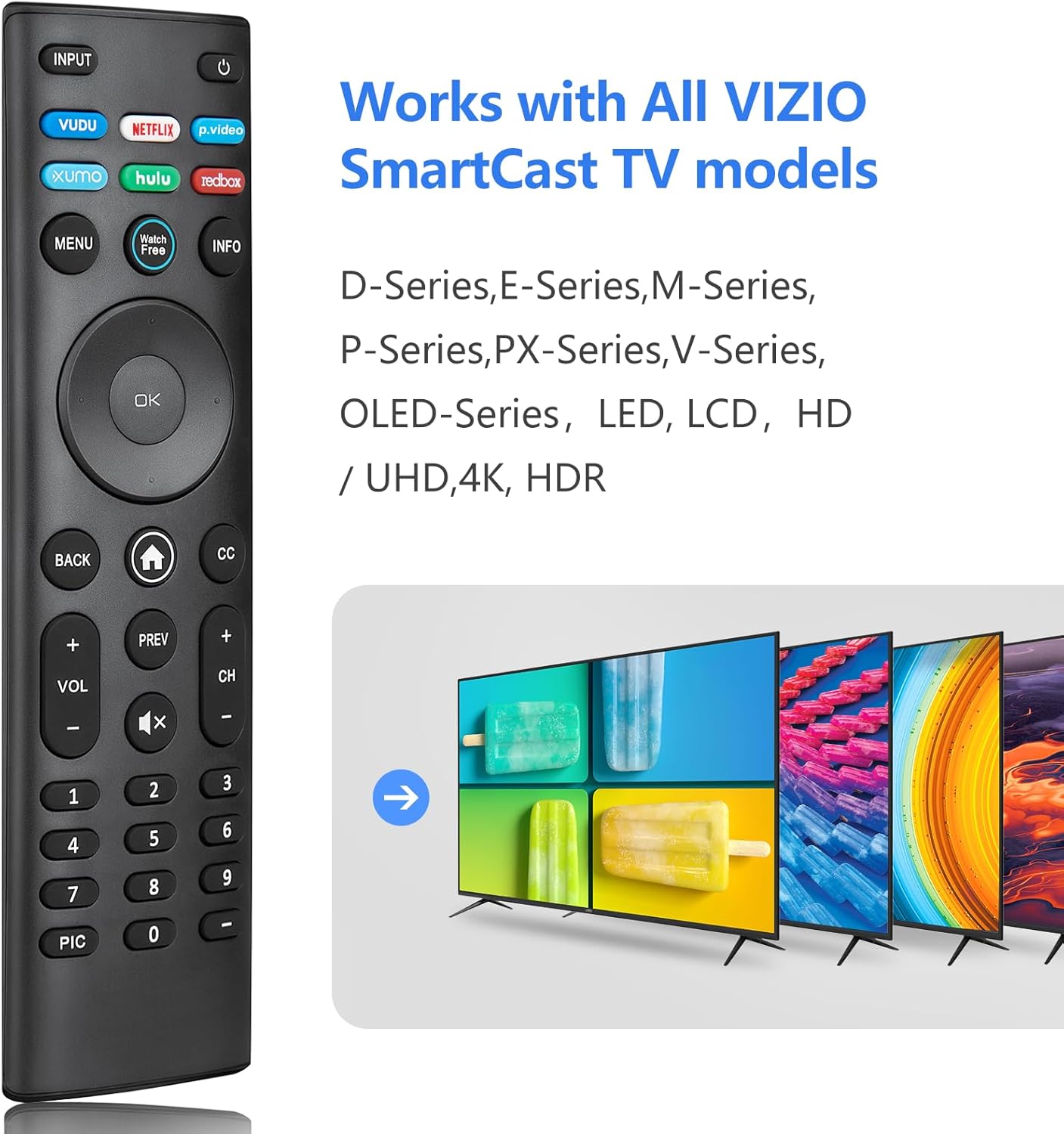
Image: The Angrox XRT140 remote control is compatible with various VIZIO SmartCast TV models, including D-Series, E-Series, M-Series, P-Series, PX-Series, V-Series, and OLED-Series.
- Compatible VIZIO TV Models: D-Series, E-Series, M-Series, P-Series, PX-Series, V-Series, OLED-Series, and other LED, LCD, HD, 4K UHD, HDR Smart TVs.
- Nahrazuje modely dálkových ovladačů VIZIO: XRT136, XRT135, XRT510, XRT500, XRT100, XRT112, XRT122, XRT302, VR1, VR2, VR10, VR15.
Pokyny pro nastavení
Instalace baterie
- Najděte přihrádku na baterie na zadní straně dálkového ovladače.
- Posuňte kryt baterie dolů a otevřete jej.
- Insert two (2) 1.5V AAA batteries, ensuring the positive (+) and negative (-) terminals align correctly with the markings inside the compartment.
- Zasuňte kryt baterie zpět na místo, dokud bezpečně nezapadne.
Poznámka: Vždy používejte nové baterie a vyměňujte obě baterie současně. Nekombinujte staré a nové baterie ani různé typy baterií.
První použití
The Angrox XRT140 remote control requires no programming. Once batteries are installed, it is ready for immediate use with compatible VIZIO Smart TVs.
- Ensure your VIZIO Smart TV is powered on.
- Point the remote control directly towards the TV's infrared (IR) sensor.
- Press any button (e.g., Power, Volume Up) to test functionality.
If the remote does not respond, verify battery installation and ensure there are no obstructions between the remote and the TV sensor.
Návod k obsluze
Funkce tlačítek
The following diagram and descriptions detail the functions of each button on the Angrox XRT140 remote control.

Image: Detailed diagram illustrating the function of each button on the Angrox XRT140 remote control.
| Tlačítko | Funkce |
|---|---|
| VSTUP | Changes the currently displayed input source. |
| Moc (⏻) | Zapíná nebo vypíná televizor. |
| VUDU | Accesses VUDU channels/application. |
| NETFLIX | Accesses NETFLIX channels/application. |
| p.video (Prime Video) | Accesses Prime Video channels/application. |
| XUMO | Accesses XUMO channels/application. |
| HULU | Accesses HULU channels/application. |
| REDBOX | Accesses REDBOX channels/application. |
| MENU | Displays the settings menu. |
| Sledujte Zdarma | Accesses WatchFree channels (availability may vary by region). |
| INFO | Displays the information window. |
| Navigation Buttons (Up/Down/Left/Right) | Navigates on-screen menus. |
| OK / Přehrát / Pozastavit | Selects the highlighted menu option and plays or pauses content. |
| ZADNÍ | Goes to the previous on-screen menu. |
| Home Button (⌂) | Launches SmartCast Home or returns to the SmartCast Home Screen. |
| CC (Skryté titulky) | Enables or disables closed captions. Long press to open the Accessibility menu. |
| VOL +/- (Volume Up/Down) | Increases or decreases the loudness of the audio. |
| PŘEDCHOZÍ | Vrací se na kanál jako poslední viewvyd. |
| CH +/- (Channel Up/Down) | Změní kanál. |
| Ztlumit (🔇) | Zapíná nebo vypíná zvuk. |
| Číselná klávesnice (0-9) | Ručně zadá číslo kanálu. |
| PIC | Cykluje mezi různými režimy nastavení obrazu. Dlouhým stisknutím aktivujete/deaktivujete funkci zpětného hovoru. |
| pomlčka (-) | Used with the number pad to manually enter a digital sub-channel (e.g., 18-4 or 18-5). |
Odstraňování problémů
If you encounter issues with your Angrox XRT140 remote control, please refer to the following common troubleshooting steps:
- Dálkové ovládání nereaguje:
- Ensure batteries are correctly installed with proper polarity (+/-).
- Replace old batteries with two new 1.5V AAA batteries.
- Confirm there are no obstructions between the remote's IR emitter and the TV's IR receiver.
- Namiřte dálkový ovladač přímo na infračervený senzor televizoru.
- Omezený rozsah:
- Ensure batteries are fresh. Low battery power can reduce signal strength.
- Remove any objects that might be blocking the signal path between the remote and the TV.
- The remote operates via infrared (IR) and requires a direct line of sight to the TV.

Image: The remote control offers an extended transmitting distance of over 42 feet, but requires a clear line of sight.
- Konkrétní tlačítka nefungují:
- Clean the remote control buttons and surface with a soft, dry cloth to remove any dirt or residue that might be interfering with button presses.
- Pokud nereagují pouze některá tlačítka, dálkový ovladač může být poškozený. Zvažte jeho výměnu.
Specifikace
| Funkce | Detail |
|---|---|
| Číslo modelu | XRT140 |
| Značka | Angrox |
| Rozměry produktu | 6.3 x 1.57 x 0.39 palce (16.0 x 4.0 x 1.0 cm) |
| Hmotnost položky | 1.76 unce (50 gramů) |
| Jsou vyžadovány baterie | 2x baterie AAA (1.5V) |
| Speciální funkce | Ergonomic design, No Programming Required, Universal compatibility with specified VIZIO TVs |
| Výrobce | ENJOYLink Direct |

Image: Physical dimensions of the Angrox XRT140 remote control.
Údržba
- Čištění: K čištění dálkového ovladače používejte měkký, suchý hadřík. Nepoužívejte tekuté čisticí prostředky ani abrazivní materiály.
- Péče o baterie: Remove batteries if the remote will not be used for an extended period to prevent leakage. Dispose of used batteries responsibly according to local regulations.
- Skladování: Dálkový ovladač skladujte na chladném a suchém místě mimo dosah přímého slunečního záření a extrémních teplot.
Záruka a podpora
Specific warranty details for the Angrox XRT140 remote control may vary. Please refer to the product packaging or contact the retailer where the product was purchased for detailed warranty information.
For technical support or further assistance, please contact Angrox customer service through their official channels or the retailer's support services.
