1. Konec produktuview
The ASUS PRIME B660-PLUS D4 is an ATX motherboard designed to support the latest 12th Generation Intel CPUs with the LGA 1700 socket, including Pentium Gold and Celeron Processors, utilizing the Intel B660 Chipset. This motherboard is built to provide a stable foundation for your PC build, offering a balance of features and performance.
It features PCIe 3.0 readiness, supporting up to 128GB of DDR4 memory at speeds up to 5000MHz (OC) across four DIMM slots. The board incorporates Intel Turbo Boost Technology for enhanced performance. For storage and connectivity, it is equipped with three M.2 slots (PCIe 4.0), Realtek 2.5Gb Ethernet, USB 3.2 Gen 2x2 Type-C, multiple USB 3.2 Gen 2 and Gen 1 Type-A ports, USB 2.0 ports, four SATA 6Gb/s ports, and various display outputs including HDMI, DisplayPort, and D-Sub, with Thunderbolt 4 support.
The PRIME B660-PLUS D4 includes comprehensive cooling options configurable via Fan Xpert 4 or the UEFI BIOS, featuring VRM and PCH heatsinks, and hybrid fan headers. It also incorporates ASUS's SMT manufacturing process for SafeSlot, a reinforced metal sheath for PCIe slots, ensuring durability and high data speeds. For troubleshooting, the Q-LED Core display provides light patterns during the Power-On Self-Test (POST) to help diagnose potential issues. Additional features include Overvoltage Protection, DRAM Overcurrent Protection, Stainless-Steel Back I/O, and LANGuard for enhanced reliability.
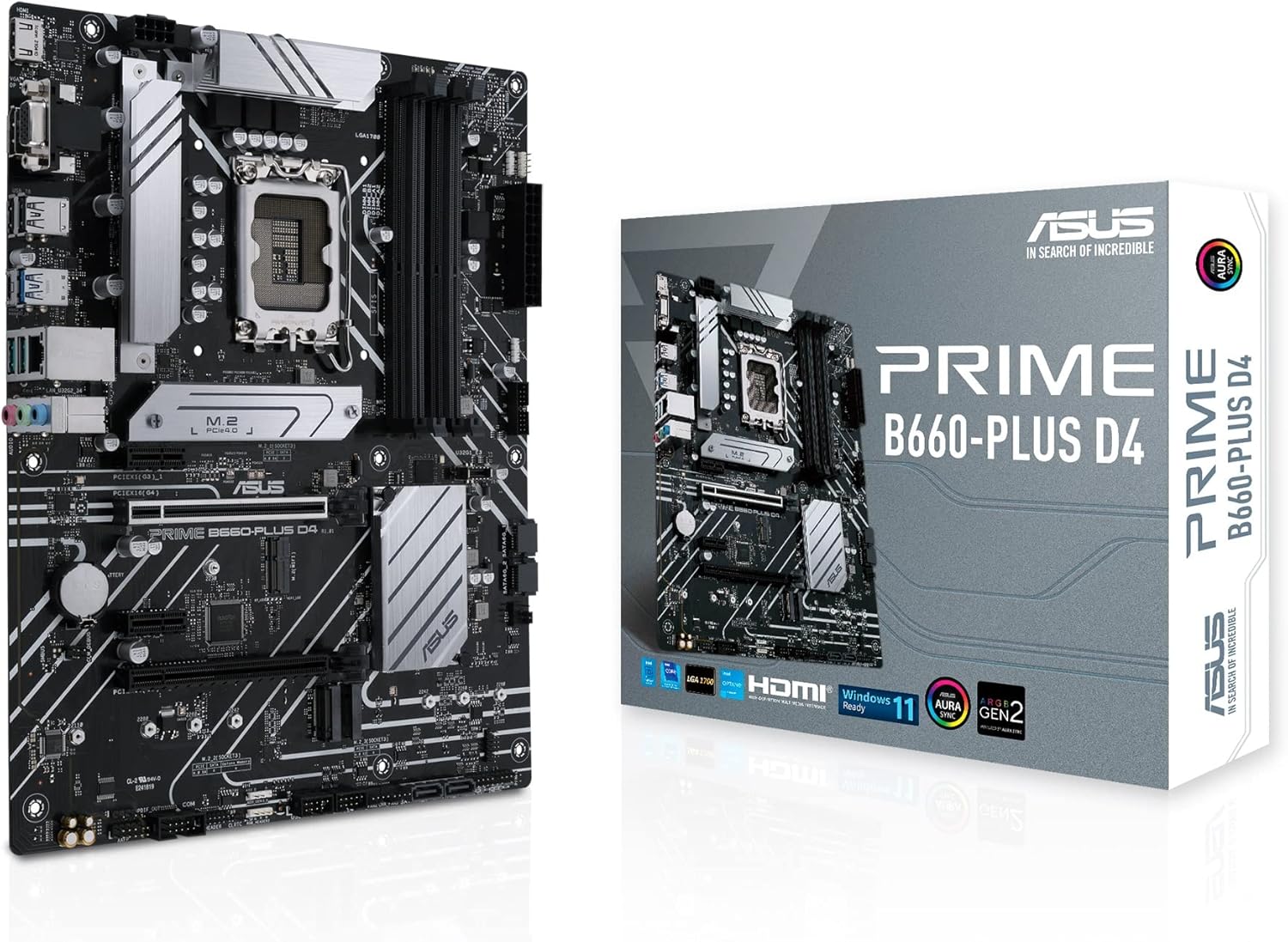
Figure 1.1: The ASUS PRIME B660-PLUS D4 Motherboard alongside its retail packaging, highlighting the product's design and branding.
2. Co je v krabici
Upon opening the package, verify that all components listed below are present and in good condition:
- Kabely: 2x kabel SATA 6Gb/s
- Smíšený:
- 1 x I/O štít
- 1 x M.2 Gumové balení
- 2 x M.2 SSD screw packages
- 1 x balení šroubů M.2 Key E
- Installation Media: 1 x podpora DVD
- Dokumentace: 1 x Uživatelská příručka
3. Nastavení a instalace
Before beginning installation, ensure your system is powered off and disconnected from the power outlet. It is recommended to wear an anti-static wrist strap to prevent electrostatic discharge (ESD) damage to components.
3.1. Příprava základní desky
- Nainstalujte procesor: Carefully align your Intel LGA 1700 processor with the socket on the motherboard. Ensure the triangular mark on the CPU aligns with the mark on the socket. Gently lower the CPU into place and secure it by closing the load plate and lever.
- Instalace chladiče CPU: Follow the cooler manufacturer's instructions to install the CPU cooler. Ensure proper thermal paste application and secure mounting.
- Instalace modulů RAM: Open the clips on the DDR4 DIMM slots. Align the notch on the memory module with the key in the slot. Press down firmly on both ends of the module until the clips snap into place. Refer to the motherboard manual for recommended dual-channel configurations.
- Instalace disků M.2 SSD: Locate the M.2 slots. Remove the M.2 heatsink (if present) and the M.2 screw package. Insert the M.2 SSD into the slot at an angle, then gently push it down and secure it with the provided screw. Reattach the heatsink if applicable.

Obrázek 3.1: Shora dolů view of the motherboard, illustrating the placement of the LGA 1700 CPU socket, DDR4 DIMM slots, and M.2 slots for component installation.
3.2. Instalace a připojení skříně
- Instalace krytu I/O: Snap the I/O shield into the rear opening of your PC case from the inside.
- Montáž základní desky: Opatrně vložte základní desku do skříně a zarovnejte otvory pro šrouby s distančními distančními otvory. Zajistěte základní desku šrouby.
- Připojte napájecí zdroj: Connect the 24-pin ATX power connector and the 8-pin (or 4+4-pin) CPU power connector from your power supply unit (PSU) to the corresponding ports on the motherboard.
- Připojení kabelů předního panelu: Connect the power button, reset button, HDD LED, power LED, and front panel USB/audio cables to the appropriate headers on the motherboard. Refer to the motherboard's user manual for exact pin layouts.
- Připojení úložných zařízení: Connect SATA data cables from your SATA SSDs/HDDs to the SATA 6Gb/s ports on the motherboard. Connect SATA power cables from your PSU to these devices.
- Instalace rozšiřujících karet: If installing a graphics card or other PCIe expansion cards, insert them firmly into the appropriate PCIe slots until they click into place. Secure them with the case's retention mechanism.

Obrázek 3.2: Úhlové view of the motherboard, highlighting the rear I/O panel, PCIe slots, and various headers for connecting case components and peripherals.
4. Návod k obsluze
Jakmile jsou všechny komponenty nainstalovány a připojeny, můžete pokračovat s počátečním spuštěním a instalací operačního systému.
4.1. Počáteční spuštění a nastavení BIOSu/UEFI
- Zapnutí: Připojte monitor, klávesnici a myš. Zapněte systém.
- Přístup k BIOSu/UEFI: During the Power-On Self-Test (POST), repeatedly press the DEL klíč nebo F2 klávesu pro vstup do nástroje pro nastavení systému BIOS/UEFI.
- Konfigurace nastavení: In the BIOS/UEFI, you can configure boot order, enable/disable features, set fan curves, and monitor system status. Save and exit the BIOS/UEFI after making any necessary changes.
- Q-LED Core Display: Observe the Q-LED Core display during POST. This feature uses light patterns from the power LED to indicate the status of key components (CPU, DRAM, VGA, Boot Device). Refer to the full user manual for specific light patterns and their corresponding troubleshooting steps.
4.2. Instalace operačního systému a ovladačů
After configuring the BIOS/UEFI, proceed with installing your preferred operating system (e.g., Windows 11, as supported by this motherboard). Ensure you have a bootable USB drive or DVD with the OS installer.
- Instalace operačního systému: Follow the on-screen prompts to install the operating system.
- Instalace ovladače: Once the OS is installed, install the necessary drivers for your motherboard. These can be found on the included Support DVD or downloaded from the official ASUS support website. Key drivers include Chipset, LAN, Audio, and any specific utility drivers.
5. Údržba
Pravidelná údržba pomáhá zajistit dlouhou životnost a optimální výkon vaší základní desky a počítačového systému.
- Čištění prachu: Periodically clean dust from inside your PC case, especially from heatsinks, fans, and ventilation areas. Use compressed air or a soft brush. Ensure the system is powered off and unplugged before cleaning.
- Aktualizace BIOSu/UEFI: Zkontrolujte podporu ASUSu website for the latest BIOS/UEFI versions. Updating the BIOS can improve compatibility, stability, and performance. Follow the instructions provided by ASUS carefully when performing a BIOS update.
- Aktualizace ovladačů: Keep your motherboard drivers (chipset, LAN, audio, etc.) updated to the latest versions available on the ASUS support website. This ensures optimal performance and compatibility with new software and hardware.
- Správa kabelů: Zajistěte úhledné uspořádání vnitřních kabelů, aby se zlepšilo proudění vzduchu a zabránilo se ucpávání komponent.
6. Řešení problémů
Tato část obsahuje pokyny k řešení běžných problémů, se kterými se můžete setkat.
6.1. Q-LED Core Diagnostics
The PRIME B660-PLUS D4 features Q-LED Core, which uses the power LED to indicate the status of key components during POST. Observe the light patterns to identify the problematic area:
- LED dioda CPU: Indicates an issue with the CPU. Check CPU installation, power connections, and CPU compatibility.
- LED dioda DRAM: Indicates an issue with the memory. Check RAM installation, try one stick at a time, or test with known good RAM.
- LED VGA: Indicates an issue with the graphics card. Check graphics card installation, power connections, and monitor cable.
- LED dioda BOOT: Indicates an issue with the boot device. Check SATA/M.2 connections, boot order in BIOS, and OS installation.
6.2. Běžné problémy
- Bez napájení: Ensure PSU is connected and switched on. Check all power cables to the motherboard and components.
- Bez displeje: Verify monitor is connected and powered on. Ensure graphics card (if dedicated) is properly seated and powered. Try connecting to integrated graphics (if CPU supports it) or another display output.
- Nestabilita/pády systému: This can be caused by overheating, unstable overclocks, faulty RAM, or driver issues. Monitor temperatures, reset BIOS to default, run memory tests, and update drivers.
- Periferní zařízení nebylo detekováno: Ensure USB devices are properly connected. Try different USB ports. Update USB drivers.
Podrobnější informace o řešení problémů naleznete v komplexní uživatelské příručce dodané se základní deskou nebo navštivte stránky podpory ASUS. webmísto.
7. Specifikace
Key technical specifications for the ASUS PRIME B660-PLUS D4 Motherboard:
| Funkce | Specifikace |
|---|---|
| Značka | ASUS |
| Název modelu | Prime B660-PLUS D4 |
| Zásuvka CPU | LGA 1700 |
| Kompatibilní procesory | Intel Celeron, Intel Pentium Gold, 12th Gen Intel Core Processors |
| Typ čipové sady | Intel B660 |
| Technologie paměti RAM | DDR4 |
| Rychlost paměti | Až 5000 MHz (přetaktování) |
| Maximální podporovaná RAM | 128 GB (4 sloty DIMM) |
| PCIe sloty | PCIe 3.0 Ready (with SafeSlot) |
| M.2 Sloty | 3 x M.2 slots (PCIe 4.0) |
| Ethernet | Realtek 2.5Gb Ethernet |
| USB porty | USB 3.2 Gen 2x2 Type-C, USB 3.2 Gen 2 Type-A, USB 3.2 Gen 1 Type-A, USB 2.0 Type-A |
| Video výstupy | HDMI, DisplayPort, D-Sub |
| Rozměry | 10.24 x 10.24 x 1.97 palce (formát ATX) |
| Hmotnost položky | 2.2 libry |
| Podpora platformy | Windows 11 |
8. Záruka a podpora
ASUS products are manufactured to the highest quality standards. For information regarding the warranty period and terms for your ASUS PRIME B660-PLUS D4 Motherboard, please refer to the warranty card included in your product packaging or visit the official ASUS support webmísto.
For technical assistance, driver downloads, BIOS updates, and further product information, please visit the ASUS Support Center:
Navštivte podporu ASUS Webmísto
When contacting support, please have your product model name (PRIME B660-PLUS D4) and serial number (if applicable) ready.


