1. Úvod
This manual provides instructions for the U.S. Solid Blade Holder, Accessory #200, designed for use with U.S. Solid JF-3000 and JF-7000 Automatic Tape Dispensers. This component is a replacement part for the cutting mechanism of your tape dispenser, ensuring precise and efficient tape cutting.
2. Bezpečnostní informace
This blade holder contains sharp edges. Exercise extreme caution during installation, removal, and handling to prevent injury.
POZOR: Always use tweezers to remove tape from the outlet. Do not insert your finger into the outlet.

Detailní záběr view of the U.S. Solid Blade Holder, highlighting the integrated caution label. The label explicitly states: 'CAUTION: ALWAYS USE TWEEZERS TO REMOVE THE TAPE. DO NOT INSERT YOUR FINGER INTO OUTLET.' This emphasizes the importance of safety during operation and maintenance.
3. Konec produktuview
The U.S. Solid Blade Holder (Accessory #200) is a precision-engineered component responsible for cutting tape in the JF-3000 and JF-7000 automatic tape dispensers. It features a serrated blade for clean cuts and is designed for easy replacement.

This image displays the front of the U.S. Solid Blade Holder, showcasing its black corrugated surface and the central opening where the tape exits. The serrated cutting edge is visible at the bottom of the opening, designed for precise tape cutting.
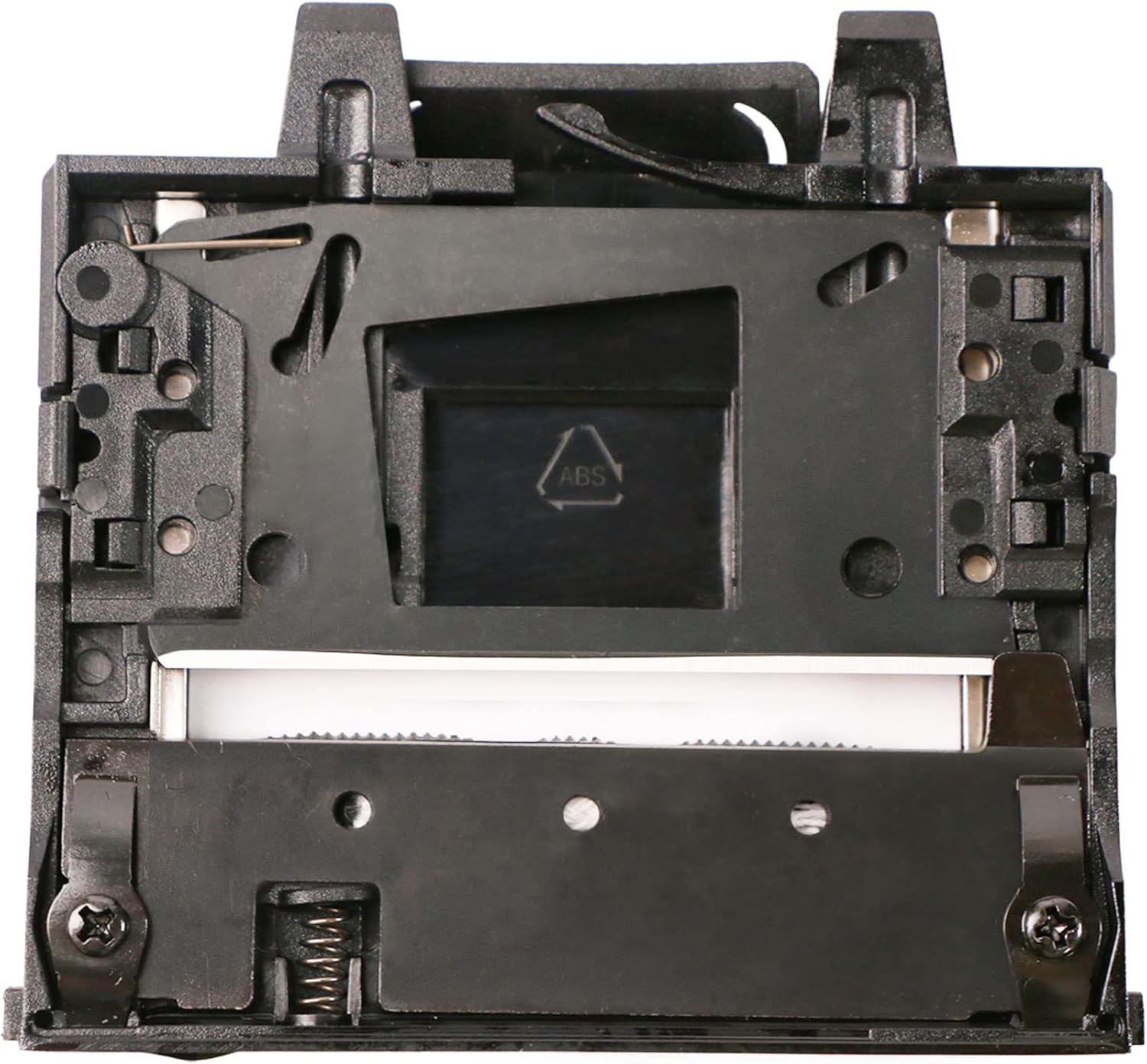
Vnitřní view of the U.S. Solid Blade Holder, revealing the intricate mechanical components, springs, and screws that facilitate the tape cutting action. The 'ABS' plastic marking is visible on one of the internal parts.
4. Instalace a výměna
This section outlines the steps to safely install or replace the blade holder in your U.S. Solid JF-3000 or JF-7000 automatic tape dispenser.
- Vypnout: Ensure the tape dispenser is unplugged from the power source before beginning any installation or replacement procedure.
- Access the Blade Holder: Refer to your specific tape dispenser's manual (JF-3000 or JF-7000) for instructions on how to safely open the dispenser and access the existing blade holder. This typically involves removing a cover or panel.
- Demontáž starého držáku čepele: Carefully identify the fasteners (screws or clips) securing the old blade holder. Use appropriate tools (e.g., a screwdriver) to loosen and remove them. Gently lift out the old blade holder, being mindful of any sharp edges.
- Install New Blade Holder: Position the new U.S. Solid Blade Holder (Accessory #200) into the designated slot. Ensure it aligns correctly with the tape path and any mounting points.
- Secure the Blade Holder: Re-insert and tighten the fasteners to secure the new blade holder firmly in place. Do not overtighten.
- Reassemble Dispenser: Replace any covers or panels that were removed to access the blade holder.
- Test funkčnosti: Plug the tape dispenser back into the power source. Load tape and perform a test cut to ensure the new blade holder is functioning correctly and providing clean cuts.
5. Function within the Tape Dispenser
The blade holder is an integral part of the automatic tape dispenser's cutting mechanism. Once installed, it works in conjunction with the dispenser's motor and feed system to:
- Provide a sharp, consistent cutting edge for various tape types.
- Ensure clean and precise cuts, preventing tape fraying or tearing.
- Facilitate the automatic dispensing and cutting process as programmed by the user on the main dispenser unit.
For detailed operating instructions of the tape dispenser itself, please refer to the user manual for your U.S. Solid JF-3000 or JF-7000 Automatic Tape Dispenser.
6. Údržba
Regular maintenance of the blade holder ensures optimal performance and extends its lifespan.
- Čištění: Periodically inspect the blade holder for tape residue, adhesive buildup, or debris. Use a soft brush or a cloth dampened with a mild cleaning solution (e.g., isopropyl alcohol) to gently clean the cutting edge and surrounding areas. Ensure the dispenser is unplugged before cleaning.
- Inspekce: Check the blade for any signs of dullness, nicks, or damage. A dull blade can lead to poor cutting performance. If the blade appears damaged or excessively dull, consider replacing the blade holder.
- Bezpečnost především: Always follow the safety precautions mentioned in this manual, especially when cleaning near the sharp blade. Use tweezers for removing stubborn tape pieces.
7. Řešení problémů
If you experience issues related to tape cutting after installing or using the blade holder, consider the following:
- Špatná kvalita řezu:
- Příčina: Dull blade, tape residue on the blade, or improper installation.
- Řešení: Clean the blade holder as described in the Maintenance section. If the issue persists, the blade may be dull and require replacement of the blade holder. Ensure the blade holder is securely installed.
- Tape Not Cutting Completely:
- Příčina: Blade holder not properly seated, or a foreign object obstructing the cutting path.
- Řešení: Power off and unplug the dispenser. Carefully inspect the blade holder for obstructions. Re-seat the blade holder to ensure it is correctly installed.
- Unusual Noise During Cutting:
- Příčina: Misalignment or loose components.
- Řešení: Power off and unplug the dispenser. Check that the blade holder is securely fastened and properly aligned.
8. Specifikace
| Funkce | Detail |
|---|---|
| Značka | US Solid |
| Číslo modelu | JFZCUT00003-NO200 |
| Číslo příslušenství | #200 |
| Kompatibilní dávkovače | U.S. Solid JF-3000, JF-7000 |
| Materiál | Plast, kov |
| Hmotnost položky | 80 g |
| Rozměry balení | 11.1 x 10.3 x 1.9 cm |
| UPC | 888107100393 |
9. Záruka a podpora
For warranty information or technical support regarding your U.S. Solid Blade Holder (Accessory #200) or compatible tape dispenser, please contact U.S. Solid customer service directly. Refer to the original product packaging or the U.S. Solid official webstránky pro kontaktní údaje.


