Zavedení
This instruction manual provides detailed information on how to set up, operate, and maintain your TTfone TT190 mobile phone. Please read this manual carefully to ensure proper use and to maximize the phone's features.
Obsah balení
Než začnete, zkontrolujte prosím, zda vaše balení obsahuje následující položky:
- Mobilní telefon TTfone TT190
- Baterie
- USB nabíjecí kabel
- Uživatelská příručka
Konec produktuview
The TTfone TT190 is an unlocked mobile phone designed with ease of use in mind, particularly for seniors. It features large, separated buttons, a clear display, and essential functions like an SOS emergency button and a loud speaker.
Klíčové vlastnosti
- Nouzové tlačítko SOS: A dedicated button for quick access to emergency contacts.
- Simple Keypad: Large, separated buttons for easy dialing and navigation.
- Hlasitý reproduktor: Enhanced volume for calls and speakerphone function.
- Jasný displej: User-friendly menu with large fonts and clear icons.
- Praktická svítilna: Integrated flashlight with a dedicated switch.
Rozložení telefonu

Obrázek: Přední a zadní strana view of the TTfone TT190 mobile phone, showing the large keypad and the SOS button on the rear.
Nastavení
Vložení SIM karty a baterie
- Jemným vypáčením od zářezu sejměte zadní kryt telefonu.
- Insert your SIM card(s) into the designated slot(s) with the gold contacts facing down. Ensure it is correctly seated.
- Insert the battery into the battery compartment, aligning the contacts.
- Nasaďte zpět zadní kryt a pevně jej zatlačte, dokud nezacvakne na místo.
Nabíjení telefonu
Před prvním použitím plně nabijte baterii telefonu.

Image: The TTfone TT190 mobile phone connected to a USB charging cable, indicating the charging process.
- Connect the small end of the USB charging cable to the phone's charging port (Micro USB).
- Připojte druhý konec kabelu USB ke kompatibilnímu napájecímu adaptéru USB nebo k portu USB počítače.
- The battery indicator on the screen will show the charging status. Disconnect the charger once the battery is full.
Návod k obsluze
Zapnutí/vypnutí
To power on, press and hold the red Ukončit hovor/Napájení button until the screen lights up. To power off, press and hold the same button until the power off option appears, then confirm.
Uskutečňování hovorů
Enter the phone number using the keypad. Press the green Volání button to initiate the call. To end a call, press the red Ukončit hovor tlačítko.

Image: A hand holding the TTfone TT190, highlighting its large, easy-to-use keypad for simple operation.
Přijímání hovorů
When an incoming call rings, press the green Volání button to answer. To reject a call, press the red Ukončit hovor tlačítko.
Odesílání a přijímání zpráv
Navigate to the 'Messages' menu. Select 'Write message' to compose a new SMS. Enter the recipient's number and your message. To read received messages, select 'Inbox'.
Using the SOS Emergency Button
The SOS button is located on the back of the phone. In an emergency, press and hold this button for a few seconds. The phone will automatically call and send an emergency SMS to pre-set contacts.

Image: The back of the TTfone TT190 showing the prominent red SOS button, with an illustration of a person in distress, indicating its emergency function.
Loud Speaker Function
The TT190 features an extra loud speaker for clear audio during calls. During a call, you can activate the speakerphone function for even louder volume.
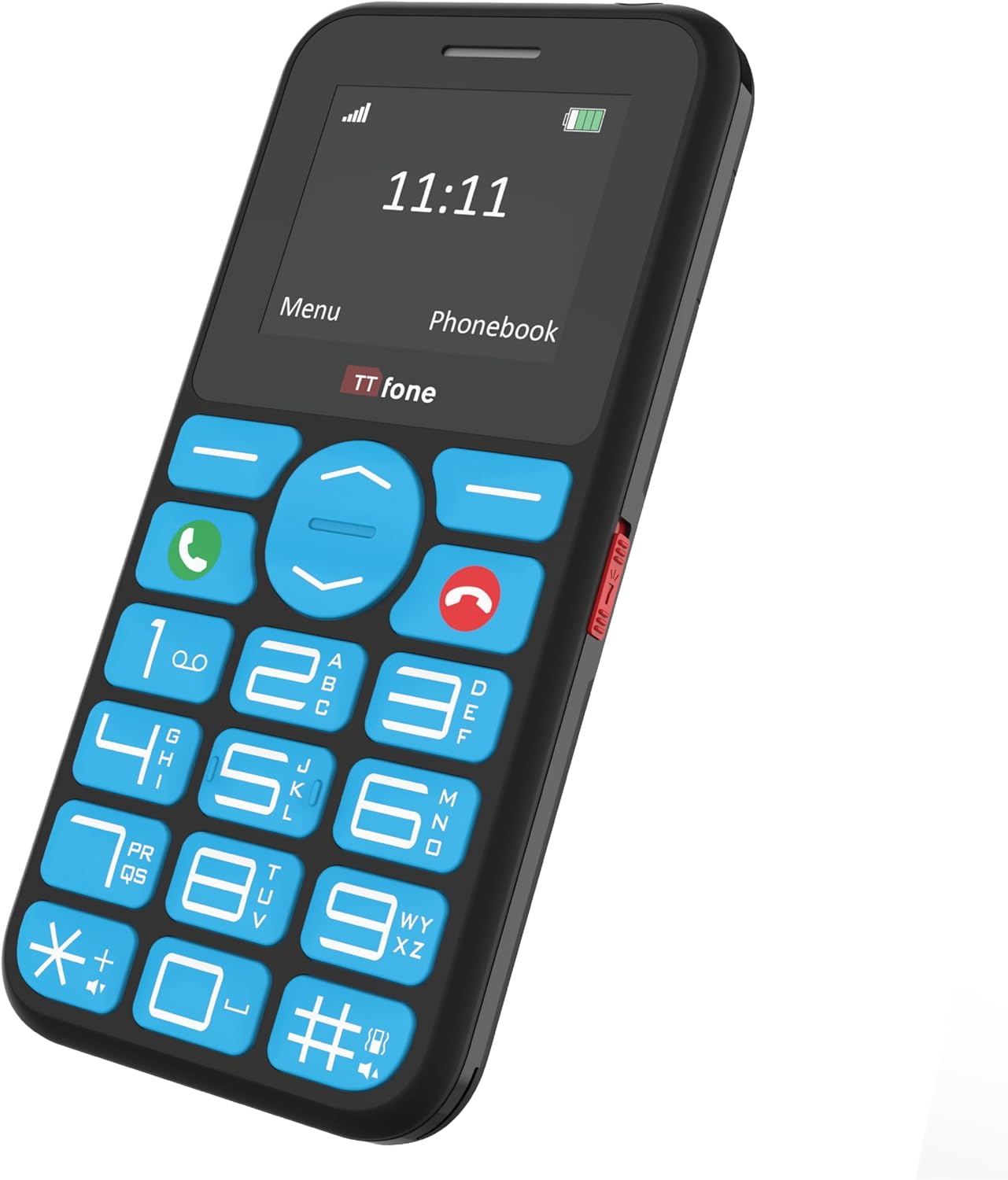
Image: An elderly person using the TTfone TT190, with visual cues indicating the loud speaker output from the phone's earpiece and rear speaker.
Použití baterky
A dedicated switch on the side of the phone controls the built-in flashlight. Slide the switch to turn the flashlight on or off.

Image: The TTfone TT190 phone emitting a beam of light from its top, illustrating its handy flashlight feature in a dark setting.
Phonebook / Contacts
To save a new contact, navigate to the 'Phonebook' or 'Contacts' menu, select 'Add new contact', and enter the name and number. To call a saved contact, select their name from the phonebook and press the green Volání tlačítko.
Navigace v nabídce
Use the navigation keys (up, down, left, right) to move through the menu options. Press the 'OK' or 'Select' button (usually the center button) to confirm a selection. Press the 'Back' or 'Clear' button to return to the previous screen.
Údržba
Čištění
Wipe the phone with a soft, dry cloth. Do not use liquid cleaners or aerosols. Keep the charging port free of dust and debris.
Péče o baterie
To prolong battery life, avoid exposing the phone to extreme temperatures. Do not leave the battery fully discharged for extended periods. Use only the original or approved charging accessories.
Odstraňování problémů
| Problém | Možné řešení |
|---|---|
| Telefon se nezapne. | Ujistěte se, že je baterie správně vložena a nabitá. Zkuste telefon nabíjet alespoň 30 minut. |
| Nelze uskutečňovat ani přijímat hovory. | Check if the SIM card is properly inserted and activated. Ensure you have network signal. Contact your service provider if issues persist. |
| Během hovorů není slyšet žádný zvuk. | Zkontrolujte nastavení hlasitosti. Ujistěte se, že reproduktor není blokován. |
| Tlačítko SOS nefunguje. | Verify that emergency contacts are correctly set up in the phone's settings. |
Specifikace
| Funkce | Detail |
|---|---|
| Značka | TTfone |
| Barva | Černý |
| Typ produktu | Bar |
| Operační systém | TTfone |
| Velikost obrazovky | 1.7 palce |
| Konektivita | Bluetooth Cellular |
| Nabíjecí port | Micro USB |
| Paměťový slot | Slot 1 |
| Speciální funkce | Large buttons, SOS emergency key, Phone for Seniors, USB |
| Složení baterie | Lithium-iontová |
| Záruka výrobce | 2 roky |
| Dostupnost náhradních dílů | 2 roky |
| Aktualizace softwaru zaručeny do | Informace nejsou k dispozici |
| Číslo modelu položky | TT970 |
| Baterie (baterie) | 1 lithium-iontové – součástí balení |
| Výrobce | TTfone |
| Země původu | Čína |
| Velikost nainstalované paměti RAM | 32 MB |
| Model CPU | Ostatní |
| Rychlost CPU | 1 Hz |
| Rezoluce | 128*160 |
| Název modelu | TT190 |
| Bezdrátový nosič | Všichni dopravci |
| Buněčná technologie | 2G |
Záruka a podpora
Záruka výrobce
The TTfone TT190 comes with a 2letá záruka výrobceTato záruka se vztahuje na vady materiálu a zpracování při běžném používání. Uschovejte si prosím doklad o koupi pro případ uplatnění záruky.
Zákaznická podpora
For technical assistance, troubleshooting, or warranty inquiries, please visit the official TTfone website or contact their customer support. Refer to the packaging or the official webstránky s nejaktuálnějšími kontaktními informacemi.
Note: Availability of spare parts is guaranteed for 2 years.


