Zavedení
The Amplicomms BigTel 1502 Duo is a DECT cordless phone system designed for users seeking amplified sound and enhanced accessibility. This dual-handset system features large buttons, an audio-boost function, powerful ringtones, and hearing aid compatibility, making it ideal for individuals with hearing impairments or those who prefer a louder, clearer phone experience. It also includes a call blocking function to prevent unwanted calls.

Obrázek: The Amplicomms BigTel 1502 Duo system, showing two black cordless handsets in their respective charging cradles. The handsets feature large, easy-to-read displays and prominent buttons.
Obsah balení
Než začnete, ujistěte se, že máte v balení všechny položky:
- 2 XNUMX x Amplicomms BigTel 1502 Handsets
- 2 x nabíjecí základny
- 2 x AAA Rechargeable Batteries (per handset)
- 1 x napájecí adaptér
- 1 x telefonní kabel
- Uživatelská příručka (tento dokument)
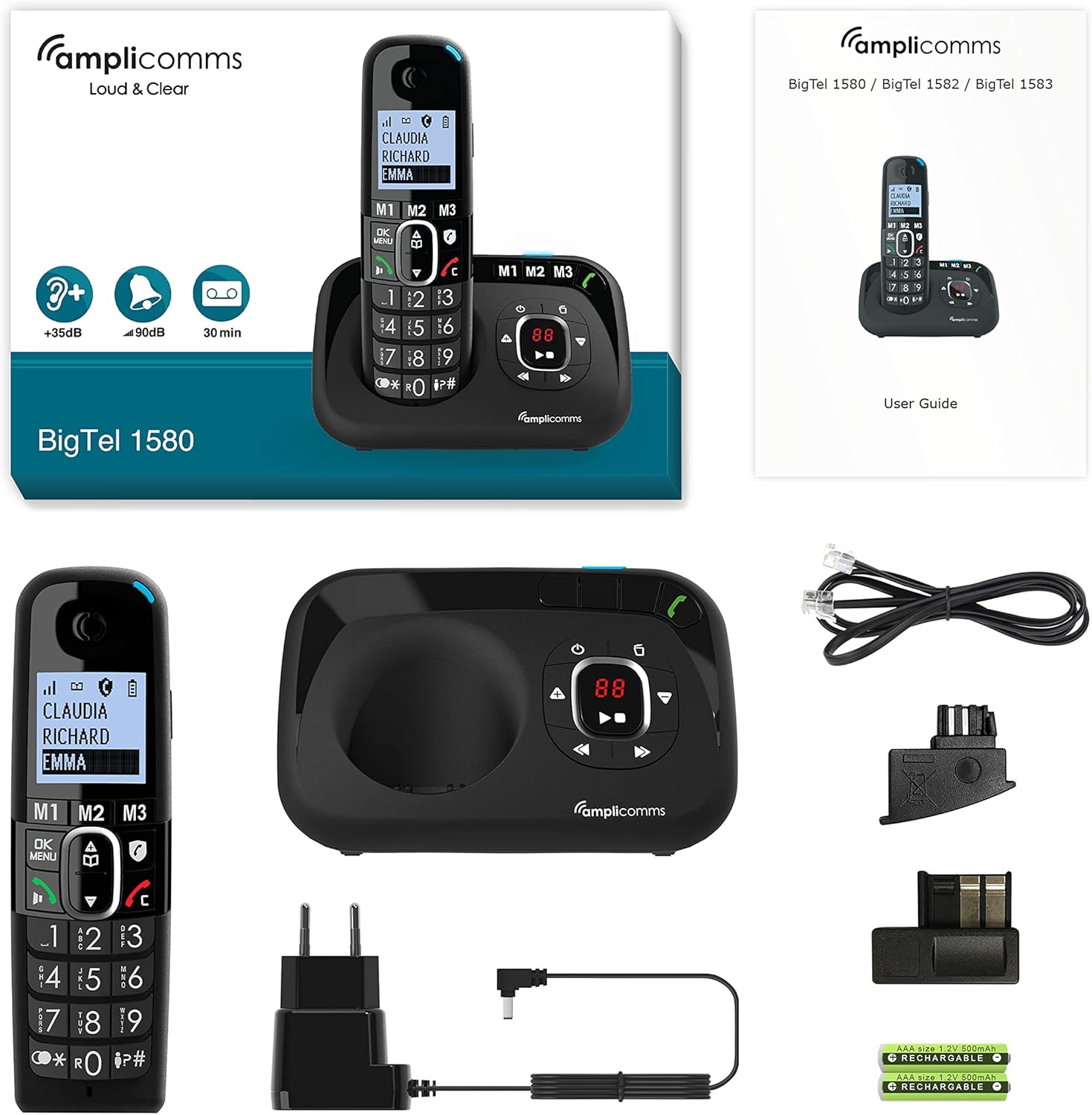
Obrázek: Komplexní view z Amplicomms BigTel 1580 (similar model) package contents, including a handset, main base unit, power adapter, telephone line cord, and rechargeable AAA batteries, alongside the user guide.
Průvodce nastavením
1. Instalace baterie
- Vyhledejte kryt přihrádky na baterie na zadní straně každého sluchátka.
- Posuňte kryt dolů pro otevření.
- Vložte dvě dobíjecí baterie typu AAA a dbejte na správnou polaritu (+ a -).
- Nasaďte kryt prostoru pro baterie.
2. Připojení základní stanice
- Connect one end of the telephone line cord to the LINE port on the main base station.
- Zapojte druhý konec telefonního kabelu do telefonní zásuvky ve zdi.
- Connect the small end of the power adapter to the DC IN port on the main base station.
- Zapojte větší konec napájecího adaptéru do standardní elektrické zásuvky.
- For the additional charging base, connect its power adapter to an electrical outlet.
3. Počáteční nabíjení
Place each handset onto its respective charging base. The display will indicate charging. For optimal battery performance, allow the handsets to charge continuously for at least 16 hours before first use, even if the display shows a full charge sooner.
Návod k obsluze
Uskutečňování a přijímání hovorů
- Chcete-li zavolat: Zvedněte sluchátko nebo stiskněte Zelené tlačítko pro volání. Dial the desired phone number using the large keypad. Press the Zelené tlačítko pro volání znovu pro zahájení hovoru.
- Chcete-li přijmout hovor: Když telefon zvoní, zvedněte sluchátko nebo stiskněte Zelené tlačítko pro volání. The visual ring indicator will also flash.
- Ukončení hovoru: Stiskněte tlačítko Červené tlačítko pro ukončení hovoru or place the handset back on its charging base.
Audio-Boost Function
The BigTel 1502 features a dedicated Audio-Boost button on the side of the handset to amplify the sound during a call by up to +35dB. This is particularly useful for users with hearing difficulties.
- Během hovoru stiskněte Audio-Boost Button (often marked with a speaker icon or "+35dB") on the side of the handset to activate or deactivate the ampzvedání.

Obrázek: Strana view z Amplicomms handset, highlighting the dedicated Audio-Boost button, typically located on the side for easy access during a call.
Funkce blokování hovorů
This feature helps prevent unwanted calls. There are two modes:
- Manuální režim: Block numbers easily during or after a call by pressing the dedicated call blocking button (often marked with a shield or "STOP" icon).
- Automatický režim: Only allows numbers stored in your phonebook or VIP numbers to ring through. All other calls are blocked. Refer to the handset menu for detailed setup of this mode.

Obrázek: Detailní záběr na Amplicomms handset, showing the large keypad, clear display, and various feature icons, including the call blocking symbol (a shield with "STOP").
Direct Memory Keys (M1, M2, M3)
The handset features three direct memory keys (M1, M2, M3) for quick dialing of your most important or frequently called contacts.
- Uložení čísla:
- Press and hold the desired memory key (M1, M2, or M3) until the display prompts you.
- Zadejte telefonní číslo pomocí klávesnice.
- Enter the name (if supported by the model).
- Stiskněte tlačítko OK/Save tlačítko pro potvrzení.
- Vytočení uloženého čísla: Simply press the desired memory key (M1, M2, or M3). The phone will automatically dial the stored number.
Phonebook (Directory)
The phone has a directory for up to 100 names and numbers.
- Accessing the Phonebook: Stiskněte tlačítko Nabídka / OK button and navigate to the "Phonebook" or "Directory" option.
- Přidání kontaktu: Select "Add New" and follow the on-screen prompts to enter the name and number.
- Vytáčení z telefonního seznamu: Scroll through the contacts using the navigation keys and press the Zelené tlačítko pro volání vytočit.
Funkce hands-free
The hands-free function allows you to talk without holding the handset, with adjustable volume.
- Během hovoru stiskněte Hands-Free/Speaker button (often marked with a speaker icon) to activate or deactivate speakerphone mode.
- Use the volume up/down keys to adjust the speaker volume.
Údržba
- Čištění: Použijte měkký, damp K čištění sluchátka a základny použijte hadřík. Nepoužívejte abrazivní čisticí prostředky ani rozpouštědla.
- Péče o baterie:
- Vždy používejte dodané dobíjecí baterie.
- Pokud telefon nebudete delší dobu používat, vyjměte baterie, abyste zabránili jejich vytečení.
- Nevystavujte baterie extrémním teplotám.
- Umístění: Place the base unit in a central location away from other electronic devices that may cause interference (e.g., microwaves, Wi-Fi routers).
Odstraňování problémů
| Problém | Možná příčina | Řešení |
|---|---|---|
| Není slyšet oznamovací tón / Nelze uskutečňovat ani přijímat hovory. | Telefonní kabel není správně připojen. Napájecí adaptér není připojen. Handset out of range or not registered. | Ujistěte se, že jsou všechny kabely pevně připojeny. Zkontrolujte elektrickou zásuvku. Move closer to the base unit. Re-register handset if necessary (refer to full manual). |
| Low or no sound during a call. | Hlasitost je příliš nízká. Audio-Boost not activated. | Adjust call volume using the side keys. Press the Audio-Boost button on the side of the handset. |
| Displej sluchátka je prázdný. | Batteries are depleted or not inserted correctly. | Place handset on the charging base. Ensure batteries are correctly inserted and charged for at least 16 hours initially. |
| Unwanted calls still coming through. | Call blocking not configured correctly. | Ensure call blocking is activated and numbers are added to the block list. Check if "Automatic Mode" is enabled for VIP-only calls. |
Specifikace
| Funkce | Detail |
|---|---|
| Značka | Amplicommy |
| Číslo modelu | ATL1423334 (BigTel 1502 Duo) |
| Barva | Černý |
| Typ telefonu | Bezdrátový DECT telefon |
| Speciální funkce | Large keys, Audio-Boost (+35dB), Hearing aid compatible, Call blocking, Adjustable ringer volume (up to 90dB), Hands-free function |
| Kompatibilní zařízení | Sluchadla |
| Baterie | 2 x AAA rechargeable batteries (included) per handset |
| Doba hovoru | Až 10 hodin |
| Kapacita telefonního seznamu | 100 jmen a čísel |
| Zobrazit | Large backlit display with large characters |
Záruka a podpora
Amplicomms products are designed for reliability and performance. For information regarding warranty coverage, technical support, or spare parts availability, please refer to the warranty card included in your product packaging or visit the official Amplicommy webwebu. Můžete se také obrátit na svého prodejce a požádat o pomoc.


