1. Úvod
Thank you for choosing the Dalton 2000VA Uninterruptible Power Supply (UPS). This device is designed to provide reliable power backup and protection for your electronic equipment against power outages, surges, and fluctuations. Please read this manual thoroughly before installation and operation to ensure optimal performance and safety.
2. Důležité bezpečnostní pokyny
Vždy dodržujte tato základní bezpečnostní opatření, abyste snížili riziko požáru, úrazu elektrickým proudem a zranění:
- Neotevírejte UPS casing. Uvnitř nejsou žádné součásti, které by mohl uživatel opravit. Servis svěřte kvalifikovanému servisnímu personálu.
- Do not use the UPS in environments with excessive dust, humidity, or extreme temperatures.
- Ujistěte se, že je UPS připojena k uzemněné zásuvce.
- Do not connect non-computer related items like medical equipment, life support equipment, or household appliances to the UPS.
- Position the UPS in a well-ventilated area, away from direct sunlight or heat sources.
- In case of emergency, press the power button to turn off the UPS and disconnect it from the AC power source.
3. Obsah balení
Ověřte, zda jsou v balení přítomny všechny položky:
- Dalton 2000VA UPS Unit
- Napájecí kabel
- Komunikační kabel USB (pokud je k dispozici)
- Uživatelská příručka (tento dokument)

Obrázek 3.1: Přední strana view of the Dalton 2000VA UPS unit, showing the display screen and power button.
4. Nastavení a instalace
Follow these steps to set up your UPS:
- Rozbalení: Opatrně vyjměte UPS z obalu. Zkontrolujte, zda při přepravě nedošlo k poškození.
- Umístění: Place the UPS on a flat, stable surface in a cool, dry, and well-ventilated area. Ensure there is adequate space around the unit for airflow.
- Počáteční poplatek: Before connecting any devices, plug the UPS power cord into a grounded wall outlet. Allow the unit to charge for at least 8 hours to ensure the battery is fully charged. The display will indicate charging status.
- Připojovací zařízení:
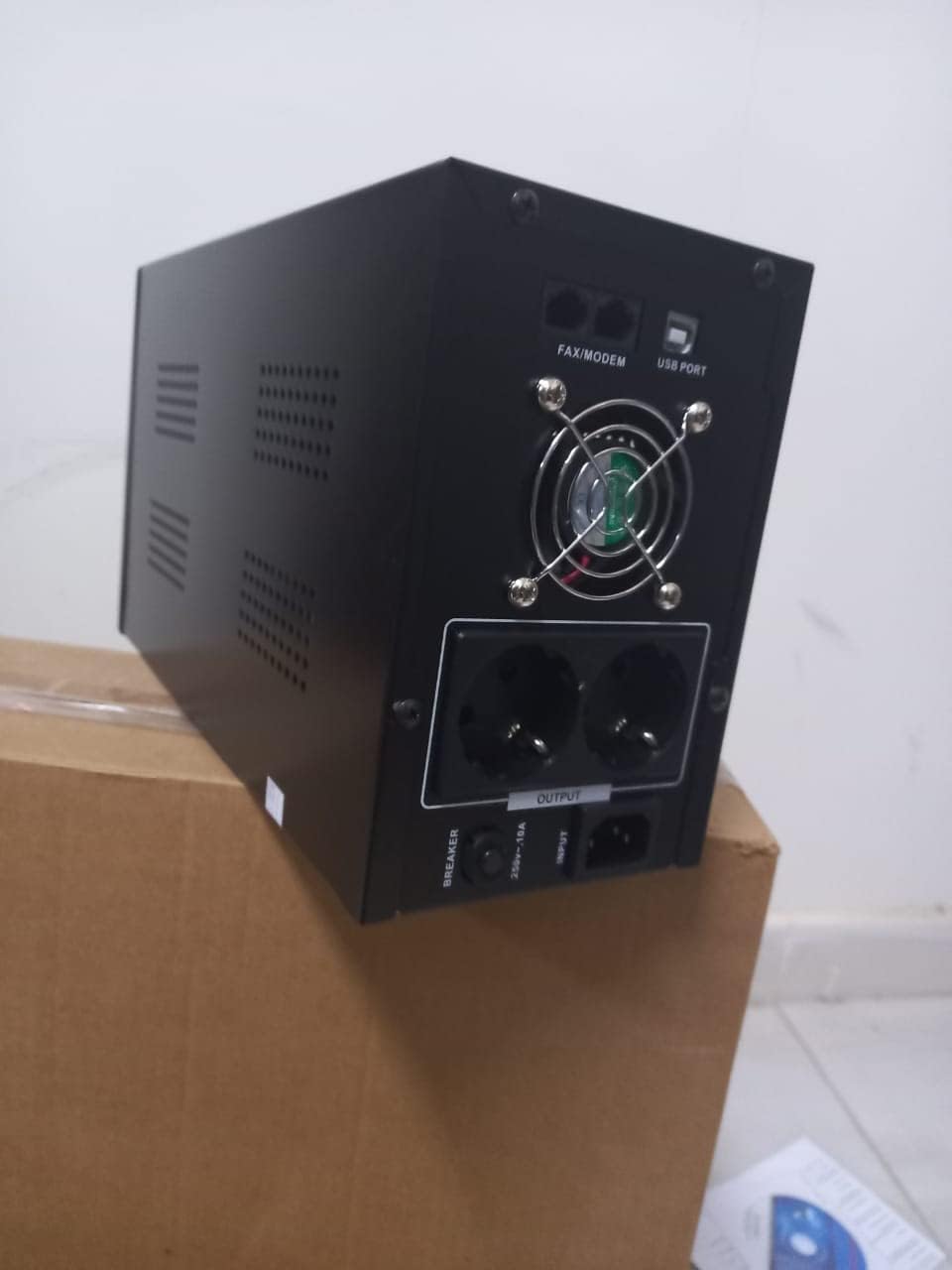
Obrázek 4.1: Zadní view of the Dalton 2000VA UPS, highlighting the input power port, output sockets, and USB/Modem ports.
- Once the battery is charged, connect your computer, monitor, and other critical electronic devices to the UPS output sockets.
- Do not overload the UPS. Refer to the specifications section for maximum load capacity.
- If applicable, connect the USB communication cable from the UPS to your computer for monitoring software (software not included, check manufacturer's webstránky).
5. Obsluha UPS
5.1 Zapnutí/vypnutí
- Zapnutí: After connecting to AC power and charging, press and hold the power button on the front panel for approximately 3 seconds until you hear a beep and the display illuminates.
- Vypnutí: Press and hold the power button for approximately 3 seconds until you hear a beep and the display turns off. If the UPS is running on battery, it will shut down immediately. If connected to AC, it will switch to bypass mode before shutting down.
5.2 Porozumění zobrazení
The front panel LCD display provides real-time status information:
- V: Zobrazuje vstupní objemtage from the utility power.
- VEN: Zobrazuje výstupní objemtage provided by the UPS to connected devices.
- NORMÁLNÍ: Indicates the UPS is operating on utility power.
- Netopýr: Zobrazuje aktuální úroveň nabití baterie.
- Zatížení: Udává procentotagkapacity UPS využívané připojenými zařízeními.
- Battery Mode Icon: Appears when the UPS is running on battery power during an outage.

Obrázek 5.1: Strana view of the UPS, showing the illuminated display with power status indicators.
5.3 Funkce záložní baterie
V případě výpadku proudutage, the UPS will automatically switch to battery power, providing continuous power to your connected devices. The duration of backup power depends on the load connected and the battery's charge level. The UPS will emit an audible alarm during battery operation.
When utility power returns, the UPS will automatically switch back to AC power and begin recharging its battery.
6. Údržba
- Péče o baterie: To maximize battery life, ensure the UPS is always connected to an AC outlet to keep the battery charged. If the UPS is stored for an extended period, recharge it every three months for at least 8 hours.
- Čištění: Disconnect the UPS from all power sources before cleaning. Use a soft, dry cloth to wipe the exterior. Do not use liquid or aerosol cleaners.
- Větrání: Regularly check that the ventilation openings are not blocked by dust or debris to prevent overheating.
7. Řešení problémů
Běžné problémy a jejich řešení naleznete v tabulce níže:
| Problém | Možná příčina | Řešení |
|---|---|---|
| UPS se nezapne. | Battery not charged or power cord disconnected. | Ensure power cord is securely plugged in and allow battery to charge for 8 hours. |
| UPS v normálním režimu nepřetržitě pípá. | Stav přetížení. | Disconnect non-essential equipment until the alarm stops. Check total load. |
| Krátká doba zálohování. | Battery not fully charged or battery nearing end of life. | Allow UPS to charge for 8 hours. If issue persists, battery may need replacement (contact service center). |
| UPS does not provide power during outage. | Battery discharged or internal fault. | Ensure UPS was fully charged. If problem persists, contact authorized service center. |
8. Technické specifikace
| Funkce | Detail |
|---|---|
| Rozměry produktu | 12.5 x 22.5 x 38 cm |
| Výrobce | Dalton |
| Název značky | Obecný |
| Barva | Černý |
| Materiál | Kov |
| Proud | 5 Ampere |
| Form Factor | Nosič |
| Frekvenční rozsah | 50-60 Hz |
| Výstupní objemtage | 220 voltů |
| Typ konektoru | AC |
9. Záruka a podpora
Dalton provides an authorized maintenance center for all Uninterruptible Power Supply units. For warranty claims, technical support, or service inquiries, please contact your local Dalton authorized distributor or service center. Keep your purchase receipt as proof of purchase for warranty validation.
For further assistance, please visit the official Dalton webwebu nebo kontaktujte zákaznickou podporu.


