1. Úvod
This manual provides essential information for the safe and efficient operation of your Mitsubishi WD720U-G DLP Projector. Please read this manual thoroughly before using the projector and retain it for future reference. This document covers setup, operation, maintenance, troubleshooting, and detailed specifications.
2. Bezpečnostní informace
Dodržujte následující bezpečnostní opatření, abyste zabránili poškození projektoru a zajistili bezpečnost uživatele:
- Neblokujte větrací otvory. Zajistěte dostatečný prostor kolem projektoru pro správné proudění vzduchu.
- Nedívejte se přímo do objektivu projektoru, když je lamp je zapnutý, protože může způsobit poškození očí.
- Neumisťujte projektor na nestabilní vozík, stojan nebo stůl.
- Pokud projektor nebudete delší dobu používat, odpojte napájecí kabel ze zásuvky.
- Veškeré opravy svěřte kvalifikovanému servisnímu personálu.
3. Obsah balení
Ověřte, zda balení obsahuje všechny následující položky:
- Mitsubishi WD720U-G DLP Projector
- Síťový napájecí kabel
- Krytka objektivu
- VGA (D-sub) Cable
- CD s uživatelskou příručkou
4. Konec produktuview
The Mitsubishi WD720U-G is a high-brightness DLP projector designed for various applications, featuring 3D readiness and multiple connectivity options.
4.1 Nahoru View
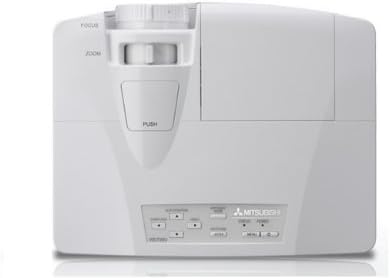
This image displays the top of the Mitsubishi WD720U-G projector. Visible features include the focus and zoom adjustment rings located near the lens, and a control panel with various buttons for menu navigation and settings adjustments.
4.2 Zadní View (Input/Output Terminals)
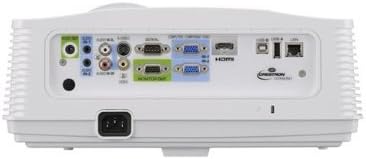
This image illustrates the rear panel of the Mitsubishi WD720U-G projector, highlighting its comprehensive array of input and output terminals. These include multiple RGB (VGA) ports, audio input/output jacks, RCA video and S-Video inputs, an HDMI port, and a network port, among others.
5. Nastavení
5.1 Umístění
Position the projector on a stable, flat surface or mount it securely. Ensure the projector is within the optimal projection distance for your screen size (viewable size: 40"- 300"). Avoid placing it in direct sunlight or near heat sources.
5.2 Připojení zařízení
Connect your source devices (e.g., computer, Blu-ray player) to the appropriate input terminals on the projector's rear panel:
- RGB: Mini D-sub 15pin x2 (for computer connections)
- Zvuk: Stereo mini jack (φ3.5mm) x 2 (one for PC1, another for PC2)
- Video: RCA x 1 + S-VIDEO x 1 (for standard video sources)
- Digitální: HDMI x 1 (for high-definition digital sources)
- Video Audio: RCA jack (L/R) x 1
5.3 Zapnutí/vypnutí
Connect the AC power cable to the projector and a power outlet. Press the power button on the projector or remote control to turn the unit on. To turn off, press the power button again and confirm the shutdown when prompted.
6. Ovládání projektoru
6.1 Základní obsluha
After powering on, adjust the focus and zoom using the rings on the projector lens until the image is clear and fills your screen. Use the control panel buttons or remote control to navigate the on-screen menu.
6.2 Úprava nastavení
Access the projector's menu to adjust various settings:
- Jas: The projector offers 4300 ANSI Lumens. Adjust as needed for ambient light conditions.
- Kontrast: The contrast ratio is 3000:1 (On/Off). Fine-tune for optimal image depth.
- Rezoluce: Native resolution is 1280 x 800. The projector supports a maximum resolution of 1600 x 1200.
- Barva: The 5-Segment (R,G,B,W,Y) color wheel provides vibrant colors. Adjust color settings in the menu if necessary.
6.3 Video Compatibility
The projector supports a wide range of video formats:
- NTSC/NTSC 4.43/PAL (including PAL-M, N)/SECAM/PAL-60
- Component Video: 480i/p(525i/p), 576i/p(625i/p), 720p(750p), 1080i/p(1125i/p 60Hz), 1080i/p(1125i/p 50Hz)
6.4 3D Ready Feature
This projector is 3D-Ready. To utilize 3D functionality, compatible 3D content, 3D glasses, and a 3D-compatible source device are required.
7. Údržba
7.1 Čištění
Regularly clean the projector lens with a soft, lint-free cloth specifically designed for optical surfaces. Use a soft brush or compressed air to remove dust from the ventilation grilles. Do not use abrasive cleaners or solvents.
7.2 lamp Nahrazení
Projektor lamp má omezenou životnost. Když lamp indicator lights up or the image brightness significantly decreases, the lamp may need replacement. Refer to the detailed instructions in the User Manual CD for safe lamp náhradní postupy.
8. Řešení problémů
Pokud se s projektorem setkáte s problémy, podívejte se na následující běžné problémy a jejich řešení:
- Bez obrázku: Ensure all cables are securely connected, the correct input source is selected, and the projector is powered on.
- Rozmazaný obrázek: Adjust the focus and zoom rings on the lens. Ensure the projection surface is flat and the projector is stable.
- Zkreslený obraz: Check the projector's keystone correction settings in the menu. Ensure the projector is perpendicular to the screen.
- Žádný zvuk: Verify audio cables are connected correctly and the volume is not muted on both the projector and the source device.
- Upozornění na přehřátí: Ensure ventilation openings are clear and the projector is in a well-ventilated area. Turn off the projector and allow it to cool down.
9. Specifikace
| Funkce | Specifikace |
|---|---|
| Značka | MITSUBISHI |
| Model | WD720U-G |
| Zobrazovací technologie | DLP 0.65" |
| Jas | 4300 ANSI Lumens |
| Nativní rozlišení | 1280 x 800 |
| Maximální rozlišení | 1600 x 1200 |
| Viewschopný Velikost | 40" - 300" |
| Kontrastní poměr | 3000:1 (On/Off) |
| Barevné kolo | 5-Segment (R,G,B,W,Y) |
| Speciální funkce | 3D-Ready |
| Typ reproduktoru | Stereo |
| Technologie připojení | hdmi, vga |
| Vstupní svorky | RGB (Mini D-sub 15pin x2), Audio (Stereo mini jack φ3.5mm x2), Video (RCA x1, S-VIDEO x1), Digital (HDMI x1), Video Audio (RCA L/R x1) |
| Kompatibilita videa | NTSC/NTSC 4.43/PAL/SECAM/PAL-60, Component Video (480i/p, 576i/p, 720p, 1080i/p) |
| Hmotnost položky | 9 libry |
| Rozměry produktu | 13.6 x 10.6 x 5.3 palce |
| Doporučená použití | Domácí kino |
10. Záruka a podpora
This product is offered as an Amazon Renewed item. It has been professionally inspected and tested to work and look like new. Renewed products are eligible for replacement or refund under the Obnovená záruka Amazonu if you are not satisfied with your purchase. For further support or inquiries, please refer to the documentation provided with your renewed product or contact Amazon Renewed customer service.


