Zavedení
Thank you for choosing the BUFFBEE Alarm Clock with Wireless Charging Station. This device combines a digital alarm clock with a versatile wireless charging stand, designed to charge your iPhone, Apple Watch, and AirPods simultaneously. It features a dimmable LED display, adjustable volume, and multiple safety protections to ensure efficient and secure charging. Please read this manual carefully before use to ensure proper operation and to maximize the lifespan of your product.
Co je v krabici
Po otevření balení se prosím ujistěte, že obsahuje všechny následující položky:
- BUFFBEE Alarm Clock with Wireless Charging Station
- Nabíjecí kabel USB-C
- Napájecí adaptér
- Uživatelská příručka (tento dokument)
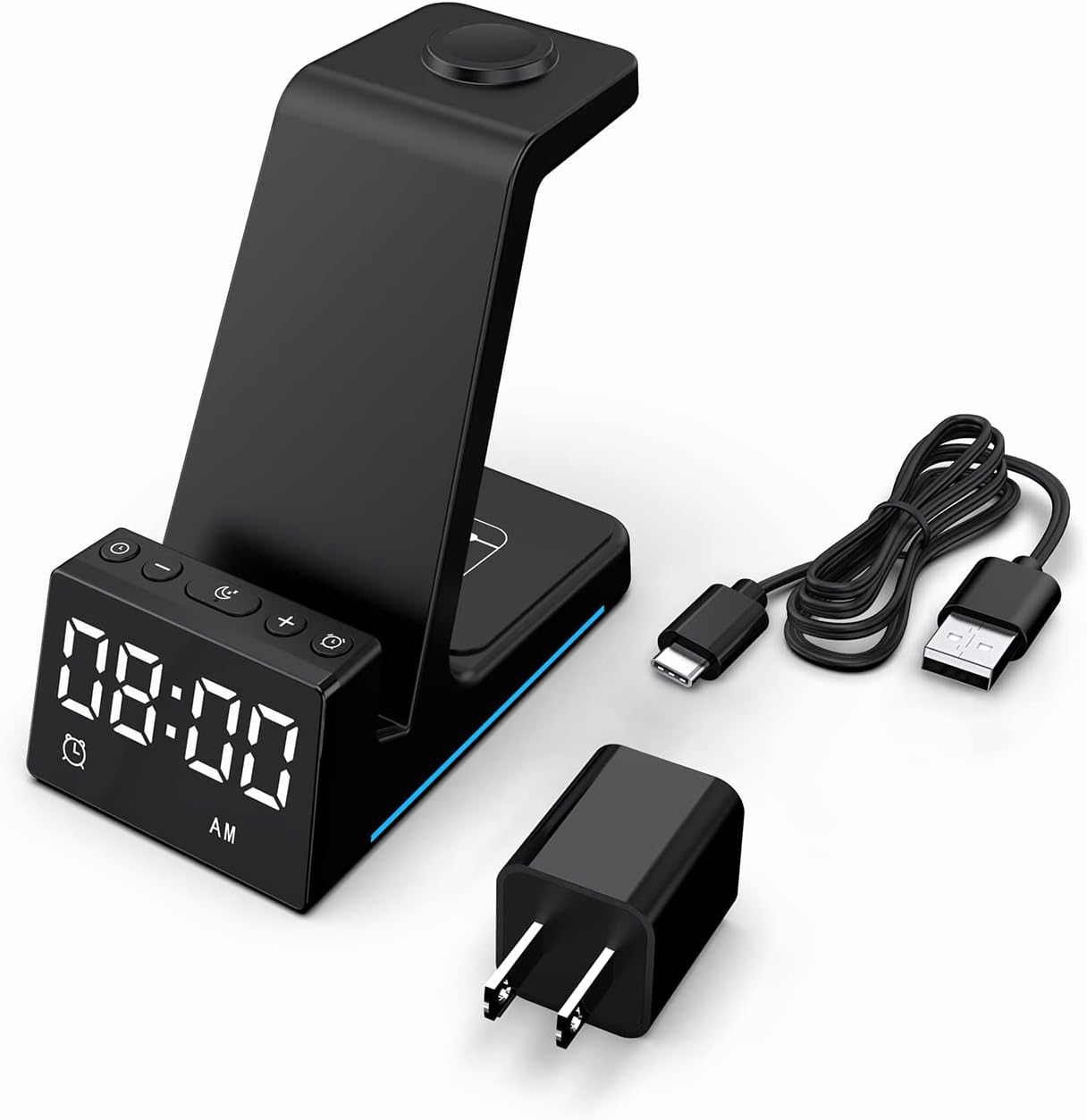
Obrázek: Všechny komponenty jsou součástí balení produktu.
Konec produktuview
The BUFFBEE Alarm Clock with Wireless Charging Station is designed for convenience and efficiency. It features dedicated charging areas for your smartphone, Apple Watch, and AirPods, alongside a clear digital clock display.
Klíčové vlastnosti:
- Digitální budík: Features adjustable brightness and volume, with 12/24 hour format options.
- Wireless Phone Charging: Supports 15W, 10W, 7.5W, and 5W output for various wireless charging enabled smartphones.
- Nabíjení Apple Watch: Dedicated magnetic charging spot for Apple Watch Series 2-7, SE.
- Nabíjení AirPods: Wireless charging pad for AirPods 2 (with wireless charging case), AirPods 3, and AirPods Pro.
- Bezpečnostní ochrany: Built-in overcharge, overvoltage, overheat, and overcurrent protection.

Image: The charging station with devices in place, highlighting its multi-device capability.

Image: Diagram illustrating the internal safety features and charging coils.
Nastavení
Follow these steps to set up your BUFFBEE Alarm Clock with Wireless Charging Station:
- Připojte napájení: Insert the USB-C end of the charging cable into the port on the back of the charging station. Plug the other end of the cable into the provided power adapter, then plug the adapter into a wall outlet. The digital display will light up, indicating power is connected.
- Umístění zařízení:
- chytrý telefon: Place your wireless charging enabled smartphone vertically or horizontally on the main charging stand. Ensure it is centered for optimal charging.
- Apple Watch: Place your Apple Watch on the magnetic charging disc at the top of the stand.
- AirPods: Place your AirPods (with wireless charging case) on the flat charging pad at the base of the unit.
- Ověřte nabíjení: A blue indicator light will briefly illuminate when a device is correctly placed and charging. Your device's screen will also show a charging icon.
Video: Official product video demonstrating the setup and charging capabilities of the BUFFBEE Alarm Clock with Wireless Charging Station for iPhone, Apple Watch, and AirPods.

Image: Universal compatibility chart for different devices and charging wattages.
Návod k obsluze
Nastavení času
- Stiskněte a podržte Nastavení času button (usually marked with a clock icon) for 3 seconds. The hour digits will begin to flash.
- Použijte + a - tlačítka pro nastavení hodiny.
- Stiskněte tlačítko Nastavení času button again to switch to minute adjustment. The minute digits will flash.
- Použijte + a - tlačítka pro nastavení minut.
- Stiskněte tlačítko Nastavení času ještě jednou tlačítko pro potvrzení a ukončení režimu nastavení času.
- To switch between 12-hour and 24-hour format, briefly press the Nastavení času button when not in setting mode.
Nastavení alarmu
- Stiskněte a podržte Alarm set button (usually marked with an alarm clock icon) for 3 seconds. The alarm hour digits will flash.
- Použijte + a - tlačítka pro nastavení hodiny budíku.
- Stiskněte tlačítko Alarm set button again to switch to alarm minute adjustment. The alarm minute digits will flash.
- Použijte + a - tlačítka pro nastavení minut budíku.
- Stiskněte tlačítko Alarm set ještě jednou tlačítko pro potvrzení a ukončení režimu nastavení budíku.
- Chcete-li alarm aktivovat nebo deaktivovat, krátce stiskněte Alarm set tlačítko. Na displeji se zobrazí/zmizí ikona alarmu.
- When the alarm sounds, press any button to activate the snooze function (typically 9 minutes). To turn off the alarm completely, press and hold the Alarm set tlačítko.

Obrázek: Overview of the digital alarm clock features.
Nastavení jasu displeje
The LED display has multiple brightness levels to suit your preference, especially for nighttime use.
- Stiskněte tlačítko Jas button (usually marked with a sun icon) repeatedly to cycle through the available brightness levels (e.g., 100%, 40%, 3%, 1%, 0% off).
- Select the desired brightness level. The '0% off' setting turns the display completely off for undisturbed sleep.

Image: Visual representation of the 5-level adjustable brightness settings.
Nastavení hlasitosti budíku
The alarm volume can be adjusted to your preferred level.
- While the alarm is sounding, or during alarm setting mode, press the Objem button (usually marked with a speaker icon) to cycle through the available volume levels.
- Select the desired volume.

Image: Illustration of the 3-level adjustable volume feature.
Údržba
To ensure the longevity and optimal performance of your charging station, follow these maintenance guidelines:
- Čištění: Disconnect the power before cleaning. Use a soft, dry cloth to wipe the surface. Do not use abrasive cleaners, solvents, or chemical sprays.
- Vyhněte se tekutinám: Chraňte zařízení před vodou a jinými tekutinami. Neobsluhujte jej mokrýma rukama.
- Teplota: Store and operate the device in a dry environment at room temperature. Avoid extreme heat or cold.
- Zacházení: S přístrojem zacházejte opatrně. Zabraňte jeho pádu nebo silným nárazům.
- Napájení: Only use the provided power adapter and cable. Using unauthorized power sources may damage the device and void the warranty.
Odstraňování problémů
If you encounter any issues with your BUFFBEE Alarm Clock with Wireless Charging Station, please refer to the following troubleshooting guide:
| Problém | Možná příčina | Řešení |
|---|---|---|
| Device is not powering on. | Power cable not connected properly; Power adapter faulty; Wall outlet not working. | Ensure the USB-C cable is securely connected to both the station and the power adapter. Try a different wall outlet. Verify the power adapter is functioning. |
| Smartphone/AirPods not charging wirelessly. | Device not placed correctly; Device not wireless charging compatible; Phone case too thick; Foreign objects on charging pad. | Reposition the device to ensure it is centered on the charging pad. Remove any thick phone cases or metallic objects. Confirm your device supports Qi wireless charging. |
| Apple Watch se nenabíjejí. | Watch not placed correctly; Watch charger not making contact; Watch model not supported. | Ensure the Apple Watch is securely placed on the magnetic charging disc. Remove any watch cases that might obstruct contact. This charger supports Apple Watch Series 2-7, SE. |
| Nabíjení je pomalé nebo přerušované. | Using a non-original power adapter/cable; Device overheating; Multiple devices charging simultaneously. | Use the provided power adapter and cable. Ensure the device is in a well-ventilated area. Charging multiple devices may slightly reduce individual charging speeds. |
| Alarm clock display is too bright/dim. | Je třeba upravit nastavení jasu. | Stiskněte tlačítko Jas button to cycle through the 5 brightness levels, including 'off'. |
| Alarm is not sounding or is too quiet/loud. | Alarm not set or deactivated; Volume level too low/high. | Verify the alarm is activated (alarm icon visible). Adjust the alarm volume using the Objem tlačítko. |
Specifikace
| Funkce | Detail |
|---|---|
| Rozměry produktu | 6.3 x 1.5 x 3.5 palce |
| Hmotnost položky | 15.8 unce |
| Značka | BUFFBEE |
| Typ konektoru | Bezdrátový |
| Kompatibilní zařízení | Cellular Phones, Apple Watch, AirPods (with wireless charging case) |
| Kompatibilní modely telefonů | Samsung Galaxy S10 series, iPhone 8 and newer, other Qi-enabled phones |
| Speciální funkce | Adjustable, Fast Charging, Wireless Charger, Wireless Charging |
| Vstupní objemtage | 9 voltů |
| Celkový počet portů USB | 1 (pro příkon) |
| Wattage | 15 watts (max output) |
| Specifikace splněna | Qi |
| Zdroj napájení | AC Adapter (Battery Powered refers to internal clock battery backup, not main power) |
Záruka a podpora
Your BUFFBEE Alarm Clock with Wireless Charging Station comes with a standard manufacturer's warranty. For specific warranty details, including duration and coverage, please refer to the warranty card included in your product packaging or contact BUFFBEE customer support directly.
If you require technical assistance, have questions about product operation, or need to report a defect, please reach out to BUFFBEE customer service through the contact information provided on the product packaging or the official BUFFBEE webweb. Před kontaktováním podpory si prosím připravte model produktu a datum zakoupení.


