1. Úvod
This instruction manual provides essential information for the safe and efficient use of your Samsung HW-A58C 5.1ch Soundbar system. This system is designed to enhance your home audio experience with optimized sound for various content, clear dialogue, and dynamic surround sound. Please read this manual thoroughly before operating the product and retain it for future reference.
- Optimalizovaný zvuk: Enjoy sound tailored for sports, games, movies, and more.
- Jasný dialog: A dedicated center channel speaker ensures voices are projected clearly.
- Wireless Surround Sound: Wireless rear speakers provide an immersive audio experience.
- Zesílení basů: Instantly enhance bass with a dedicated button.
2. Bezpečnostní informace
Dodržujte prosím následující bezpečnostní opatření, abyste předešli úrazu elektrickým proudem, požáru nebo poškození produktu.
- Riziko úrazu elektrickým proudem: Do not remove the cover or back of the product. There are no user-serviceable parts inside. Refer all servicing to qualified service personnel.
- FCC Compliance (U.S.A.): This device complies with Part 15 of the FCC Rules. Operation is subject to two conditions: (1) this device may not cause harmful interference, and (2) this device must accept any interference received.
- Upozornění FCC: Jakékoli změny nebo úpravy, které nejsou výslovně schváleny stranou odpovědnou za shodu s předpisy, mohou vést ke ztrátě oprávnění uživatele k provozování tohoto zařízení.
- Stíněné kabely: Use only shielded cables and connectors to connect the unit to other equipment to ensure compliance with FCC requirements.
- Vystavení záření: This product complies with FCC radiation exposure limits. It should be installed and operated with a minimum distance of 20cm between the radiator and your body.
3. Obsah balení
Ověřte, zda jsou v balení přítomny všechny komponenty:
- Samsung Soundbar (HW-A58C)
- Bezdrátový subwoofer
- Bezdrátové zadní reproduktory (2 jednotky)
- Wireless Receiver for Rear Speakers
- Remote Control with 2 AA Batteries
- Power Cables (3 for Soundbar, Subwoofer, and Wireless Receiver)
- HDMI kabel
- Wall Mount Kit (Brackets)
- Stručný návod k obsluze
Video: Unboxing the Samsung HW-A58C 5.1ch Soundbar system, showing all included components and their initial appearance.

Obrázek: Přední strana view of the Samsung HW-A58C Soundbar, showcasinjeho elegantní design.

Obrázek: Přední strana view of the wireless subwoofer, designed to provide deep bass.
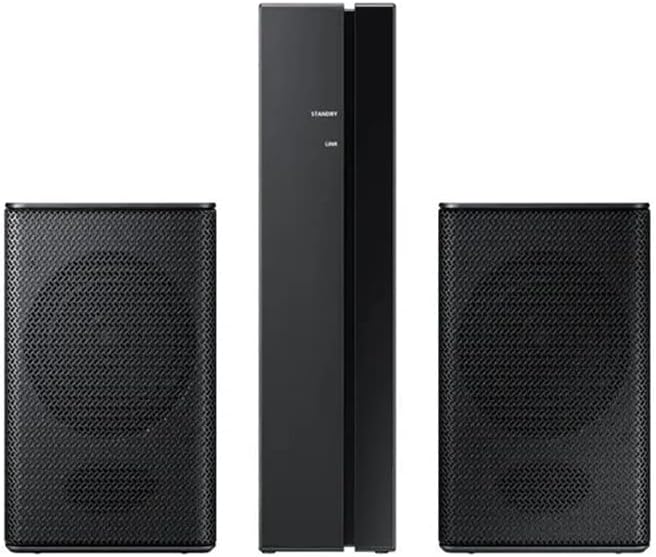
Image: The two wireless rear speakers and their receiver unit, which connect wirelessly to the soundbar.
4. Nastavení
4.1. Umístění
- Soundbar: Place the soundbar centrally below your TV. Ensure it is on a stable surface or securely wall-mounted using the provided kit.
- subwoofer: Position the wireless subwoofer in a corner of the room or near the soundbar for optimal bass distribution.
- Zadní reproduktory: Place the wireless rear speakers behind your listening position, ideally equidistant from the center. Connect them to the wireless receiver.
4.2. Připojení
Připojte soundbar k televizoru jedním z následujících způsobů:
- HDMI ARC (doporučeno):
- Připojte jeden konec kabelu HDMI k HDMI TO TV (ARC) port na soundbaru.
- Připojte druhý konec k HDMI ARC port na vašem televizoru.
- Ensure your TV's Anynet+ (HDMI-CEC) function is enabled.
- Optický kabel:
- Connect an optical cable (not included) from the soundbar's DIGITÁLNÍ AUDIO VSTUP (OPTICKÝ) port to your TV's optical output port.
- Bluetooth:
- Refer to the "Operating" section for detailed Bluetooth pairing instructions.
Connect the power cables to the soundbar, subwoofer, and wireless receiver, then plug them into power outlets.
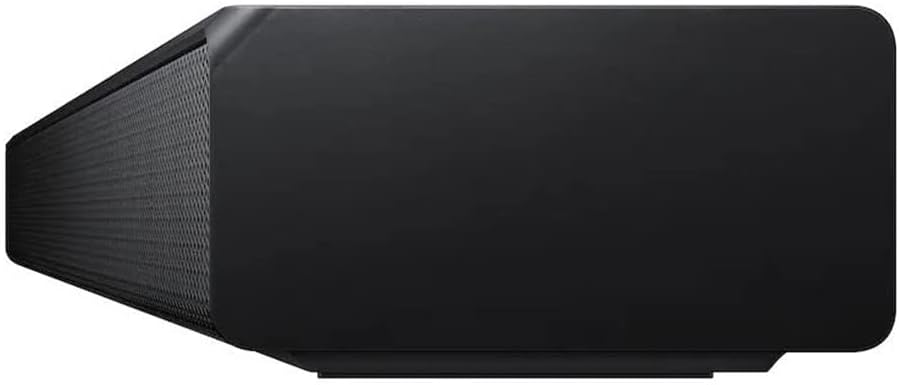
Obrázek: Zadní view of the soundbar, showing the HDMI ARC, HDMI IN, USB, and power ports.
4.3. Párování bezdrátových reproduktorů
The subwoofer and wireless rear speakers should automatically connect to the soundbar when powered on. If they do not connect, follow these steps:
- Ensure the soundbar and wireless receiver are powered on.
- On the back of the wireless receiver, press and hold the SADA ID button for at least 5 seconds. The LINK LED indicator will blink blue.
- With the soundbar powered off, press and hold the Up button on the soundbar's remote control for 5 seconds.
- The soundbar display will show "ID SET" and then "LINK" when connected. The LINK LED on the wireless receiver will turn solid blue.
5. Návod k obsluze
5.1. Basic Controls (Using Remote Control)
- Moc: Stiskněte tlačítko Moc button to turn the soundbar On/Off.
- Objem: Použijte Zvýšení/snížení hlasitosti tlačítky pro nastavení hlavní hlasitosti.
- Zdroj: Stiskněte tlačítko Zdroj button to cycle through input modes (HDMI, D.IN, BT, USB).
- Ztlumit: Stiskněte tlačítko Ztlumit tlačítko pro dočasné ztlumení zvuku.
5.2. Sound Modes and Effects
- Adaptivní zesvětlení zvuku: Automatically optimizes sound based on content (movies, sports, news).
- Zesílení basů: Stiskněte tlačítko Bass Boost button on the remote for enhanced low-frequency sound.
- Herní režim: Provides perfectly synced directional audio and crosstalk cancellation for gaming.
- Rozšíření prostorového zvuku: Rozšiřuje zvukytage pro pohlcující zážitek.
- Norma: Delivers original sound without additional effects.
5.3. Připojení Bluetooth
Chcete-li připojit zařízení Bluetooth:
- Stiskněte tlačítko Zdroj button on the remote until "BT" appears on the soundbar display.
- Na svém mobilním zařízení povolte Bluetooth a vyhledejte dostupná zařízení.
- Select "[AV] Samsung Soundbar A-Series" from the list.
- Once connected, "BT PAIRING" will appear on the soundbar display.
The soundbar supports Bluetooth multi-connection, allowing two devices to be connected simultaneously.
6. Údržba
Pro zajištění dlouhé životnosti a optimálního výkonu vašeho soundbaru:
- Čištění: Wipe the surfaces with a soft, dry cloth. Do not use liquid cleaners or abrasive materials.
- Větrání: Ensure proper ventilation around all units to prevent overheating. Do not block any ventilation openings.
- Napájecí kabel: Regularly check the power cords for any damage. If damaged, discontinue use and contact service personnel.
- Skladování: Pokud budete jednotku skladovat delší dobu, odpojte ji od napájení a uložte ji na chladném a suchém místě.
7. Řešení problémů
| Problém | Řešení |
|---|---|
| Žádná síla. | Ensure all power cords are securely connected to the units and a working power outlet. |
| Žádný zvuk. |
|
| Subwoofer or rear speakers not connecting/no sound. |
|
| Dálkové ovládání nefunguje. |
|
| Zvuk je zkreslený nebo nejasný. |
|
8. Specifikace
| Funkce | Detail |
|---|---|
| Název modelu | HW A58C |
| Typ reproduktoru | Soundbar |
| Speciální funkce | Zesílení basů, stereo párování |
| Doporučená použití | Pro systémy prostorového zvuku |
| Kompatibilní zařízení | Smartphone, Tablet, Laptop, Television, Projector |
| Konfigurace kanálů prostorového zvuku | 5.1 |
| Barva | Černý |
| Zahrnuté komponenty | Soundbar, Wireless Rear Speakers |
| Hmotnost položky | 12.45 kilogramů (27.4 liber) |
| Vodotěsný | NEPRAVDA (Není voděodolné) |
| Počet položek | 1 |
| Kontrolní metoda | Dotek |
| Technologie bezdrátové komunikace | Bluetooth |
| Zdroj napájení | AC |
| Typ zvukového ovladače | Dynamický ovladač |
| Dosah Bluetooth | 10 metrů |
| Technologie připojení subwooferu | Bezdrátový |
| Specifická použití | Systémy domácí zábavy |
| Styl | Sleek, Modern, Home Theater, Cinematic |
| Vnitřní/venkovní použití | Krytý |
| Výrobce | Samsung |
| Rozměry soundbaru (Š x V x H) | 38.6 cm x 2.3 cm x 4.1 cm |
| Rozměry subwooferu (Š x V x H) | 7.1 cm x 13.5 cm x 10.7 cm |
| Rozměry zadního reproduktoru (Š x V x H) | 3 cm x 5 cm x 3 cm |
| Maximální výstupní výkon reproduktoru | 380 wattů |
| Technologie připojení | Bluetooth |
| Režim zvukového výstupu | Surround |
| Typ montáže | Držák na zeď |
9. Záruka a podpora
Tento produkt je nabízen jako položka Amazon Renewed. Produkty Amazon Renewed jsou profesionálně kontrolovány a testovány, aby fungovaly a vypadaly jako nové. Pokud nejste s nákupem spokojeni, máte nárok na výměnu nebo vrácení peněz za obnovené produkty v souladu s podmínkami. Obnovená záruka Amazonu.
For technical support or further assistance, please contact Samsung Customer Service or refer to the official Samsung support webmísto.
- Samsung Support Phone: 1-800-SAMSUNG (1-800-726-7864)
- Obnovená záruka Amazonu: Další informace


