Zavedení
Thank you for choosing the Mistral MSF1650R 16-inch Stand Fan. This manual provides important information regarding the assembly, operation, maintenance, and troubleshooting of your new fan. Please read it thoroughly before use and retain it for future reference.
Důležité bezpečnostní pokyny
- Always ensure the fan is placed on a stable, level surface to prevent it from tipping over.
- Neprovozujte ventilátor s poškozeným kabelem nebo zástrčkou. Pokud je kabel poškozen, musí být vyměněn výrobcem, jeho servisním zástupcem nebo podobně kvalifikovanou osobou, aby se předešlo nebezpečí.
- Unplug the fan from the power outlet before cleaning, assembling, or disassembling parts.
- Keep fingers, pencils, or any other objects out of the fan guard when it is operating.
- Nepoužívejte ventilátor v blízkosti vody nebo v nadměrně vlhkém prostředí.
- Tento spotřebič není určen pro použití osobami (včetně dětí) se sníženými fyzickými, smyslovými nebo duševními schopnostmi nebo nedostatečnými zkušenostmi a znalostmi, pokud na ně nedohlíží osoba odpovědná za jejich bezpečnost nebo jim nebyla poskytnuta instrukce ohledně používání spotřebiče.
- Děti by měly být pod dozorem, aby bylo zajištěno, že si se spotřebičem nebudou hrát.
Komponenty produktu
Familiarize yourself with the main parts of your Mistral MSF1650R stand fan.
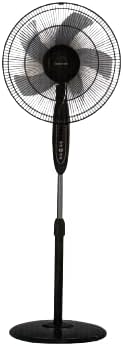
Obrázek 1: Přední strana view of the Mistral MSF1650R 16-inch Stand Fan, showing the fan head, control panel, adjustable stand, and round base.

Figure 2: The Mistral MSF1650R stand fan accompanied by its remote control, illustrating the convenience of remote operation.
- Přední stráž
- Fan Blade (5 ABS blades)
- Zadní stráž
- Skříň motoru
- Ovládací panel
- Nastavitelná tyč stojanu
- Báze
- Dálkové ovládání
Montážní návod
Pro sestavení stojanového ventilátoru postupujte podle těchto kroků:
- Připevněte základnu: Place the stand pole onto the base and secure it using the provided screw and washer from underneath the base.
- Install the Rear Guard: Position the rear guard onto the motor housing, ensuring it aligns with the locating pins. Secure it with the guard nut.
- Mount the Fan Blade: Slide the fan blade onto the motor shaft, aligning the notch on the blade with the pin on the shaft. Secure it with the blade cap, turning it counter-clockwise.
- Attach the Front Guard: Place the front guard onto the rear guard, aligning the clips. Secure the guards together using the guard ring and clip, ensuring it is tightly fastened around the perimeter.
- Upravit výšku: Loosen the height adjustment knob on the stand pole, extend or retract the pole to the desired height, and then tighten the knob securely.
Návod k obsluze
Your Mistral MSF1650R fan can be operated via the control panel on the fan body or the remote control.
Funkce ovládacího panelu:
- Tlačítko ON/OFF: Stisknutím zapnete nebo vypnete ventilátor.
- Tlačítko SPEED: Press repeatedly to cycle through fan speeds: Low, Medium, High.
- Tlačítko MODE: Stisknutím tlačítka můžete vybrat mezi režimy Normální, Přirozený a Spánek.
- Tlačítko TIMER: Press to set the operating timer (up to 7.5 hours). Each press adds 0.5 hours.
- OSC (Oscillation) Button: Press to start or stop the fan head oscillating horizontally.
Funkce dálkového ovládání:
The remote control duplicates all functions available on the fan's control panel for convenient operation from a distance.
- Ujistěte se, že jsou baterie správně vloženy do dálkového ovladače.
- Point the remote control towards the fan's receiver when operating.
- Buttons on the remote correspond to the functions described above (ON/OFF, SPEED, MODE, TIMER, OSC).
Údržba a čištění
Pravidelné čištění pomůže udržet výkon ventilátoru a prodloužit jeho životnost.
- Před čištěním odpojte: Always disconnect the fan from the power supply before attempting any cleaning or maintenance.
- Čištění vnějších povrchů: Wipe the fan's exterior surfaces with a soft, damp tkanina. Nepoužívejte abrazivní čisticí prostředky nebo rozpouštědla.
- Clean Fan Blades and Guards: To clean the fan blades and inside the guards, you may need to carefully remove the front guard. Use a soft cloth or a vacuum cleaner with a brush attachment to remove dust. Ensure all parts are dry before reassembling.
- Skladování: If storing the fan for an extended period, cover it to protect it from dust and store it in a dry, cool place.
Odstraňování problémů
Běžné problémy a jejich řešení naleznete v tabulce níže.
| Problém | Možná příčina | Řešení |
|---|---|---|
| Ventilátor se nezapne. | Žádné napájení. Ventilátor není zapojen do zásuvky. Tlačítko napájení není stisknuto. | Zkontrolujte elektrickou zásuvku. Ujistěte se, že je zástrčka zcela zasunutá. Stiskněte tlačítko ON/OFF. |
| Slabé proudění vzduchu. | Otáčky ventilátoru nastaveny příliš nízko. Dust accumulation on blades/guards. | Zvyšte rychlost ventilátoru. Clean fan blades and guards as per maintenance instructions. |
| Ventilátor vydává neobvyklý zvuk. | Volné části. Ucpání lopatek ventilátoru. | Ensure all assembly screws and nuts are tight. Unplug and check for any foreign objects. |
| Dálkové ovládání nefunguje. | Vybité baterie. Překážka mezi dálkovým ovladačem a ventilátorem. | Vyměňte baterie. Zajistěte nerušený výhled na přijímač ventilátoru. |
Specifikace
Technical details for the Mistral MSF1650R 16-inch Stand Fan.

Figure 3: Detailed specifications of the Mistral MSF1650R stand fan, including dimensions, power, and features.
| Model | MSF1650R |
| Lopatka větráku | 5 ABS Fan Blade |
| svtage | 220 - 240 V ~ 50 Hz |
| Moc | 55W |
| Objem vzduchu | 66.49 m³/min |
| Maximální průtok vzduchu | 3.45 m/s |
| Rozměry produktu | 45 x 15 x 57 cm (H x Š x V) |
| Maximální výška | 1.3m (Adjustable) |
| Čistá hmotnost | 5.85 kg |
| Speciální funkce | Adjustable Height, Remote Controlled, 7.5 Hours Timer, 3 Speed Selection, Normal/Natural/Sleep Modes |
Záruka a podpora
For warranty information or technical support, please refer to the warranty card included with your purchase or contact Mistral customer service. Keep your proof of purchase for warranty claims.
For further assistance, please visit the official Mistral webnebo se obraťte na jejich autorizovaná servisní střediska.


