1. Úvod
The Thinkcar Thinktool Reader SmartScan is a cost-effective, professional diagnostic tool designed for comprehensive vehicle system analysis. It supports full OBD II and EOBDII functions, allowing users to read and clear fault codes, view live data streams, and perform various diagnostic tests across multiple vehicle systems. This manual provides detailed instructions for setting up, operating, maintaining, and troubleshooting your SmartScan device.
2. Nastavení
Before using your Thinktool Reader SmartScan, ensure it is properly set up and connected to your vehicle.
2.1 Vybalení a úvodní kontrola
Carefully remove the Thinktool Reader SmartScan from its packaging. Inspect the device and all included accessories for any signs of damage. If any components are missing or damaged, please contact customer support immediately.
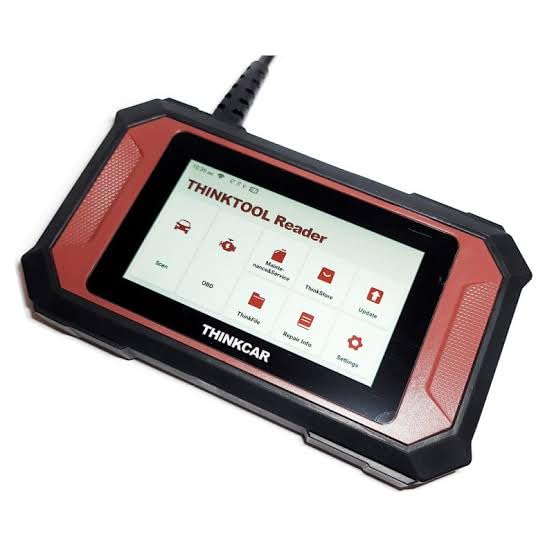
Figure 2.1: The Thinkcar Thinktool Reader SmartScan device, showcasinjeho kompaktní design a uživatelské rozhraní.
2.2 Připojení k vozidlu
- Locate the vehicle's OBD-II port. This port is typically found under the dashboard on the driver's side, but its location may vary by vehicle model. Refer to your vehicle's owner's manual if you cannot find it.
- Ujistěte se, že je zapalování vozidla v poloze VYPNUTO pozice.
- Connect the Thinktool Reader SmartScan's diagnostic cable to the vehicle's OBD-II port. Ensure a secure connection.
- Otočte zapalování vozidla do polohy ON position (engine off). The SmartScan device will power on automatically.
3. Návod k obsluze
The Thinktool Reader SmartScan offers a range of diagnostic and maintenance functions. Navigate the device using its touchscreen interface.
3.1 Full OBD II / EOBDII Functions
This device supports all 10 modes of OBD II / EOBDII tests, providing comprehensive engine diagnostics.

Figure 3.1: Interface showing various OBDII/EOBDII functions.
- Číst kódy: Načítá diagnostické chybové kódy (DTC) z počítače vozidla.
- Vymazání chybových kódů: Vymaže kódy DTC z počítače vozidla a vypne kontrolku poruchy Lamp (MIL).
- View Freeze Frame: Displays a snapshot of the vehicle's operating conditions at the time a fault code was set.
- Živý datový stream: Shows real-time data from the vehicle's sensors and modules, often displayed graphically for easier analysis.
- Test senzoru O2: Načte výsledky testů monitoru kyslíkového senzoru (lambda sondy) pro poslední dokončené testy z palubního počítače vozidla.
- Test systému EVAP: Zahájí zkoušku těsnosti systému odvodu spalin vozidla.
- Test palubního monitoru: Získává výsledky pro komponenty a systémy hnacího ústrojí související s emisemi, které nejsou nepřetržitě monitorovány.
- Připravenost I/M: Kontroluje připravenost systémů pro monitorování emisí.
3.2 OE-Level Diagnostics for 7 Systems
The SmartScan provides professional-grade diagnostics for key vehicle systems beyond standard OBDII, including Engine, ABS, Airbags (SRS), Automatic Transmission, Body Control Module, Instrument System, and Air Condition.

Obrázek 3.2: Přesview of OE-Level Diagnostic System Coverage.
- Systém motoru: Comprehensive diagnostics for engine performance and emissions.
- ABS (protiblokovací brzdový systém): Checks for issues related to braking safety and control.
- Airbags (SRS - Supplemental Restraint System): Diagnoses airbag system faults to ensure proper deployment.
- Automatická převodovka: Monitors transmission performance and identifies potential issues.
- Body Control Module (BCM): Diagnoses issues with vehicle body electronics, including lights, windows, and central locking.
- Instrument System: Checks for faults in the dashboard instruments and gauges.
- Air Condition (AC): Diagnoses problems within the vehicle's climate control system.
3.3 Funkce resetování údržby
The Thinktool Reader SmartScan offers 28 common maintenance reset functions, allowing you to perform various service resets after repairs or component replacements.

Figure 3.3: Icons representing the 28 Maintenance Reset Functions.
Key reset functions include:
- Reset oleje: Resetuje systém životnosti motorového oleje.
- Resetování brzdových destiček: Resets the brake pad life after replacement.
- Reset úhlu řízení: Resetuje snímač úhlu řízení.
- Párování baterií: Zaregistruje novou baterii do řídicí jednotky vozidla.
- Tyre Reset (TPMS): Resetuje systém sledování tlaku v pneumatikách.
- Adaptace elektrické škrticí klapky: Relearns the electronic throttle body.
- Krvácení z ABS: Provádí odvzdušnění brzd ABS.
- Regenerace DPF: Initiates diesel particulate filter regeneration.
- Reset vstřikovače: Kóduje nová čísla vstřikovačů do řídicí jednotky motoru (ECU).
- Resetování airbagu: Clears airbag crash data.
- Učení se s výbavou: Performs crankshaft position sensor adaptive learning.
- Immobilizer Reset: Resets the immobilizer system.
- Kalibrace systému Windows: Initializes power windows.
- Language Reset: Změní jazyk zobrazení.
- NOX Reset: Resets the NOx sensor.
- Resetování zastavení/startování: Resets the start-stop system.
- Reset AdBlue: Resets the AdBlue system.
- Reset AFS: Resets the adaptive front lighting system.
- Inicializace střešního okna: Initializes the sunroof.
- EGR Adaptation: Adapts the Exhaust Gas Recirculation valve.
- Učení A/T: Performs transmission adaptive learning.
- Resetování vzduchového filtru: Resets air/fuel ratio adaptations.
- Transport Mode Reset: Deaktivuje přepravní režim.
- Reset ODO: Resets the odometer.
- SUS Reset: Resets suspension system.
- Coolant Reset: Resets coolant related parameters.
- Kalibrace sedadla: Calibrates seat positions.
- Basic TPMS Reset: Basic TPMS reset.
3.4 Vehicle Coverage and Updates
The Thinktool Reader SmartScan covers 100% of car makes worldwide, including Indian, American, Asian, Chinese, and European cars. It is compatible with vehicles manufactured after 1996 that support OBD II protocols (CAN, ISO9141, KWP2000, J1850 PWM, J1850 VPW).

Figure 3.4: Global Passenger Car Coverage.
The device features lifetime free automatic updates, ensuring you always have access to the latest vehicle data and diagnostic functions without additional cost. Regular updates enhance compatibility and functionality.
4. Údržba
Proper maintenance will extend the life of your Thinktool Reader SmartScan and ensure its optimal performance.
- Čištění: K čištění zařízení používejte měkký, suchý hadřík. Nepoužívejte abrazivní čisticí prostředky ani rozpouštědla.
- Skladování: Přístroj skladujte na chladném a suchém místě mimo dosah přímého slunečního záření a extrémních teplot.
- Péče o kabely: Diagnostický kabel nadměrně neohýbejte ani nekruťte. Uskladněte jej úhledně, aby nedošlo k jeho poškození.
- Aktualizace softwaru: Regularly check for and install available software updates to ensure the device has the latest features and vehicle compatibility.
5. Řešení problémů
If you encounter issues with your Thinktool Reader SmartScan, refer to the following common problems and solutions.
| Problém | Možná příčina | Řešení |
|---|---|---|
| Zařízení se nezapne. | Loose connection to OBD-II port; Vehicle ignition not ON; Vehicle battery low. | Ensure cable is securely connected. Turn ignition to ON position. Check vehicle battery. |
| Cannot establish communication with vehicle. | Incorrect protocol selected; Faulty OBD-II port; Device software issue. | Verify vehicle compatibility. Try on another vehicle. Update device software. Contact support if issue persists. |
| Obrazovka nereaguje nebo zamrzá. | Software glitch; Low power. | Perform a soft reset (refer to device manual for specific steps, usually holding power button). Ensure stable power supply. |
6. Specifikace
Technical specifications for the Thinkcar Thinktool Reader SmartScan.

Figure 6.1: Thinktool Reader SmartScan Specifications Overview.
| Funkce | Detail |
|---|---|
| Výrobce | Thinkcar |
| Značka | thinkcar |
| Model | Thinktool Reader SmartScan |
| Operační systém | Android 6.0 |
| Rozlišení displeje | 720 x 1440 |
| Velikost obrazovky | 5 palců |
| ROM | 1 GB |
| Skladování | 16 GB |
| In-build Chip | CORTEX A7 1.3GHz |
| Bezdrátový | WiFi (802.11b/g/h) |
| Pracovní teplota | 0 °C až 50 °C (32 °F až 122 °F) |
| Skladovací teplota | -20 °C až 60 °C (-4 °F až 140 °F) |
| Hmotnost položky | 350 g |
| Rozměry balení | 20 x 12 x 12 cm |
| Certifikáty | CE, FCC, ROHS |
| UPC | 768297574559 |
7. Záruka a podpora
Thinkcar products are manufactured to the highest quality standards. This product comes with a standard manufacturer's warranty against defects in materials and workmanship. Please refer to the warranty card included in your product packaging for specific terms and conditions, including the warranty period.
7.1 Zákaznická podpora
If you have any questions, require technical assistance, or need to report a problem with your Thinktool Reader SmartScan, please contact Thinkcar customer support. Have your product model and serial number ready when contacting support.
For the most up-to-date support information, including contact details and FAQs, please visit the official Thinkcar website or the retailer's support page where you purchased the device.


