1. Konec produktuview
The emotal Dual-Mic AI Noise Cancelling Bluetooth Headset is designed for clear communication and extended use, ideal for cell phone calls, driving, and business environments. It features advanced AI noise-cancelling technology, dual HD microphones, and a lightweight, ergonomic design for comfort.
Mezi klíčové vlastnosti patří:
- Potlačení hluku pomocí umělé inteligence: Isolates your voice from background noise for crystal-clear conversations.
- Prodloužená doba hovoru: Up to 30 hours of HD talk time and 240 hours of standby on a 1.5-hour charge. Includes a quick charge feature for 3 hours of playtime with a 10-minute charge.
- Ultralight & Ergonomic: Weighing only 0.5oz, designed for comfortable, secure fit during long periods of use.
- IPX6 Vodotěsnost: Poskytuje ochranu před postříkáním a potem.
- Systém s dvojitou baterií: Comes with an extra battery for continuous use.

Image: The emotal Dual-Mic AI Noise Cancelling Bluetooth Headset, showcasing its sleek black design and over-ear hook.
2. Obsah balení
Ujistěte se, že v balení jsou přítomny všechny položky:
- 1x emotal Bluetooth Headset
- 1x nabíjecí kabel USB-C
- 6x Eartips (one pair pre-installed)
- 1x Uživatelská příručka
- 1x Extra baterie
3. Průvodce nastavením
3.1 Počáteční nabíjení
Before first use, fully charge the headset. The headset needs to be detached from the ear hook for charging.
- Detach the main headset unit from the ear hook.
- Connect the USB-C cable to the charging port on the headset unit.
- Připojte druhý konec kabelu USB-C ke kompatibilnímu zdroji napájení USB (např. síťový adaptér, USB port počítače).
- Kontrolka bude zobrazovat stav nabíjení (podrobnosti naleznete v části o LED indikátorech). Úplné nabití trvá přibližně 1.5 hodiny.
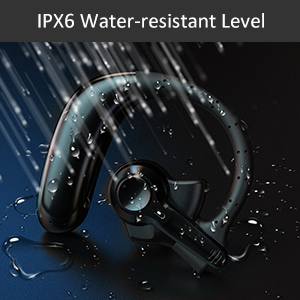
Image: Correct USB-C charging method for the headset, showing the detachable unit being charged.
3.2 Výběr ušních koncovek
For optimal sound quality and comfort, select the eartip size that best fits your ear canal. Three sizes are provided.

Image: Illustration of different eartip sizes and how to achieve a secure and comfortable fit in the ear.
3.3 Nošení headsetu
The headset is designed for use in either the left or right ear. The main unit can be rotated and the microphone adjusted for optimal positioning.
- Nasaďte si ušní háček na ucho.
- Insert the eartip into your ear canal.
- Adjust the main unit by rotating it 180 degrees to switch between left and right ear wear.
- Adjust the microphone boom to point towards your mouth for clear voice pickup.
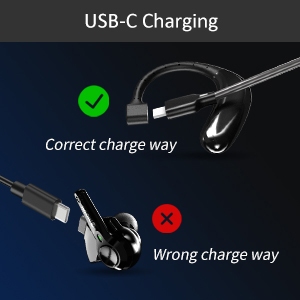
Image: Step-by-step guide on how to switch the headset for left or right ear use by rotating the main unit and adjusting the microphone.
3.4 Párování Bluetooth
Připojení náhlavní soupravy k zařízení:
- Ujistěte se, že jsou sluchátka nabitá a vypnutá.
- Press and hold the multi-function button on the headset for 3-5 seconds until the indicator light flashes blue and red, indicating pairing mode.
- Na svém zařízení (chytrý telefon, tablet, notebook) povolte Bluetooth.
- Hledat "emotal UFO4-01" (or similar name) in the list of available Bluetooth devices.
- Select the headset to connect. Once connected, the indicator light will turn solid blue or flash slowly.
Poznámka: The headset cannot connect with two devices simultaneously.
4. Návod k obsluze
4.1 Základní ovládací prvky
The headset features a single multi-function button for various operations:
- Zapnutí/vypnutí: Long touch for 3 seconds to power on, 5 seconds to power off.
- Další skladba: Double touch the button.
- Přijmout/zavěsit hovor: Double touch the button.
- Zvýšit hlasitost: Long touch the button. (Note: There is no dedicated volume down or mute button on the headset itself. Volume down must be controlled via the connected device.)
- Aktivace hlasového asistenta (Siri/Google Assistant): Triple touch the button.

Image: Visual representation of the single button controls for power, music playback, call management, volume, and voice assistant activation.
4.2 Správa hovorů
The dual-mic AI noise-cancelling technology ensures clear conversations even in noisy environments.

Image: Diagram illustrating how dual-mic and AI noise cancelling technology reduce background noise for clearer calls, showing "Before" and "After" sound wave comparisons.
For business professionals and truckers, the headset provides a hands-free solution for reliable communication on the go.
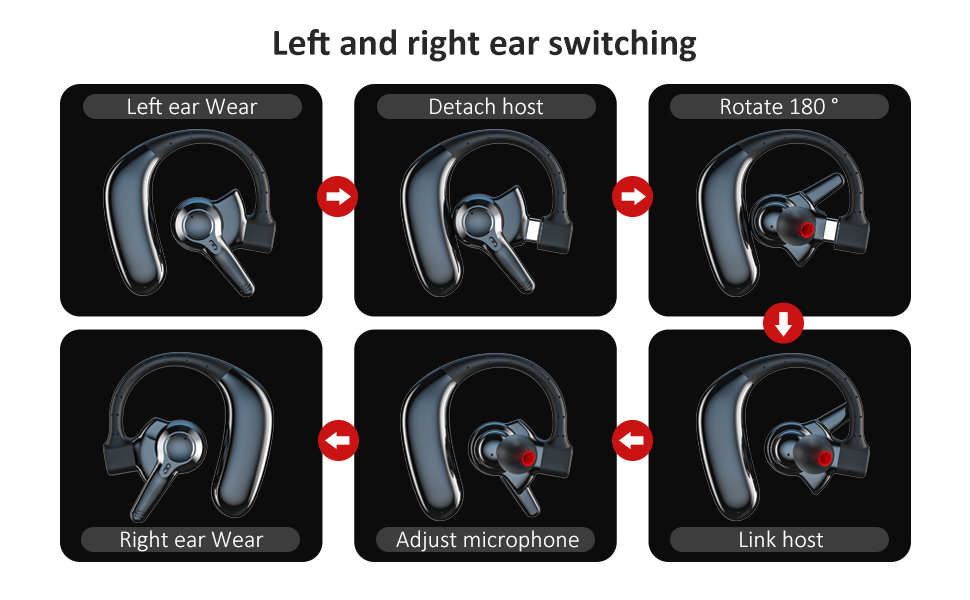
Image: A man driving a car while wearing the headset, emphasizing its hands-free functionality for calls on the road.
4.3 Správa baterie
The headset offers significant battery life and comes with an extra battery for extended use.

Image: Visual representation of the headset's battery life, highlighting 30 hours of HD talk time and 240 hours of standby time.
To swap batteries:
- Gently detach the current battery unit from the headset.
- Attach the fully charged spare battery to the headset.
- Charge the depleted battery using the USB-C cable for future use.
5. Údržba a péče
To ensure the longevity and optimal performance of your emotal Bluetooth Headset, follow these care instructions:
- Čištění: Otřete sluchátka s mikrofonem měkkým, suchým hadříkem. Nepoužívejte abrazivní čisticí prostředky ani rozpouštědla.
- Voděodolnost: The headset is IPX6 waterproof, meaning it is protected against powerful water jets. It can withstand sweat and light rain, but it is not designed for submersion in water.
- Skladování: Sluchátka skladujte na chladném a suchém místě mimo dosah extrémních teplot a přímého slunečního záření.
- Péče o baterie: Avoid fully depleting the battery frequently. Charge it regularly to maintain battery health.
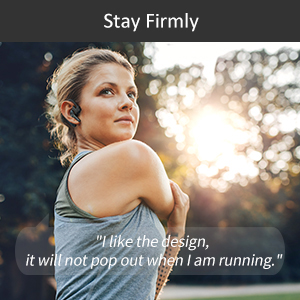
Image: Visual depicting the headset's IPX6 water resistance, showing water splashing on the device.
6. Řešení problémů
Pokud máte problémy s náhlavní soupravou, vyzkoušejte následující řešení:
| Problém | Možné řešení |
|---|---|
| Sluchátka se nezapnou. | Ensure the headset is fully charged. Press and hold the multi-function button for 3 seconds. |
| Nelze spárovat se zařízením. | Ensure Bluetooth is enabled on your device and the headset is in pairing mode (flashing blue/red light). Make sure the headset is not already connected to another device. Restart both devices and try again. |
| Špatná kvalita zvuku během hovorů. | Ensure the microphone is adjusted to point towards your mouth. Check for obstructions. Move closer to your connected device to avoid interference. |
| Volume is too low/high. | Adjust volume using the long touch on the multi-function button (volume up only) or directly from your connected device. |
| Sluchátka se často odpojují. | Ensure you are within the Bluetooth range (approx. 33 feet/10 meters). Avoid strong electromagnetic interference. Re-pair the headset if necessary. |
7. Specifikace
| Funkce | Detail |
|---|---|
| Název modelu | UFO4-01 |
| Technologie připojení | Bezdrátové připojení (Bluetooth 5.0) |
| Kontrola hluku | Active Noise Cancellation (AI Noise Cancelling) |
| Doba hovoru | Up to 30 Hours HD Talk Time |
| Pohotovostní doba | Až 240 hodin |
| Doba nabíjení | Přibl. 1.5 hodin |
| Úroveň odolnosti proti vodě | IPX6 Vodotěsný |
| Hmotnost položky | 0.48 unce (přibližně 0.03 libry) |
| Rozměry produktu | 2.36 x 1.96 x 1.1 palce |
| Kompatibilní zařízení | Cellphones (iOS/Android), Windows |
| Typ ovládání | Hlasové ovládání (Siri, Google Assistant) |
| Tvar sluchátka | Circle (In Ear with Over-Ear Hook) |
| Materiál | Kompozitní |
| UPC | 850040753158 |
8. Záruka a podpora
emotal offers comprehensive customer support for your headset:
- Záruka: Replacement within 18 months of purchase.
- Služby zákazníkům: 24-hour customer service is available for any concerns or inquiries. Please contact us via message through your purchase platform.
- Další zdroje: For further details, you may refer to the official User Guide and Safety Information PDFs available online.
For the most up-to-date support information, please visit the official emotal store or contact customer service directly.


