1. Úvod
This manual provides detailed instructions for the proper use and maintenance of your Cellularline Task Dual-Mode Headset. Please read this manual thoroughly before using the product to ensure optimal performance and longevity.
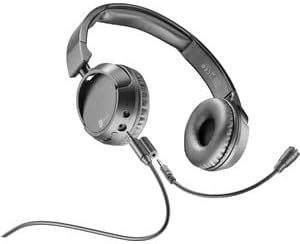
The Cellularline Task headset is designed for versatility, offering both wired and wireless (Bluetooth) connectivity. It features a detachable microphone, making it suitable for smart working, remote learning, and music listening.
2. Konec produktuview
The Cellularline Task headset combines comfort with functionality, featuring over-ear cushions and intuitive controls. Its dual-mode capability allows seamless switching between wired and Bluetooth connections.

Obrázek 2.1: Cellularline Task Dual-Mode Headset with detachable microphone connected.
Klíčové vlastnosti:
- Dual-mode stereo headset (wired and Bluetooth).
- Wireless communication technology compatible with various devices (iPhone, Samsung, Huawei, Xiaomi, etc.).
- Modern design with comfortable over-ear cushions.
- Adaptable and removable microphone, ideal for video calls and audio recording.
- Volume limitation feature for hearing protection.
- Up to 18 hours of continuous music playback or talk time.
3. Nastavení
3.1 Obsah balení
Before proceeding, ensure your package contains the following items:
- Cellularline Task Headset
- Odnímatelný mikrofon
- Nabíjecí kabel (USB)
- Audio Cable (3.5mm jack)
- Uživatelská příručka (tento dokument)
3.2 Nabíjení headsetu
Before first use, fully charge the headset. Connect the provided USB charging cable to the charging port on the headset and to a compatible USB power source. The LED indicator will show charging status and turn off or change color when fully charged.
3.3 Připojení odnímatelného mikrofonu
The microphone can be easily attached or detached based on your usage needs.
- Locate the microphone input port on the left earcup of the headset.
- Align the 3.5mm jack of the detachable microphone with the port.
- Gently push the microphone jack into the port until it is securely seated.
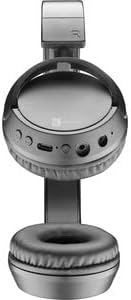
Obrázek 3.1: Headset with the detachable microphone removed, showing the input port.
3.4 Kabelové připojení
Použití náhlavní soupravy v kabelovém režimu:
- Zkontrolujte, zda je náhlavní souprava vypnutá.
- Připojte jeden konec 3.5mm audio kabelu k audio vstupnímu portu na sluchátkách.
- Connect the other end of the 3.5mm audio cable to the audio output jack of your device (e.g., computer, smartphone, tablet).
- The headset will function as a wired headset, drawing power from the connected device if needed, or using its own battery for active features.

Obrázek 3.2: Headset connected via 3.5mm audio cable, demonstrating wired mode.
3.5 Párování Bluetooth
To connect your headset wirelessly via Bluetooth:
- Zapnutí: Press and hold the Power button on the headset until the LED indicator flashes, indicating pairing mode.
- Aktivujte Bluetooth: Na svém zařízení (chytrý telefon, tablet, počítač) přejděte do nastavení Bluetooth a ujistěte se, že je Bluetooth povoleno.
- Hledat Zařízení: Vaše zařízení vyhledá dostupná zařízení Bluetooth.
- Vyberte sluchátka s mikrofonem: From the list of found devices, select "Cellularline Task" (or similar name).
- Potvrdit připojení: Once connected, the LED indicator on the headset will change to a steady light or flash slowly, and your device will confirm the connection.
The headset is compatible with iPhone, Samsung, Huawei, Xiaomi, and other Bluetooth-enabled devices.
4. Návod k obsluze
4.1 Zapnutí/vypnutí
- Zapnutí: Stiskněte a podržte tlačítko napájení přibližně 3 sekundy, dokud se nerozsvítí LED indikátor.
- Vypnout: Stiskněte a podržte tlačítko napájení přibližně 5 sekund, dokud nezhasne LED indikátor.
4.2 Ovládání hlasitosti
The headset features tactile controls for volume adjustment.
Obrázek 4.1: Detailní záběr view of the earcup showing control buttons for volume and playback.
- Zvýšení hlasitosti: Stiskněte tlačítko „+“.
- Snížit hlasitost: Stiskněte tlačítko „-“.
The headset includes a volume limitation feature to protect your hearing.
4.3 Správa hovorů
When connected via Bluetooth, you can manage calls directly from the headset:
- Přijmout hovor: Stiskněte jednou multifunkční tlačítko (obvykle tlačítko napájení nebo vyhrazené tlačítko pro volání).
- Ukončit hovor: Během hovoru stiskněte jednou multifunkční tlačítko.
- Odmítnout hovor: Stiskněte a podržte multifunkční tlačítko po dobu 2 sekund, když zvoní příchozí hovor.
4.4 Přehrávání hudby
When connected via Bluetooth, control your music playback:
- Přehrát/pozastavit: Stiskněte jednou multifunkční tlačítko.
- Další skladba: Stiskněte a podržte tlačítko „+“.
- Předchozí skladba: Stiskněte a podržte tlačítko „-“.
4.5 Použití mikrofonu
The detachable microphone is designed for clear voice capture during calls or recordings.
- Ensure the microphone is securely attached (refer to Section 3.3).
- Position the microphone appropriately for optimal voice pickup.
- When using the headset in wired mode, the microphone functionality will depend on the connected device's compatibility with 4-pole 3.5mm jacks.
5. Údržba
5.1 Čištění
- K čištění sluchátek s mikrofonem použijte měkký, suchý hadřík.
- Nepoužívejte abrazivní čisticí prostředky, rozpouštědla ani agresivní chemikálie.
- Zabraňte vniknutí vlhkosti do jakýchkoli otvorů.
5.2 Skladování
- Sluchátka skladujte na chladném a suchém místě mimo dosah přímého slunečního záření a extrémních teplot.
- If storing for an extended period, ensure the battery is partially charged (around 50%) to maintain battery health.
5.3 Péče o baterii
- Vyhněte se častému úplnému vybíjení baterie.
- Nevystavujte baterii vysokým teplotám.
- If the headset will not be used for a long time, charge it every few months to prevent deep discharge.
6. Řešení problémů
6.1 Sluchátka se nezapínají
- Ensure the headset is fully charged. Connect it to a power source and wait a few minutes before attempting to power on again.
- Zkuste jiný nabíjecí kabel nebo napájecí adaptér.
6.2 Žádný zvuk nebo nízká hlasitost
- Zkontrolujte úroveň hlasitosti na sluchátkách i na připojeném zařízení.
- If using Bluetooth, ensure the headset is properly paired and connected.
- If using wired mode, ensure the 3.5mm audio cable is fully inserted into both the headset and the device.
- Vyzkoušejte s jiným zdrojem zvuku nebo zařízením.
6.3 Problémy s párováním Bluetooth
- Ujistěte se, že sluchátka jsou v režimu párování (LED bliká).
- Vypněte a zapněte Bluetooth na vašem zařízení.
- Forget the headset from your device's Bluetooth list and attempt to pair again.
- Ensure the headset is within the effective range of your device (typically 10 meters).
6.4 Mikrofon nefunguje
- Ujistěte se, že je odnímatelný mikrofon bezpečně připojen k headsetu.
- Check microphone settings on your connected device to ensure the headset's microphone is selected as the input device.
- Vyzkoušejte mikrofon s jinou aplikací nebo zařízením.
- Ensure the microphone is not muted on your device or via any headset controls (if applicable).
7. Specifikace
| Značka | Buněčná linie |
| Název modelu | BTHEADBTASKK |
| Technologie připojení | Wireless (Bluetooth), Wired (3.5mm jack) |
| Technologie bezdrátové komunikace | Bluetooth |
| Form Factor | Over-Ear |
| Speciální funkce | Fast Charging, Volume Control, Included Microphone |
| Čas přehrávání | Až 18 hodin |
| Doba hovoru | 18 hodin |
| Kompatibilní zařízení | Laptop, Tablet, Mobile Phone, Universal |
| Typ ovládání | Dotykové ovládání, Dálkové ovládání |
| Materiál | Plast, Guma |
| Barva | Černý |
8. Záruka a podpora
Cellularline products are designed and manufactured to the highest quality standards. For information regarding warranty coverage, please refer to the warranty card included with your product or visit the official Cellularline webmísto.
If you encounter any issues not covered in this manual or require further assistance, please contact Cellularline customer support through their official webwebu nebo kontaktních informací uvedených na obalu produktu.
Webmísto: www.cellularline.com


