Zavedení
Děkujeme, že jste si vybrali Amplicomms BigTel 1582 Cordless Big Button Phone. This system is designed to provide clear and accessible communication, especially for users with hearing or visual impairments, or those who prefer simplified operation. It features large buttons, a loud ringer, amplified audio, and an integrated answering machine. This manual provides detailed instructions for setting up, operating, and maintaining your new telephone system.

Obrázek: The Amplicomms BigTel 1582 system, showing the main base station with one handset and an additional charging cradle with a second handset.
Bezpečnostní informace
- Use only the power adapter and batteries supplied with the product.
- Nevystavujte telefon vodě ani vlhkosti.
- Avoid placing the base station or charging cradle near heat sources or direct sunlight.
- Udržujte telefon mimo dosah silných elektromagnetických polí.
- Nepokoušejte se jednotku otevírat ani opravovat sami. Veškerý servis svěřte kvalifikovanému personálu.
- Baterie zlikvidujte zodpovědně v souladu s místními předpisy.
Obsah balení
Zkontrolujte prosím, zda jsou v balení přítomny všechny položky:
- 1 x BigTel 1580 Base Station with integrated answering machine
- 2 x Cordless Handsets (one for the base, one for the additional charging cradle)
- 2 x Handset Charging Cradles (one integrated with base, one separate)
- 2 x Power Adapters (for base and additional cradle)
- 1 x telefonní kabel
- 4 x dobíjecí baterie AAA (2 na sluchátko)
- 1 x Uživatelská příručka (tento dokument)
Konec produktuview
Funkce sluchátka

Obrázek: Podrobný view of the handset highlighting the large backlit display, M1/M2/M3 direct memory buttons, and indicators for increased ring volume and audio ampzvedání.
- Velký podsvícený displej: Poskytuje jasnou viditelnost identifikace volajícího a možností nabídky.
- Velká tlačítka: Large, easy-to-read keypad for effortless dialing.
- M1, M2, M3 Direct Memory Buttons: For quick dialing of frequently called numbers.
- Volume Boost Button: Increases in-call audio volume by up to +35dB.
- Kompatibilní s naslouchátky: Reduces interference for hearing aid users.
- Vizuální indikátor vyzvánění: A light on the handset flashes when there's an incoming call.
Vlastnosti základnové stanice

Image: The base station, showing the integrated answering machine controls and the M1/M2/M3 direct call buttons, allowing calls directly from the base.
- Integrovaný záznamník: Records up to 30 minutes of messages.
- Hands-free hlasitý telefon: Allows calls directly from the base unit.
- Direct Call Buttons (M1, M2, M3): Initiate calls to pre-programmed numbers directly from the base.
- Počítadlo zpráv: Digital display shows the number of new messages.
Nastavení
1. Připojení základní stanice
- Připojte jeden konec telefonního kabelu do zásuvky „LINE“ na zadní straně základnové stanice.
- Connect the other end of the telephone line cord to your telephone wall socket or router/hub.
- Connect the power adapter to the "POWER" socket on the back of the base station.
- Zapojte napájecí adaptér do elektrické zásuvky.
2. Installing Handset Batteries
- Otevřete kryt přihrádky na baterie na zadní straně každého sluchátka.
- Insert the 2 AAA rechargeable batteries, observing the correct polarity (+ and -).
- Bezpečně zavřete kryt bateriového prostoru.
3. Charging the Handsets
- Place each handset onto its respective charging cradle (one on the base station, one on the additional cradle).
- Ensure the "Charge" indicator on the handset or base lights up, indicating proper charging.
- For first-time use, charge the handsets for at least 15 hours to ensure full battery capacity.
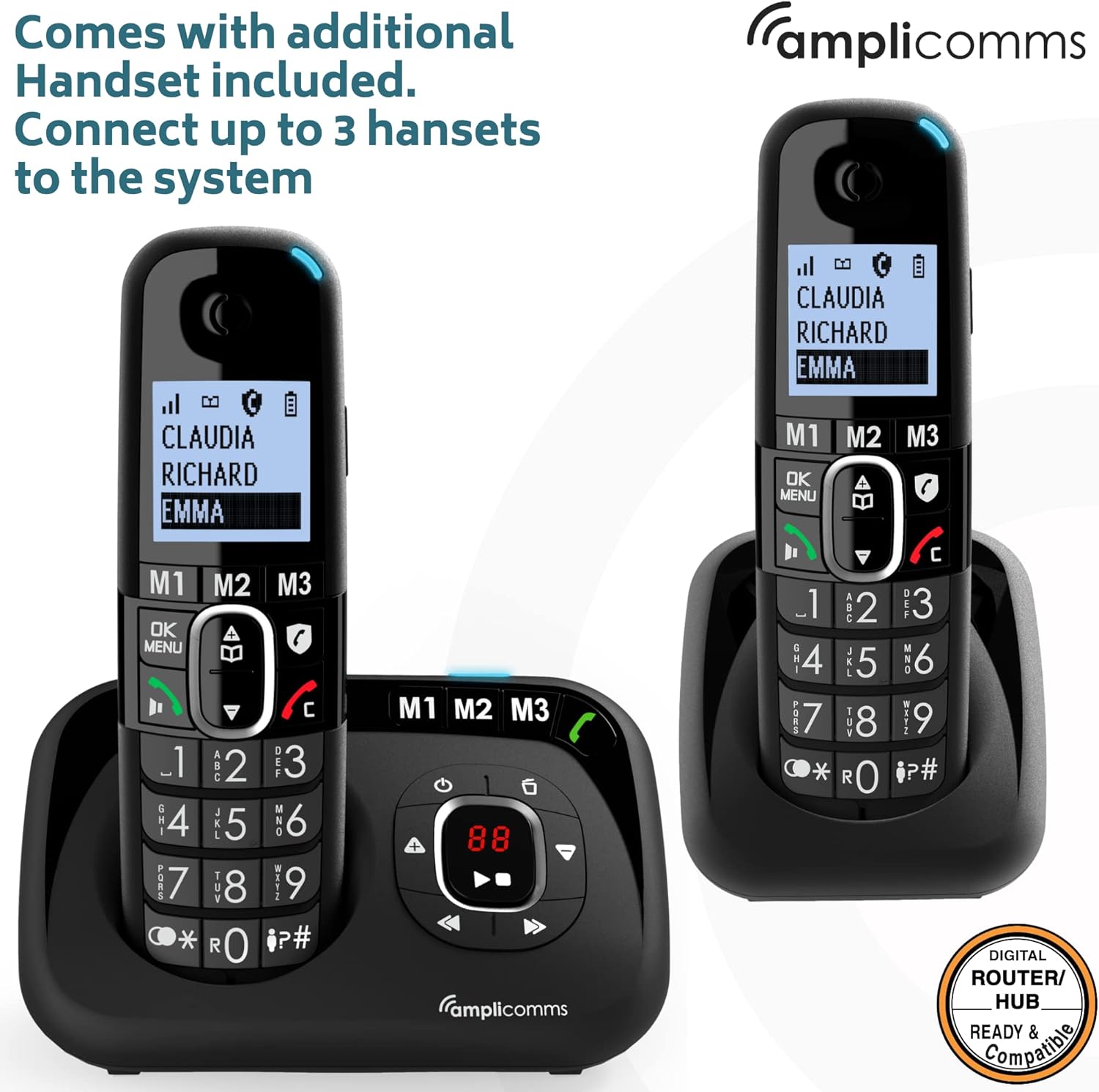
Obrázek: The Amplicomms BigTel 1582 system with both the main base and the additional charging cradle, demonstrating the multi-handset capability.
4. Registering Additional Handsets (if necessary)
Your additional handset(s) should be pre-registered. If not, or if you purchase additional handsets (up to 3 total), follow these steps:
- Na základně stiskněte a podržte tlačítko STRANA button (usually located on the side or back) until the registration indicator on the base starts flashing.
- Na sluchátku stiskněte MENU / OK, then navigate to "Register Handset" (or similar option) and press MENU / OK znovu.
- Zadejte systémový PIN (výchozí je 0000) a stiskněte MENU / OK.
- The handset will display "Registering..." and then "Handset Registered" once successful.
Návod k obsluze
Uskutečňování hovorů
- Z telefonu:
- Vytočte požadované telefonní číslo pomocí velké klávesnice.
- Stiskněte tlačítko GREEN (Call) tlačítko pro zahájení hovoru.
- Chcete-li hovor ukončit, stiskněte tlačítko RED (End Call) tlačítko.
- Using Direct Memory Buttons (M1, M2, M3):
- To program: Press and hold M1/M2/M3, enter the number, then press MENU / OK uložit.
- To call: Simply press the desired M1, M2, or M3 button on the handset or base. The phone will automatically dial the stored number.
Přijímání hovorů
- When the phone rings, the visual ring indicator on the handset will flash.
- Stiskněte tlačítko GREEN (Call) button on the handset or the Hlasitý telefon button on the base to answer.
Nastavení hlasitosti
- Earpiece Volume (during a call): Použijte NAHORU/DOLŮ navigation buttons on the handset.
- Hlasitost vyzvánění: Navigate through the handset menu to "Settings" > "Ringer Volume" to adjust. The ringer can be increased up to 90dB.
- Zesílení zvuku: Během hovoru stiskněte příslušné tlačítko Posílit button (often marked with an ear icon) on the handset to amplify the incoming audio by up to +35dB. Press again to deactivate.
Funkce záznamníku
Integrovaný záznamník dokáže nahrát až 30 minut zpráv.
- Zapnutí/vypnutí: Stiskněte tlačítko ON/OFF tlačítko na základní stanici.
- Přehrávání zpráv: Stiskněte tlačítko HRÁT button on the base station. The message counter will display the number of new messages.
- Skipping/Deleting Messages: Použijte PŘESKOČIT a VYMAZAT buttons on the base during message playback.
- Nahrávání odchozí zprávy (OGM): Access the answering machine settings via the handset menu or base controls to record your personalized greeting.
Interkom (pro více sluchátek)
- To call another handset: Press the INT (Intercom) button on your handset, then dial the number of the desired handset (e.g., 2 for handset 2).
- To transfer a call: During an external call, press INT, dial the handset number, wait for them to answer, then hang up to transfer.
Údržba
- Čištění: Otřete telefon a základnovou stanici měkkým hadříkemamp tkanina. Nepoužívejte abrazivní čisticí prostředky nebo rozpouštědla.
- Péče o baterie:
- Vždy používejte dodané dobíjecí baterie AAA.
- Pokud telefon nebudete delší dobu používat, vyjměte baterie, abyste zabránili jejich vytečení.
- Replace batteries when they no longer hold a charge effectively.
- Umístění: Place the base station in a central location to maximize cordless range. Avoid placing it near large metal objects or other electronic devices that may cause interference.
Odstraňování problémů
| Problém | Možná příčina | Řešení |
|---|---|---|
| Žádný oznamovací tón. | Telefonní kabel není připojen nebo je vadný. | Check connections. Try another phone in the same socket. |
| Sluchátko se nenabíjí. | Handset not correctly seated in cradle; dirty charging contacts; batteries not inserted or faulty. | Ensure handset is properly seated. Clean contacts with a dry cloth. Check battery insertion and condition. |
| Žádný displej na sluchátku. | Batteries flat or not inserted. | Charge handset for 15 hours. Check battery insertion. |
| Špatná kvalita zvuku / statický šum. | Mimo dosah; rušení od jiných elektronických zařízení. | Move closer to the base station. Relocate base station away from other electronics. |
| Nelze uskutečňovat ani přijímat hovory. | Handset not registered; base station not powered. | Register handset (see Setup section). Check base station power connection. |
| Záznamník nenahrává. | Záznamník je vypnutý; paměť je plná. | Ujistěte se, že je zapnutý záznamník. Smažte staré zprávy, abyste uvolnili místo. |
Specifikace
- Model: Amplicomms BigTel 1582 (1580 + Additional Handset)
- Typ telefonu: Bezdrátový DECT telefon
- Typ systému odpovědí: Digitální, doba nahrávání až 30 minut
- Hlasitost vyzvánění: Až 90 dB
- Zesílení zvuku: Až +35 dB
- Baterie: 4 x AAA dobíjecí baterie (součástí balení)
- Barva: Černý
- Materiál: Plast
- Hmotnost položky: 0.8 kilogramů (celkové balení)
- Rozměry balení: 21.2 x 17.3 x 9.1 cm
- Výrobce: Atlinks
- Země původu: Hongkong
- Kompatibilní zařízení: Digital home networks (e.g., routers, home hubs)
Záruka a podpora
Amplicomms products are designed for reliability and performance. For warranty information, please refer to the warranty card included in your product packaging or visit the official Amplicommy website. For technical support or service inquiries, please contact your retailer or the Amplicomms customer service department.
Výrobce: Atlinks
Značka: Amplicommy
Webmísto: www.amplicomms.com (Poznámka: Toto je zástupný symbol URL, prosím, podívejte se do dokumentace k produktu, kde najdete správné kontaktní informace na podporu.)


